
On this page
Most application forms fail in one of two ways. Some ask so much that good people give up on page three. Others ask so little that you can't tell anyone apart, so you end up emailing 40 applicants for the thing you forgot.
This guide shows you how to make an application form that sits in the middle: short enough to finish, and complete enough to decide from. It works for a job, a volunteer role, a grant, a scholarship, a membership, a program or a call for speakers. You'll plan the sections, screen out people who don't qualify, collect documents, set a deadline and review the results in a sheet. There's a free planning worksheet at the end, plus links to guides and templates for 15 kinds of application.
Start with the decision, not the questions#
A good application starts before the first question: write down what you're choosing. "Six summer interns." "24 garden plots." "Three new board members." That one line decides everything else.
Then list every question you'd like to ask and sort each one into two piles:
- Must-know. The answer changes who you pick or what you do next. "Do you live in the city?" decides who gets a garden plot.
- Nice-to-know. Interesting, but you won't act on it. "How did you hear about us?" can wait for a later form, or ride along as a hidden field on the link (
?source=newsletter).
Keep the must-know pile and cut most of the rest. Every extra question costs you applicants, and it costs your reviewers time too.
If you're hiring in the US, there's another reason to keep it tight. The US Equal Employment Opportunity Commission (EEOC) says: "As a general rule, the information obtained and requested through the pre-employment process should be limited to those essential for determining if a person is qualified for the job". The same page says: "Employers are explicitly prohibited from making pre-offer inquiries about disability." (EEOC, Prohibited employment policies and practices, checked 28 October 2026.)
What you can ask instead: the EEOC's page on medical questions says "An employer may ask a job applicant whether they can perform the job and how they would perform the job." (EEOC, Pre-employment inquiries and medical questions and examinations, checked 28 October 2026.) State and local rules add more, so check yours. This guide isn't legal advice.
How to make an application form: the six sections#
Whether you're working out how to make an application form for a job or how to create an application form for a grant, the same six sections come up. Put each one on its own page, in this order:
| Section | What goes in it | Question types |
|---|---|---|
| 1. Contact details | Name, email, phone | Short text, email, phone |
| 2. Eligibility | The two or three yes-or-no questions that decide who can apply | Multiple choice |
| 3. Experience | What they've done before, in their own words or from a list | Checkboxes, long text, a number |
| 4. Statement | Why them, why now: one short essay question with a word guide | Long text |
| 5. Documents | CV, portfolio, transcript, references, proof of address | File upload, URL |
| 6. Agreement | A plain yes or no to your rules, plus a typed name if you want one | Multiple choice, short text |
Eligibility comes second on purpose. People who don't qualify should find out on page two, not after 20 minutes of writing. Want help picking types for the rest? Here's every question type and when to use it.
A few habits help with every section:
- Say what's coming. Put the deadline, the rough time it takes and what happens next at the top of page one.
- Make only must-know questions required. In HornetForms, questions start optional, and you switch on "Required" per question.
- Give a word guide for essays. "About 150 words" stops both the one-liners and the novels.
Screen out people who don't qualify with logic#
The kindest application form tells people early when they can't apply. In HornetForms, a logic jump can go straight to a named ending. The person skips the rest of the form and sees that ending's message instead.
Here's how the rules for a garden plot application look:
Do you live in the city? is "No"     → jump to Ending: Not eligible
Are you 18 or older? is "No"         → jump to Ending: Ask a parent
The "Not eligible" ending can point to another program that fits better. A form can hold up to 20 endings, so each "no" can get its own message. Logic can also show extra questions only to the people they apply to, such as a "Tell us about your last role" question only for people who say they've done the work before. The logic, piping and calculations guide covers the rest.
Good to know: the form still finishes when someone reaches an ending, so their contact details and eligibility answers reach your list. Filter the responses table by the eligibility answer to set those rows aside before you review. If you set a redirect URL for the whole form, it applies to these responses too, so people go to that page instead of the ending.
Collect CVs, portfolios and other documents#
Use one file upload question per document, so each one lands in its own column. In HornetForms, a file upload question takes up to 10 files, and you choose the file types it accepts. A CV question might allow PDF and Word files only. A portfolio question might allow images and PDFs.
On the Free plan, each file can be up to 10 MB. Pro and Business have no plan cap on file size. Applicants never need an account or a sign-in to fill in the form or upload a file.
For big portfolios, ask for a link instead. A URL question checks that the answer starts with http or https, so you get a working link rather than "see my website".
Long applications: pages, progress and finishing later#
Creating an application form for a grant or scholarship usually means a long one. Three settings make a long online application form easier to finish:
- Pages and a progress bar. Split the sections across pages and people can see how far they've come.
- Partial responses (Pro and Business). See who started an application but didn't finish it.
- A resume link (Pro and Business). With partial responses on, applicants can email themselves a link to finish later. The link lasts seven days.
If you get a lot of fake or mistyped emails, email verification (Pro and Business) asks applicants to confirm their address with a six-digit code.
Set a deadline and a cap#
Two settings, on every plan, keep a round under control:
- Close date. Set a date and a time. After it, visitors see your own closed message (plain text, up to 500 characters), such as "Applications for 2027 are closed. We open again in January."
- Response limit. Set the most applications you can read, and the form closes when it hits that number. People you screen out with an ending finish the form too, so leave room for them.
You can also set an opening date, so the link is ready to share before the round starts. Visitors see a notice until it opens. On HornetForms you get unlimited responses within fair use on every plan, so any cap is one you choose. Here's more on what happens when a form hits its response limit.
In Word or Google Docs, or online?#
You can make an application form in Word or Google Docs: a heading, some labels, a table of blank boxes and a line to sign. That's fine for a paper copy at the front desk. The trouble starts when the answers come back as attachments, photos of paper and emails you have to type up.
If you're asking how to make an application form on Google Docs, the guide to making a fillable form in Word, Google Docs or online walks through both editors. It also covers the shortcut: if you already have the application as a PDF or Word (.docx) file, HornetForms can import it and its AI rebuilds it as an online form for you to review. Each file uses one AI generation from your monthly allowance (three a month on Free).
Comparing form builders? Here's how Google Forms and HornetForms compare. And for the general build steps for any form, see how to create an online form.
Review applications in a sheet#
The last part of the job is the review, and it's worth planning before anything arrives. Do it in a spreadsheet. HornetForms keeps the form and the answers. Scoring, comments and decisions live in columns you add to your own sheet.
- Get the rows. Connect Google Sheets on any plan, and each application lands as a new row. The sheet starts with "Response ID" and "Submitted at", then one column per question, then a "Response link" that opens the full application. Or download the CSV export from the responses table.
- Add your columns. One score column per reviewer, an average, a decision and the date you told the applicant.
- Score with a rubric. Write down what a 1, a 3 and a 5 look like before anyone starts. The grant scoring rubric and the scholarship rubric are good models. Hiring? Score interviews the same way with an interview evaluation form.
Two other settings help the person running the round. You can turn on an email to yourself for each new response. And you can send each applicant a confirmation with your own subject and text, once you pick the email question it goes to.
Who sees the applications? Everyone you add to your HornetForms workspace can read every response in it, whatever their role. So add only the people who should read the applications, and ask only what they need to see. More on sending form responses to Google Sheets, Slack or Notion.
Application form examples by type#
You don't have to start from a blank page. Each of these has its own questions, logic and downloads:
- Jobs: the job application form template covers what to ask and skip, with a ready-made job application form. For care work, see the caregiver job application form. For a freelance bench, use the freelancer application form.
- Volunteers: the volunteer application form covers references and volunteers under 18.
- Money: grant application questions and the scholarship application form, both with scoring rubrics.
- Members and boards: the membership application form, the nonprofit board member application and the board and commission application for public boards.
- Clients, partners and speakers: the coaching application form, the partner program application form and the speaker application form for a call for speakers.
- Events and programs: the vendor application form for craft fairs and markets, the summer camp registration form and the youth sports registration form.
Free application form planning worksheet#
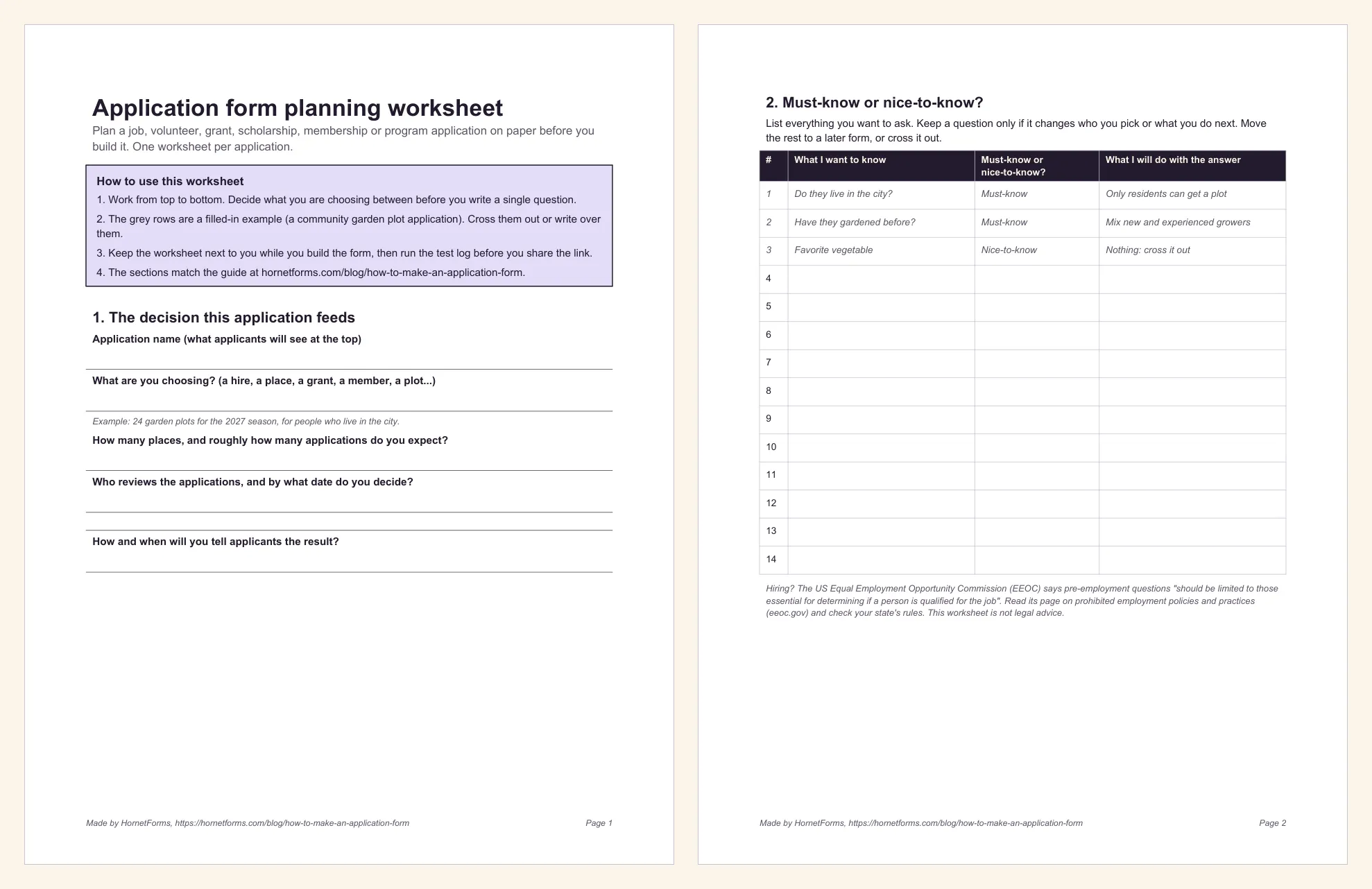
The planning worksheet walks you through the whole plan on paper: the decision, must-know and nice-to-know questions, the six sections, screening rules and their endings, documents, dates and caps, where the applications go, your review sheet columns and a test log. The grey rows show a filled-in garden plot application.
- PDF, US Letter
- PDF, A4
- Word (DOCX), to type into
Open your next application round#
Now you know how to make an application form people finish: decide what you're choosing, keep the must-know questions, screen early with logic, collect documents in their own questions, set a deadline and review in a sheet. Fill in the worksheet first and the build takes far less time. The features page has the wider tour, and the pricing page shows what each plan includes. Sign up for free and open your application form this week.