
On this page
Your PTA, Rotary club or family fund has $1,000 for a graduating senior. Then 40 students apply. Now three volunteers have to pick one, fairly, in two weeks, without reading 40 essays that all say "I am a hard worker."
A good scholarship application form makes that job easier before the first essay arrives. It asks only what your readers will score, screens out students who don't qualify, and collects the transcript and the letter in one place. This guide covers what to ask, essay prompts that tell you something, eligibility questions, deadlines and how to score fairly. At the end there's a free scholarship application form template and a scoring rubric spreadsheet that shows where your readers disagree.
Who this scholarship application form is for#
Small scholarship programs run by people with day jobs:
- PTAs and school foundations with a senior scholarship or two.
- Service clubs and churches that give back to local students each spring.
- Employers with an award for employees' children.
- Family and memorial funds set up in someone's name.
The applicant is a student asking for money for their own education. That makes this a different form from a grant application, where an organization asks for money for a project. If you fund groups, see our guide to grant application questions. And if you're filling a seat on a board rather than handing out an award, the nonprofit board member application guide is the one you want.
What to ask on a scholarship application form#
Every question costs a 17-year-old time, often during exam season. So ask only what a reader will use, and see our guide on how to make an application form people finish for more on keeping it short. Most scholarship application questions fall into six areas, and each one maps to a line on your rubric.
| Area | What to ask | What it tells your readers |
|---|---|---|
| About the student | Name, email, phone, mailing address | Who to contact, and where to send the result |
| School and plans | Current school, finishing year, grade point average as on the transcript, where they plan to study and what | Whether they meet your rules, and where the money will go |
| Activities and service | Up to six activities with role, hours a week and years | What they do outside class, including jobs and family care |
| Paying for school | How they'll pay, what this award would change, other awards offered | Financial need, if your award counts it |
| Essay | One prompt, 300 to 500 words | How they think, in their own voice |
| Recommendation | Recommender's name, relationship and contact | What an adult who knows them says |
Questions that trip students up#
A few small changes save your applicants grief:
- Ask for the grade point average "as it appears on your transcript". Schools report it differently, and you'll check it against the transcript anyway.
- Count jobs and family care as activities. A student who works 20 hours a week or picks up a younger brother every day has less time for clubs. Say so on the form, or your rubric will reward the students with the most free time.
- Make the money section optional when need doesn't count. If your award is for the best essay, don't ask about family finances at all.
- Ask for other awards offered. It helps you spread money across students instead of stacking it on one.
Scholarship application questions for the essay#
The essay is where most programs find their winner, and where most applications blur together. Generic prompts get generic answers. "Why do you deserve this scholarship?" invites a list of virtues. A prompt that asks about a specific moment gets you a story.
Prompts that tend to work:
- Tell us about a time you had to figure something out on your own. What did you do, and what would you do differently now?
- What is a problem in your town or school you would like to help fix? What have you already tried?
- Who outside your family has shaped what you want to do next? What did they do?
- Tie one prompt to your purpose. A nursing memorial fund might ask about a time the student cared for someone.
Set a word range, such as 300 to 500 words, and tell students that readers want their own voice and real examples, not a perfect essay. On the form, a long-answer question works well for the essay. Some students write in a document first and upload it, so a file upload question for the essay is fine too.
Transcripts, letters and other attachments#
Ask for files only when a reader will open them. For most small scholarships that means:
- The latest transcript. An unofficial copy is usually enough at this stage. Required.
- One letter of recommendation. From a teacher, coach, employer or community leader who is not family. Required.
- An acceptance letter or proof of enrollment. Optional, since many students apply before they hear back.
- A resume or portfolio link. Optional, and only if your readers will look.
Mark each one required or optional. Give recommenders at least two weeks, and offer them a short recommendation form so they don't have to write a full letter from scratch. Our free template includes one.
Screen out ineligible applicants with logic#
Nothing wastes a reader's evening like a beautiful essay from a student who graduates next year. Put your rules on the first page of the scholarship application form, followed by one yes or no question: "Do all of these describe you?"
- You are a graduating senior at a school in Lake County.
- You will enroll in a college, university or trade program this fall.
- Your grade point average is 2.5 or higher.
Then use conditional logic to act on the answer. A page targeted by a show rule stays hidden until its rule matches, so you can show the rest of the application only when a student answers yes. For a student who answers no, show a short note that explains the rules and hide the submit button with a second rule. They learn in 30 seconds that this one isn't for them, and your readers never see an application they can't score.
Keep one rule loose: if you're not sure whether a student qualifies, let them apply and check by hand. A strict screen that turns away a borderline case costs more than one extra application.
Set a close date and a response limit#
Scholarships run on deadlines, and plenty of students finish on the last night. Set the form to close on its own, so nobody has to remember to switch it off at midnight:
- Close on a date. Pick the date and the exact time. After that, visitors see your closed-form message instead of the form. Write it in plain text, up to 500 characters, such as "Applications for the 2027 award closed on March 15. We'll tell every applicant the result by April 30."
- A scheduled opening date. Open the form on the day you announce the award, so early birds see a notice until then.
- A response limit. If your readers can only score 60 applications, stop the form at 60. Here's what happens when a form hits a response limit and how to word it.
Score applications with a rubric#
A rubric turns "I liked her essay" into a number your committee can compare. It has three parts: the criteria (what you score), a weight for each, and anchors that say what each score means. Without anchors, one reader's 3 is another reader's 4.
The default rubric in our spreadsheet scores six parts from 0 to 4: essay 25%, academic record 20%, financial need 20%, activities and service 15%, recommendation 10%, and goals and fit 10%. Change them to fit your award. If need doesn't count, switch that part off.
Each part gets its own anchors, written for students rather than projects:
| Part | 0 | 2 | 4 |
|---|---|---|---|
| Essay | No essay, or it does not answer the prompt | Answers the prompt with one example, but the point is hard to follow | Clear, specific and personal: you learn something the rest of the form does not show |
| Academic record | No transcript | Meets your minimum | A strong record, or a clear rise, with challenging courses for that school |
| Activities and service | Nothing listed | Some roles and hours, with little commitment over time | Long commitment and a visible effect on others |
| Recommendation | No recommendation received | Positive, with one general example | Specific, vivid examples from someone who clearly knows the student |
Read grades against the student's own school. A B average with the hardest courses a small rural school offers can say more than an A average elsewhere.
The spreadsheet turns each reader's scores into a score out of 100: the sum of weight times score, divided by 4 times the sum of the weights, times 100. A reader who gives 3 on every part lands on 75.
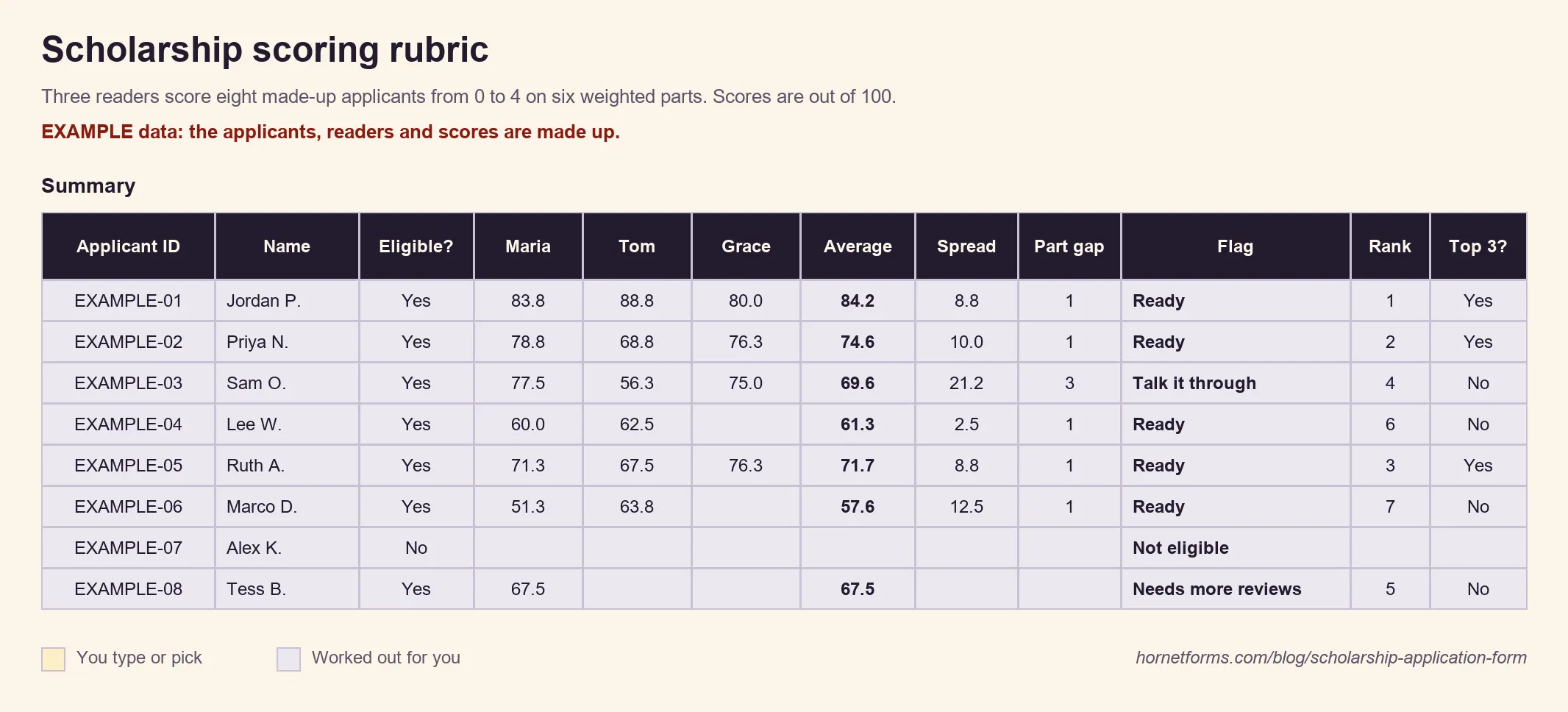
EXAMPLE data: we made up the applicants, readers and scores. Delete them and add your own.
Readers who disagree#
Score alone first, then compare. In the example above, Maria gave Sam's essay a 4 and Tom gave it a 1. Their totals sit 21 points apart, so the sheet flags Talk it through. Maybe Tom missed the point, or maybe Maria knows the family. Either way, talk before you rank.
A few habits keep a volunteer panel fair:
- Step out when you know a student. Small towns are small. Each reader says if they know an applicant or their family personally and skips that one. In the sheet, a reader types Yes under "Know this applicant?" and their row doesn't count.
- Use at least two readers per applicant, and three when you can.
- Agree on the rubric before the first application arrives, and keep it for the whole round.
- Let the scores guide the decision, not make it. Your committee still picks the winners.
Tell applicants the result#
Every student who applied deserves an answer, including the ones who didn't win. Plan three messages:
- "We got your application." You can switch on a confirmation email to each applicant. Pick the email question that holds their address in the notification settings, and write your own subject and body.
- The result. Send these yourself, from your own email, once the committee decides. Our template asks winners whether you may share their name, school and photo, so check that answer before you announce.
- How the money gets paid. Most schools ask scholarship providers to pay the school, not the student. Northwestern University's financial aid office, for example, says "The scholarship check should be made payable to Northwestern University" and asks for the student's full name and ID on the check (Northwestern University Undergraduate Financial Aid, Outside Scholarships, accessed 28 October 2026). Remind winners to tell their school's financial aid office about the award, since outside awards can change the rest of their aid.
One more rule worth printing on your form: applying is free. The Federal Trade Commission's advice to students is blunt: "Never pay to apply for a scholarship" (FTC, How To Avoid Scholarship and Financial Aid Scams, accessed 28 October 2026). Saying up front that you never charge a fee or ask for bank details helps families trust a real award.
Build your scholarship application form online#
Start from a blank form and add the questions from the table above. Not sure which question type fits each one? Here's every question type and when to use it. These features do most of the work, on every plan unless it says otherwise:
- Multi-page forms with a progress bar. Put eligibility on page one, then one area per page, so a long application feels like a few short ones.
- File upload. A file upload question takes up to 10 files, and you can limit the allowed file types, for example to PDF and Word for transcripts. Free allows files up to 10 MB each, and Pro and Business have no plan cap. Students never need an account or a sign-in to apply or upload.
- Conditional logic for the eligibility screen above.
- Close date, scheduled opening and response limit, as above.
- A PDF of any response. Download each application as a PDF for your reader packet.
- Google Sheets. Each application arrives as a new row, one column per question, ready to copy into the rubric's Applicants tab.
On Pro and Business, with partial responses on, students can email themselves a link to finish a half-done application later, which helps when the essay takes a weekend. You can also turn on an email to yourself for each new response.
Good to know: on Pro and Business you can add people to your HornetForms workspace, and anyone you add can read every response in it. If a reader needs to step out of one applicant, share the other applications with them as PDFs or sheet rows rather than adding them to the workspace.
HornetForms has unlimited responses within fair use, so a busy deadline night won't hit a cap you didn't set. The features page lists the rest of what a form can do.
Download the template and the rubric#
The scholarship application form template. Edit it in Word (DOCX), or print a PDF, US Letter or a PDF, A4. It has four parts:
- The student application: a "Can you apply?" box, a "How we choose" box with the six parts and weights, then nine sections from contact details to signature, with an activities table, three essay prompts and an attachments checklist.
- A one-page recommendation form for the recommender, with four quick ratings and room for one story.
- A reader score sheet for paper panels: a "do you know this applicant?" question, the six parts with weights and the 0, 2 and 4 anchors.
- Notes for the committee to read before you open applications.
The scholarship scoring rubric. The rubric spreadsheet opens in Excel and Google Sheets. Set your parts, weights and anchors on Rubric, reader names and numbers on Settings, and list students on Applicants. Each reader then scores on their own tab, Reader 1 to Reader 4, with one row per applicant. Summary shows one column per reader, the average, the spread, the biggest gap on one part, a flag and a rank, for up to 100 applicants. The rubric as a CSV holds the parts, weights and all five anchors, ready to paste into your guidelines.
Collecting student details for something else, like a club or class? The student information sheet guide covers that form.
Open your scholarship this spring#
Pick your questions, set the rules and the close date, and publish the weights with the form so students know what counts. Then hand your readers the rubric and a date. The pricing page shows what each plan includes, and the Free plan is free forever. Sign up for free and have your scholarship application form live before the announcement goes out.