
On this page
The raffle is in six weeks. Someone on the committee says, "Let's ask the shops on Main Street." Then nothing happens, because nobody knows who to ask, what to say or who already asked the bakery last week.
A donation request form fixes the "what to say" part. It comes in two kinds. A nonprofit uses one to ask a business for a gift. A business uses the other to collect the requests that land on its counter every week. This guide covers both: what each one asks, how to approach local businesses, a letter you can copy, what the IRS says about thanking donors, and a tracker so no request falls through the cracks. All the downloads at the end are free.
Two kinds of donation request form#
The words are the same, but the jobs are different:
- A nonprofit's donation request form goes from you to a business. It says who you are, what the event is, what you're asking for and how you'll thank them. You hand it over with a letter, or you send a link.
- A business's donation request form sits on the business's website or at its front desk. Schools, clubs and charities fill it in, and the owner reviews every request in one place instead of in a pile of letters.
If you run a nonprofit, you'll use the first one and you'll meet the second one often. If you own a business that gets asked a lot, the second one saves your week. Both share most of their questions, so we'll start there.
What to ask on a donation request form#
These questions work in both directions. A nonprofit fills them in on its own form, and a business asks for them on its intake form.
| Question | Type | Why it's there |
|---|---|---|
| Organization name, contact name, email, phone | Short text, email, phone | Who to reply to |
| Type of organization | Multiple choice | Registered nonprofit, school group, community group or club, or other |
| Your mission, in a sentence or two | Long text | What the gift will support |
| What are you asking for? | Multiple choice | Gift card or product, cash gift, auction or raffle item, food or drinks, or a service |
| The item, amount or service | Short text | The specific ask, like "pizza for 40 volunteers" |
| Event name, date and expected attendance | Short text, date, number | How big and how soon |
| Who does it serve? | Long text | The people the money or item helps |
| How you'll recognize the gift | Checkboxes | Name in the program, social media post, announcement, or none needed |
| Date you need a reply by | Date | So nobody misses your deadline |
| Proof of tax-exempt status | File upload, optional | A copy of the IRS determination letter, if the business asks for one |
Not sure which question type fits an extra question of your own? Here's which question type to pick.
Make the ask specific#
"Anything you can give" is easy to ignore. "A $50 gift card for our raffle" or "two dozen cupcakes for the bake sale" is easy to say yes to. The "item, amount or service" question forces that choice before the request goes out. It also helps the business compare requests side by side.
Keep proof of status optional#
Not every group that asks is a registered nonprofit. Plenty of school groups and youth clubs ask too. Make the file upload optional and add a short text question that shows only for "Other", so a group can explain who it is.
How to ask local businesses for donations#
A good letter helps, but most yeses come from the way you ask. Here's a simple process:
- Make a list. Write down 20 or so businesses near your event, with the person to ask if you know them. Ask your volunteers which shops they use. A friendly face opens doors.
- Check how each business takes requests. Some have their own request form online. Use it. Others prefer a letter or a visit.
- Ask early. A business may review requests on a set schedule, so give it plenty of time before your event.
- Ask in person when you can. Bring the letter and a one-page request form. Ask for the manager or owner, keep it short and leave the papers behind.
- Pick your follow-up date. Write it down before you leave. If you haven't heard back by then, check in once by phone or email, in your own words.
- Thank every donor. Win or lose, a short thank-you keeps the door open for next year.
Big groups trip over each other here. Two volunteers ask the same bakery, and nobody asks the hardware store. The tracker further down gives each business one row, so everyone can see who asked whom and when.
Donation request letter template#
Here's a short letter you can copy. Fill in the brackets and keep it to one page:
Dear [contact name],
I'm writing on behalf of [organization name], a [nonprofit, school group or club] in [town] that [one line on what you do].
On [event date], we're holding [event name] at [place]. We expect about [number] people, and the money we raise goes to [what it pays for].
Would [business name] consider donating [a specific ask]? We need it by [date].
To thank you, we will [the recognition you can offer]. We send every donor a written thank-you letter once the gift arrives.
I've added a one-page request form with our details. You can tick your answer on it and hand it back, or reply at [link or QR code]. I'll check back with you on [your follow-up date].
Warm regards, [Your name], [role], [phone], [email]
The printable kit below has this letter in Word, so you can put it on your letterhead. Its second page is a one-page request form with a reply box the business can tick and hand back.
Let businesses reply online#
That "[link or QR code]" line is worth the effort. Build a short reply form in HornetForms with three questions: "Can you help?" (yes, not this time, call me), "What can you give?" and "When can we pick it up?" Every form gets a QR code (PNG or SVG) you can print on the letter. Here's more on putting a QR code on paper.
Want to know which business replied without asking them to type their name? Add a hidden field called business and give each letter its own link:
https://forms.hornetforms.com/f/spring-run-reply?business=example-bakery
The hidden field shows up as its own column in your responses and in Google Sheets.
Build a donation request form for your business#
If you're the business owner, an online form turns a pile of letters into a list you can sort. Build it from a blank form, using the questions in the table above, then add a few logic rules:
Type of organization is "Other"
  → show and require: Tell us about your group
What are you asking for? is "Cash gift"
  → show: Amount you're asking for
What are you asking for? is "Gift card or product"
  → show: Delivery (we pick it up, mail or deliver it, send it electronically)
Logic can show, hide and require questions on every plan. Our guide to logic, piping and calculations walks through rules like these. A request for a gift is a short application at heart, so the tips in how to make an application form apply here too.
A few settings do the rest:
- Attachments. A file upload question takes up to 10 files, and you can limit it to the file types you want, like PDF and images. Each file can be up to 10 MB on the Free plan, and Pro and Business have no plan cap. People never need an account to fill in your form or upload a file.
- Giving cycles. Review requests each quarter? Set a close date and time, and write your own closed-form message, like "We review requests each quarter. Please check back on July 1." The message is plain text.
- A thank-you for asking. Turn on the respondent confirmation email, pick the Email question and write your own subject and message, like "Thanks for your request. We reply to every request within four weeks." Promise only what you'll do.
- Hearing about new requests. Owner notifications start off. You can turn on an email to yourself for each new response, or send each one to a Slack or Discord channel.
- A list you can sort. Connect Google Sheets on any plan, and each request lands as a new row, starting with a "Response ID" and "Submitted at" column. The Summary tab counts answers to choice questions, like which kind of gift people ask for most.
Everyone you add to your HornetForms workspace can read every request in it, so collect only what you need. HornetForms has unlimited responses within fair use on every plan, so a busy season never stops at a plan's response cap. For more places your answers can go, see how to send form responses to Google Sheets, Slack or Notion.
Giving bigger amounts, with a review panel and scores? A business or family foundation may want a full set of grant application questions and a scoring rubric instead.
Recognition and thank-you letters: what the IRS says#
When a business says yes, the nonprofit's job is to thank it in writing. In the US, the IRS guide for charities, Publication 1771 (Rev. 11-2023, accessed 28 October 2026), sets out what that thank-you should hold. Here's what it says, quoted directly.
When a written thank-you is needed: "Donors are responsible for obtaining a contemporaneous written acknowledgment from a charitable organization for any single monetary contribution or noncash contribution valued at $250 or more before donors can claim a charitable deduction on their federal income tax returns."
What goes in it. The organization provides a written statement with its name, "the amount of any monetary contribution", "a description (but not the fair market value) of any contribution of property", and a statement that no goods or services were given in return, "if that was the case". If you did give something back, the statement includes "a description and good faith estimate of the fair market value of the goods or services".
How to send it: "Letters, postcards, or computer-generated forms with the above information are acceptable." An email to the donor works too.
The Publication gives sample wording, like this one for a cash gift:
"Thank you for your cash contribution of $300 that (organization's name) received on December 12, 2015. No goods or services were provided in exchange for your contribution."
One more rule matters when you give something back, like event tickets. Publication 1771 says: "An organization must provide a written disclosure statement to a donor who makes a payment exceeding $75 partly as a contribution and partly for goods and services provided by the organization." That statement tells the donor the deductible part is limited to what they gave above the value of what they got, with your good faith estimate of that value.
So what about recognition, like a business's name in your program? Whether that counts as something given in return is a question for your adviser, not a form.
Good to know: this is general information from an IRS publication, not tax advice. US rules only. For gifts of goods, our in-kind donation form guide covers the wording and IRS Form 8283. Check with your adviser for anything beyond that.
Track every request in a spreadsheet#
Requests go out on paper, by email and through other people's forms, so the answers come back the same way. The free donation request tracker keeps them in one place. It opens in Excel and Google Sheets.
- Clear the example rows. The tracker ships with eight made-up businesses so you can see how it works.
- Add a row for each business you ask. Type the business, the contact, what you asked for, the date you asked and how (in person, letter, email, their online form or phone).
- Type your own follow-up date. Leave it empty and the tracker suggests one, 14 days after you asked. You can change that number on the Settings tab. You send the follow-up yourself.
- Record the answer. Pick Waiting, Yes, Partly, No or Ask next time. For a yes, type what they gave and, if you know it, its value.
- Record the gift and the thank-you. Type the date the gift arrived and the date you sent the written thank-you.
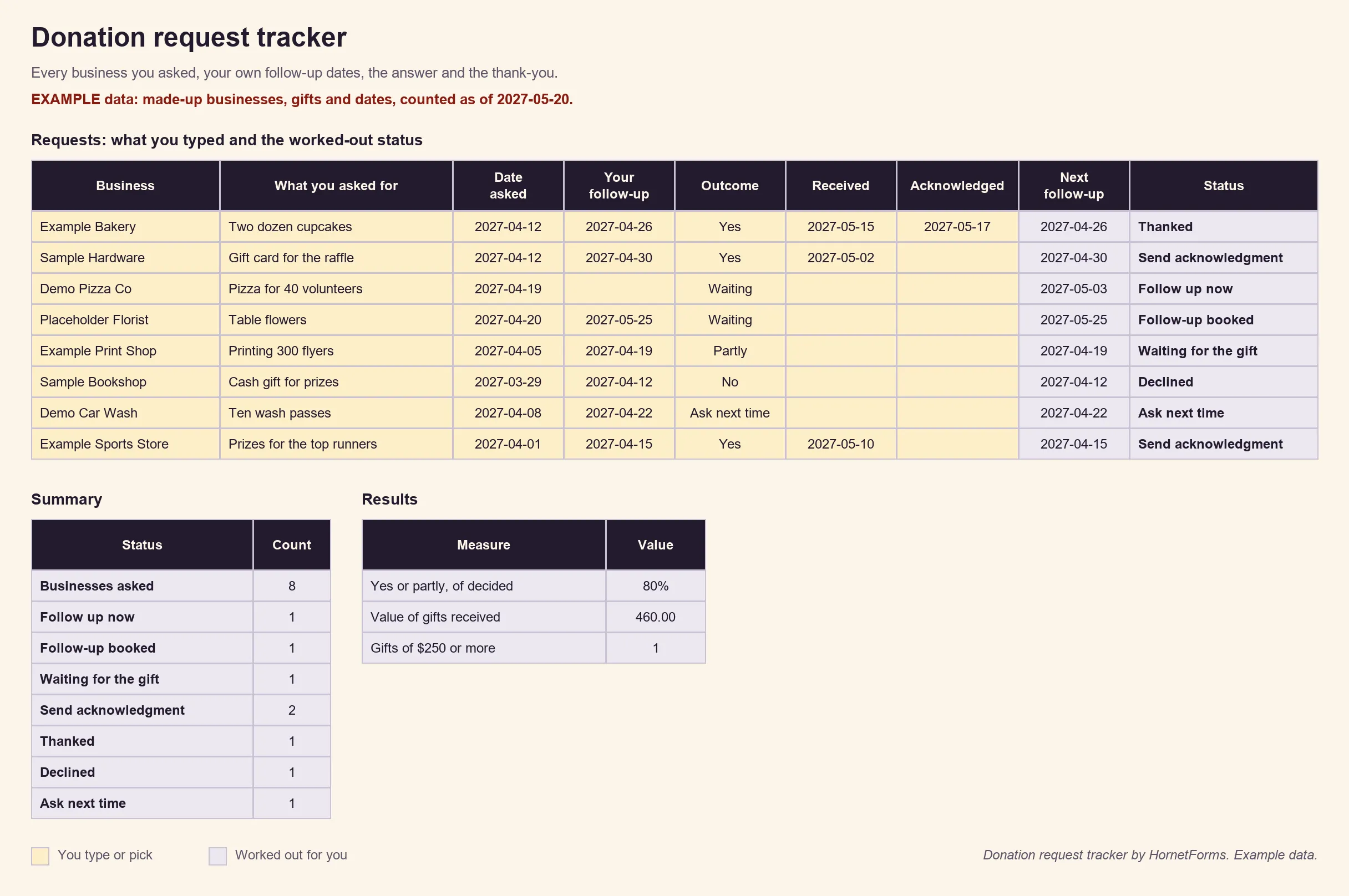
EXAMPLE data only: the businesses, people, gifts and dates are made up. Clear the example rows before you add your own.
The Status column does the sorting: Follow up now, Follow-up booked, Waiting for the gift, Send acknowledgment, Thanked, Declined or Ask next time. An IRS line column flags any gift with a value of $250 or more, so you know a written acknowledgment matters. The Summary tab counts each status and shows the share of decided requests that got a full or partial yes.
There's also a CSV with just the column headers if you'd rather build a sheet of your own in Google Sheets.
Related forms for fundraising#
A donation request is one way to raise support. Other jobs have their own forms:
- Selling sponsorship packages with tiers and logos? Start from the event sponsorship form template.
- Collecting items for an auction? The silent auction donation form covers item details, opening bids and bid sheets.
- Logging gifts of goods and services? The in-kind donation form has a gift log and acknowledgment wording.
- Asking supporters to pledge a gift over time? A pledge form template does that job.
Free donation request form downloads#
Everything in this guide, ready to print or edit:
- The nonprofit kit (request letter plus a one-page request form with a reply box): PDF, US Letter, PDF, A4 or Word (DOCX)
- The business's donation request form (for incoming requests, with a box for your own review): PDF, US Letter, PDF, A4 or Word (DOCX)
- The request tracker: donation-request-tracker.xlsx for Excel and Google Sheets, or the header-only CSV
On the Free plan, an online form shows a small "Made with HornetForms" badge. On Pro and Business, you can remove it and add your logo and a cover image. The pricing page lists what each plan includes.
Put your donation request form online#
A good donation request form makes a specific ask, says who it helps and how you'll say thanks. Nonprofits pair it with a short letter and a follow-up date of their own. Businesses put it online, close it between giving cycles and review every request in one sheet. The features page has the wider tour. Sign up for free and build your donation request form today.