
On this page
Your volunteers signed up. They turned up. Now somebody asks how many hours they gave this year, and the answer lives in a clipboard, three group chats and one person's memory.
A volunteer hours log template fixes that. Every shift becomes one row: who helped, when, on what, and for how long. This guide covers what to record, a free volunteer hours log template for Excel and Google Sheets, a short form volunteers fill in themselves, how to check each entry in your own sheet, and how to put a dollar value on the hours. There's also a printable sign-in sheet for days when the Wi-Fi gives up.
This post starts after people join. If you're still recruiting, our volunteer application form guide and the volunteer sign-up form template cover that part.
Why track volunteer hours at all#
Counting hours can feel like admin for its own sake. It isn't. A clean log pays off in three places.
- Grant reports and annual reports. Funders may ask what your volunteers did. "Forty people gave 1,200 hours to the food bank" lands better than "lots of people helped." Independent Sector, which publishes a yearly estimate of what a volunteer hour is worth, notes that "Charitable organizations frequently use this estimate to quantify the enormous value volunteers provide" (Independent Sector, Value of Volunteer Time, accessed 28 October 2026). That estimate needs hours to multiply.
- Thanking people properly. A log shows who turned up every Saturday since spring. That's the person who gets the shout-out, the certificate or the first pick of shifts. When someone stops coming, a short volunteer exit survey tells you why.
- Student service hours. Some students need a record of their hours for school, a club or an award. Ask the school what proof it accepts before the first shift, so you collect the right details from day one.
There's a fourth, quieter benefit. A log tells you which programs run on two tired people, before those two people burn out. To learn which programs your area needs most, run a community needs assessment survey.
What to record in a volunteer hours log#
Keep each entry small. You want enough detail to total the hours and to answer a question later, and no more. Here's what every row in the volunteer hours log template holds:
| Field | Why you need it |
|---|---|
| Date | To total hours by month and to spot a date typed wrong |
| Full name | So the right person gets the credit |
| The most reliable way to match the same person across many entries | |
| Program or activity | So you can report hours per program, such as food bank sorting or park cleanup |
| Hours | The number you'll add up, with halves allowed (2.5) |
| Notes | Optional context, like "covered the late shift" |
| Event (hidden) | Which event or site the entry came from, filled in by the link |
Leave out what you don't need. Home addresses, dates of birth and emergency contacts belong in your application records, not in a log you'll share with a committee. If your volunteers are also paying members, keep those details on your membership application form.
The free volunteer hours log template (Excel and Google Sheets)#
The free volunteer hours log template opens in Excel and in Google Sheets. It has five tabs:
- Log: one row per entry. Paste your form's responses at cell A1, headers included, or type rows from a paper sheet under the same headers.
- By volunteer: each person once, with their entries, hours logged, approved hours, the value of those hours and the last date they helped.
- By month: entries, how many different volunteers helped, hours logged and approved hours for each month.
- Settings: your hourly value of volunteer time (empty until you type one), the most hours you expect in a single entry, and the month your year starts.
- Start here: six short steps and a colour key. Yellow cells are yours to type in. Grey cells work themselves out.
The sheet matches a person by email, or by name when the email is blank. So "Ava Example" and "ava example" with the same email count as one volunteer. It finds each column by its header name, which means the column order doesn't matter. A CSV export and a Google Sheets sync both work.
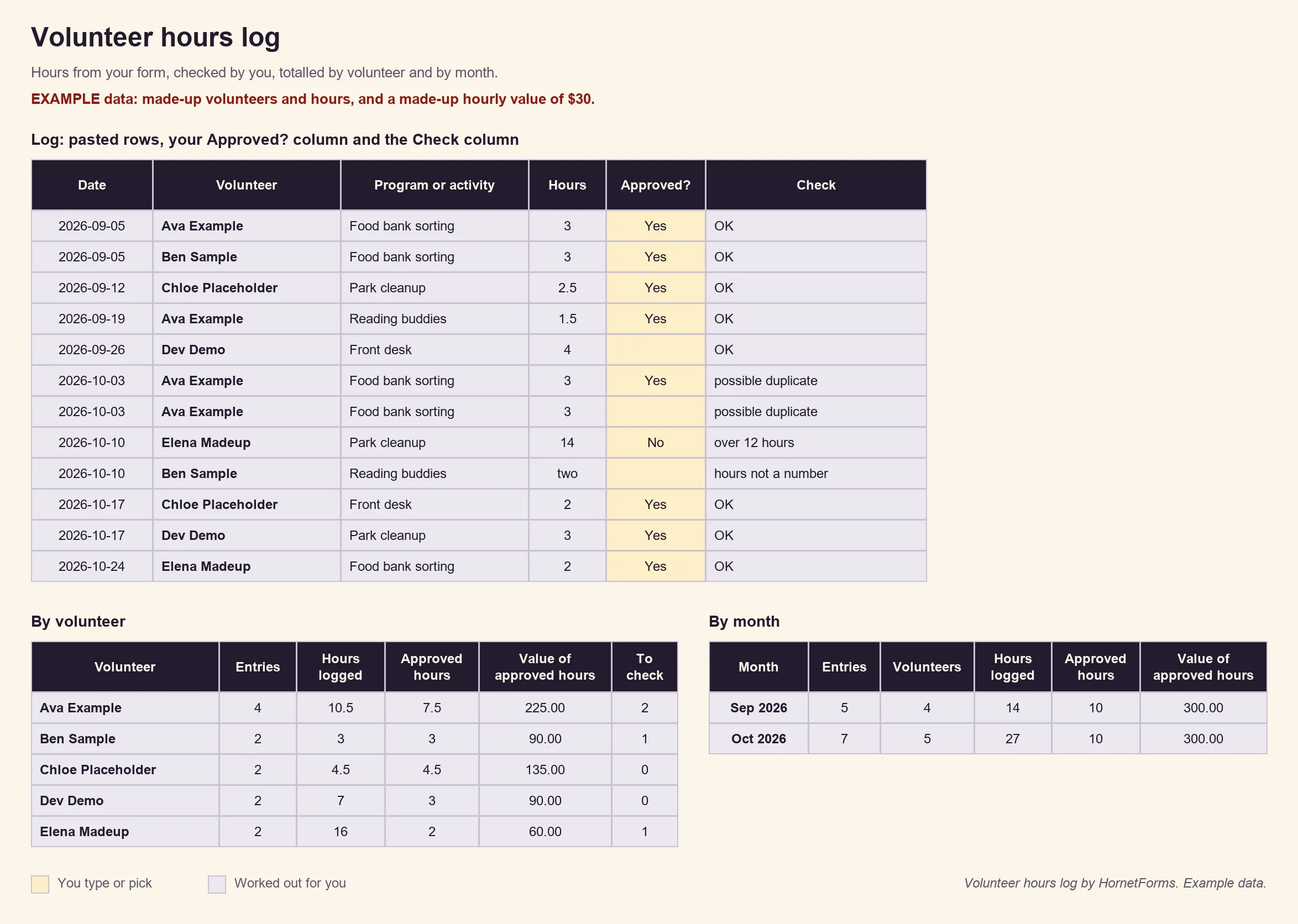
EXAMPLE data only: the volunteers, hours and the $30 hourly value are made up. The downloaded file ships with an empty hourly value.
The rows on the Log tab are clearly marked EXAMPLE, and a red line warns you while they're still there. Clear them, then paste your own. Prefer to build your own sheet? Grab the CSV with just the column headers.
Let volunteers log their own hours with a form#
A volunteer hours log template is only as good as what goes into it. Typing every row yourself works for five volunteers. At 50, it eats your Sunday. A short form lets each volunteer log their own hours on a phone, in under a minute, before they leave.
Start from a blank form. It takes about ten minutes.
The questions#
| Question | Type | Setting |
|---|---|---|
| Date | Date | Required |
| Full name | Short text | Required |
| Required | ||
| Program or activity | Dropdown | Required; list your real programs |
| Hours | Number | Required |
| Notes | Long text | Optional |
| event | Hidden field | Filled from the link |
Keep the labels exactly as above if you want the sheet to work without edits. The labels become your column headers. If you rename a question, type the new name on the sheet's Settings tab and the formulas follow. Unsure which type fits a question? Here's every question type and when to use it.
Volunteers never need an account or a sign-in to answer. And because HornetForms gives you unlimited responses within fair use, a busy season won't run into a plan cap. If another tool has capped you before, here's what to do when a form hits its response limit.
Tag each event with a hidden field#
A hidden field is a question volunteers never see. It takes its value from the link that opened the form. Name it event, then share a link per event:
https://forms.hornetforms.com/f/<your-slug>?event=park-day
https://forms.hornetforms.com/f/<your-slug>?event=saturday-sort
Every response from the first link records park-day. You can also fill in a visible question from the link. Set the Program question's Prefill parameter to program, and ?program=Park+cleanup picks that option for the volunteer. The form matches the option label and ignores capital letters. Our post on tracking links with URL parameters covers more tricks like this.
A QR code at the sign-in desk#
Publish the form, open the Share tab and download its QR code as a PNG or an SVG. Print it on a card for the sign-in desk, the volunteer room door or the back of a name badge. People scan it on the way out and log the shift while it's fresh.
One detail matters here. The Share tab's QR code holds the plain form link, without any ?event= values. That's fine when the Program dropdown tells you where people worked. If you want a code that carries the event too, turn the full prefilled link into a code with a separate QR tool. Our RSVP QR code guide walks through printing and testing codes.
Send every response to Google Sheets#
Connect Google Sheets to the form, on every plan. Each response becomes one new row. The spreadsheet starts with a "Response ID" column and a "Submitted at" column, then one column per question, then a "Response link" column. Hidden fields like event get their own column too.
Prefer files? Export a CSV from the Responses tab on every plan, or an Excel file on Pro and Business. You can filter the responses first, with up to 10 conditions, so one export holds a single program. To hear about each entry as it lands, turn on an email to yourself for each new response. Notifications start switched off. You can also send volunteers a confirmation email with a subject and message you write: pick the Email question as the address in the notification settings. Our guide to where your form responses can go covers Slack, Discord and Notion as well.
Check and approve hours in your own sheet#
Self-reported hours are mostly right. Mostly. Someone taps 30 instead of 3, or sends the form twice because the first try felt slow. Your sheet catches these, and you decide what counts.
The Log tab has a grey Check column. It says OK, or it names what to look at:
- no name or email
- no hours, or hours that aren't a number ("two" instead of 2)
- hours of zero or less
- more hours than your limit on Settings (12 in the example, so pick your own)
- no date, or a date in the future
- a possible duplicate: same person, same date, same program
Next to it sits a yellow Approved? column. Read the Check, ask the volunteer or the shift lead if something looks off, then type Yes or No. Only Yes rows count as approved hours on By volunteer and By month. Hours logged and approved hours sit side by side, so you always see the gap.
Good to know: the sheet never approves anything for you. Approved? is your call, typed by you. HornetForms collects the answers; the decision stays with your team.
Need proof for one person, such as a student's school record? Open their response in HornetForms and download it as a PDF, on every plan. Keep the file with your log, so you can answer the school's question in a minute.
Putting a dollar value on volunteer time#
Grant reports often turn hours into dollars. In the US, the usual yardstick is Independent Sector's value of volunteer time: "Many nonprofits use the national and state value of volunteer time values to demonstrate the return on investment of volunteerism within their organizations." On the same page, Independent Sector says it "announced on April 21, 2026 that the estimate for the value of a volunteer hour was $36.14 in 2025" (Independent Sector, Value of Volunteer Time, accessed 28 October 2026). The page also offers figures for each state and data going back to 2001.
Three things to know before you use it:
- It changes every year. In Independent Sector's words, "The value of volunteer time annual updates are released in April during National Volunteer Week." Check the page for the latest figure before each report.
- The 2025 number rests on early data. The page marks it "Preliminary data used to generate 2025 estimate."
- It's an average. "The state or national estimates are not designed to address these special cases," the page says about skilled volunteers, like a retiree who gives legal help. It's "an estimate of an hour of volunteer service, in general."
That's why the volunteer hours log template ships with the hourly value empty. Type the national figure, your state's figure or your own, on the Settings tab. The value columns fill in for approved hours only. In your report, name the figure and its year, so a reader can check it. Our grant application questions guide shows where figures like this fit in a funding request.
A printable sign-in sheet for paper days#
Not every site has signal, and not every volunteer carries a phone. Print the sign-in sheet for those days. It has lines for the program, the date and the coordinator, then 20 numbered rows with Full name, Email, Time in, Time out, Hours and Initials. For other events, we also have visitor, meeting and open house sign-in sheets.
The columns match the form, so you can type each line straight onto the Log tab under the same headers. Better still, tape your form's QR code to the clipboard. The sheet catches the people who can't scan, and the form catches everyone else.
Start logging hours this week#
A good volunteer hours log template keeps one row per shift, counts hours by person and by month, and leaves the approving to you. Pair it with a short form and a QR code, and your volunteers do most of the typing. The Free plan is free forever, and the integrations page lists every place your responses can go. Sign up for free, build your hours form, and print the QR code before your next shift.