
On this page
Most volunteer programs start with good intentions and a bit of a mess. A paper form sits in a binder at the front desk. A Google Form lives on someone's personal account. Offers to help arrive by email, by text and in the car park after an event. Then somebody tries to turn all of it into a rota the night before.
A volunteer application form fixes the front of that mess. Every offer arrives in the same shape, with the same details, in one place. This guide covers what to ask, page by page, how to handle references and volunteers under 18, and how to turn applications into a shift roster. At the end you'll find a free template, printable copies and a roster sheet you can copy.
What a volunteer application form should ask#
Keep the volunteer application form short. People offer help when they feel generous, so ask what you need to say yes and to reach them. Save the extra questions for the roles that need them. Here's the full list from the template:
| Question | Type | Why you ask it |
|---|---|---|
| Full name, email, phone | Short text, email, phone | So you can reply and call back about shifts |
| How should we contact you? | Multiple choice | Some people never pick up calls; others never read email |
| Are you 18 or older? | Multiple choice (Yes or No) | It decides whether the parent or guardian page shows |
| Emergency contact name and phone | Short text, phone | Who to call if something goes wrong on a shift |
| Which roles interest you? | Checkboxes, with Other | So you match people to work they actually want |
| When are you available? | Checkboxes | Weekday mornings, afternoons and evenings, Saturdays, Sundays |
| How often would you like to help? | Multiple choice | Once, about once a month, or every week |
| When could you start? | Date | So you don't book someone who's away until spring |
| Skills you'd like to use | Checkboxes, with Other | First aid, languages, driving, food safety and more |
| Why would you like to volunteer with us? | Long text | One open question that tells you the most |
About the volunteer#
Make name, email and phone required, then ask how they'd like you to get in touch. For age, ask "Are you 18 or older?" with a plain Yes or No. You only need to know which side of 18 someone is on, and a date of birth collects more personal data than that job needs. Finish the first page with an emergency contact name and phone number.
Roles and availability#
List your real roles as checkboxes and add "Select all that apply" under the question. Name the roles that need extra checks plainly, like "Working with children or young people". The form's logic reads those exact options, as you'll see below.
Ask for availability in parts of the week, not exact dates. "Saturdays" stays true for months, while "the 14th" is stale by the 15th.
Good to know: ask for availability, then build the roster yourself. Nobody thinks they've booked a shift you can't staff, and you decide how many people each shift needs.
Skills and why they want to help#
A skills question with checkboxes turns up the first aider, the Spanish speaker and the person with a van. Then ask one open question: "Why would you like to volunteer with us?" A placeholder like "A sentence or two is plenty" keeps the answers short and honest. Not sure which question type fits a field? Here's which question type to pick.
Roles that need references and a background check#
Some roles carry more responsibility than others, like working with children or with older or vulnerable adults. For those roles, ask for references and for consent to a check before the person starts.
The template's third page, References and checks, asks for:
- Two references: a name and how they know the volunteer, plus an email or phone number. The template makes the first one required.
- Consent to a check: "This role needs a background check. Do you agree to one?" The answers are "Yes, I agree" or "I have questions first", with the note "We'll explain the process before anything happens."
The page only shows when someone ticks one of the two sensitive roles. Everyone else goes straight from availability to the end. A rule like this takes one line of conditional logic, and our logic, piping and calculations guide shows how to set it up.
Your group runs the check itself, through your own provider and your own safeguarding policy. The volunteer application form only records the volunteer's consent and their references. In England and Wales, GOV.UK says "You can check the criminal record of someone applying for a role by getting a Disclosure and Barring Service (DBS) check." It lists "a voluntary organisation" among the groups that can ask for one (GOV.UK, check someone's criminal record, accessed 27 October 2026, no page date). Scotland, Northern Ireland and other countries have their own rules.
Leave identity numbers off the application. That means Social Security or National Insurance numbers, passport or driving licence numbers, and questions about criminal history. If a check needs them, your check provider collects them through its own process.
Good to know: this is general guidance, not legal advice. Check what your country, your insurer and your safeguarding policy ask for in each role.
Volunteers under 18#
Teenagers make great volunteers, and their parents want to know where they are. When someone answers "No" to "Are you 18 or older?", the volunteer application form shows a Parent or guardian page. It asks for:
- The parent or guardian's name, email and phone
- "I agree to this young person volunteering with us", with a single "Yes, I agree" option
- "Parent or guardian's signature", a signature question where the parent signs on screen with a finger or a mouse
A teen can fill in the form on a phone and then hand it to their parent for the last page. The signature question records the drawn signature with the response, and that's all it does. If your policy asks for a separate consent form, print the PDF version below. Its parent page ends with a signature and date line.
Turn applications into a shift roster#
Your volunteer application form tells you who wants to help and when. A roster tells everyone where to be. The free volunteer shift roster bridges the two, and it opens in Excel and Google Sheets.
- Export your responses. In HornetForms, open Responses, then Export, then CSV. Or connect Google Sheets so each application lands as a new row, on every plan. Here's how to send form responses to Google Sheets, Slack or Notion.
- Paste them in. Paste the CSV at cell A1 of the Applicants tab, headers included. The sheet finds columns by their names, so the order doesn't matter.
- Mark who's ready. Pick a Status for each person: New, Contacted, Ready or Not now. After you check references yourself, type Yes under References checked. For a volunteer under 18, type Yes under Guardian signature on file once you've seen the signature.
- List your shifts. On the Shifts tab, type each shift's name, date, start and end time, part of the week, role and how many people you need. Then pick up to six volunteers per shift from a dropdown.
The sheet works out how many people each shift has, how many it still needs, and a status of Empty, Open, Full or Over. Its Check column names anyone who:
- isn't available at that time of the week
- didn't pick that role
- has two shifts at the same time
- has no Yes for references on a sensitive role
- is under 18 without a guardian signature on file
A Summary tab counts it all up.
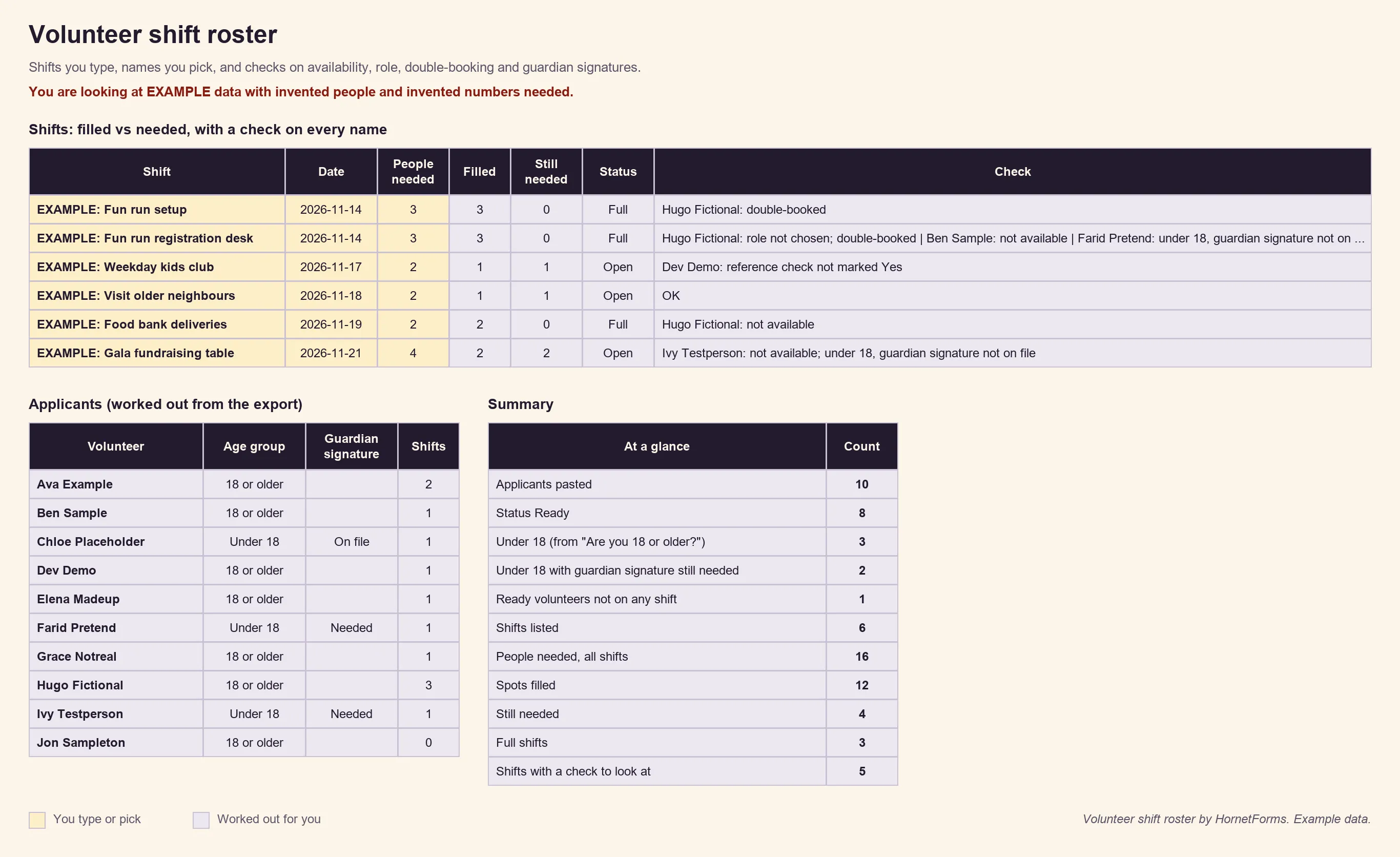
EXAMPLE data only: the people, shifts and numbers needed are all made up. Clear the example rows before you paste your own.
You still decide who goes where. The sheet only compares what people told you with what you typed, and it never marks anyone as approved. There's also a CSV with just the column headers if you'd rather start a sheet of your own. Once the shifts start, a volunteer hours log template records the time each person gives.
To hear about new applications as they arrive, turn on owner email notifications, which work on every plan. A Slack or Discord message to the coordinators' channel works on every plan too, and the integrations page has the full list.
A free volunteer application form template#
Our volunteer application form template has up to four short pages: Volunteer with us, Roles and availability, References and checks, and Parent or guardian. The last two only show when they apply. Each page has a short "why we ask" line, so people see why you want each answer.
The template also has a hidden source field. Add it to the links you share and every response records where the volunteer found you:
https://forms.hornetforms.com/f/<your-slug>?source=library-flyer
https://forms.hornetforms.com/f/<your-slug>?source=newsletter
Three ways to use it:
- Open it in HornetForms. The template page at
forms.hornetforms.com/templates/volunteer-applicationhas a Use this template button that takes you through sign-up and opens your own copy. Already have an account? It's in the template gallery under Registration & events. - Print it. For a sign-up table at a fair or a church hall, download the PDF, US Letter, the PDF, A4 or the Word (DOCX) version if you want to add your logo.
- Plan the shifts. Use the volunteer shift roster from the section above.
For a one-day event where helpers only need to say when they're free, a shorter volunteer sign up form does the job in two short pages.
A few settings help once the form is live:
- QR codes and custom slugs work on every plan, so the flyer on the noticeboard can point straight at the form.
- Certificates and CVs: add a file upload question if a role needs proof of a first aid course. Volunteers never need an account or a sign-in to answer or upload, and each file can be up to 10 MB on Free.
- Your look: forms on Free show a small "Made with HornetForms" badge. Pro adds your logo and a cover image, and removes the badge.
HornetForms has unlimited responses on every plan, so a big recruitment drive never runs into a response cap halfway through.
Recruit your next volunteers this week#
A good volunteer application form asks a few clear questions. It asks more only for the roles that need it, and it brings in a parent when the volunteer is under 18. The roster sheet then turns those answers into shifts you control. When the season ends, a few volunteer survey questions tell you what to keep for next time. The Free plan is free forever, and the features page has the wider tour. Sign up for free and publish your volunteer application form today.