
On this page
Volunteers rarely complain. They just stop showing up. One week the Saturday crew is six strong, a month later it's three, and nobody can say quite when it changed or why.
Good volunteer survey questions catch that drift early. This guide gives you 50 of them, split across the three moments that matter: when people sign up, right after a shift, and when someone steps back. You'll also find wording for church and faith-based teams, tips on keeping each survey short, and what to do with the answers. At the end there's a free question bank and a CSV file that builds the after-shift survey for you.
Three volunteer surveys: recruitment, after-shift feedback and exit#
One long annual survey tries to do everything and ends up doing nothing well. Three short surveys, each sent at the right moment, work better:
| Survey | When to send it | What it tells you |
|---|---|---|
| Recruitment | When someone offers to help, or a few weeks after they start | Why they came, when they're free, which role fits them and how they like to be thanked |
| After-shift feedback | Within a day of a shift or an event | Whether the shift ran well, what got in the way and whether they'll come back |
| Exit | Within a week of someone stepping back | Why they left, what would have kept them and whether the door is still open |
The University of Florida's 4-H volunteer guides explain why this matters. Their fact sheet on evaluating volunteer programs says "Evaluation is not the decision itself, but rather the preparation for the decision." It also says feedback "shows all members connected to the program that their concerns will be addressed. These results can help increase volunteer retention and youth participation." (UF/IFAS Extension, Engaging Volunteers through ISOTURES: Evaluating Volunteer Programs, 4-H 6.10, 2010, an archived fact sheet, accessed 28 October 2026.)
Each set of volunteer survey questions below feeds one decision: which role to offer, what to fix before the next shift, and what to change for the next volunteers.
Volunteer survey questions for recruitment#
A recruitment survey (some teams call it a volunteer interest survey) goes out when someone says "I'd like to help." Keep it to eight or 10 questions. These are the ones that earn their place:
- Which areas would you like to help with? Checkboxes with your real jobs: events, the food pantry, office help, outreach, youth programs.
- What draws you to volunteer with us? Checkboxes (more on the options below).
- How often could you help? A one-off event, about once a month, every other week, every week, or not sure yet.
- When are you usually free? Weekday mornings, afternoons or evenings, Saturdays, Sundays.
- About how many hours a month could you give? Ranges that never overlap: fewer than 4, 4 to 8, 9 to 16, more than 16.
- Have you volunteered before? First-timers may need a buddy on day one.
- What skills or experience would you like to use? This is how you find the bookkeeper or the Spanish speaker you didn't know you had.
- Do you prefer working with people or behind the scenes? A quiet sorter and a natural greeter both do great work in the right seat.
- Are you 18 or older? Add a show rule so the parent or guardian questions appear only after a No.
- What email should we use to reach you?
Question 2 deserves a closer look. A 2025 UF/IFAS Extension publication says volunteers "are motivated by six primary reasons: purpose, esteem, career, power, achievement, and affiliation." (UF/IFAS Extension, Recognizing Volunteers, AEC822, May 2025, accessed 28 October 2026.) The bank's options cover all six in plain words: the cause, feeling needed, learning skills, leading things, reaching goals and being part of a team. The answer also tells you how to thank them later.
If you also need references, background checks or a full screen for some roles, that belongs on a volunteer application form, not in a survey. For a quick sign-up with availability and a guardian contact for under-18s, start from the volunteer sign-up form template.
Volunteer feedback survey questions after a shift#
The after-shift survey is the one you'll send most, so it has to be short. Five to eight questions, two minutes on a phone. These are the strongest volunteer feedback survey questions in the bank:
- Overall, how satisfied were you with today's shift? A five-face rating.
- How clear were your tasks before you started? A 1 to 5 scale from "Not clear at all" to "Very clear".
- Did you have the tools and supplies you needed? Yes, mostly or no.
- How well did staff support you during the shift?
- Was the amount of work about right? Too little to do, about right, or too much. Bored volunteers leave as fast as overworked ones.
- What was the best part of your shift?
- What one thing would make the next shift better? One priority, not a wish list.
- Will you sign up for another shift? Yes, maybe or no. Call the maybes this week.
For a fuller check-in once a season, add a satisfaction matrix to your volunteer survey questions. The UF/IFAS fact sheet lists satisfaction items for orientation, training, the volunteer role and communication with staff and other volunteers. The bank turns those into one matrix question with five rows and a five-point scale from "Very dissatisfied" to "Very satisfied". In HornetForms a matrix takes up to 20 rows and 10 columns, and the Summary tab shows it as a table with the count and share for every cell.
Then ask the question most surveys skip: "Which kinds of thanks mean the most to you?" The 2025 UF/IFAS publication suggests that "volunteer coordinators may also consider speaking with their volunteers on their preferred recognition styles." The options run from a personal thank-you note to a group meal, a chance to learn, a bigger role or a certificate. Some people would rather skip the award night and get a handwritten note. Now you'll know which ones.
Volunteer exit survey questions#
People who are leaving often say what regulars won't. Send the exit survey within a week, while the reasons are fresh, and keep it under 10 questions:
- How long did you volunteer with us?
- What is the main reason you're stepping back? Moving away, less free time, health or family, the role was not what I expected, I didn't feel supported, the shift times don't work for me, or other.
- Is there anything we could have done to keep you? Often the fix is small: a different day or a different job.
- Did your role match what you expected when you signed up? A No points back to your recruitment message.
- Did you feel your work was recognized? Yes often, sometimes, rarely or never.
- What should we change for the next volunteers?
- Would you consider volunteering with us again?
- Would you like to hear about one-off events or shorter roles? This keeps the door open for people who left because of time.
- May we contact you about your answers? Show the email question only to people who pick Yes.
Question 5 matters because recognition and staying go together. The UF/IFAS publication says "Volunteer recognition and reward has a significant effect on the willingness of a volunteer to continue volunteering." Its older companion fact sheet adds a warning worth taping to the volunteer office door: "The longer a volunteer is involved in the 4-H program, the more likely they are to notice when the elements of good volunteer management are not in place." (UF/IFAS Extension, Recognition of Volunteer Success, 4-H 6.9, 2010, archived, accessed 28 October 2026.)
Tell people up front who will read their answers. In HornetForms, everyone in your workspace can see every response, so say so plainly in the survey's welcome text.
Satisfaction and NPS scores for volunteers#
Two volunteer survey questions give you a headline number to track from month to month. Use the presets so HornetForms scores them for you:
- Satisfaction. The CSAT preset is a rating with five faces. HornetForms works out the share of people who picked one of the top two faces.
- Loyalty. "How likely are you to recommend volunteering with us to a friend?" with the NPS preset, on a 0 to 10 scale. The score is promoters (9 or 10) minus detractors (0 to 6), as a share of all answers.
Both appear in the built-in analytics and on the Summary tab, on every plan, so you don't need a spreadsheet. Always follow the NPS question with "What is the main reason for your score?" The number tells you how people feel; the reason tells you what to fix. Our guide on how to calculate NPS covers the maths.
For every other scale, label both ends. A 1 to 5 scale with "Not clear at all" and "Very clear" under the ends reads the same way for everyone. You can label the ends of a linear scale with up to 100 characters each. If you're unsure which question type fits, here's every question type and when to use it.
Church volunteer survey questions#
Faith communities run on volunteers, and the same three surveys fit. The main change is the words. Swap "role" for "ministry" or "team", and use the names your people already use: greeters and ushers, children's ministry, the worship team, hospitality, the food pantry, tech and sound.
A few church volunteer survey questions that faith communities often need, beyond the bank:
- Which ministries would you like to serve in? Checkboxes with your real teams.
- How many ministries do you serve in right now? One, two, three or more. Someone serving on three teams can burn out quietly.
- How connected do you feel to our church family through serving? A 1 to 5 scale from "Not connected" to "Very connected".
- Would you like to be paired with someone who already serves on this team?
- Is there anything you'd like us to pray about with you? Optional, open text. Say who will read the answers.
Keep the exit survey gentle. Someone stepping back from the nursery schedule may still sit in the third row every week. "Would you like to hear about one-off ways to serve, like the Christmas meal?" makes a kind last question.
If your congregation worships in more than one language, every HornetForms form can show its buttons and messages to respondents in any of 12 languages, on every plan. Pro and Business add form translations of your own questions into up to 10 languages.
Keep volunteer surveys short and timely#
The best volunteer survey questions still fail when the survey is too long or arrives too late. A few rules:
- Send the after-shift survey the same day. By next week, people remember the shift as "fine".
- Five to eight questions after a shift; up to 10 for recruitment and exit. Cut any question that doesn't feed a decision.
- Don't survey the same people after every single shift. Weekly regulars can answer once a month or once a season.
- Test it with two or three volunteers first. Their confusion is cheaper than 40 confused answers.
Our guide to writing survey questions people actually answer covers wording, like avoiding two questions in one. Running a school, camp or daycare too? Our parent survey questions bank works the same way.
Reach volunteers at the sign-in desk#
The easiest moment to get answers to your volunteer survey questions is while people are still in the building. Put the survey's QR code on the sign-in or sign-out desk, on the break room wall and on the back of the name badge. Our guide on how to make a QR code for a form covers getting people to scan it.
In HornetForms, open the Share tab and download the QR code as a PNG (512 by 512 pixels) or as an SVG, which stays sharp on a big poster. Respondents never need an account or a sign-in to answer. For more on printed codes, see our post on using an RSVP QR code at events.
Want to know which station each answer came from? Give the role question a prefill parameter and add it to the link:
https://forms.hornetforms.com/f/volunteer-feedback?role=Kitchen
The Share tab code opens the plain form link. For one code per station, turn each prefilled link into a QR code with a generator you trust.
HornetForms has unlimited responses within fair use on every plan, so a busy season never runs into a response cap halfway through.
Act on the answers and tell volunteers#
Volunteer survey questions that change nothing teach people to stop answering. Close the loop in three steps:
- Read the results every week or two. The Summary tab shows each question at a glance, with the NPS and CSAT scores worked out. Response filters let you look at one role or one shift at a time. To hear about answers as they arrive, turn on an email to yourself for each new response.
- Pick one fix. The most common answer to "What one thing would make the next shift better?" is usually your next job. Put it on the agenda, with a name next to it.
- Tell volunteers what you changed. A two-line "You said, we did" in the newsletter or at the next shift huddle: "You told us setup started without a plan. Now the setup lead sends it the night before."
If your team works from a spreadsheet, connect Google Sheets so each response lands as a new row. Here's how to send form responses to Google Sheets, Slack or Notion.
When volunteers also give, the same people who answer your surveys may be the ones filling in your pledge form at the next appeal.
Free volunteer survey question bank and import file#
Everything here is free to download and change:
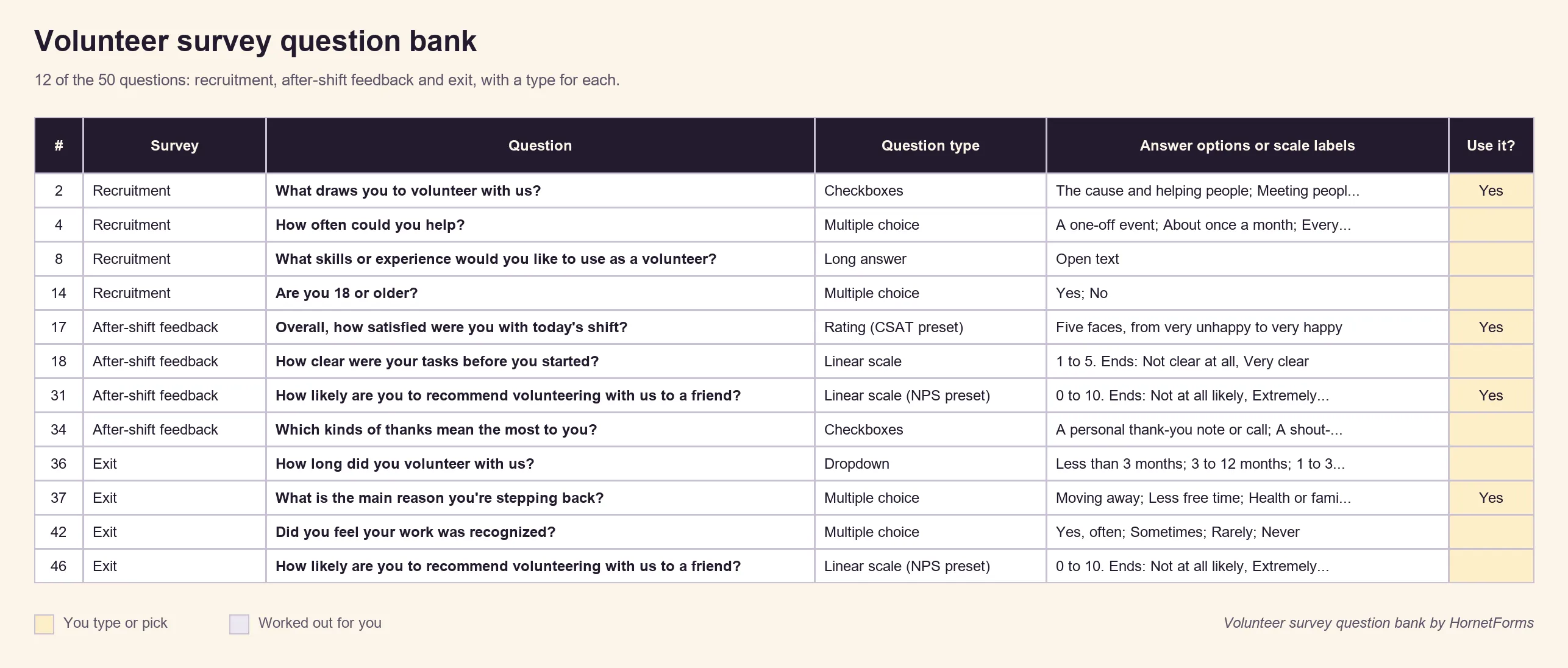
- The question bank. The volunteer survey question bank (Excel) holds all 50 volunteer survey questions: 15 for recruitment, 20 for after-shift feedback and 15 for exit. Each row has a topic, a question type, answer options or scale labels, and a reason to ask it. Filter by survey, mark the ones you want with Yes, and the Read me tab counts your picks. It opens in Excel and Google Sheets. A CSV copy is there too.
- The import file. The after-shift volunteer survey CSV has 14 questions as column headings and eight example rows.
The CSV builds the after-shift survey for you. On the Import a form screen, drop in the file. HornetForms reads it in your browser, for free on every plan, and uses the example rows to guess each question's type. We ran the importer's own code on this file, and every column landed as planned:
- Role, tools, sign-up again and contact: multiple choice
- The three 1 to 5 questions: ratings
- The recommend question: a 0 to 10 linear scale
- The thanks question: checkboxes
- The four open questions: long text
- The last column: an email question
The example rows only guide the types; they never become responses.
The import brings in the questions. Then take five minutes in the editor:
- Swap the 0 to 10 question for an NPS question (type / and pick NPS) so it's scored for you. Swap the satisfaction rating for the CSAT preset too, if you like the faces.
- Want words under the ends of the clarity and welcome questions? Replace those two ratings with 1 to 5 linear scales and label both ends.
- Add a show rule so the email question appears only after a Yes to "May we contact you about your answers?"
- Rename the roles to your own jobs.
Try it on your next shift#
Pick the survey you need most. For most teams that's the after-shift one. Import the CSV, trim it to the volunteer survey questions you'll act on, and put the QR code on the sign-out desk before Saturday. When the answers come in, fix one thing and tell your volunteers you did.
The Free plan is free forever, with unlimited forms and unlimited responses within fair use. Sign up for free and send your first volunteer survey this week.
Net Promoter®, NPS® and Net Promoter System® are registered trademarks of Bain & Company, Inc., NICE Systems, Inc., and Fred Reichheld. Net Promoter Score℠ is a service mark of Bain & Company, Inc., NICE Systems, Inc., and Fred Reichheld.