
On this page
You ran a course, a workshop or a training day, and now you want to know how it landed. "Did you like it?" gets you a shrug. A Likert scale survey gets you something you can count: how many people agreed, how many didn't, and how sure they were.
This guide covers what a Likert scale survey is, whether to use five points or seven, label sets you can copy, and how to build one online. Then comes the part most guides skip: how to score the answers. You get a free Likert scoring calculator (it works as a Likert scale generator for your results), a CSV of label sets and a one-page cheat sheet.
What a Likert scale survey is, and what it is not#
A Likert scale survey asks people how much they agree with a set of statements, on the same answer scale every time. "The course goals were clear: Strongly disagree, Disagree, Neither agree nor disagree, Agree, Strongly agree."
The name comes from the psychologist Rensis Likert. His 1932 paper, "A Technique for the Measurement of Attitudes" (Archives of Psychology, No. 140), asked students to react to statements with the words "(a) strongly approve, (b) approve, (c) undecided, (d) disapprove, (e) strongly disapprove" (Likert 1932, scan of the original on the Internet Archive, accessed 28 October 2026).
The key idea is in how he scored it. He gave each answer a number from 1 to 5 and found each person's score "by finding the average of the numerical values of the positions that he checked". So strictly speaking, the scale is the whole set of statements added up. Each single statement is a Likert item.
That's why a few things often get called Likert scales but aren't quite:
- A star rating. One question, no statement, no agree or disagree. It's a rating question.
- A 0 to 10 "how likely are you to recommend" question. That's a different scale with its own scoring.
- A single "rate this from 1 to 5". Useful, but it's one item.
Don't worry about the name. Do worry about consistency: same labels, same order, same number of points on every statement you plan to compare.
Five points or seven#
This is the question everyone asks first. The short answer: both work, and seven gives you finer steps if people can tell the steps apart.
The research leans towards more points, up to a limit. Preston and Colman asked 149 people to rate a store or restaurant on scales from 2 to 11 points. They found that "the two-point, three-point, and four-point scales performed relatively poorly, and indices were significantly higher for scales with more response categories, up to about 7" (Preston and Colman, Acta Psychologica, 2000, abstract on PubMed, accessed 28 October 2026). People liked longer scales too: "Respondent preferences were highest for the 10-point scale, closely followed by the seven-point and nine-point scales."
Survey researchers Jon Krosnick and Stanley Presser reviewed decades of studies and concluded: "Overall, our review suggests that 7-point scales are probably optimal in many instances" (Krosnick and Presser, Question and Questionnaire Design, Handbook of Survey Research, 2010, accessed 28 October 2026).
| If you... | Use |
|---|---|
| Survey people on a phone, after a long day of class | Five points |
| Want to label every point with words | Five or seven (seven still labels well) |
| Track small changes between two runs of a course | Seven points |
| Already ran the survey last term | Whatever you used last time, so you can compare |
Two rules matter more than the number. Label every point, and keep the middle. Krosnick and Presser write: "Various studies suggest that reliability is higher when all points are labeled with words than when only some are." They also cite a study that found "adding midpoints to rating scales improved the reliability and validity of ratings". A middle option gives people who really are neutral somewhere honest to go.
Ready-made label sets to copy#
Agreement isn't the only answer scale. Match the labels to the question: "How often did you do the reading?" needs frequency words, not agree and disagree. Asking customers instead of students? See our customer satisfaction survey questions.
| Set | Five-point labels (low to high) | Use it for |
|---|---|---|
| Agreement | Strongly disagree, Disagree, Neither agree nor disagree, Agree, Strongly agree | Statements about the course or the teacher |
| Frequency | Never, Rarely, Sometimes, Often, Always | Habits: reading, practice, attendance |
| Satisfaction | Very dissatisfied, Dissatisfied, Neither satisfied nor dissatisfied, Satisfied, Very satisfied | Venue, materials, support |
| Quality | Very poor, Poor, Fair, Good, Excellent | A session, a handout, a speaker |
| Likelihood | Very unlikely, Unlikely, Neither likely nor unlikely, Likely, Very likely | Next steps: take the next course, use a skill |
| Importance | Not at all important, Slightly important, Moderately important, Very important, Extremely important | Picking topics for next time |
The seven-point versions add a step on each side, like Somewhat agree and Somewhat disagree, or Very rarely and Very often. Importance is one-sided: it runs from "not at all" up, with no negative end. All six sets, in both five-point and seven-point versions, are in the free Likert label sets CSV, ready to paste into a sheet or a form.
Build a Likert scale survey online: one statement or a grid#
Looking for a Likert scale maker? In HornetForms you have two ways to build a Likert scale survey. Both are among the 20+ question types, and both work on every plan.
A linear scale for one statement. Type the statement as the question and label the ends of the scale. Each end label can be up to 100 characters, so "Strongly disagree" and "Strongly agree" fit easily. Use this when a statement stands alone, or when you want it on its own page.
A matrix for a set of statements. Put each statement in a row and each label in a column. A matrix takes up to 20 rows and 10 columns, so a seven-point agreement grid with a dozen statements fits with room to spare. Keep it on one answer per row, so people pick one label for each statement. Use this when you have several statements on the same scale, which is the classic Likert scale survey.
The fastest start is our course evaluation form template. It already has both kinds:
- Page one, the course: course name, instructor's name and an overall rating from 1 to 5. Next comes "The instructor explained concepts clearly" on a five-point linear scale from Strongly disagree to Strongly agree. Then a matrix of five statements: clear goals, helpful materials, assignments that matched the teaching, a manageable workload and help when needed. It ends with a question on the pace.
- Page two, your experience: hours spent outside class, what helped most, what to change, and whether they'd recommend the course. Answer "Maybe" or "No" and a box appears asking what would make it worth recommending.
Swap the statements for your own and keep the scale. If you're still writing them, our guide on how to write survey questions covers wording, and the questionnaire template post shows how to lay out a full survey.
Score it: mean, top-two box and spread#
Once answers come in, the Summary tab in HornetForms shows each matrix as a table. Every statement gets a row, and every cell shows how many people picked that answer and its share of the row, shaded so the big groups stand out. That's your raw material. For the rest of the survey, our guide on how to analyze survey data covers cleaning, counting and cross-tabs.
From those counts, three numbers tell you most of what you need:
- Mean. Number the points 1 to 5 (or 1 to 7), multiply each by its count, add them up and divide by the number of answers. It's the same idea Likert used in 1932.
- Top-two box. The share of people who picked the two highest points (Agree and Strongly agree). It answers "how many people were happy?" in plain words.
- Spread. The standard deviation. A small one means people mostly agreed with each other. A big one means the room was split, which a middling mean can hide.
Add the bottom-two box (the share in the two lowest points) and you can see the unhappy group too. Top-two minus bottom-two gives you a simple net score.
Good to know: the gaps between labels aren't measured distances. "Agree" to "Strongly agree" isn't always the same step as "Disagree" to "Neither". Many researchers prefer to report the counts and shares, and treat the mean as a quick summary. Report both and you're covered.
The free Likert scoring calculator (Excel) does the maths. It's the Likert scale calculator part of this guide: type each statement, pick 5 or 7 points and paste the counts from the Summary tab. It handles up to 20 statements. For each one it works out the number of answers, mean, standard deviation, top-two box, bottom-two box, middle share and net score. It also draws a bar chart of top-two against bottom-two. Got a negatively worded statement, like "I often felt lost in class"? Mark it as reverse scored and the sheet flips it, so a high score always means the good end.
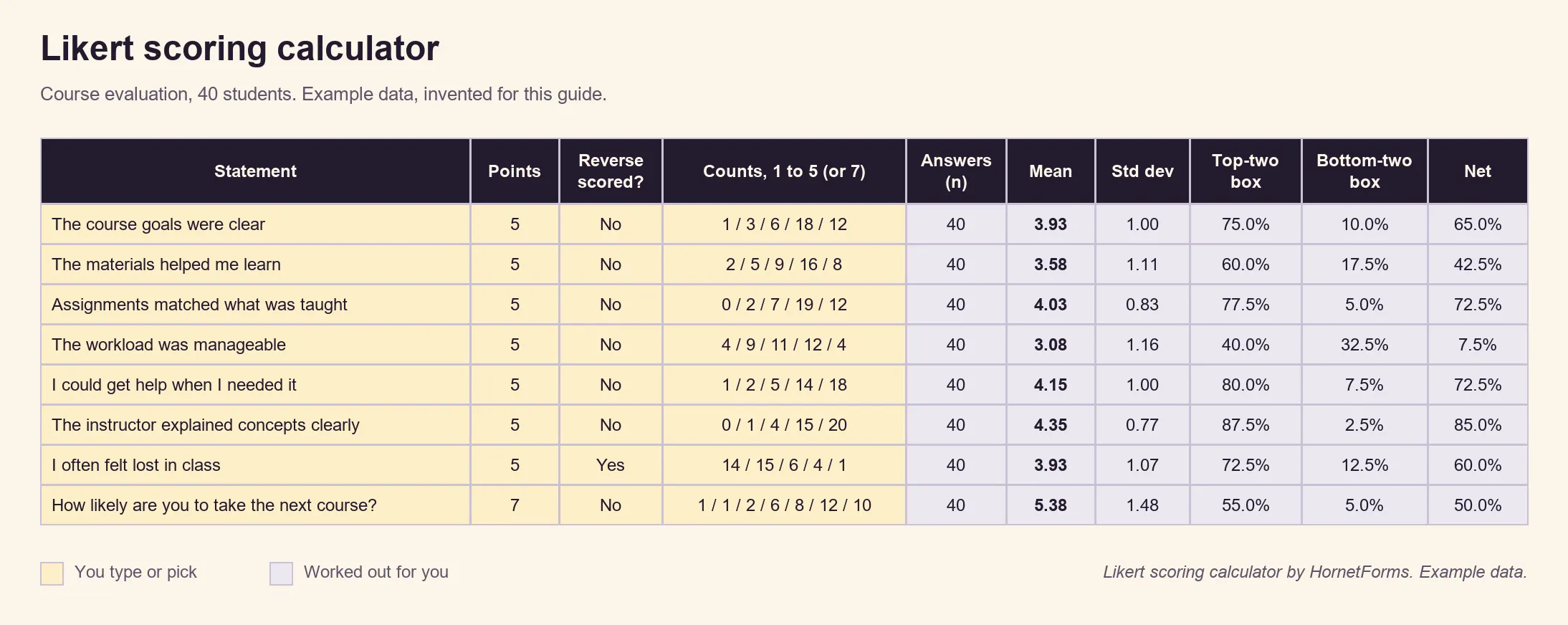
Example data only, invented for this guide.
Look at the workload row. Its mean of 3.08 sits near the middle, but the counts show 40% agreed and 32.5% disagreed. That's not a neutral class. It's a split one, and the spread of 1.16 says the same thing. There's also a CSV of the input columns if you want to build your own version.
Prefer to work from raw answers? The CSV export works on every plan, and Excel export comes with Pro and Business (see the pricing page). Count each answer per statement with a COUNTIF, then paste the counts into the calculator.
Mistakes that skew results#
Most bad Likert scale survey data comes from the questions, not the maths. Watch for these:
- Two ideas in one statement. Nobody can answer "The course was useful and well paced" if it was useful but rushed. Split it into two rows.
- Labels that skip or overlap. "Often, Sometimes, Occasionally" leaves people guessing which one is bigger. Use one of the label sets above.
- Flipping the order. If Strongly disagree sits on the left for ten statements and on the right for the eleventh, someone will tick the wrong end. Keep the low end on the same side every time.
- Only agree or disagree statements. People tend to agree. Krosnick and Presser report that "averaging across 10 studies, 52% of people agreed with an assertion, whereas only 42% of people disagreed with the opposite assertion". Mix in direct questions with their own labels, like "How clear were the instructions?" with Very unclear to Very clear.
- Reading the mean alone. A 4.1 can hide a split room. Check the bottom-two box before you celebrate.
- Comparing a five-point mean with a seven-point mean. They live on different scales. Compare shares instead, or keep the scales the same.
The Likert cheat sheet (PDF, US Letter) puts the label sets, the five-or-seven advice, the formulas and these mistakes on one page. It also comes as an A4 PDF.
Course and workshop examples#
Here are statements you can drop into a Likert scale survey. Keep each group on one scale.
A course (agreement, five points)
- The course goals were clear from the start.
- The materials helped me learn.
- The assignments matched what was taught.
- The workload was manageable.
- I could get help when I needed it.
- I can use what I learned outside class.
A one-day workshop (quality, five points)
- The content of the sessions
- The pace of the day
- The hands-on exercises
- The handouts and slides
- The room and the breaks
Teaching habits (frequency, five points)
- The instructor started on time.
- Feedback on my work arrived within a week.
- I could ask questions during class.
What's next (likelihood, seven points)
- How likely are you to take the next course?
- How likely are you to use this skill in the next month?
Finish with one or two open questions, like "What helped you learn the most?" and "What would you change?". The scores tell you where to look. The comments tell you why. For more open questions, see our list of feedback form questions. Running an event rather than a course? Our post-event survey questions post has a set built for that.
Run your next Likert scale survey#
Pick a label set, choose five or seven points and put your statements in a matrix. Then paste the Summary tab counts into the free calculator and read more than the mean. HornetForms is free forever on the Free plan, with unlimited forms and responses, and there's more on the features page. If you're coming from Google Forms, here's how HornetForms compares. Sign up for free and send your first Likert scale survey this week.