
On this page
The event is over, you've stacked the chairs, and you want to know how it went. Search for post-event survey questions and you'll find lists with dozens of them. Nobody answers dozens of questions on a phone in a taxi. Plan for about a minute of each person's time, and pick the questions that tell you what to keep, what to fix and who might come back.
This guide gives you a short set of post-event survey questions, with a follow-up that changes with the score. It covers when to send the survey, using one real conference's numbers, and how to read the results without building a spreadsheet from scratch. At the end you'll find a free template, a printable feedback card and a scorecard that works out your score for each event.
The post-event survey questions worth asking#
Two short pages with 11 questions is plenty. The first page asks how the day felt overall. The second asks about the details: the sessions, the room, the food and what to do next time. Here are the post-event survey questions in our template, in order:
| Question | Type | What it tells you |
|---|---|---|
| How likely are you to recommend this event to a colleague? | Linear scale, 0 to 10, required | Your Net Promoter Score (NPS), the one number to track from event to event |
| What let you down? | Long text, shown for scores of 0 to 6 | The specific thing to fix, in their words |
| Could we quote you? | Long text, shown for scores of 9 or 10 | A line for the next event page, if they agree |
| The sessions | Rating, 1 to 5 | Whether the content landed |
| The venue | Rating, 1 to 5 | Whether to book the same room again |
| The food and coffee | Rating, 1 to 5 | The gripe people rarely mention unless you ask |
| Which session stood out? | Short text | Who to invite back |
| Would you come back next time? | Multiple choice | Definitely, Probably, Probably not or No |
| What should we do more of? | Checkboxes | Workshops, lightning talks, panels, longer breaks, hallway time, an evening social |
| Anything else? | Long text | Room for the thing you didn't think to ask |
| Email (only if you'd like a reply) | Email, optional | A way to answer someone who raised a problem |
The recommend question comes first on purpose. If someone closes the tab after one answer, you still have the number that matters most. The ratings come later because they're quick to tap and don't need much thought.
Ask about the follow-up, not just the score#
A score of 4 on its own tells you someone was unhappy. It doesn't tell you why. So the template shows "What let you down?" only to people who score 0 to 6. People who score 9 or 10 see "Could we quote you?" instead. Everyone in the middle skips both and moves on to the ratings.
Two logic rules do this, and you can see them in the editor:
How likely are you to recommend...? is 6 or less   → show "What let you down?"
How likely are you to recommend...? is 9 or more   → show "Could we quote you?"
The follow-up answers usually teach you more than the number does. Our logic, piping and calculations guide walks through rules like these step by step.
Keep names optional#
The template never asks for a name. The only personal field is the email at the end, and its label says why it's there: only if you'd like a reply. Some people find it easier to mention a cold room or a dull talk when they don't have to sign their name to it. If someone does want an answer, they leave an email and you can write back.
Questions for speakers, volunteers and sponsors#
Attendees aren't the only people with useful opinions. Speakers, volunteers and sponsors saw the event from a different angle, so give each group its own short survey instead of adding their questions to the attendee one. Three post-event survey questions for each group is enough.
Speakers
- How well did the room, the AV and the timing work for your session?
- What should we tell speakers earlier next time?
- Would you speak at one of our events again?
Volunteers
- Did you know what to do and who to ask on the day?
- Which part of your shift could we plan better?
- Would you volunteer with us again?
Sponsors
- Did the event bring you the conversations you hoped for?
- What would make your table or slot more useful next time?
- How likely are you to sponsor our next event? (0 to 10)
Each of these is a short form you can build from the attendee template: keep the 0 to 10 question, swap the wording, and delete what doesn't apply. The guide to which question type to pick helps if you want to add your own. For a longer survey of your helpers, see our volunteer survey questions.
When to send it so people answer#
Timing matters as much as the post-event survey questions themselves. People are most willing to answer while the event is still fresh, and that window closes fast.
One of the clearest write-ups comes from Wikimedia Deutschland. In September 2014 it ran OERde14, a conference on open educational resources in Berlin with more than 350 participants. The team timed an email with the survey link to go out during the host's closing remarks. The host also told the room the invitation would arrive within minutes. By the next day, 72 people had answered (20% of the total). Three days later, answers had slowed to nine a day.
On day four, the team sent what it calls a "very friendly" follow-up email to everyone who hadn't answered. Answers climbed back to 40 a day. In the end 172 participants answered, which the team reports as a 50% response rate (Wikimedia Meta-Wiki, "Timing and tenaciousness" learning pattern, accessed 27 October 2026). That's one conference from 2014, so treat it as a useful example rather than a rule.
You can copy the pattern without an email tool:
- Put a QR code on the last slide and on a sign by the exit. Every HornetForms form has a QR code you can download as a PNG or SVG.
- Give the form a short custom slug that people can type from the screen if their camera won't focus.
- Send the link the same day, in the thank-you email you already send to attendees.
Good to know: send one follow-up, a few days later, and make it easy to ignore. The Wikimedia team sent theirs only to people who hadn't answered, and warns that people who already answered may get irritated or fill it in twice. With names optional, you can't tell who answered, so open with "If you've already told us, thank you" and keep it to two lines.
Read the results without a spreadsheet#
Good post-event survey questions only pay off if someone reads the answers. You don't need to do the maths for the recommend question by hand. The question uses the NPS preset, so the Summary tab and the built-in analytics work out the score for you. They split answers into promoters (9 or 10), passives (7 or 8) and detractors (0 to 6). The score is the percentage of promoters minus the percentage of detractors, so it runs from -100 to 100.
Running a series? Add a hidden field called event and put its value in the link, so one survey serves every event:
https://forms.hornetforms.com/f/meetup-feedback?event=spring-meetup
The value lands on each response, and nobody filling in the form sees it. A spring link and an autumn link then feed the same survey, and you can still tell the answers apart.
To catch a bad score the day it arrives, connect Slack or Discord. Both post a message for every new completed response, with the answers in it, hidden fields included. Google Sheets and Notion work too, on every plan. Our tour of where your form responses can go covers each one. And because HornetForms has unlimited responses on every plan, a busy conference never runs into a plan's response cap halfway through the feedback.
A free event feedback scorecard#
When you run the same post-event survey questions at several events and want one view of them all, use the free event feedback scorecard. It opens in Excel and Google Sheets. Export your responses as CSV and paste the file into the Responses tab. Then type your event values on the Lists tab, one per row. There's also a CSV with just the column headers if you want to see the expected format first.
The sheet does the counting:
- Scorecard shows one row for all responses and one per event: responses, promoters, passives, detractors, the percentages, the NPS, and the average rating for the sessions, the venue and the food.
- Come back and do more of count the "Would you come back next time?" answers and each "What should we do more of?" option, with a top pick per event.
- Quotes lists every answer to "Could we quote you?" with its score and event. Two yellow columns let you mark it OK to publish and type the name to credit, once you've asked the person.
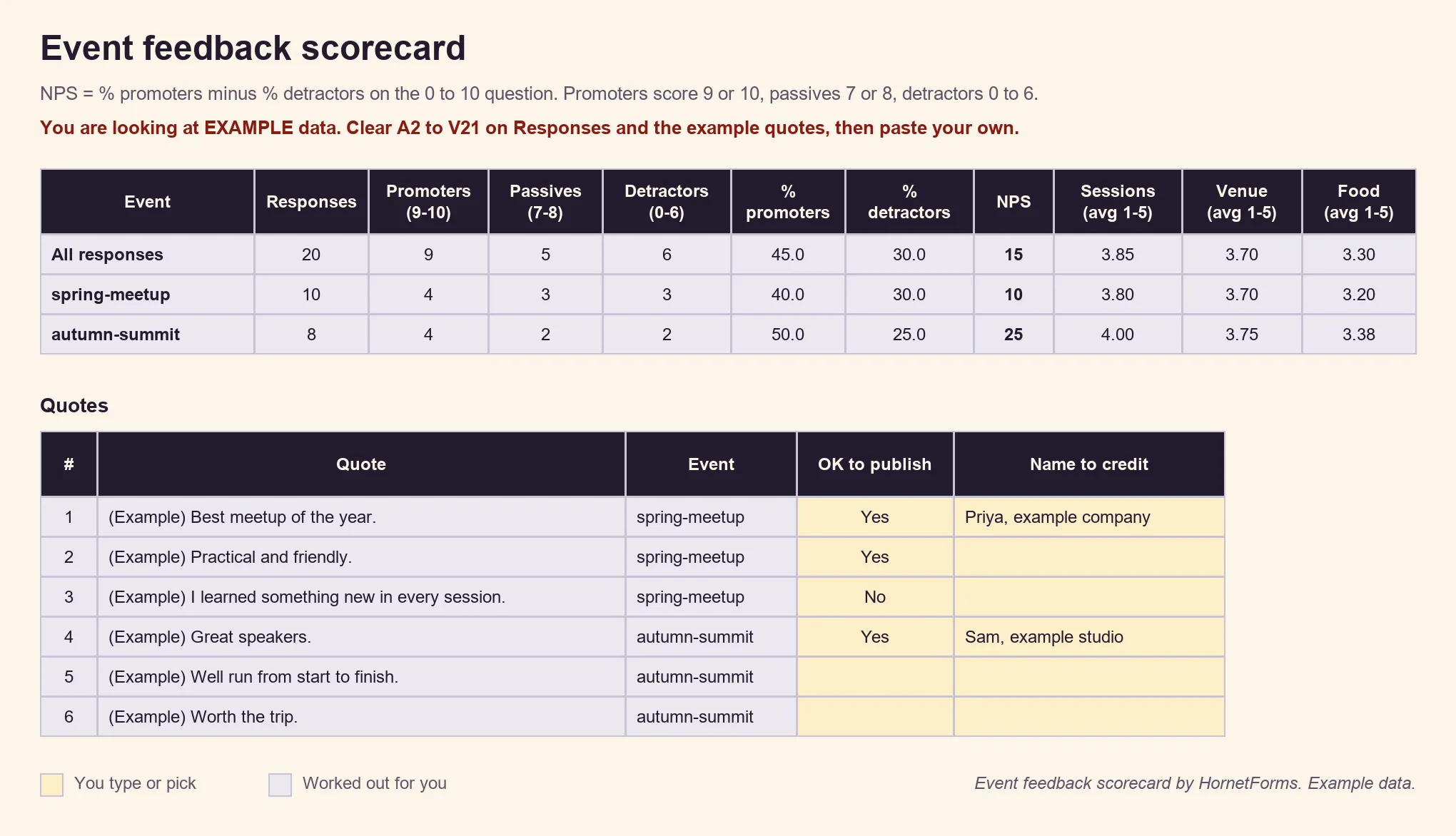
EXAMPLE data only. The events, scores and quotes are samples, so clear the example rows and paste your own export.
The sheet finds each column by its header name, so it still works if you add a question. It has room for 1,000 responses, eight events and 100 quotes.
Get the free post-event survey template#
Our Post-event NPS survey template has all 11 post-event survey questions from the table, on two pages. It comes with both follow-up rules, the NPS preset on the recommend question and the hidden event field. The thank-you screen says "Thanks for the honest answers".
- Open it in HornetForms. The template page at
forms.hornetforms.com/templates/post-event-npshas a Use this template button. It takes you through sign-up and opens your own copy, ready to edit. - Print it. For a room with patchy signal, or a group that prefers paper, download the PDF, US Letter, the PDF, A4 or the Word (DOCX) version if you want to add your logo. The printed card adds a short "why we ask" line to each section and tells people which follow-up to answer, based on their score.
Running a day with several sessions and an online stream? The event feedback form template asks how each person attended and rates each part of the day in a grid.
If you collect paper cards, type them into the form afterwards, so every answer ends up in the same place as the online ones. The features page shows the rest of what the form builder can do, from logic to integrations.
Send it before people leave the room#
Copy the template and swap in your own event name. Put the QR code on your last slide and send the link the same day. Then send one friendly follow-up a few days later. Short post-event survey questions, a follow-up that changes with the score and a scorecard per event will tell you what to repeat next time. For workshops, talks and classes, our list of feedback form questions has more. Sign up for free and have your survey ready before the closing talk.
Net Promoter, NPS, NPS Prism and the NPS-related emoticons are registered trademarks of Bain & Company, Inc., NICE Systems, Inc. and Fred Reichheld.