
On this page
A week before the fair, the vendor folder is a mess. Some forms came back as scans, some as phone photos, two by post with a check stapled on. One vendor needs power but never said so. Another sent the insurance certificate in an email nobody can find.
A health fair vendor registration form fixes most of that with one link. This guide covers the questions to ask every vendor, how to work out the booth fee from their answers and how to take the fee in the same form. At the end you'll find a free template, printable copies and a vendor tracker with a table map.
It works for a community health fair, a wellness day at work or a school health night. Running a craft fair or a market instead? See our craft fair vendor application guide.
What a health fair vendor registration form needs to do#
A vendor form does four jobs at once:
- Reserve a table. Who's coming, and what kind of space they want.
- Plan the room. Indoor or outdoor, power, chairs and people at each table.
- Collect the fee and the papers. The booth fee, plus a nonprofit letter or an insurance certificate when your rules ask for one.
- Set expectations. Your set-up times, what you provide and what vendors bring.
The city and county vendor packets we read share a pattern. Several price a table by where it sits or whether it needs power, some waive the fee for nonprofits that send proof, and some ask for a door prize. Most are PDFs that vendors return by email or post.
Keep visitors separate. The health fair vendor registration form is for the organisations behind the tables. If visitors sign up too, give them their own short form.
The questions to ask every vendor#
Here's the full set from our free health fair vendor registration form template:
| Question | Why you ask |
|---|---|
| Organization name, kind of organization, contact name, email, phone | So you know who's behind the table and how to reach them |
| Cell number for the day of the fair | Office phones don't help at 7 in the morning |
| What will you offer at your table? | So you can balance the room and spot two of the same |
| Which space would you like? | Indoor, outdoor or a nonprofit table; it sets the booth fee |
| Do you need electricity? | Outlets run out fast, and power can cost extra |
| How many people will staff your table? How many chairs? | Seats and badges for the day |
| Will you bring any of these? | Door prizes, food samples, demos and giveaways need planning |
| Proof of nonprofit status, certificate of insurance | Only for the tables that need them |
| Vendor rules | One tick that says they've read your rules |
Want to add a field of your own? Here's which question type to pick.
Who they are and what they'll offer#
The kind of organisation matters because it changes the fee and the papers you need. Ask for a cell number for the day as well as a regular phone, because that number goes on your sign-in sheet.
One open question covers the table itself: "What will you offer at your table?" The hint says information, demonstrations or giveaways. If a vendor plans a screening or a service, the hint asks them to describe it briefly. That tells you what to expect without asking for anything more.
Space, power and set-up#
Indoor or outdoor and electricity are the two answers that shape your floor plan. Ask about staff and chairs with number questions, so you can add them up later. An open "Anything else you need?" box catches the rest, like a spot near a wall or step-free access.
Door prizes and food samples#
If someone ticks the door prize, the form asks them to describe it. If someone ticks food or drink samples, the form shows a note that samples may need a local permit. Check the rules with your local health department, then tell those vendors what you find.
Price the booth from the answers#
Most fairs charge different amounts for different tables, so let your health fair vendor registration form do the sums. The template has a calculated field called booth_fee, which vendors never see, and four logic rules that fill it in:
Which space would you like? is "Indoor table"                 → booth_fee = your indoor price
Which space would you like? is "Outdoor table"                → booth_fee = your outdoor price
Do you need electricity? is "Yes"                             → booth_fee = booth_fee + your power price
Which space would you like? is "Nonprofit table (fee waived)" → booth_fee = 0
The template ships with every price set to 0, so swap in your own numbers before you share it. Say you charge 60 for an indoor table and 20 for power (made-up numbers): an indoor table with electricity comes to 80.
The rules run in order, which is why the nonprofit rule comes last. A nonprofit table that needs power still comes out at 0. Our logic, piping and calculations guide walks through rules like these.
Take the fee in the same form#
Paper packets usually end with "make your check payable to...". In HornetForms, your health fair vendor registration form can take the booth fee itself, on every plan, Free included:
- Add a Payment block at the end of the form. Vendors pay once, on Stripe's hosted Checkout page.
- Connect your own Stripe account. The money goes straight to it, and you're the merchant of record.
- Point the price at
booth_feeinstead of a fixed amount. - HornetForms adds no fee of its own. Stripe's normal processing fees apply.
- HornetForms never sees or stores card data. Vendors pay on Stripe's own page.
Emails and integrations fire only after the payment goes through. Until then, the response waits in an "Awaiting payment" tab. If a vendor cancels, refund them in your own Stripe Dashboard, and the response shows the refund status. When the price comes out at 0, as it does for nonprofit tables, the form completes normally with no payment step.
If you approve vendors first#
Some fairs review every vendor before anyone pays. Then leave the Payment block off the registration form. When you approve a vendor, send them a short second form with the space and power questions, the same fee rules and the Payment block. Give its organisation question a prefill name, like organisation, and put each vendor's name in their link:
https://forms.hornetforms.com/f/<your-payment-form>?organisation=Valley%20Bike%20Club
Collect nonprofit letters and insurance certificates#
Paperwork is where a health fair vendor registration form earns its keep. In the template, the upload for proof of nonprofit status appears only when someone picks the nonprofit table, and then it's required. So the waived fee and the letter always arrive together. The insurance upload stays optional, with a note: "Only if our vendor rules ask for one."
On HornetForms, respondents never need an account or a sign-in to answer a form or upload a file. Free allows files up to 10 MB each, and Pro and Business have no plan cap.
Google's help page says this about the file upload question in Google Forms: "To answer this question, responders need to sign in to a Google Account" (Google Docs Editors Help, accessed 27 October 2026). A vendor without one gets stuck at the upload. Here's a fair comparison with Google Forms if you're weighing the two.
Keep attendee health details out of it#
A health fair vendor registration form never needs to ask about visitors, and the template asks vendors only about their table.
Good to know: ask only what you'll use. If you run a visitor sign-up too, a name, an email and how they heard about the fair is plenty. Leave screenings, results and anything about someone's health to the vendors who run those services, and keep it off your forms. Every extra detail is one more thing you have to look after.
Assign tables and send the day-of details#
A few settings do the busywork, on every plan:
- Response limit. Set it to your table count, and the form closes when it's full. A vendor on the payment page holds their place, so two vendors paying at once can't both take the last table.
- Close date. Your deadline. After it, visitors see your own closed message.
- Emails. You can turn on an email to yourself for each new vendor, and each vendor gets a confirmation with your own subject and text.
- Google Sheets or Slack. Each response can land as a sheet row or a Slack message. Here's how to send form responses to Google Sheets, Slack or Notion.
- QR codes. Every form gets one (PNG or SVG) for your vendor flyer.
The template also has a hidden source field. Add ?source=flyer to the link, and each response records where the vendor found you. A public link attracts bots too, so here's how to keep bots out of your forms.
The free vendor tracker and table map#
Every health fair vendor registration form ends in a list you work from. The free health fair vendor tracker opens in Excel and Google Sheets. Export your responses as CSV and paste them into the Vendors tab at A1. The sheet finds columns by their header names, so the order doesn't matter. A CSV with just the column headers is there too.
- Vendors has yellow columns for you: booth fee status (To collect, Payment form sent, Paid, Waived or Refunded), the amount, a table number, confirmed and papers received.
- Tables flags two vendors on one table, a vendor who needs power at a table with no outlet, and an indoor or outdoor mix-up.
- Table map is a grid where you type table numbers, with a second grid showing who sits where.
- Summary counts tables by space, power needs, staff badges, chairs, door prizes and nonprofit tables missing a letter.
- Sign-in (printable) lists each vendor's cell number, table and power, with an Arrived column to tick.
- Checklist runs from eight weeks out to the day after the fair.
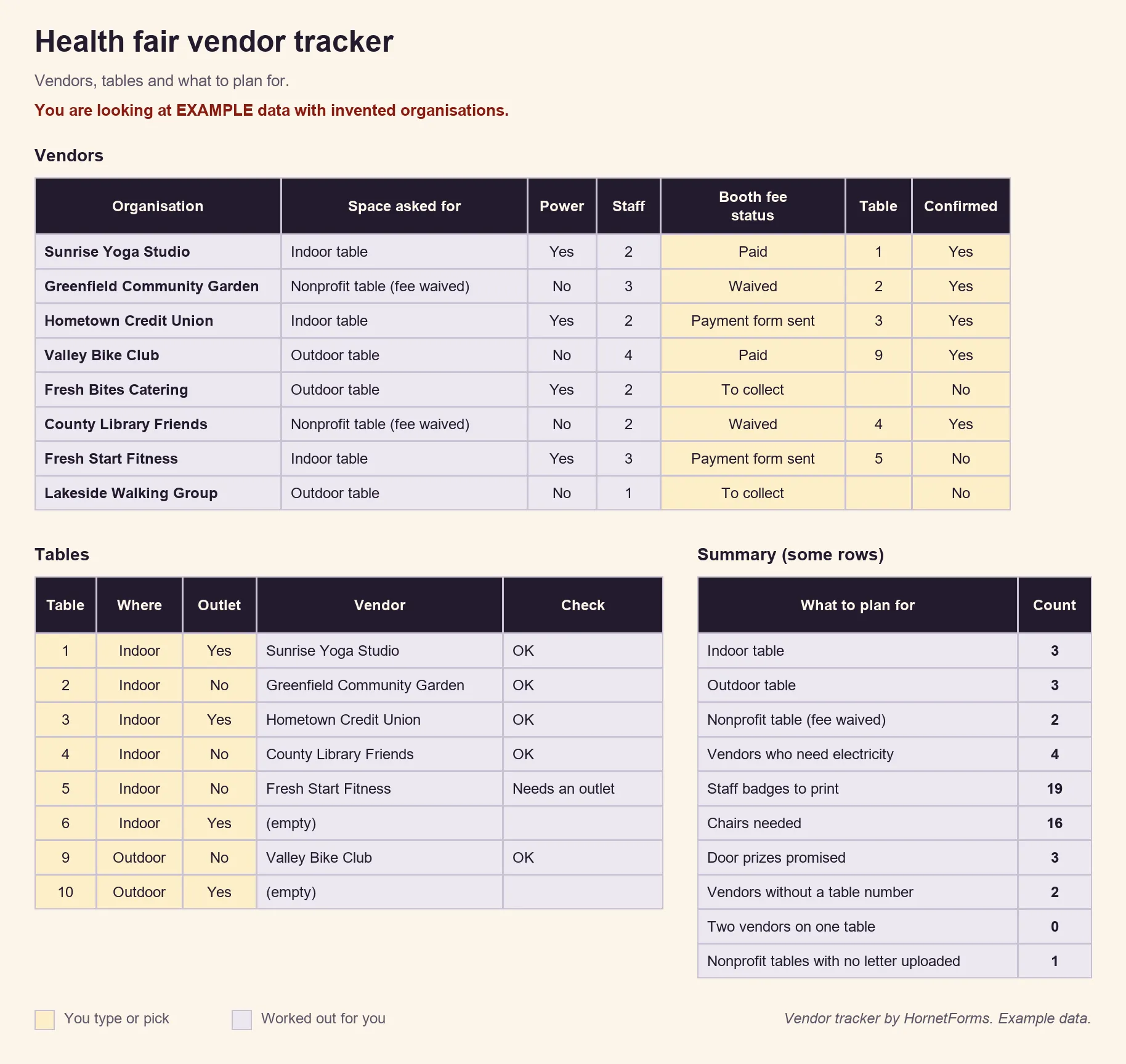
EXAMPLE data only: we made up the organisations, tables and fee statuses. Clear the example rows and paste your own export.
A free health fair vendor registration template#
The template has three short pages: About your organization, Your table, and Papers and rules. Each page has a "why we ask" line. It includes the follow-ups above, the hidden source field and booth_fee with its four rules. Nonprofit tables finish on their own thank-you screen: "We'll check your letter and confirm your table."
The last steps are yours: add the Payment block, and edit the vendor rules paragraph with your own set-up and break-down times.
- Open it in HornetForms. The template page at
forms.hornetforms.com/templates/health-fair-vendor-registrationhas a Use this template button that takes you through sign-up and opens your own copy. Already have an account? It's in the template gallery under Registration & events, as "Health fair vendor registration". - Print it. Download the PDF, US Letter, the PDF, A4 or the Word (DOCX) version to add your logo and prices.
- Track it with the vendor tracker.
The features page covers everything else a health fair vendor registration form can do, and the pricing page shows what each plan includes.
Open your vendor sign-ups#
Copy the template, set your booth prices and add the Payment block. Print the QR code on your vendor flyer and keep the tracker open as tables fill up. The Free plan is free forever, with unlimited forms and responses. Sign up for free and open your health fair vendor registration form today.