
On this page
A call for speakers sounds simple until the pitches arrive. Bios land in your inbox, headshots in a shared folder, and the committee's scores in three different spreadsheets. One organiser ran a two-day conference with a dozen speakers and summed it up on Hacker News: "It was a ton of work to organize everything and i had spreadsheets everywhere" (Hacker News, 26 August 2025).
A good speaker application form fixes most of that before it starts. Every pitch arrives in the same shape, with the bio, the headshot and the abstract in one place. This guide covers what to ask and how to collect files from people without a Google account. It also shows how to open and close the call on time, and how to score talks as a team. At the end you'll find a free template, printable copies and a review sheet that ranks your lineup.
What to ask in a speaker application form#
Your committee needs two things from each pitch: who the speaker is, and what the session is. Split the speaker application form into those two pages, so people can finish the first one fast and spend their effort on the second. For applications beyond events, see our guide on how to make an application form.
About the speaker#
| Question | Type | Why the committee needs it |
|---|---|---|
| Full name | Short text, required | For the programme and the reply |
| Email, required | Where you send the decision | |
| Job title | Short text, optional | Context for the audience |
| Company or organization | Short text, optional | Context, and a check for too many talks from one company |
| Speaker bio | Long text, required | Third person, 60 to 80 words, ready to print as written |
| A talk you've given before | Website link, optional | A recording or slides show how they present |
| Headshot | File upload, one image | For the programme, the website and social posts |
Asking for the bio in the third person, with a word range, saves you an evening of rewriting. You get text you can paste straight into the programme.
About the session#
| Question | Type | Why the committee needs it |
|---|---|---|
| Talk title | Short text, required | What goes on the schedule |
| Abstract | Long text, required | 150 to 250 words on what the room will walk away with |
| Slides or a talk outline (optional) | File upload, PDF | A draft shows how far along the talk is |
| Session format | Multiple choice, required | Talk (30 min), Lightning talk (10 min), Workshop (90 min) or Panel |
| How should we set the room up? | Long text, shown for workshops | Tables, power, screens, and what attendees should bring |
| Who is it pitched at? | Dropdown | Beginners, Intermediate, Advanced or "Anyone, really" |
| AV or accessibility needs | Long text, optional | Captions, a hand-held mic, a stool, a quiet room |
| Do you need travel support? | Multiple choice, required | A yes or no you can budget for |
| Where would you travel from? | Short text, shown for "Yes, please" | A rough idea of the cost |
The slides question asks for a PDF. Tell speakers to save their deck as a PDF before they upload it. A draft is fine at this stage.
Good to know: ask for one session per form, and say so at the top. When each pitch is its own response, the committee scores every talk on its own merits, and a speaker with two ideas simply sends two forms.
Headshots and slides without a Google sign-in#
Your speakers come from everywhere: other companies, universities, freelance work. Many won't have a Google account, or won't want to use their personal one for a work pitch.
That matters if you build the speaker application form in Google Forms. Google's help page on question types is clear about the file upload question. It says: "To answer this question, responders need to sign in to a Google Account." (Google Docs Editors Help, "Choose a type of question for your form", accessed 27 October 2026). The uploaded files then go to a new folder in the form owner's Google Drive. If every speaker you invite already uses Google, that works fine.
In HornetForms, people never need an account or a sign-in to answer a form or upload a file. Speakers open your speaker application form, attach the headshot and the PDF, press submit, and they're done. Uploads go up to 10 MB per file on the Free plan, with no plan cap on Pro and Business. Our Google Forms comparison and the post on where Google Forms starts to pinch cover the other differences.
Open and close your call for speakers on time#
A call for speakers has two dates that matter: when it opens and when it closes. Set both in the form's settings, so you don't have to remember on the day.
- Scheduled opening. The form opens at a set date and time, and visitors see a notice until then. You can share the link early, in a newsletter or on the event page.
- Close date. Pick the deadline, and the form stops taking pitches on time.
- Closed message. Write your own, so late visitors know what happens next: "The call for speakers has closed. Thanks to everyone who pitched. We'll reply to every speaker by 15 January."
Leave one response per person switched off for a speaker application form. Plenty of good speakers send two ideas, and you want both.
To find out which channel brings your best speakers, use the hidden source field in the template. Add it to each link you share, like this:
https://forms.hornetforms.com/f/call-for-speakers?source=newsletter
https://forms.hornetforms.com/f/call-for-speakers?source=meetup-slides
Speakers never see the field, but it lands on every response. A custom slug, like the one above, is easy to read out at a meetup, and link previews make the link look tidy when you post it on social media. Public links attract bots too, so every plan includes a honeypot field, a time check and rate limits. Our guide on how to keep bots out of your forms explains each one.
Review the pitches as a team#
Once your speaker application form closes, the hard part starts: picking a lineup that is fair to the people who pitched. Three habits make it easier.
- Agree on the criteria first. Score every talk on the same three things: relevance to your audience, clarity of the abstract, and speaker fit for the format.
- Get more than one opinion. Two or three reviewers per talk smooth out one person's taste.
- Decide your slots before you score. Know how many talks, lightning talks, workshops and panels you have room for.
While pitches arrive, the responses table lets you search and filter them as they come in. You can download any response as a PDF to send to a reviewer who prefers reading on paper. For a live feed, connect Slack or Discord, and each new pitch posts to your committee channel with the answers in it. Google Sheets and Notion work too, on every plan. Our tour of where your form responses can go shows how to set each one up.
Score talks in the free review sheet#
When it's time to decide, export the speaker application form responses as CSV and use the free speaker review sheet. It opens in Excel and Google Sheets. There's also a CSV with just the column headers if you want to see the expected format first.
- Paste the CSV into the Submissions tab, headers included.
- On the Settings tab, type up to five reviewer names. You can also change how much relevance, clarity and speaker fit count.
- On the Review tab, each reviewer scores every talk from 1 to 5 on the three criteria. Then you pick a status: Shortlist, Accept, Decline or Waiting.
- On the Lineup tab, type how many slots you have per format. The sheet ranks every scored talk and shows whether it fits inside the slots for its format.
The sheet also lets you hide names while reviewing. Set "Blind review" to Yes on the Settings tab, and the Review and Lineup tabs show "Submission 7" instead of the name and "(hidden)" instead of the company. It's an aid for a fair first pass, not a guarantee: a talk title or abstract can still hint at who wrote it, and the Submissions tab still shows everything.
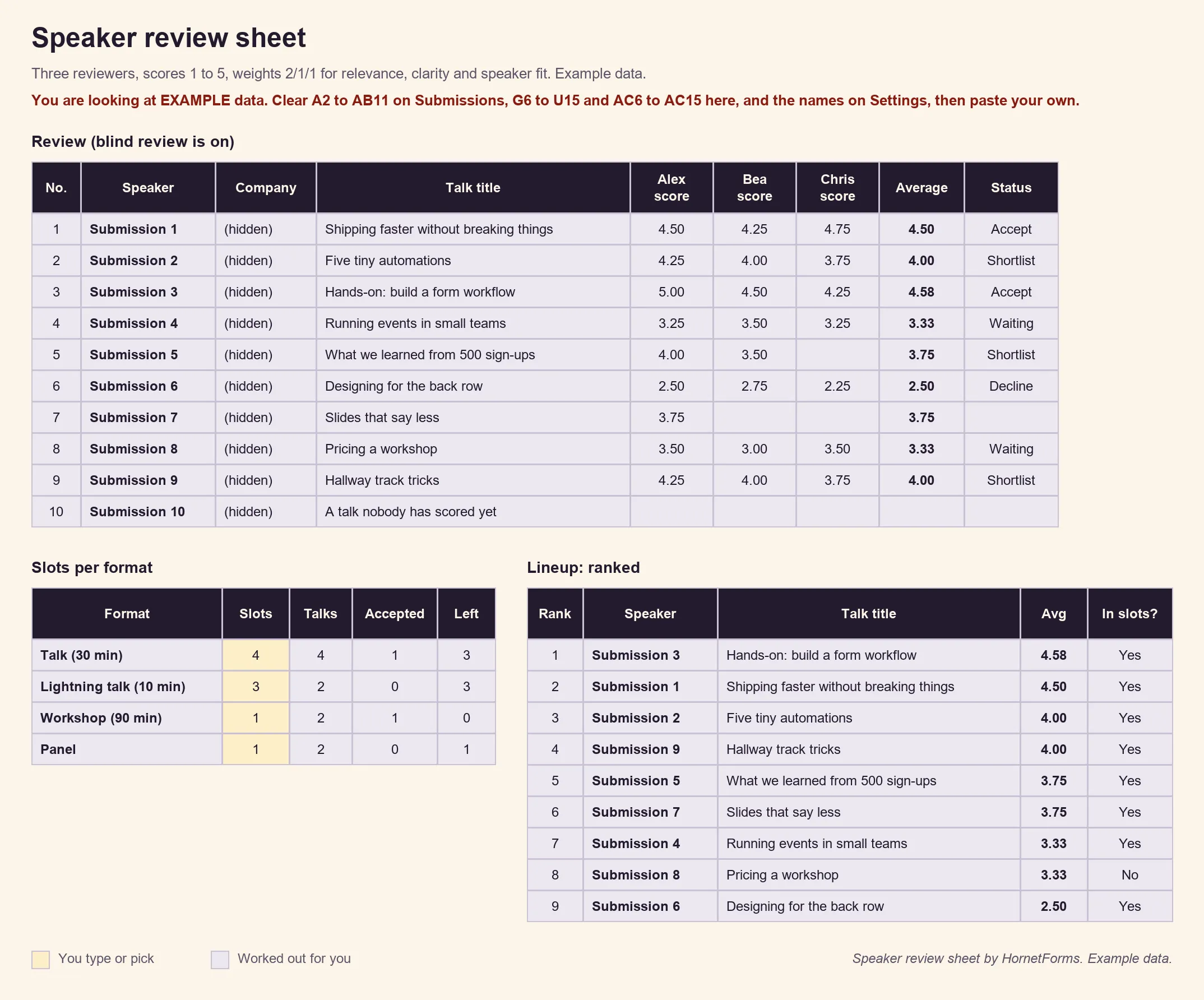
EXAMPLE data only. The speakers, talks, reviewers, scores and slots are samples. Clear the example rows and paste your own export.
The sheet finds each column by its header name, so it still works if you reorder questions. It has room for 300 pitches and five reviewers. It holds speakers' names and email addresses, so keep it where only your committee can open it.
Get the free speaker application template#
Our Speaker application template is the speaker application form from the tables above, on two pages. It comes with the hidden source field and two logic rules that keep the form short:
Session format is "Workshop (90 min)"           → show "How should we set the room up?"
Do you need travel support? is "Yes, please"    → show "Where would you travel from?"
So a lightning talk speaker never sees the room setup question, and only people who ask for travel support say where they'd come from. Our logic, piping and calculations guide walks through rules like these. The thank-you screen says "Pitch received!" and tells speakers the program team will reply once the call closes.
- Open it in HornetForms. The template page at
forms.hornetforms.com/templates/speaker-applicationhas a Use this template button. It takes you through sign-up and opens your own copy, ready to edit. - Print it. Some committees like a paper copy to circulate, or a Word file to adapt. Download the PDF, US Letter, the PDF, A4 or the Word (DOCX) version. The printout adds a short "why we ask" line to each page.
Want to add a question of your own, like a co-speaker or a preferred day? Here's which question type to pick.
On the Free plan, the form shows a small "Made with HornetForms" badge. Pro and Business remove it and let you add your logo and a cover image, so the speaker application form looks like part of your event. You can also run the form on your own domain (one on Pro, 10 on Business). The pricing page lists what each plan includes.
Open your call for speakers#
Copy the template, set the opening and closing dates, and write a closed message that tells late visitors what happens next. Share the link with a source on each channel, then score the pitches in the review sheet once the call closes. A clear speaker application form and one shared scoring sheet give every speaker a fair hearing. Sign up for free and open your call for speakers this week.