
On this page
You rent out a hall, a pavilion or a community room. People ask for it on a PDF they print, sign, scan and email back, then pay at the counter. Half the requests arrive without a time, and the insurance certificate turns up a week later in a separate email.
A good facility rental request form fixes most of that in one link. This guide covers the questions to ask and why each one is there. It also shows how to take the fee in the same form and how to spot two groups asking for the same room. At the end you'll find a free template, printable copies for walk-in requests and a booking log that flags clashes.
It works the same for a church hall, a school gym, a park shelter or a library meeting room. Anyone who rents out a space can copy it. Repairs to the space go on a maintenance request form instead.
What a facility rental request form is for#
A facility rental request form collects everything you need to answer four questions:
- Does it fit? Is the space free on that date, and is it big enough for the group?
- What needs setting up? Tables, the kitchen, a projector, power.
- What else does the booking need? Proof of insurance, a check on food and alcohol, extra staff.
- What do you charge? Your own fee, which might change for residents, members or local groups.
The form is a request, not a booking. The booking happens when you confirm it. One town's pavilion form puts it plainly. "All reservation requests submitted online or in person are subject to review and confirmation by Town of Pittsford staff." (Town of Pittsford, NY, Pavilion Use Application Form, Rev. 11/02/2023, accessed 27 October 2026.) Put a line like that at the top of your own form, so nobody treats a sent form as a confirmed date.
Facility rental request form questions to ask#
Here's the full set from our free template, page by page:
| Question | Type | Why it's there |
|---|---|---|
| Your full name, group or organization, email, phone | Short text, email, phone | So you know who's asking and how to reach them about the date |
| Do you live in [town]? | Multiple choice | Sets the fee if you charge residents less |
| Which space? | Dropdown | The first thing you check against your calendar |
| Date you'd like, backup date | Date | A backup date saves a round of emails when someone already has the first one |
| Start time including setup, end time including cleanup | Time | The real time the room is in use, not just the party |
| How many people do you expect? | Number | Checks the group against the room's capacity |
| What will you need? | Checkboxes | So the space is ready when they arrive |
| Will there be food or drinks? Will you charge admission or sell anything? | Multiple choice, with a follow-up | Flags bookings that need a closer look |
| Certificate of liability insurance | Multiple choice, then file upload | Proof of insurance arrives with the request |
| Rules, name of the person responsible, signature, date | Checkbox, short text, signature, date | One named person agrees to your rules |
Who is asking#
Ask for a name, an optional group name, an email and a phone number. The email matters most, because that's where your answer goes. Ask whether they live in your town only if your fee or your rules depend on it.
The space, the date and the times#
Use a dropdown for the space, so the names stay the same in every response. Ask for start and end times that include setup and cleanup. A party that runs from 2 to 5 often needs the room from 1 to 6.
Add "Other" to the space list for anything you haven't named. Choosing it shows a "Which other space?" box and makes the person fill it in.
Setup, food and anything for sale#
Checkboxes for equipment keep the list short. Food, alcohol and sales are where most venues have extra rules, so ask a plain yes or no first. Show the follow-up box only to people who answer yes. Running a market where sellers apply for a stall? That's a vendor application form. Not sure which question type fits a field? Here's which question type to pick.
Insurance and the rules#
Ask whether they have a certificate of liability insurance, and show the upload only to people who say yes. Then link your rules, ask them to tick that they've read them, and finish with the full name of the person responsible, a signature question and the date. The person signs on screen with a finger or a mouse.
Good to know: ask only what you'll use. Some facility forms ask for a driver's license number or a date of birth. Leave those out unless your policy needs them, because every extra detail is one more thing you have to look after.
Facility use request vs rental application#
Churches, schools and parks often call this a facility use request form. Others call it a facility rental application form, a facility reservation request form or a room reservation request form. They're the same form with a different name on top. Pick the words your community already uses.
A rental agreement is a different thing. It's a legal document with your terms and liability rules, so it should come from your own legal or insurance adviser. The request form simply links to your rules and records that the person read them.
Take the fee in the same form#
Paper facility forms often end with an "office use only" box for cash, check or card, like the Pittsford form above. You can take the fee in the form instead, on every HornetForms plan, Free included:
- Add a Payment block at the end of the form. Respondents pay once, on Stripe's hosted Checkout page.
- Connect your own Stripe account. The money goes straight to it, and you're the merchant of record.
- Charge a fixed price, or one calculated from the answers. The template has a calculated Fee field that respondents never see. It starts at $50 and drops to $30 when someone says they live in town. Point the Payment block's price at that field. Those two amounts come from the Pittsford form and are only an example, so change them to yours.
- HornetForms adds no fee of its own. Stripe's normal processing fees apply.
- HornetForms never sees or stores card data. People pay on Stripe's own page.
Emails and integrations fire only after the payment goes through. Until then, the request waits in an "Awaiting payment" tab. If you can't confirm the date, refund it in your own Stripe Dashboard, and the response shows the refund status.
Not every booking needs a fee. Hide the Payment block with a logic rule when no payment is due, for a free room or a group you don't charge, or set the price to 0, and the form completes normally. Rather confirm the date before anyone pays? Leave the Payment block out and take the fee when you confirm.
Good to know: if you're a town, library, school or other public body, check with your finance office before you take card payments online. They'll know the rules for your fees.
One link per space#
The template has a hidden field called space. Put the space's name in the link, and every response records which link or QR code the person used:
https://forms.hornetforms.com/f/<your-slug>?space=pavilion-a
https://forms.hornetforms.com/f/<your-slug>?space=community-room
Every plan includes QR codes, so you can print one for each door or notice board. The person never sees the hidden field, but it shows up in your responses and your export. The logic, piping and calculations guide covers hidden fields, show and hide rules and calculated fields in more depth.
Can't you do this in Google Forms or Microsoft Forms?#
For a name and a date, yes. The trouble starts with the insurance certificate.
Google's help page says this about the file upload question in Google Forms: "To answer this question, responders need to sign in to a Google Account" (Google Docs Editors Help, accessed 27 October 2026). Microsoft's help page says: "File upload is only available when 'Only people in my organization can respond' or 'Specific people in my organization can respond' is the selected setting" (Microsoft Support, accessed 27 October 2026). A member of the public renting your hall isn't in your organization.
On HornetForms, respondents never need an account or a sign-in to answer a form or upload a file. Free allows files up to 10 MB each, and Pro and Business have no plan cap. For the wider picture, here's a fair comparison with Google Forms, plus our side-by-side pages for Google Forms and Microsoft Forms.
Keep a booking log so nothing double-books#
A facility rental request form collects requests. You still decide who gets the room. Here's how requests reach you:
- An email for every new request, and a confirmation email to the person who asked, on every plan. Say in it that you'll reply to confirm the date.
- A PDF of any response to download for your file, on every plan. Pro and Business can also attach a PDF copy to the notification email.
- A Google Sheets row or a Slack message per request, built in on every plan. Here's how to send form responses to Google Sheets, Slack or Notion.
- A CSV export of every response. On a form with a Payment block, it adds payment columns such as status and amount.
The free facility booking log opens in Excel and Google Sheets. Paste your CSV export into the Responses tab, type your rooms and capacities into the Spaces tab, and the Log tab lists one row per request. It checks each group against the room's capacity and shows whether the person has paid. It also flags a clash when another request wants the same space on the same date at an overlapping time. You set each request's status to New, Confirmed or Declined, and the Calendar tab lists confirmed bookings by date. A CSV with just the column headers is there too.
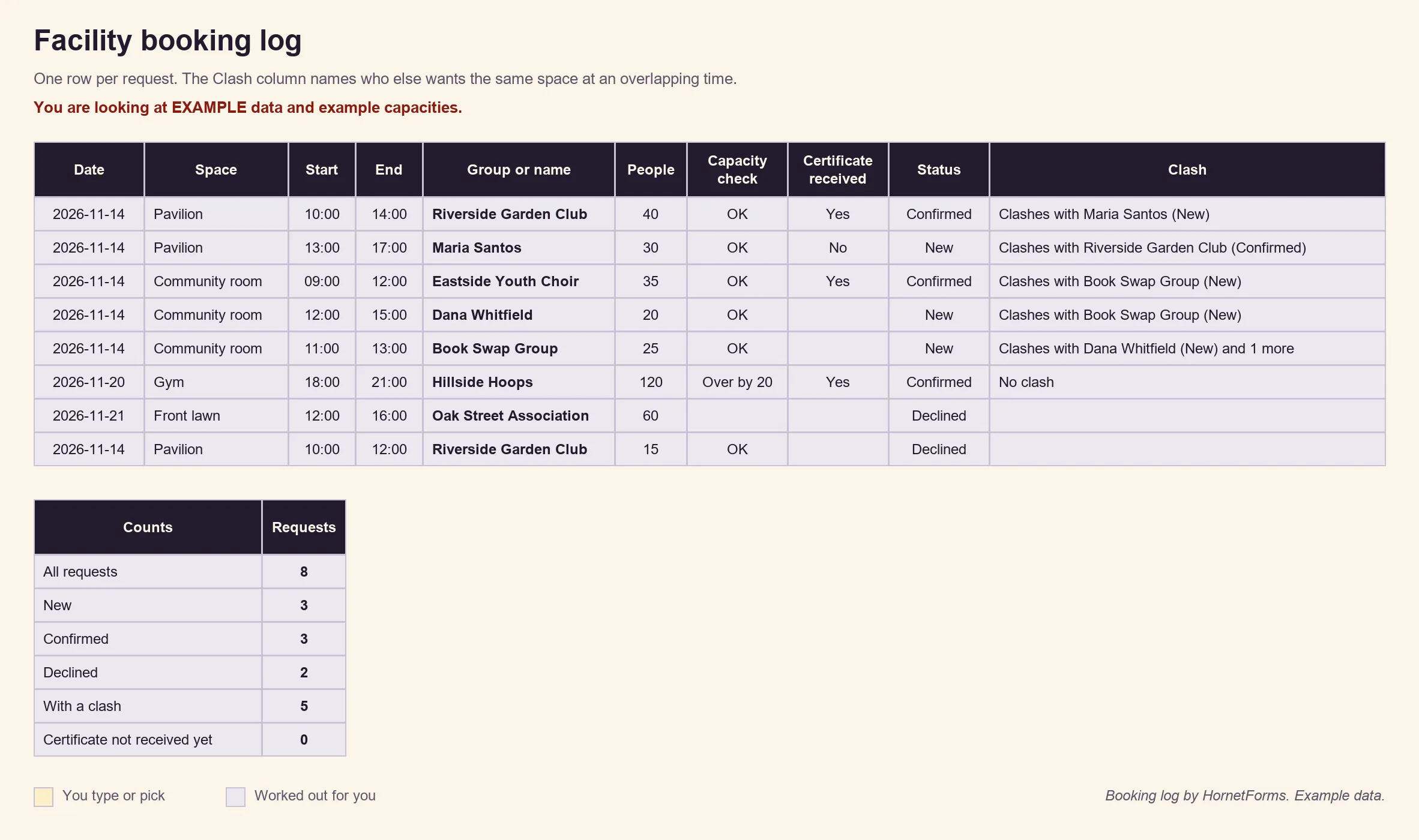
Example data: we made up the names, capacities and bookings. Delete the example rows and add your own.
If you're a public body, the answers people send you are usually public records. Say so in a plain line on the form, ask only what you're happy to see shared, and keep the log and your exports under your own records rules.
Free facility rental request form template#
Our template has five short pages: Who is asking, What you'd like to book, Setup and extras, Insurance, and Rules and signature. Each page has a short "why we ask" line, the four show-and-hide rules described above, the hidden space field and the calculated Fee field. You add the Payment block yourself, because templates don't include one.
Three ways to use it:
- Open it in HornetForms. The template page at
forms.hornetforms.com/templates/facility-reservation-requesthas a Use this template button that takes you through sign-up and opens your own copy. Already have an account? It's in the template gallery under Operations, as "Facility reservation request". Replace[town]and[link to your rules]with your own before you share it. - Print it for walk-in requests. Download the PDF, US Letter, the PDF, A4 or the Word (DOCX) version to add your logo and your fees.
- Track it. Use the facility booking log from the section above.
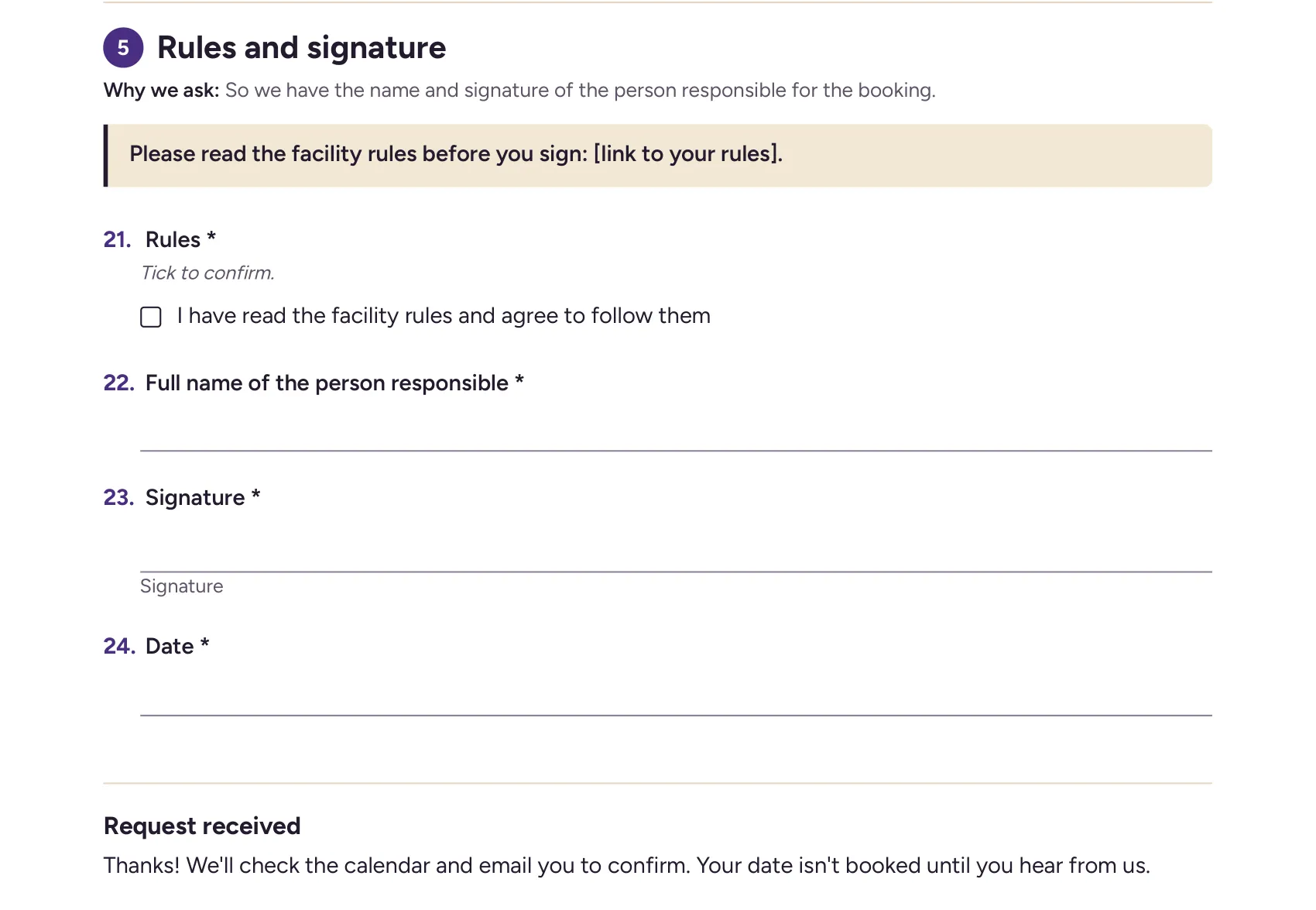
The Rules and signature section of the printable version.
Put your space online this week#
Copy the template, set your fee, add your rules link and print a QR code for the door. The pricing page shows what each plan includes, and the Free plan is free forever with unlimited forms and responses. Sign up for free and take your next facility request as a link.