
On this page
Every spring the same pile lands on the market committee's table. Applications came in by email, on paper and through a friend of a friend. Half have no photos. Three people ticked "10 x 20" but paid for a 10 x 10. Somebody's insurance certificate is a blurry phone picture of a phone screen.
A good vendor application form sorts most of that out before it starts. This guide covers what to ask a craft fair, farmers market or festival vendor, how to collect photos and an insurance certificate, how to price booths from the answers and take the fee, and how to jury the applications in a spreadsheet. At the end there's a free printable application (PDF and Word) and a booth tracker for Excel or Google Sheets.
What to ask on a vendor application form#
A vendor application form has two jobs. It tells you whether a vendor fits your event, and it tells you what their booth needs. Ask for those two things and little else. Our guide on how to make an application form people finish has more on keeping it short. Here's the set we use in this guide, over four short pages:
| Question | Type | Why it's there |
|---|---|---|
| Business name, contact name, email, phone | Short text, email, phone (all required) | Who's behind the booth, and how to reach them |
| Website or shop link | URL, optional | Jurors like to see more of the work |
| What do you sell? | Multiple choice, required | One category per vendor keeps your mix easy to count |
| Tell us about your products | Long text, required | Materials, price range, anything special |
| Do you make or grow what you sell? | Multiple choice | Yes, all of it; Most of it; No, I resell |
| Product photos | File upload, up to five images | The jury's main evidence |
| Booth size | Multiple choice, required | Sets the booth fee |
| Do you need electricity? Will you sell food or drinks? | Multiple choice | Power planning, and a note about food permits |
| Seller's permit number | Short text, optional | Only if your state asks vendors to hold one |
| Certificate of insurance | File upload | Only if your rules ask for one |
| Vendor rules | Checkboxes, one option, required | "I have read the vendor rules and agree to follow them" |
Two fields stay out of sight: a hidden source field that records where the vendor found your call (?source=flyer on the link), and a calculated field called booth_fee. Want to add your own questions? Here's which question type to pick for each one.
Change the categories for your event#
The categories decide how your jury balances the event, so match them to what you want on the floor. A craft fair vendor application might list jewelry, art and prints, pottery, textiles, woodwork and bath and body. A farmers market vendor application leans on fresh produce, plants, baked goods and prepared food. A festival vendor application often adds food trucks and merchandise. Keep the list short. Seven or eight options and an "Other" is plenty.
What to leave off#
Skip anything you won't use this season. You don't need a vendor's date of birth, a full product inventory or their bank details. Ask for a seller's permit number only if your state wants event organizers to collect it (more on that below).
Ask for product photos and an insurance certificate#
Photos make or break a juried show, so make the upload question on your vendor application form required. In HornetForms, a file upload question takes up to 10 files, and you can limit the file types it accepts. For product photos, allow images only and set the limit to five. For the insurance certificate, allow PDF files and images and keep it to one file.
Vendors never need an account or a sign-in to fill in the form or upload a file. On the Free plan, each file can be up to 10 MB. Pro and Business have no plan cap on file size.
Good to know: put your photo rules in the question's help text, such as "three to five photos: your work up close and your booth set up". You'll get far fewer blurry shots of a single earring.
If your rules ask for insurance from every vendor, make that upload required too. If only some vendors need it (say, food sellers), use logic to show the upload only to them. A second rule can show a short note when someone answers Yes to "Will you sell food or drinks?", telling them food sellers may need a permit from the local health department.
Set booth fees with a calculated field#
Most events charge different amounts for different booths. Let the vendor application form do the sums. The booth_fee calculated field never shows on the form, and four logic rules fill it in:
Booth size is "10 x 10 ft"          → booth_fee = 75
Booth size is "10 x 20 ft"          → booth_fee = 140
Booth size is "Table only (6 ft)"   → booth_fee = 40
Do you need electricity? is "Yes"   → booth_fee = booth_fee + 25
These prices are made up, so swap in your own. A 10 x 10 booth with power comes to 100. The power rule comes last, so it adds to whichever booth size the vendor picked. You can also show the fee on the thank-you screen, so vendors see what they owe before they pay. For more on how rules like these stack up, see the logic, piping and calculations guide.
Collect the booth fee with a one-time payment#
HornetForms has a Payment block that takes a one-time payment on Stripe's hosted Checkout page, on every plan, Free included. Here's how it works for booth fees:
- Your own Stripe account. A workspace admin connects it once. The money goes straight to your Stripe account, and you're the merchant of record.
- A fixed or calculated price. Point the price at
booth_fee, or type one fixed price if every booth costs the same. Each form has one Payment block and one currency. - No HornetForms fee. Stripe's normal processing fees apply, and HornetForms adds nothing on top.
- No card data on our side. Vendors pay on Stripe's own page, so HornetForms never sees or stores card details.
Until a vendor finishes paying, their response waits in an Awaiting payment tab. Emails, webhooks and integrations fire only after the payment goes through. If a vendor drops out, refund them in your own Stripe Dashboard, and HornetForms shows the refund status on the response.
Juried shows: apply first, pay when accepted#
A first-come market can take the fee with the application. A juried craft fair usually can't, because you don't know who's in yet. So split it into two forms:
- The application form has no Payment block. It collects the details, photos and papers.
- A short booth payment form goes to the vendors you accept. It asks for the business name, email, booth size and electricity, runs the same
booth_feerules and ends with the Payment block.
Give the payment form's questions a "Prefill parameter" in their settings, such as business, email and size. Then each accepted vendor gets a link with their details already filled in:
https://forms.hornetforms.com/f/booth-payment?business=Juniper%20Clay%20Studio&email=rosa@example.com&size=10%20x%2010%20ft
Choice questions match the option label, so the booth size lands on the right option. The event registration form with payment guide covers the Payment block set-up in more detail.
Set a deadline and a booth count#
Two settings on every plan keep your vendor application form honest:
- Close date. Set the date and time applications close. After that, visitors see your own closed message (plain text, up to 500 characters), such as "Applications for the 2027 fair are closed. Join our mailing list for next year."
- Response limit. Set it to the number of booths, and the form closes when it's full.
When a form has a Payment block and a response limit, a pending payment holds a place under your response limit while the vendor pays.
Where you put the limit depends on how you choose vendors. For a first-come farmers market, set it on the one form that takes the fee. For a juried show, leave the application form open to everyone until the close date, and set the limit on the booth payment form instead. Here's more on what happens when a form hits its response limit. On HornetForms, you get unlimited responses within fair use on every plan, so any cap on a form is one you set.
A few more settings help:
- Emails. You can turn on an email to yourself for each new response. You can also send each vendor a confirmation with your own subject and text, once you pick the email question it goes to. With a Payment block, it goes out after the payment goes through.
- QR codes. Every form gets one (PNG or SVG) for your call-for-vendors flyer.
- Bots. A public link draws spam too, so here's how to keep bots out of your forms without puzzles.
Jury the applications in your sheet#
Every vendor application form ends in a list you work from. Juried shows score each vendor on the photos and the description, then pick a balanced mix. That works best in a spreadsheet, with every juror's score on one row. The free vendor booth tracker opens in Excel and Google Sheets:
- Export your applications. Open the form's Responses page and download the CSV.
- Paste them in at cell A1 of the Applications tab, headers included. The sheet finds columns by their names, so the order doesn't matter.
- Score and decide. Each juror types a score from 1 to 5. Then pick Accepted, Waitlist or Declined and give accepted vendors a booth number.
- Paste payments. If you use a separate booth payment form, paste its CSV export on the Payments tab. The sheet matches payments to applications by email.
For each vendor, the tracker shows the category, booth size, the fee on the form, the average jury score and a paid status from your export. Type Y in the "Paid another way" column for a check or cash. The Categories tab compares accepted vendors with your own target for each category, so you can spot a room with five jewelry booths and no pottery. Summary counts accepted booths by size, power needs, food sellers, vendors without a booth number, and the fees collected.
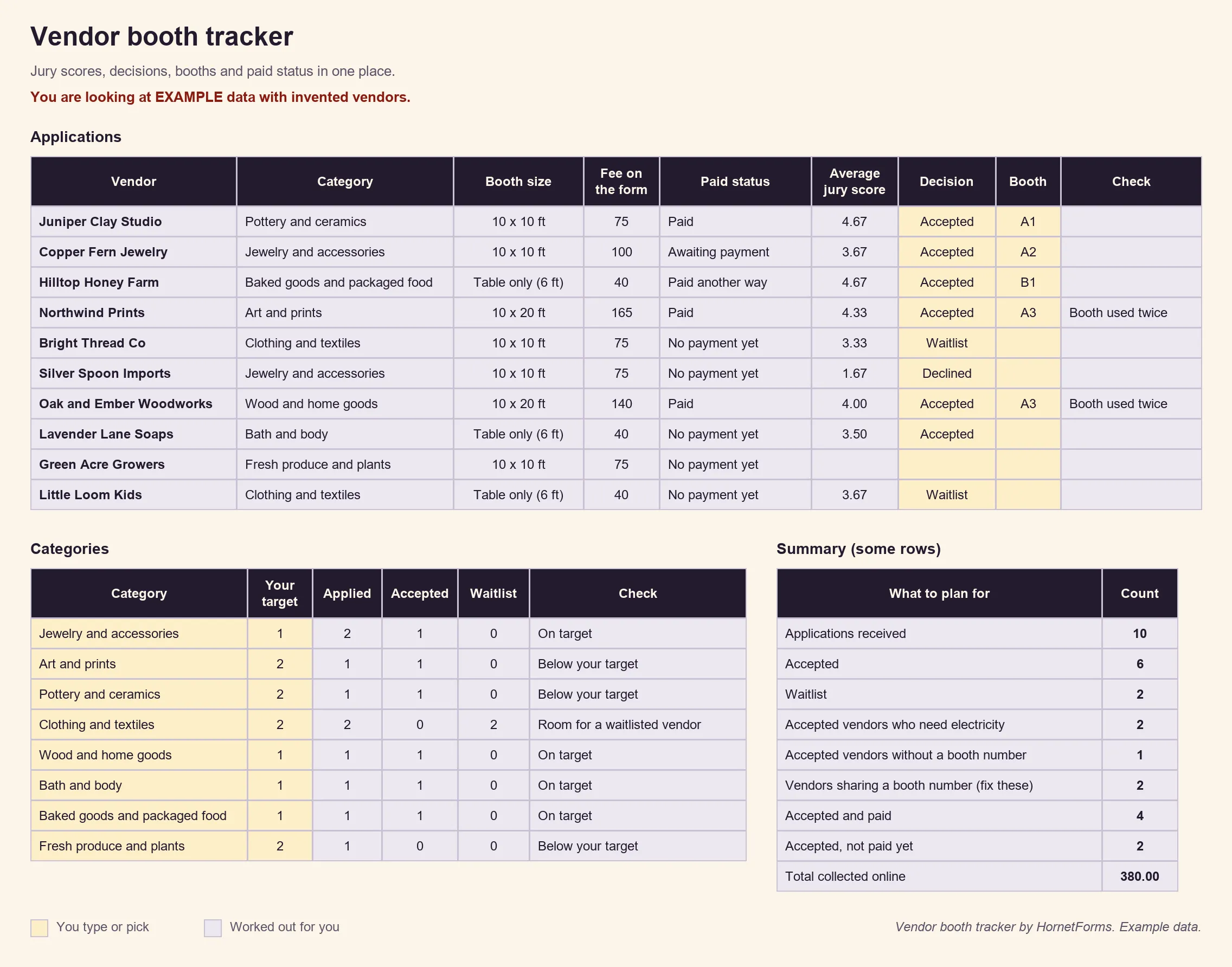
EXAMPLE data only: the vendors, scores and fees are made up. Clear the example rows before you paste your own.
Prefer rows that arrive on their own? Connect Google Sheets on any plan, and each application lands as a new row with a "Response ID" and "Submitted at" column. For paid status, use the CSV export, which includes the payment columns. Here's how to send form responses to Google Sheets, Slack or Notion. There's also a CSV with just the tracker's column headers if you'd rather build a list of your own.
Temporary sales permits: check your state#
Some states expect people who sell at fairs and markets to hold a permit, and some expect the organizer to collect details. Rules differ by state, so treat this as a pointer, not advice.
California is one example. Its tax department says: "People who sell new or used merchandise in California, including handcrafted items, are generally required to hold a seller's permit." It also says those sellers "must give operators, in writing," a short list of details that includes their business name, a description of the items they sell and their "Seller's permit number" (California Department of Tax and Fee Administration, Publication 111, Sellers and Vendors, accessed 28 October 2026).
That's why the vendor application form in this guide has an optional seller's permit question. Check your own state's revenue department before your event, then make the question required, change its wording or remove it.
Printable vendor application for paper sign-ups#
Some vendors still apply on paper, at last year's fair or at the market info booth. The printable vendor application asks the same questions in the same order, so paper and online applications fit the same tracker:
- PDF, US Letter
- PDF, A4
- Word (DOCX), to add your logo, dates and booth prices
It ends with a signature line and a box for the organizers: date received, jury scores, the decision, a booth number and how the vendor paid.
Build your vendor application form#
Build this one from a blank form, with the table above as your list:
- Add the questions over four pages: About your business, What you sell, Your booth, and Papers and rules.
- Add the hidden
sourcefield and the calculated fieldbooth_feewith its four rules. - Add the logic that shows the food note (and the insurance upload, if only food sellers need it).
- Set a close date. Then either add the Payment block and a response limit, or build the short booth payment form for accepted vendors.
Running a health fair rather than a craft fair? The health fair vendor registration form has a ready template with nonprofit tables and a table map. Renting the hall for your market? See the facility rental request form. Selling sponsorships for the same festival? Start from the event sponsorship form template. And if local businesses donate raffle prizes instead of renting booths, the in-kind donation form logs those gifts.
On the Free plan, your form shows a small "Made with HornetForms" badge. Pro and Business remove it. The pricing page lists what each plan includes.
Open vendor applications this week#
A vendor application form that works asks who the vendor is, what they sell and what their booth needs. It collects photos and papers in one place and prices each booth with a few rules. Take the fee on Stripe's page when you're ready, and jury the rest in your sheet. The features page has the wider tour. Sign up for free and open your vendor application form today.