
On this page
Every club, society and community group runs on the same small loop. Someone wants to join. They fill in a form, hand over the dues, and land on a list. A year later, somebody has to work out who is still a member and who needs a nudge. Most groups do that loop with a paper form, a cash tin and a spreadsheet that drifts out of date.
A good membership application form template fixes the first half of the loop, and a simple tracker fixes the second. This guide covers what to ask and what to skip, how to price membership types with logic, and how to collect the dues in the same form if you want to. Next year, you send the form link again yourself, and a spreadsheet keeps track of the dates. At the end you'll find a free printable form (PDF and Word) and a member tracker for Excel or Google Sheets.
What to ask on a membership application form#
The same questions work for a club membership form, a society or a small association. Ask what you need to run the membership and to reach the member. Every extra question slows people down before they get to the dues, and our guide on how to make an application form people finish has more on that. Here's the set we use in this guide, split over two short pages:
| Question | Type | Why it's there |
|---|---|---|
| Full name | Short text, required | For your member list |
| Email, required | How you reach members, and how the tracker spots someone who joins again | |
| Phone | Phone, optional | Only for groups that call or text members |
| Mailing address | Long text, optional | Only if you send anything by post |
| Membership type | Multiple choice, required | Sets the price: Individual, Family, Student, Life member |
| Family members' names | Long text, shown for Family | So everyone on a family membership is on the list |
| How would you like to get involved? | Checkboxes | Events, newsletter, committee, volunteering |
| Can we email you club news? | Multiple choice | A clear yes or no for your mailing list |
| Club rules | Checkboxes, one option, required | "I have read the club rules and agree to follow them" |
Two fields stay out of sight. A hidden source field records where people found the form, and a calculated field called dues works out the price. Not sure which question type fits your own extras? Here's which question type to pick.
What to leave off#
Skip anything you won't use this year. That usually means date of birth, gender, job title and a second phone number. If a student rate needs proof, ask people to bring their card to the first meeting rather than collect a copy of it.
The UK's data protection regulator puts the idea plainly: "So you should identify the minimum amount of personal data you need to fulfil your purpose. You should hold that much information, but no more." (ICO, Principle (c): Data minimisation, accessed 28 October 2026). It's a good habit wherever your group is, and fewer questions also means more finished forms.
Membership types and fees with logic#
Most groups have a few membership types at different prices. In HornetForms, one multiple choice question and a few logic rules turn those types into a price. The dues calculated field sits on page two, where members never see it, and the rules fill it in:
Membership type is "Individual"     → dues = 30
Membership type is "Family"         → dues = 50
Membership type is "Student"        → dues = 15
Membership type is "Life member"    → dues = 300
These are sample prices, so swap in your own. A second rule shows the "Family members' names" question only when someone picks Family, so everyone else skips it. Our logic, piping and calculations guide walks through rules like these step by step.
Want a free type too, say for honorary members or volunteers? Add the option and a rule that sets dues to 0. When the price comes out at 0, the form completes normally, with no payment step.
Good to know: keep the option labels in your membership application form template and in the tracker's Settings tab exactly the same. The tracker reads the type by its label to work out the next reminder date.
Collect the dues in the form (optional)#
If you'd rather not chase bank transfers, you can collect the dues in the same form. HornetForms has a Payment block that takes a one-time payment on Stripe's hosted Checkout page, right after the last question. It works on every plan, including Free.
Connect your Stripe account and set the price#
A workspace admin connects your own Stripe account once. The money goes straight to your Stripe account, and your group is the merchant of record. HornetForms never sees or stores card data, because members pay on Stripe's own page. Stripe's normal processing fees apply, and HornetForms adds no fee of its own.
Then add the Payment block at the end of page two:
- Add a Payment block after the last question.
- Set the price to come from the calculated field
dues, instead of a fixed amount. - Pick your currency. Each form has one Payment block and one currency.
If every member pays the same, skip the calculated field and type a fixed price instead. Our event registration form with payment guide walks through the same setup for a paid event, and how to ask a client for a deposit covers the wording side of asking for money up front.
What happens while someone pays#
Until a member finishes on Stripe's page, their response waits in an Awaiting payment tab, apart from your paid members. Emails, webhooks and integrations fire only after the payment goes through. So your welcome email and the new row in your sheet only happen for members who have paid.
Refunds happen in your own Stripe Dashboard, and HornetForms shows the refund status on the response. The form also works embedded on your website. With the HornetForms embed script, the whole page goes to Stripe for the payment step.
Next year: send the form link again#
Next year, you send the same form link again, from your own email, newsletter or group chat, at the time that suits your group. The member fills in the form again, the same way they joined. It's also a good moment to ask what members want next, and our community needs assessment survey has questions you can borrow.
A few settings make that smooth:
- Leave "one response per person" off. Members fill in this form again next year, so a second response from the same email is expected, not a mistake.
- Prefill the link. Give the name, email and type questions a "Prefill parameter" in their settings. Then a link can carry each member's details, so they only check and confirm. A hidden
sourcevalue tells you the response came from your email:
https://forms.hornetforms.com/f/join-the-club?email=maya@example.com&type=Individual&source=email-2028
- Send a confirmation. Turn on the respondent email, pick the Email question and write your own subject and message, like "Welcome back, and thanks for staying with the club." With a Payment block, it goes out only after the payment goes through. You can also turn on an email to yourself for each new response.
The tracker below shows who to send the link to, and when.
Track members in Google Sheets or Excel#
Every membership application form template needs a list behind it. The free membership tracker opens in Excel and Google Sheets and turns your responses into one member list, with a next reminder date for each member.
- Export your responses. Open the form's Responses page and download the CSV. With a Payment block, the CSV also carries payment columns, like Payment status, Payment amount and Payment paid at.
- Paste them in. Paste the CSV at cell A1 of the Responses tab, headers included. The sheet finds columns by their names, so the order doesn't matter.
- Set your terms. On the Settings tab, type each membership type with a term in months: 12 for a yearly membership, 0 for no reminder, like Life member. If you remind everyone on the same day each year, type that date instead.
- Read the Members tab. It lists each member once, soonest reminder date first.
For each member, the sheet works out the joined date (the day the payment went through), a "Next reminder date (your own)", the days to that date and a status:
- Remind soon when the next reminder date is within 30 days (you can change the window)
- Lapsed once the date has passed
- Current for paid members who aren't due yet
- Unpaid when the payment didn't go through
- No reminder for types with a term of 0
When a member fills in the form again, their new row replaces the old one on the Members tab, matched by email address.
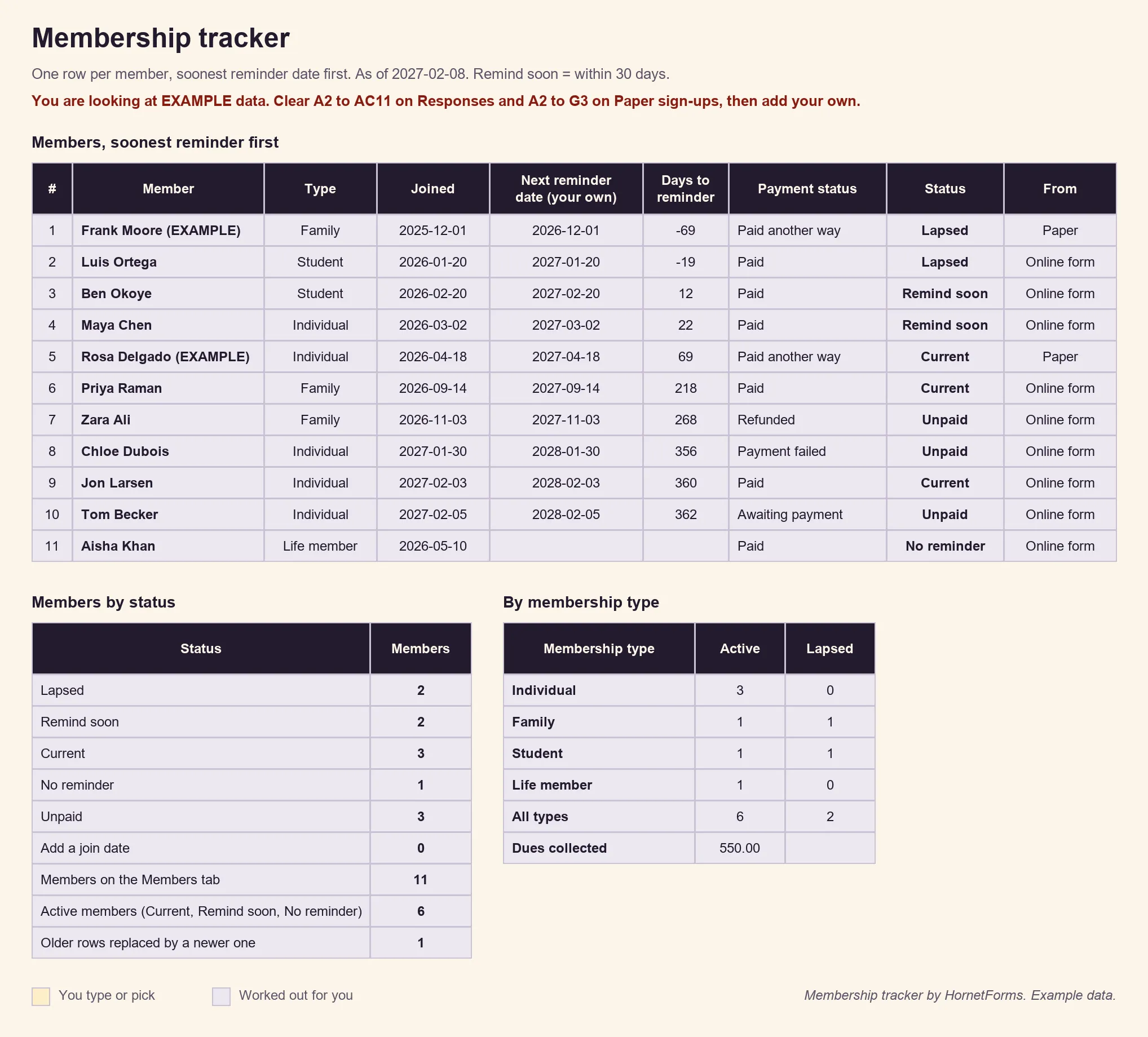
EXAMPLE data only: the people, dates and prices are made up. Clear the example rows before you paste your own.
The Summary tab counts active members by type and adds up the dues collected, before Stripe's fees. There's also a CSV with just the column headers if you'd rather build a list of your own.
Prefer rows that arrive on their own? Connect Google Sheets, on every plan, and each finished application lands as a new row with a "Response ID" and "Submitted at" column. That sync leaves out the payment columns, so use the CSV export for the tracker's money totals. Here's how to send form responses to Google Sheets, Slack or Notion.
Printable membership application form for paper sign-ups#
Not everyone joins online. Some members sign up at the annual fair, at the front desk or after a meeting. The printable version of this membership application form template asks the same questions, so paper and online sign-ups fit in the same tracker:
- PDF, US Letter
- PDF, A4
- Word (DOCX), so you can add your logo and your own prices
It ends with a signature and date line and a box for the membership team: date received, how they paid, who took it and the next reminder date. Type each paper sign-up into the tracker's Paper sign-ups tab with the date and a Y once they've paid. If they fill in the online form later with the same email, the tracker matches them up.
A QR code helps here too. Every form gets one (PNG or SVG) and a custom slug, so a poster at the clubhouse can point straight at the online form. Members never need an account or a sign-in to fill it in.
Get the membership application form template#
Build this one from a blank form, with the table above as your list:
- Add the questions from the table over two pages: About you, then Your membership.
- Add the hidden
sourcefield and the calculated fielddues, with one rule per membership type. - Add the rule that shows "Family members' names" for Family.
- Optional: add the Payment block with its price from
dues.
That's your membership application form template, online. Need a shorter membership form template for a small club? Keep the name, email, membership type and rules questions. Then grab the downloads:
- The member tracker: membership-tracker.xlsx for Excel and Google Sheets
- The printable form: the Letter PDF, A4 PDF or Word file
Running volunteers as well as members? The volunteer hours log template works the same way: a form for the people, a sheet for the totals.
HornetForms has unlimited responses within fair use on every plan, so a big membership drive never stops at a plan's response cap. On the Free plan, the form shows a small "Made with HornetForms" badge. On the Pro and Business plans, you can remove it and add your logo and a cover image. The pricing page lists what each plan includes.
Open your membership form this week#
A membership application form template that works asks a handful of clear questions and prices each type with one rule. It can collect the dues on Stripe's page before the member lands on your list. Next year, you send the same form link again, and the tracker shows who to send it to. The features page has the wider tour. Sign up for free and open your membership application form today.