
On this page
Camp sign-ups have a way of arriving from everywhere at once. A paper form in a backpack, an email with "Week 2, maybe 3?", a voicemail about a peanut allergy, and a check with no name on it. By June you have a pile and a spreadsheet nobody trusts.
A good summer camp registration form gets all of that in one place, in the same shape, before the first drop-off. This guide covers what to ask, how to price sessions and take a deposit or the full fee, how to handle siblings, and how to collect health forms. At the end there's a free printable form (PDF and Word) and a camper roster for Excel or Google Sheets that sorts your export into age groups, sessions and paid status.
What to ask on a summer camp registration form#
Ask what your staff need on day one and nothing more. Here's the set this guide uses, over five short pages:
| Question | Type | Why it's there |
|---|---|---|
| Camper first and last name | Short text (two questions, required) | Name tags, cabin lists and sign-in sheets |
| Date of birth | Date, required | Age groups, worked out in the roster |
| Grade in the fall, T-shirt size | Dropdowns | Grouping and the shirt order |
| Which sessions? | Checkboxes, required | One option per week, and it sets the fee |
| Parent or guardian name, email, phone | Short text, email, phone (required) | Who to reach during camp |
| Second parent or guardian, emergency contact | Short text | A backup who isn't a parent |
| Who may pick up your camper? | Long text, required | Staff release a child only to these names |
| Allergies, medications at camp, anything else staff should know | Long text | Plain questions; "none" is a fine answer |
| Immunization record or camp physical form | File upload, up to three files | The papers your camp asks for |
| Photo permission | Multiple choice: Yes, No | A plain yes or no for camp photos you share |
| Camp rules | Checkboxes, one option, required | "I have read the camp rules and agree to them" |
Two calculated fields stay out of sight: camp_fee adds up the weeks, and amount_due holds what the family pays today. Want to add your own questions? Here's which question type to pick for each one.
Keep session names short and comma-free#
Write each session as one option, with its dates, such as "Week 1: June 14 to 18". The export puts every week a parent ticks in one cell, separated by commas, so a comma inside a session name makes a mess of your sheet. Dates in the option also save you from "which week was Week 3 again?" emails.
What to leave off#
You don't need a Social Security number, a full medical history or a parent's employer. If a question doesn't change what staff do at camp, cut it. Shorter forms get finished.
Sessions and fees#
Most camps charge by the week. Let the summer camp registration form do the math. The camp_fee calculated field never shows on the form, and a few logic rules fill it in:
Which sessions? includes "Week 1: June 14 to 18"    → camp_fee = camp_fee + 250
Which sessions? includes "Week 2: June 21 to 25"    → camp_fee = camp_fee + 250
(one rule for each week, and one for each week on the "Second child" page)
How would you like to pay? is "Full fee now"        → amount_due = camp_fee
How would you like to pay? is "$100 deposit now"    → amount_due = 100
These prices are made up, so swap in your own. A child signed up for weeks 1 and 3 comes to 500. The last two rules copy the total into amount_due, or set it to the deposit, depending on the parent's choice. You can show the fee on the thank-you screen too. For more on how rules like these stack up, see the logic, piping and calculations guide.
Take the fee or a deposit with a one-time payment#
HornetForms has a Payment block that takes a one-time payment on Stripe's hosted Checkout page, on every plan, Free included. For camp fees:
- Your own Stripe account. A workspace admin connects it once. The money goes straight to your Stripe account, and you're the merchant of record.
- A fixed or calculated price. Point the price at
amount_due. Each form has one Payment block and one currency. - No HornetForms fee. Stripe's normal processing fees apply, and HornetForms adds nothing on top.
- No card data on our side. Parents pay on Stripe's own page, so HornetForms never sees or stores card details.
Until a parent finishes paying, their registration waits in an Awaiting payment tab. Emails, webhooks and integrations fire only after the payment goes through. If a family cancels, refund them in your own Stripe Dashboard, and HornetForms shows the refund status on the response.
If you take a deposit, collect the rest the way you already do, such as a check before the first day. The roster below shows who paid in full, who paid a deposit and what's still to collect. The event registration form with payment guide walks through the Payment block set-up step by step.
Registering siblings#
HornetForms takes one set of answers per response, so plan for brothers and sisters in one of two ways:
- One form per child. The simplest choice. Parents fill in the summer camp registration form once for each child, and every child gets a row in your export. Say so in the form's opening text: "Fill in one form for each child."
- A fixed "Second child" page. At the end of the health page, ask "Registering another child?" with Yes and No. A show rule displays a "Second child" page only when the answer is Yes. That page asks the camper questions again under their own labels, such as "Second camper first name" and "Second camper sessions". The fee rules add the second child's weeks to the same
camp_fee, so the family pays once.
A form built for two children covers most families. For a third child, ask parents to send the form again. The roster handles both set-ups: every child gets a row, including a second camper from the same form.
Health forms parents upload#
Many camps ask for an immunization record or a camp physical form before the first day. A file upload question on your summer camp registration form collects them with the sign-up. In HornetForms, a file upload question takes up to 10 files, and you can limit the file types it accepts. For health forms, allow PDF files and images and set the limit to three.
Parents never need an account or a sign-in to fill in the form or upload a file. On the Free plan, each file can be up to 10 MB. Pro and Business have no plan cap on file size.
Good to know: some parents will hand in paper. Keep the upload optional and track paper copies in the roster's "Paper health form received" column, so nobody gets turned away at drop-off over a missing PDF.
Keep allergies and medications as plain long-text questions with a short hint, such as "Food, insect or medicine allergies, or write none". The roster flags every answer that says something other than "none", so your nurse or lead counselor can read those first.
Close date and camp capacity#
Two settings on every plan keep sign-ups in line with the spots you have:
- Close date. Set the date and time registration closes. After that, visitors see your own closed message (plain text, up to 500 characters), such as "Summer registration is closed. Email us to join the waitlist."
- Response limit. Set it to the number of registrations you can take, and the form closes when it's full.
When a form has a Payment block and a response limit, a pending payment holds a place under your response limit while the parent pays. A response limit counts responses, so a family with two children on one form counts once. If you use the "Second child" page, set the limit a little below your camper count, or use one form per child.
Weeks that fill on their own? Build the summer camp registration form once, duplicate it for each week, and give each copy its own response limit. Here's more on what happens when a form hits its response limit. On HornetForms, you get unlimited responses within fair use on every plan, so any cap on a form is one you set.
A few more settings help:
- Emails. You can turn on an email to yourself for each new response. You can also send each parent a confirmation with your own subject and text, once you pick the email question it goes to. With a Payment block, it goes out after the payment goes through.
- QR codes. Every form gets one (PNG or SVG) for flyers and school newsletters. Here's how to make a QR code for a form people actually scan.
Who sees the answers#
Everyone in your HornetForms workspace can read every response, whatever their role. On a summer camp registration form, that includes allergies, medications and pickup names. So invite only the staff who need the camper list, and ask only what you'll use.
The same goes for the roster file. Once you download it, it holds every child's details, so keep it with the same small group. For questions you send parents after camp, such as what their child enjoyed, the parent survey questions guide has a set for camps.
State licensing and health guidance: check your state#
Camp rules differ by state, and some day camps need a child-care license while others don't. Treat this section as a pointer, not advice.
Texas is one example. Its child-care regulators answer the question "Do I need a license to operate an 11-week summer program?" plainly: "There is no exemption for an 11-week summer program." The same page says Texas law "exempts a child care facility that operates for less than three consecutive weeks and less than 40 days" in a 12-month period (Texas Health and Human Services, CCR Licensing Exemptions, accessed 28 October 2026). Look up your own state's child-care licensing office before you open registration.
The CDC also has camp guidance. Its measles checklist for summer camps tells camp leaders to "Review applicable state or local laws and regulations on public health-related camp requirements" and to "Maintain documentation of measles immunity status for all campers, staff, and volunteers, including any with medical or other exemptions from vaccination" (CDC, Preparing and Responding to Measles: Checklist for Summer Camps, accessed 28 October 2026). Its norovirus page for youth camps suggests you "let parents know that they may need to pick up ill campers" (CDC, Preventing Norovirus at Youth Camps, accessed 28 October 2026).
That's why the summer camp registration form in this guide asks for an immunization record or physical form and a pickup list. Check your state and local health department, then change the upload question's wording to match what they ask for.
Track campers in the free roster#
Every summer camp registration form ends in a list you work from. The free summer camp roster opens in Excel and Google Sheets:
- Set up the Lists tab. Type your first day of camp, your age groups and your session names exactly as they read on your form.
- Export your registrations. Open the form's Responses page and download the CSV.
- Paste them in at cell A1 of the Registrations tab, headers included. The sheet finds columns by their names, so the order doesn't matter.
- Work from the Campers tab. Every child gets a row with their age on the first day, age group, sessions, documents and paid status.
Paid status comes from your own export. A payment smaller than the camp fee shows as "Deposit paid", with the balance still to collect. Type Y in the "Balance paid another way" column when a family pays the rest by check. Type Y in "Paper health form received" when a paper copy arrives. The Sessions tab counts campers per week and age group against your own planned spots, and Summary counts missing health forms, photo permissions and the money collected.
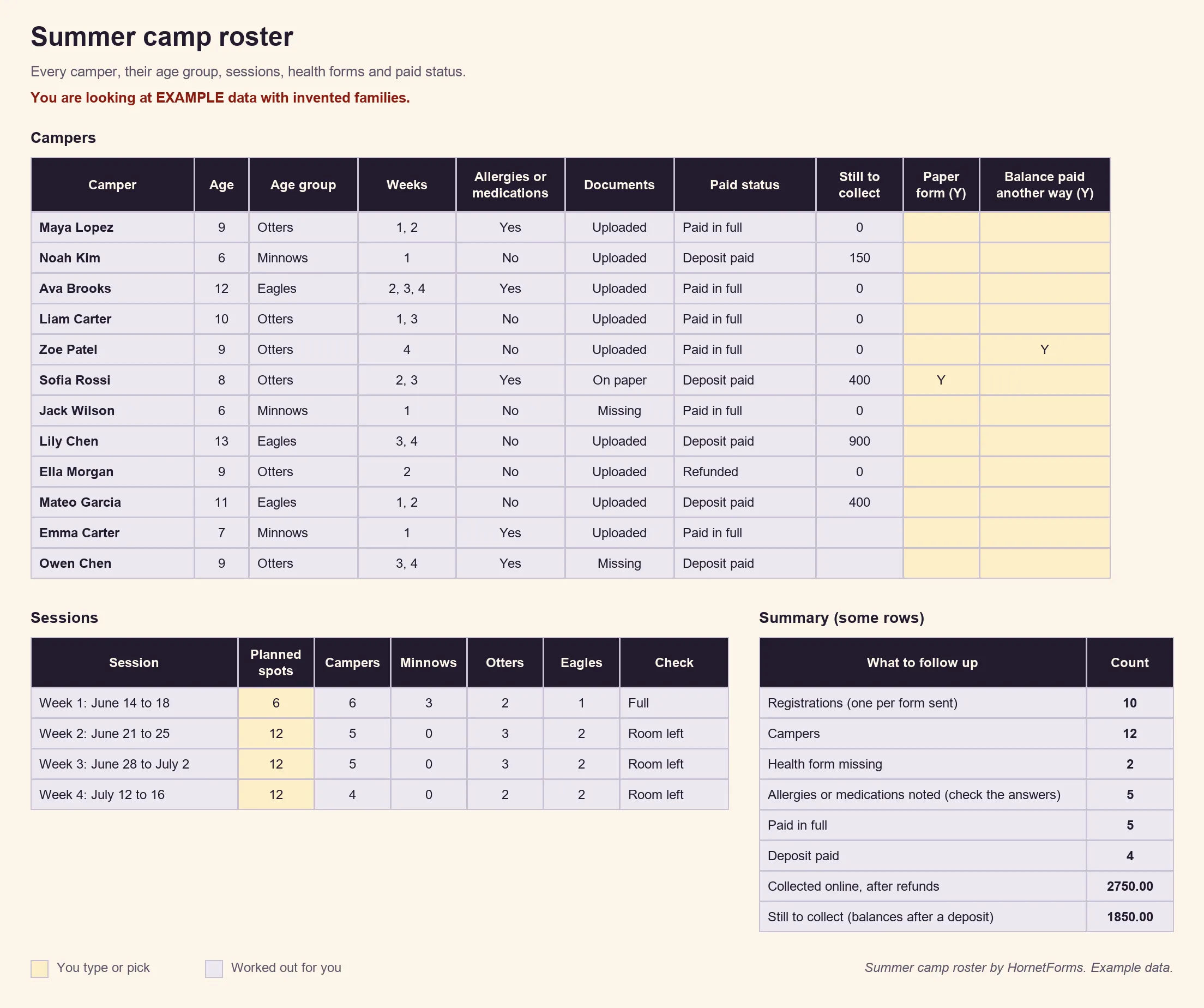
EXAMPLE data only: the families, dates and fees are made up. Clear the example rows before you paste your own.
Prefer rows that arrive on their own? Connect Google Sheets on any plan, and each registration lands as a new row with a "Response ID" and "Submitted at" column. For paid status, use the CSV export, which includes the payment columns. Here's how to send form responses to Google Sheets, Slack or Notion. There's also a CSV with just the roster's column headers if you'd rather build a list of your own.
Printable summer camp registration form#
Some families still sign up on paper, at a school open house or the front desk. The printable form asks the same questions in the same order, so paper and online registrations fit the same roster:
- PDF, US Letter
- PDF, A4
- Word (DOCX), to add your logo, dates and weekly fees
It has a second child section, a fee line, a signature line and a box for camp staff. Already have your own paper form? HornetForms can import a PDF or Word (.docx) file: AI rebuilds it as an online form for you to review, using one AI generation per file. Here's more on making a fillable form in Word, Google Docs or online.
Build your summer camp registration form#
Build this one from a blank form, with the table above as your list:
- Add the questions over five pages: Your camper, Parents and pickup, Health and permissions, Second child, and Payment.
- Add the show rule for the "Second child" page, the calculated fields
camp_feeandamount_due, and their rules. - Add the Payment block with its price pointed at
amount_due. - Set a close date and a response limit, then share the link and the QR code.
Running a school trip instead of a camp? The field trip permission slip covers that. For the school year, the student information sheet collects family details.
Running a league as well? Our youth sports registration form guide covers teams, tryouts and uniforms.
On the Free plan, your form shows a small "Made with HornetForms" badge. Pro and Business remove it. The pricing page lists what each plan includes.
Open camp registration this week#
A summer camp registration form that works asks who the camper is, which weeks they want and who can pick them up. It collects health forms with the sign-up, prices the weeks with a few rules and takes the fee or a deposit on Stripe's page. The roster does the sorting. Sign up for free and open your summer camp registration form today.