
On this page
You run a CPR class on Saturday morning. Sign-ups arrive as phone calls, emails and a PDF someone scanned at an odd angle. Half the names are nicknames, two people want a manual, and nobody's sure who has paid. A CPR class registration form puts all of that in one place: who's coming, which course, the name for the card and the fee.
This guide walks through the questions worth asking and how to run one form per class date. It also covers taking the fee when people sign up and getting a clean roster to your instructor. At the end you'll find a free template, printable copies, a class roster and a sign-in sheet for the door.
It works for a fire department's community class, an independent instructor, a workplace training day or a first aid course at a community center.
What a CPR class registration form should ask#
Keep it short. People sign up on a phone between other things, and every extra question is a reason to stop. Our free template asks for the course, the person and the fee, and leaves the rest for class day. Here are the questions that do the work:
| Question | Why you ask |
|---|---|
| Which course would you like? | So you bring the right materials and the right instructor |
| Full name as it should appear on your card | So the card matches the person, the first time |
| Email and phone | Where the class details go, and a number for last-minute changes |
| Is this your first course or a renewal? | So you know who's new and who has done it before |
| Parent or guardian name and phone | Shown only for students who need them |
| Do you need a student manual? | So you bring enough copies, and it can add to the fee |
| Class policy | One required tick: "I've read the class policy" |
The template also carries two fields people never see: a hidden source field and a calculated class_fee. Both come up below. Want to add a question of your own? Here's which question type to pick.
Which course they want#
The course question offers five choices:
- CPR and AED
- CPR, AED and first aid
- Pediatric CPR and first aid
- BLS for healthcare providers
- Not sure, please help me choose
Swap these for the courses you actually teach, using the names in your course provider's materials. The last option matters more than it looks. Someone who isn't sure still signs up, and you get a chance to call them and help.
The name for the card#
"Full name as it should appear on your card" is the question that saves the most hassle later. Ask for it in exactly those words. Nobody enjoys reprinting a card because the form said "Jon" and the wallet says "Jonathan."
First course or renewal#
"Is this your first course or a renewal?" tells you who's in the room before you start. You can plan your time, pair a first-timer with someone who has done it before, and see at a glance how the group splits. Your course provider's materials say what each kind of class covers, so the form doesn't need to.
Younger students#
A parent or guardian name and phone appear only for students who need them, and then the form requires both. So you always have a grown-up to call. Check your course provider's age rule before you share the CPR class registration form, and say it in your class details.
Accommodations: ask people to call you#
The hands-on practice in a CPR class can be physical. Some students will want to talk through how it works for them, and that conversation belongs on the phone, not in a text box.
Good to know: the template's policy paragraph says it plainly: "Need an accommodation for the hands-on practice? Please call or email us before class and we'll talk it through." Keep that line, and keep questions about anyone's health off the form. A CPR class registration form only needs to know who's coming, which course and how they'll pay.
Asking less also means you have less to look after. The roster holds names, emails and phone numbers, and that's plenty.
One form per class date#
A CPR class registration form works best as one form per class date. Build the first one, then duplicate it for each date on your schedule, on every plan. Each copy has its own settings, so each class stops at its own number.
For each form, set:
- A response limit equal to your seats. The form closes when it reaches that number.
- A close date for the last moment you take sign-ups, like the evening before class.
- A scheduled opening date if sign-ups for next month should open on a set day. Visitors see a notice until then.
- A closed message of up to 500 characters that people see when the form closes or fills up. Point them to your next date.
Give each form a short custom slug and tag the link with where you shared it:
https://forms.hornetforms.com/f/cpr-nov-14?source=flyer
https://forms.hornetforms.com/f/cpr-nov-14?source=newsletter
The ?source= part fills the hidden source field, so every response says where the person found the class. Each form also gets a QR code (PNG or SVG) for the flyer on the noticeboard. And people never need an account or a sign-in to sign up.
HornetForms has unlimited responses on every plan, so a busy term never runs into a response cap you didn't choose. The only limit is the one you set for each class.
Take the class fee when they sign up#
Cash at the door means change, receipts and a list of people who "will pay next time." A Payment block lets your CPR class registration form take a one-time payment right after the last question, on every plan, Free included.
Set the fee from the answers#
The template already works out the fee. Its calculated class_fee field starts at 0, and logic rules fill it in from the course and the manual:
Which course would you like? is "CPR and AED"                  → class_fee = your price
Which course would you like? is "CPR, AED and first aid"       → class_fee = your price
Which course would you like? is "Pediatric CPR and first aid"  → class_fee = your price
Which course would you like? is "BLS for healthcare providers" → class_fee = your price
Do you need a student manual? is "Yes, please add one"         → class_fee = class_fee + your manual price
Every amount ships as 0, so swap in your own numbers before you share the form. The manual rule runs last, so it adds to whichever course price came first. Our logic, piping and calculations guide walks through rules like these.
Notice the one course with no rule: "Not sure, please help me choose". Its fee stays at 0, so that person signs up without paying, and you call them to pick a course. When the price comes out at 0, or logic hides the Payment block, the form completes normally.
Add the Payment block#
The template comes without a Payment block, because the Stripe account has to be yours. A workspace admin connects it once, under Settings, then Payments. Then:
- Open your copy of the template and add a Payment block at the end of the second page.
- Set the price to come from the calculated field
class_fee. - Pick your currency.
Students pay on Stripe's hosted Checkout page. The money goes straight to your Stripe account, and you are the merchant of record. HornetForms never sees or stores card data. HornetForms adds no fee of its own, and Stripe's normal processing fees apply.
While people pay#
Until someone finishes on Stripe's page, their sign-up waits in an Awaiting payment tab. Emails, webhooks and integrations fire only after the payment goes through, so a "new sign-up" email for a paid course means the payment went through.
A pending payment also holds a place under the form's response limit. So two people paying for the last seat at the same moment can't oversell the class. If someone can't make it, refund them in your own Stripe Dashboard, as your class policy says. HornetForms shows the refund status on the response.
Write your refund or credit policy into the policy paragraph on page two. The required "I've read the class policy" tick makes sure everyone sees it before they sign up.
Send the roster to your instructor#
Once sign-ups come in, a few settings do the busywork, on every plan:
- Emails. You can turn on an email to yourself for each new sign-up. Each student gets a confirmation with your own subject and text: the address, parking, what to wear and what to bring.
- Google Sheets or Slack. Each response can land as a sheet row or a Slack message. Here's how to send form responses to Google Sheets, Slack or Notion.
- CSV export. Download every response for the class as one file. On a form with a Payment block, the export carries payment columns, like Payment status.
The integrations page lists every place a response can go. A public sign-up link attracts bots too, so here's how to keep bots out of your forms.
The free class roster#
The free CPR class roster opens in Excel and Google Sheets. It's built for one CPR class registration form per class date.
- Sign-ups. Export your responses as CSV and paste them at A1. The sheet finds columns by their header names, so the order doesn't matter, with or without the payment columns.
- Roster. Everyone A to Z: name as on the card, course, first course or renewal, email, phone, parent or guardian phone, student manual and paid. Yellow columns for "Manual handed out" and a note are yours.
- Summary. Type the class name, date and your seats. It counts sign-ups, seats left, first courses and renewals, each course, manuals to bring, paid and unpaid.
- Sign-in. A printable list of names with a blank Initials column.
Paid reads the Payment status column when your form has a Payment block. Took cash instead? Type Yes under "Paid by hand". A CSV with just the column headers is there too if you'd rather build your own sheet.
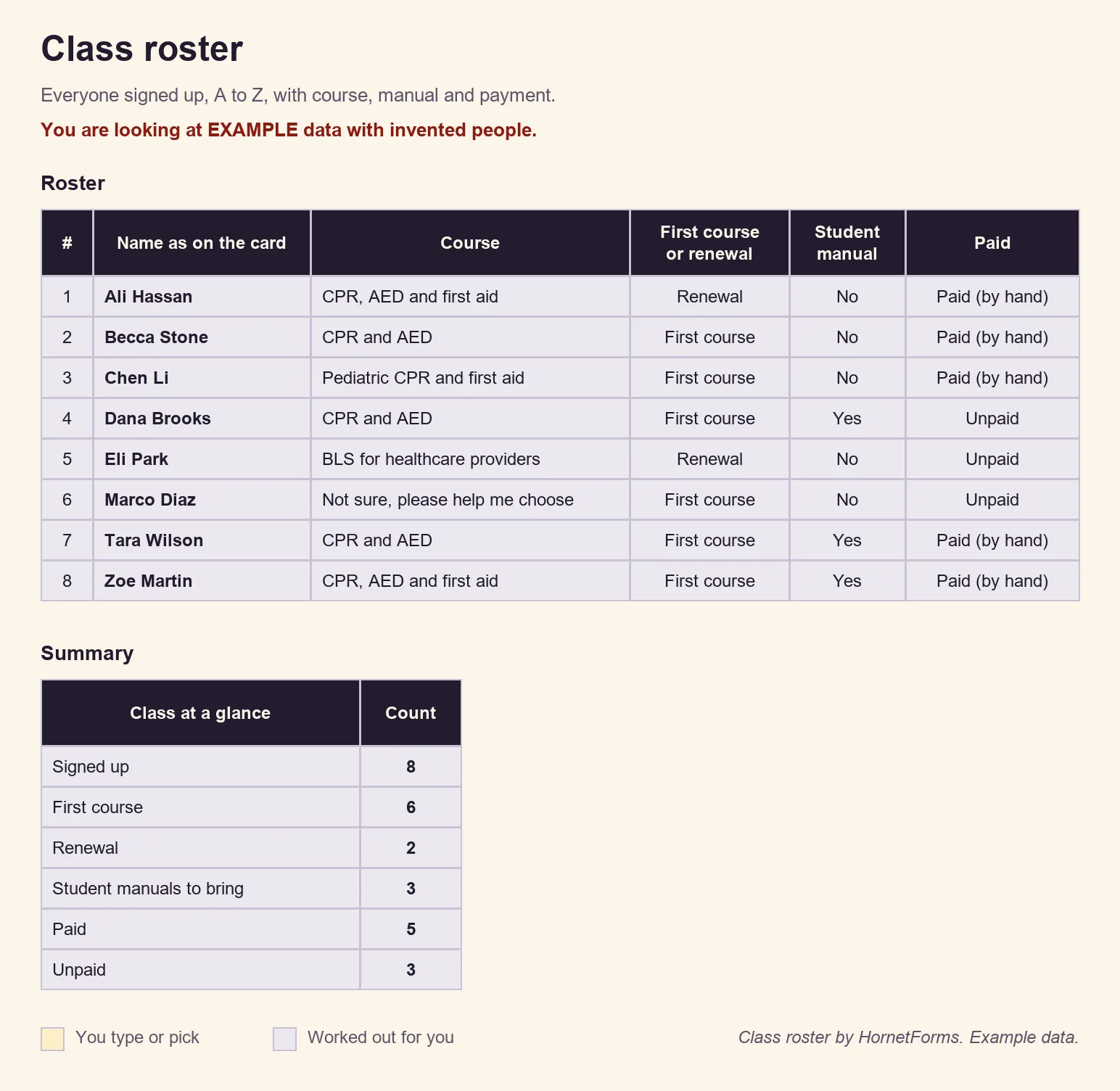
EXAMPLE data only: we made up the students, courses and payments. Clear the example rows on the Sign-ups tab before you paste your own export.
A sign-in sheet for the door#
Prefer paper on the day, with room for walk-ins? Print the class sign-in sheet as a PDF, US Letter, a PDF, A4 or a Word (DOCX) file. It has spaces for the class, date and instructor, then 22 numbered rows for each person's name, initials and a note. For visitors, meetings and open days, we have more sign-in sheet templates.
A free CPR class registration template#
The template has two short pages: "You and your course" and "Fee and policy". It includes the follow-up questions above, the hidden source field and class_fee with its fee rules. The thank-you screen reads "You're signed up" and "We'll email you the class details. Please arrive ten minutes early."
The last steps are yours: set your prices, add the Payment block and edit the policy paragraph.
- Open it in HornetForms. The template page at
forms.hornetforms.com/templates/cpr-class-registrationhas a Use this template button that takes you through sign-up and opens your own copy. Already have an account? It's in the template gallery under Registration & events, as "CPR class registration". - Print it. For sign-ups at the front desk, download the PDF, US Letter, the PDF, A4 or the Word (DOCX) version to add your logo. It has the same 10 questions, a short "why we ask" line for each page, and a note above each follow-up that says when to answer it. Type the paper answers into your form later, so everyone ends up on one roster.
- Track it with the class roster.
The features page covers everything else a CPR class registration form can do, and the pricing page shows what each plan includes.
Open registration for your next class#
Copy the template, rename the courses, set your prices and add the Payment block. Set the response limit to your seats, print the QR code on your flyer and keep the roster open as seats fill. The Free plan is free forever, with unlimited forms and responses. Sign up for free and open registration for your next CPR class.