
On this page
A clipboard by the door does a simple job. It tells you who came, when they arrived and why they were there. Then the day ends, and the sheet goes in a drawer with a coffee ring on it and three names nobody can read.
A good sign-in sheet template fixes the first half of that problem: the right columns, enough rows and a clear line at the top. A digital sign-in fixes the second half, because every name goes straight into a spreadsheet. Below you'll find what a sign-in sheet should record and four free printable sign-in sheet templates (visitor, meeting, class and open house). Then it shows how to set up sign-in with a QR code at the door. It ends with what to do with the list once the day is over.
What a sign-in sheet records#
Every sign-in sheet template answers some of the same five questions: who you are, when you arrived, why you're here, how to reach you and who you came to see. Most sheets need three or four, not all five.
| Column | Why it's there | Sheets that use it |
|---|---|---|
| Name (print) | Tells you who came. "Print" matters: signatures are hard to read later | All four |
| Time in and time out | Shows who was in the building, or in the class, and for how long | Visitor, class |
| Reason for visit or here to see | Lets the front desk point people to the right person | Visitor |
| Email or phone | Lets you send notes, slides or a follow-up | Meeting, class, open house |
| Organization or role | Tells you which groups had someone in the room | Meeting, visitor |
| Working with an agent, how they heard, OK to follow up | The three questions every listing agent asks at the door | Open house |
Two rules keep any sign-in sheet template honest. Ask only for what you'll use, and put the date and place once at the top, not on every line. Everyone running late skips a sheet with 14 columns. Need people to claim a limited number of spots ahead of time? That's a sign-up, so see our first come, first served sign-up sheet guide.
Four printable sign-in sheet templates#
Our free sign-in sheet template pack has four sheets. Each one comes as a Word file you can edit and as a PDF in US Letter and A4. Every sheet has spaces at the top for the date and place, plus numbered rows. It also has a dashed box that says "Paste your QR code here", so you can offer paper and phones side by side.
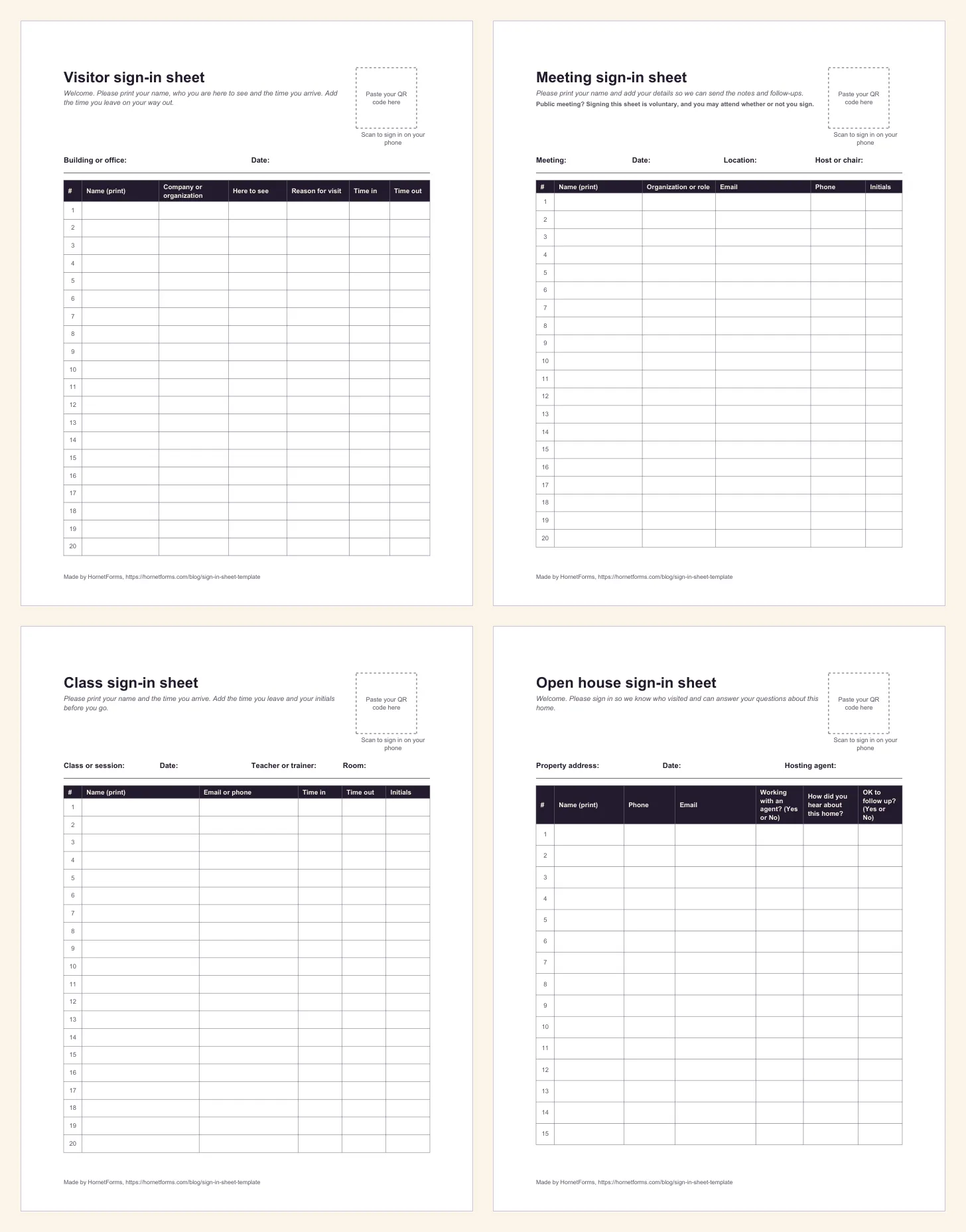
The four sheets in the free pack, US Letter. Each has a dashed box at the top right for your form's QR code.
Visitor sign-in sheet#
For offices, schools, studios and workshops. Spaces for the building or office and the date, then 20 rows of Name (print), Company or organization, Here to see, Reason for visit, Time in and Time out.
Meeting sign-in sheet#
For team meetings, trainings, board meetings and community meetings. Spaces for the meeting, date, location and host or chair, then 20 rows of Name (print), Organization or role, Email, Phone and Initials. It also carries a short line for public meetings: "Signing this sheet is voluntary, and you may attend whether or not you sign." Delete it in the Word file for an internal team meeting. More on why it's there further down.
Class sign-in sheet#
For workshops, after-school sessions, trainings and adult classes. Spaces for the class or session, date, teacher or trainer and room, then 20 rows of Name (print), Email or phone, Time in, Time out and Initials.
Open house sign-in sheet#
For real estate agents and anyone showing a home. Spaces for the property address, date and hosting agent, then 15 taller rows of Name (print), Phone, Email, Working with an agent? (Yes or No), How did you hear about this home? and OK to follow up? (Yes or No).
Already running something more specific? Our posts on volunteer hours, CPR classes and yoga classes each ship their own sign-in sheet for those days.
Digital sign-in with a QR code at the door#
Paper works until someone has to type 40 names into a spreadsheet and guess at the handwriting. A digital sign-in sheet template skips that step. People scan a QR code by the door, fill in a short form on their phone and press Submit. Each answer lands as one row, already typed.
Here's how to set one up in HornetForms:
- Build a short form. Copy the columns from the paper sheet you'd use. Name, email or phone, and one or two choice questions are plenty. Our guide to every question type and when to use it helps you pick a dropdown or multiple choice for each one.
- Publish it and open the Share tab. The QR code card has Download PNG and Download SVG buttons. Use the SVG for anything you print big, since it never blurs; the PNG is a 512-pixel square.
- Print the code on the sheet. Paste it into the dashed box on any sheet in the pack, or print it larger on a sign by the door with a line like "Scan to sign in".
- Keep the paper sheet too. Some visitors won't have a phone handy. Both kinds of sign-in can end up in one list (see below).
Visitors sign in without making an account or logging in to anything. That counts at a door, where people have 10 seconds and one free hand.
For print size and placement, see our guide on how to make a QR code for a form. The short version: print it big, keep a white border around it and test it with two phones.
Signing people in on one shared tablet at the door? The thank-you screen has no "submit another response" button, so after each sign-in, reload the link or scan the QR code again. That opens a fresh, empty form for the next person. Leave "Also limit to one response per browser" off in the settings, or the tablet shows "You've already responded" after the first visitor.
"Submitted at" is the sign-in time#
You don't need a "Time in" question on the digital version. HornetForms records the time for you. With Google Sheets connected (any plan), every visitor adds one row. The second column, "Submitted at", is the moment they pressed Submit, right after the "Response ID". Your questions follow, and a "Response link" closes the row.
Prefer a file? Any plan can download a CSV of the responses; Pro and Business can also download Excel. The CSV starts with Response ID, Submitted at and Started at. Its times are in UTC (ISO 8601), so a 9:05 a.m. arrival in Chicago in June shows as 14:05. Convert to your local time before you share the list.
Let the host know someone arrived#
A visitor sign-in can tell the right person straight away. Connect the native Slack or Discord integration and each sign-in posts to a channel with the visitor's answers. The host sees their own name under "Here to see" while the visitor is still taking off their coat. Or turn on an email to yourself for each new response. Email notifications start switched off, so turn on "Email me about new responses" in the form's Integrations tab before the first visitor walks in.
Open house sign-in sheet template for real estate agents#
An open house sign-in sheet has one job beyond counting visitors: it tells you who to call on Monday. That's why the open house sheet in the pack asks three things the others don't.
- Working with an agent? (Yes or No). You'll want to know before you follow up.
- How did you hear about this home? Yard sign, online listing, social media, a friend. After a few open houses this tells you which ones bring people in.
- OK to follow up? (Yes or No). Ask it plainly, and respect a "No".
The U.S. Department of Justice says the Fair Housing Act "prohibits discrimination by direct providers of housing, such as landlords and real estate companies". The page names these grounds: "race or color", "religion", "sex", "national origin", "familial status" and "disability" (U.S. Department of Justice, Civil Rights Division, "The Fair Housing Act", accessed 28 October 2026). We quote it for reference only. It is not legal advice.
Turn the sheet into a form with the import file#
The pack includes an open house sign-in CSV import file. Import it in HornetForms (it's free) and each column becomes a question:
| Column in the file | Question it becomes |
|---|---|
| Full name | Short text |
| Phone | Phone |
| Are you working with a real estate agent? | Multiple choice: Yes, No |
| Agent's name (if you have one) | Short text |
| How did you hear about this open house? | Multiple choice: Online listing, Yard sign or drive-by, Friend or neighbor, Social media, Email from our office |
| When are you hoping to move? | Multiple choice: Within 3 months, 3 to 6 months, 6 to 12 months, Just looking |
| Do you own or rent your current home? | Multiple choice: Own, Rent, Other |
| May we follow up with you about this home? | Multiple choice: Yes, No |
| Questions or comments | Long text |
The 10 example rows in the file only help the importer guess each question type. They never become responses. The import brings questions only, all optional, so finish the form in the editor:
- Rename the form. It takes its title from the file name, so change it to the street address.
- Add one logic rule. Show "Agent's name" only when the answer to the agent question is Yes.
- Set a close date. The close date takes a date and a time, so set it to the end of the open house. Then write a closed-form message with your phone number for anyone who scans the sign later.
- Duplicate it for the next listing. Every plan can duplicate a form, so each address gets its own form and its own list.
If you work with a team (Pro and Business), everyone with access to the workspace can read every sign-in, so agree up front who follows up with whom.
Meeting and public meeting sign-in sheets#
Public meetings are different. New York's Committee on Open Government puts it plainly: "As a general matter, however, it has consistently been advised that individuals need not identify themselves as a condition precedent to attending an open meeting of a public body." The same opinion adds that "one's identity is, in our view, irrelevant to a person's right to attend" (New York Department of State, Committee on Open Government, advisory opinion OML-AO-05349, September 12, 2013, accessed 28 October 2026).
That's why the meeting sheet says signing is voluntary. Rules differ from state to state, so check your own state's open meetings law and your clerk's practice. A digital sign-in follows the same rule: make every question optional and say so at the top.
Taking comments as well as names? A sign-in sheet is not a comment card. Our public comment form post covers written comments, speaker cards and closing comments on time.
What to do with the sign-in list#
A sign-in sheet template only pays off when someone reads the list. A few habits help:
- Put paper and phone sign-ins in one list. Copy the online rows into a new tab, type the paper rows under the same headers, and write "paper" in the Response ID column so you can tell them apart. One list beats two.
- Total by day or by host. A COUNTIF on the date or on "Here to see" shows your busiest days.
- Follow up within a day. Send the notes, slides or open house thank-you while people still remember you.
HornetForms gives you unlimited responses within fair use on every plan, Free included, so a busy front desk never runs out of room. Some tools cap replies; see when your form hits the response limit for how that plays out. Our guide to where your form responses can go covers Google Sheets, Slack, Discord and Notion in more detail.
Questions people ask#
Is there a sign-in sheet template for Word or Google Docs?#
Yes. Every sign-in sheet template in the pack comes as a Word (DOCX) file. To use it in Google Docs, upload the file to Google Drive and open it with Google Docs. Add your logo, change the columns or paste your QR code into the dashed box.
Can I make a sign-in sheet in Excel?#
You can. Put the column names in row 1 (Name, Email, Time in and so on) and print with gridlines on. Or skip the typing: connect a sign-in form to Google Sheets, and each person who signs in adds a row with "Submitted at" already filled in.
What should an open house sign-in sheet include?#
Name, phone, email, whether the visitor is working with an agent, how they heard about the home and whether you may follow up. The open house sheet in the pack asks exactly those six things.
Download the free sign-in sheet templates#
- Visitor sign-in sheet: Word (DOCX), PDF, US Letter or PDF, A4.
- Meeting sign-in sheet: Word (DOCX), PDF, US Letter or PDF, A4.
- Class sign-in sheet: Word (DOCX), PDF, US Letter or PDF, A4.
- Open house sign-in sheet: Word (DOCX), PDF, US Letter or PDF, A4.
- Open house sign-in import file: CSV. Import it to create the open house questions in one step.
Print each sign-in sheet template at 100% (or "actual size") so the rows keep their height.
Put a sign-in sheet by your door this week#
Pick the sign-in sheet template that fits, print a few copies and keep them on a clipboard. Then build the digital version, paste its QR code into the dashed box and see which one people reach for. Planning an event where people reply ahead of time? Our online RSVP guide covers that side. Sign up for free and your sign-in form is ready before the first visitor knocks.
QR Code is a registered trademark of DENSO WAVE INCORPORATED.