
On this page
Group chats make poor guest lists. One person replies with a thumbs up, another says "probably", and three more answer in a different thread a week later. Then you count heads from memory.
An online RSVP fixes that. You send one link with the invite, guests tap it and answer two or three questions, and every reply lands in one list. This guide shows how to collect RSVPs online for free. It covers what to ask, where to share the link, how to close replies on time and what to write on the invite. You'll find question sets for a birthday party, a baby shower, a graduation party and a work event. At the end there's a free pack with all four, plus a sample file you can import.
What an online RSVP needs#
Most RSVP forms ask too much. A good online RSVP needs three answers:
- Yes or no. The one answer you can't plan without, so make it required.
- How many people. Use a number, so the replies add up. Say whether it counts the guest. "How many people are coming with you? (Not counting you)" stops the classic double count.
- One detail you need. Usually food: allergies or dietary needs. For a work event, it might be which sessions people will join.
Add a name, plus an email address if you want to send a confirmation. Every extra question is one more reason to close the tab and reply "later".
For food, a checkbox list beats an open box, because the answers add up cleanly. The FDA names the allergens worth knowing about: "The major food allergens are milk, eggs, fish, Crustacean shellfish, tree nuts, peanuts, wheat, soybeans, and sesame." (U.S. Food and Drug Administration, Food Allergies, accessed 28 October 2026). A party RSVP doesn't need nine boxes. Our sets use None, Vegetarian, Vegan, Gluten-free, Dairy-free, Nut allergy and Other, with a short "Tell us more" question that appears only when someone ticks Other.
Free ways to collect RSVPs online#
You have three free options, and they work well together.
Send an RSVP link#
Build a form, publish it and paste its link into your text, group chat, email or social post. Guests answer without an account or a password, which helps when half your guest list is grandparents. You can also change the form's slug in the Share tab, so the link reads forms.hornetforms.com/f/mayas-party instead of a string of random characters.
Print a QR code on the invite#
Mailing paper invitations? Put the form's QR code on the card, and guests reply from their phone camera. Our RSVP QR code guide covers print size, card wording and one reply per household.
Embed the form on your event page#
If the event already has a page on a club site, a school site or your own blog, put the form right on it. HornetForms embeds a form inline, as a popup or slider, or as a full page, on every plan. Here's how to embed a form on a website, step by step.
Event and wedding websites also take RSVPs, bundled with invitation designs. An online RSVP form is the lighter choice when you already have a way to invite people and just need the replies in one place. Selling tickets? That's registration, so see our event registration form with payment guide. Splitting costs for a group instead? Here's how to collect money for a group event.
Set up an online RSVP in 10 minutes#
Here's the quickest route in HornetForms. Everything below works on the Free plan, which is free forever.
- Start from a template. The free RSVP form template puts "Your name" and "Will you attend?" on page 1. Guests who pick Yes go on to a guest count and a notes box. Guests who pick No skip straight to the thank-you screen.
- Make it yours. Put the event name and date in the form title.
- Check the path for a no. The template already ends the form when someone picks No. If you build your own, add a logic rule: when "Will you be there?" is No, jump to the end. Our post on conditional logic shows more rules you can add.
- Set up the guest count. Use a Number question. Set "Min" to 0 and a "Max" that fits your space, and switch on "Whole numbers only", so nobody types "2 or 3".
- Add your one detail. Swap "Anything we should know?" for a checkbox list of dietary needs, or keep both. Need a different kind of question? Here's which question type fits each job.
- Make the key answers required. Questions start optional. Switch on "Required" for the name and the yes or no.
- Publish and test. Open the link on your phone and send two test replies, one yes and one no, so you see exactly what guests see.
Rather start from a file? The free CSV import turns each column of our sample RSVP import file (below) into a question and picks the type from the example rows. It brings in the questions only, all on one page and all optional. Add the page break, the jump rule and the Required switches in the editor, and rename the form, because the import names it after the file.
Baby shower, birthday party, graduation and work event RSVPs#
The first questions stay the same for every event: a name and a yes or no on page 1. What changes is the detail on page 2, which guests who say no never see. Here's what each set in our pack asks after the yes.
| Event | Page 2 asks | Why it helps |
|---|---|---|
| Birthday party | How many adults (counting you), how many kids, dietary needs, and "Will a grown-up stay at the party?" An answer of "No, dropping off" shows a phone question for pickup | Kid and adult portions, and the number to call at pickup time |
| Baby shower | How many people are coming with you, dietary needs, a guess at the baby's birthday (a Date question, just for fun), a note for the parents-to-be and a mailing address for a thank-you card | The notes and addresses save you a round of texts after the shower |
| Graduation party | About when you'll arrive (1 to 3, 3 to 5 or 5 to 7 p.m.), how many in your group, dietary needs, a message for the graduate and "May we add your message to a memory book?" | Open houses run for hours, and the arrival times tell you when to bring out the food |
| Work event | Work email and team come before the yes or no. Then which parts people will join (morning session, lunch, afternoon session, evening dinner), dietary needs and "Anything that would make the day easier for you?" | A seat count for each session, a catering count and a way to ask for step-free access or a quiet room |
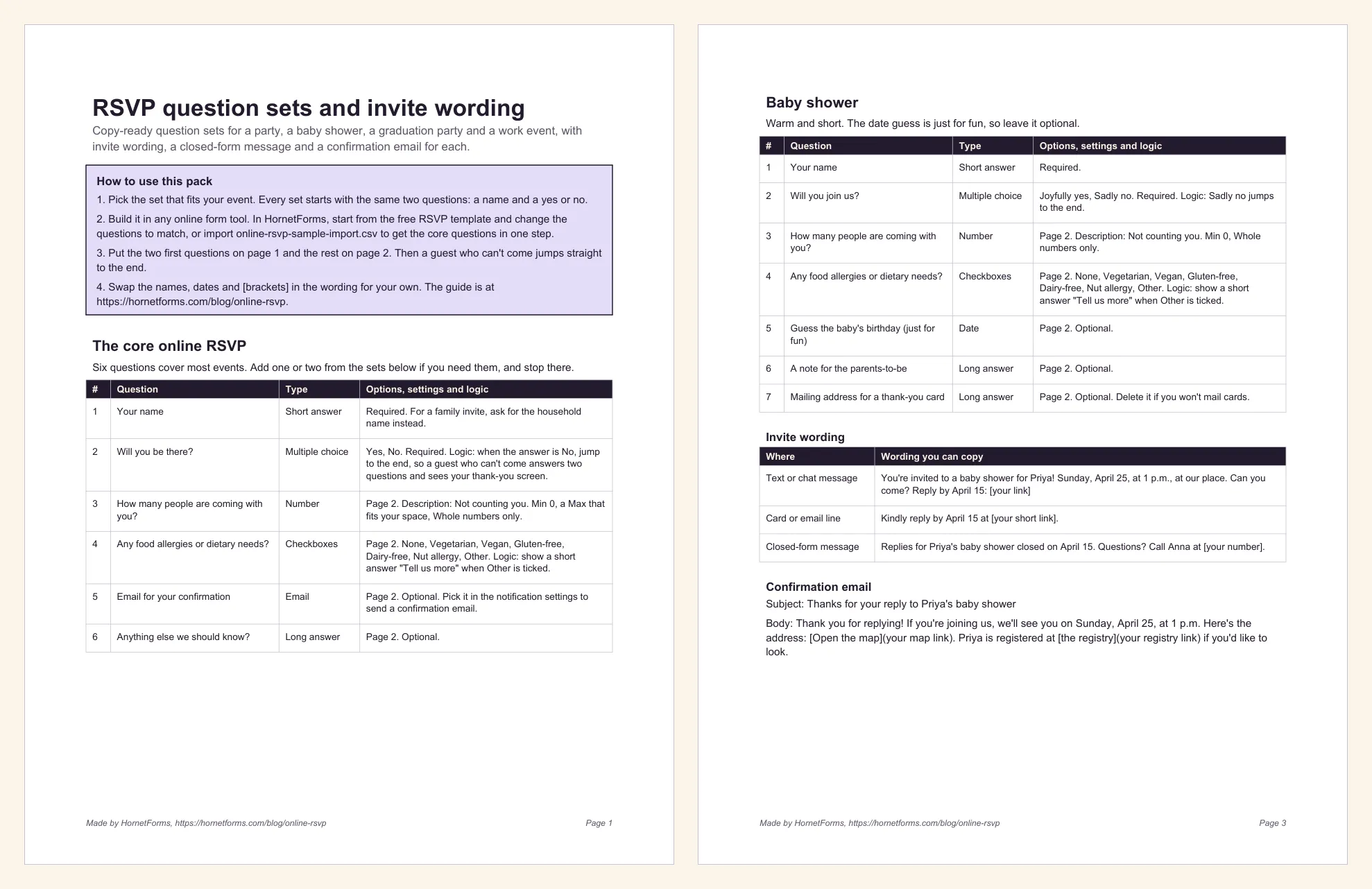
Page 1 and the baby shower set from the free pack. The party, graduation and work event sets follow the same layout.
Online wedding RSVPs need more than this: a meal per guest, plus-ones and sometimes more than one event. For those, start from the wedding RSVP form template, which asks for a household name and then a name and a meal for each person coming.
Close RSVPs on a date or at a headcount#
Every invite needs a reply-by date, and an online RSVP can enforce it. HornetForms gives you three settings on every plan:
- Close date. Set a date and a time. Pick the evening of your reply-by date, so a guest who answers at 9 p.m. on the day still gets in.
- Response limit. Got 40 seats? A response limit closes the form once that many replies arrive. It counts replies, not people, and a no is a reply too. So it fits events where each reply is one seat, like a workshop. When people bring guests, lean on the close date instead. For spots that go in order, see our first come, first served sign-up form guide.
- Closed-form message. When the form is closed or full, visitors see a message you write, up to 500 characters. It's plain text, so write a name and a phone number out in full for anyone running late.
HornetForms has unlimited responses within fair use on every plan, Free included, so the size of the guest list never decides your plan. Tools that cap replies work differently; read what happens when a form hits a response limit.
See who is coming#
Online RSVP replies start arriving the day the invite goes out. Keep track three ways, all on every plan:
- The Summary tab. Tallies for every choice question show the yes and no split at a glance, plus which dietary needs come up most.
- Google Sheets. Hook up a spreadsheet and every RSVP arrives as its own row: a "Response ID", a "Submitted at" time, one column per question and a "Response link" back to the full reply. Put a SUM under the guest-count column and you have most of your headcount. Our guide to where your form responses can go covers Slack, Discord and Notion too.
- An email to yourself. Owner notifications start switched off. Turn on an email to yourself for each new response, and every yes reaches your inbox as it lands.
One bit of headcount math: "How many people are coming with you?" doesn't count the guest, so add the number of yes replies to the sum of that column. You can also download a CSV of every reply. If you want to match replies against a full guest list in a spreadsheet, an RSVP tracker in Excel or Google Sheets is the next step.
Send guests a confirmation#
A short email after someone replies saves you a round of "wait, what time was it?" texts. HornetForms can send each guest a confirmation email when they submit their online RSVP. Two things to know:
- It needs an email question. You pick that question in the notification settings. With none chosen, no email goes out.
- You write it. The subject takes up to 200 characters and the body up to 5,000. Wrap the date in
**bold**, and write links as[text](url), which arrive clickable.
Put the email question on page 2, and only guests who say yes will see it. If you ask for it on page 1, as the work event set does, write the email so it fits a yes and a no:
Subject: Thanks for your RSVP to Maya's party

Thanks for letting us know! If you're coming, here are the details again:
**Saturday, June 12, 2 to 4 p.m.**, Riverside Park, Shelter B.
[Get directions](https://maps.example.com/riverside-park)
Changing an RSVP after it's sent#
Plans change. A yes in April can turn into a work trip in May. Give guests a simple way to tell you, such as a "Plans changed? Text Sam at 555-0142" line in the confirmation email. Put it on your thank-you screen too.
Guests can't edit a reply after they send it. So ask guests to tell you about a change, and update their response yourself. On Pro and Business, you can edit a response, and HornetForms keeps every edit in its history.
Thinking of the "Limit to one response per person" setting? It checks an answer you pick, such as the email question, not who someone is. The form turns away a second reply with the same answer and shows "A response with this answer has already been submitted." That blocks a guest who resends with a new headcount, so leave it off for an RSVP.
If someone does reply twice, trust the newest one. In Google Sheets, the "Submitted at" column tells you which came last.
RSVP wording for the invite#
The words beside the link do half the work. Every online RSVP invite needs four things: the event, the reply-by date, the link and what the link does. Swap in your own names and dates:
| Event | Wording you can copy |
|---|---|
| Birthday party (text message) | Maya is turning 7! Join us on Saturday, June 12, 2 to 4 p.m., at Riverside Park, Shelter B. Tap to RSVP by June 5: [your link] |
| Baby shower (text or email) | You're invited to a baby shower for Priya! Sunday, April 25, at 1 p.m., at our place. Can you come? Reply by April 15: [your link] |
| Graduation party (card) | The family of Jordan Lee invites you to an open house in honor of Jordan's graduation. Kindly reply by June 12 at [your short link]. |
| Work event (email) | Save your seat: our spring team day is Thursday, May 20, 9 a.m. to 4 p.m., at the Harbor Room. Please reply by Friday, May 14, so we can confirm numbers: [your link] |
| Any event | Can't make it? Please tell us anyway, so we can plan. |
A few days before the deadline, send your own short nudge to anyone who hasn't answered: "Hi Jo! We're counting heads for Maya's party on June 12. Can you let us know by Friday? Here's the link."
Questions people ask#
Is an online RSVP free?#
It can be. The HornetForms Free plan is free forever and includes logic, close dates, QR codes, Google Sheets and confirmation emails. Paid plans add extras like your own domain for the link (see the pricing page).
How do I collect RSVPs online for free?#
Build a short form with a name, a yes or no and a guest count. Publish it, paste the link into your invite and set a close date on your reply-by date.
What questions should an online RSVP ask?#
A name, a yes or no, how many people are coming and one detail you need, such as dietary needs. Put everything after the yes or no on a second page, so guests who can't come finish in seconds.
Get the free RSVP question sets#
- RSVP question sets and invite wording: PDF, US Letter, PDF, A4 or Word (DOCX). Six pages: the six core questions, then the party, baby shower, graduation and work event sets, each with invite wording, a closed-form message and a confirmation email. The last page has reply-by lines, a nudge message and a checklist to run before you send the link.
- Sample RSVP import file: online-rsvp-sample-import.csv. The core online RSVP as seven question columns with 12 example replies.
Send your invite today#
Pick a set, start from the RSVP template, set your close date and paste the link into your invite. Sign up for free, and the first replies can land before you've even ordered the cake.