
On this page
Somewhere in a kitchen drawer there's a pile of reply cards. One says "2" with no names. One picked the fish for a guest who is vegetarian. One never came back. An online wedding RSVP fixes most of that: guests reply on their phone, pick a meal for each person by name, and you get every answer in one tidy place.
This guide covers what to ask on an online wedding RSVP, the exact wording for your invitation card and your wedding website, and how to set it up for free with a ready-made template. At the end there's a free wording and question sheet in Word and PDF, so you can copy the lines straight onto your cards.
Why couples move wedding RSVPs online#
Paper replies still work. They just leave you doing the sorting. An online RSVP does a few jobs that paper can't:
- Every guest gets a name and a meal. The form asks for both, person by person, instead of one number scrawled on a card.
- Answers arrive as a list. No retyping cards into a spreadsheet at midnight.
- The deadline closes itself. You pick a date and time, and the form stops taking replies.
- No reply envelopes to stamp. Guests answer from the link or a QR code on the card.
- Out-of-town guests answer the travel questions too. Hotel rooms and shuttle seats come in with the reply.
You can keep a beautiful paper invitation and still ask for replies online. Most couples do exactly that: paper for the invitation, a link for the answer.
What to ask on an online wedding RSVP#
The best online wedding RSVP asks only what you'll use. Every extra question is one more reason for Aunt Linda to put her phone down and "do it later". Start with the questions the caterer, the venue and you need, then add a fun one at the end.
The questions every wedding RSVP needs#
Our free wedding RSVP form template has 17 questions across four pages, and logic shows several of them only when they're needed:
| Page | What it asks |
|---|---|
| Your reply | Household or family name, best email for wedding updates, and "Will you be joining us?" with "Joyfully accepts" or "Regretfully declines" |
| Who's coming | "How many of you are coming?" (one to four, children included), then a full name and a meal for each guest, then allergies or dietary needs |
| Travel and the party | A room in your hotel block, a seat on the shuttle, and "What song gets you on the dance floor?" |
| A note for the couple | A message for the two of you |
Logic does the tidying. Pick "3" for the guest count and the form shows three name and meal pairs, all required. Pick "Regretfully declines" and the form jumps straight to the note for the couple, so guests who can't come never see a meal question. The meal choices start as Chicken, Fish, Vegetarian and Child's meal. Swap in your real menu.
Plus-ones, kids and a weekend of events#
A few situations need one more question, or a clear line on the card:
- Plus-ones. If you invited someone "and guest", the guest is just another person in the count, with their own name and meal. No separate question needed.
- Children. The count includes children, and the menu has a child's meal. If you also want ages for high chairs or kids' meals, add a short answer question.
- Several events. Holding welcome drinks on Friday and a brunch on Sunday? Add a checkboxes question, "Which events will you join?", with one option per event.
- Accessibility. "Anything that would make the day easier for you?" lets guests ask for step-free access or a seat near the front without making a fuss.
Not sure which question type fits? Here's every question type and when to use it.
Meals and food allergies#
The template has an open allergies question, which catches everything. If you want cleaner counts for the caterer, add a checkboxes question with the nine major food allergens the US Food and Drug Administration names (our online RSVP guide lists them with the source). Add "None of these" as a last option, keep the open question for anything else, and pass every answer to your caterer exactly as written.
Online wedding RSVP wording for the invitation card#
The card has one job now: send guests to the form. Every online wedding RSVP card needs three things: the reply-by date, where to reply, and a way to answer for the guest who would rather call.
| Style | Wording for an online RSVP card |
|---|---|
| Classic | Kindly respond by May 15 at forms.hornetforms.com/f/garcia-wedding. |
| Formal | Kindly reply on or before the fifteenth of May at forms.hornetforms.com/f/garcia-wedding. |
| Casual | Can you make it? Let us know by May 15 at forms.hornetforms.com/f/garcia-wedding. |
| With a guest | You are welcome to bring a guest. Add their name and meal when you reply. |
| Adults only | We love your little ones, but our celebration is for adults only. Please reply by May 15. |
| Weekend of events | Tell us which events you will join, and pick a meal for each guest, by May 15. |
| Insert for paper invitations | We are collecting replies online. Please RSVP at the link below by May 15. Rather call? Maria, 555-0142. |
Print a short link people can type, not a jumble of letters. In HornetForms you can change the form's slug on every plan, so the link reads like forms.hornetforms.com/f/garcia-wedding. Set the slug before you print, and leave it alone afterwards.
Want a code on the card as well? A QR code from the Share tab opens the same form. Our post on the RSVP QR code covers print size, placement and scan-the-code wording, so we won't repeat it here.
Wording for your wedding website RSVP page#
If you have a wedding website, give the RSVP its own page with a short intro, the deadline and the answers to the questions guests ask most. A few lines you can copy:
- Intro: "We can't wait to celebrate with you! Please reply by May 15 so we can give our caterer a final count."
- One reply per household: "Reply once for your whole household. Count everyone named on your invitation, children included, and pick a meal for each person."
- Deadline: "Online RSVPs close at 11:59 pm on May 15. After that, please call or text Maria at 555-0142."
- Can I bring a guest? "If your invitation says 'and guest', yes! Count them when you reply and add their name and meal."
- I lost my invitation. "No problem. Go to the link above and type your household name as it appears on your envelope."
Then put the form on the page. Most website builders let you add a link or a button, and that's all an RSVP page needs. If yours lets you paste code, you can embed the form right on the page instead. HornetForms embeds work on every plan as inline, popup, slider or full page, and our guide on how to add a form to a website walks through each one.
Set up an online wedding RSVP for free#
Here's the whole setup, start to finish. It takes about 15 minutes, most of it spent choosing a song for the example reply.
- Start from the template. Open the wedding RSVP form template and sign up for free. The form arrives with every question and logic rule in place.
- Make it yours. Change the title, the meals, the hotel and shuttle questions, and add any of the extra questions above.
- Publish and set the slug. Publish the form, then open the Share tab and pick a short slug.
- Get the QR code. The Share tab's QR code card has Download PNG and Download SVG buttons. Give the SVG to your printer.
- Send personal links, if you like. The template's first question listens for a
householdvalue in the link. Add?household=The+Okafor+Familyto the end of your form link, and the Okafors open a form with their name already typed. The RSVP QR code guide explains how to build one link per household. - Test every path. The preview has a desktop view and a mobile view, and preview answers aren't saved. Try a household of three, then a decline, and check that the right questions appear.
The template is free, and so is everything in this list. Guests reply without an account or a sign-in, so nobody needs a password to say yes. And HornetForms has unlimited responses within fair use on every plan, Free included, so a 300-person guest list won't hit a cap. Here's what happens when a form hits a response limit on other tools.
For the full picture of RSVPs for any event, from birthdays to work parties, see our guide to online RSVPs.
Set an RSVP deadline that closes the form#
The deadline on your online wedding RSVP should land a week or two before the caterer needs the final count. That gives you time to chase the stragglers.
In the form's settings, set a close date. It's a date and a time, not just a day, and it uses your browser's time zone. So "11:59 pm on May 15" means exactly that. When the time comes, the form stops taking replies.
Then write a closed-form message, which guests see if they open the link after the deadline. It's plain text, up to 500 characters, with line breaks but no links, so write the phone number out in full:
Online RSVPs for Maria and Sam's wedding closed on May 15.
Still need to reply? Call or text Maria at 555-0142.
That one line saves a lot of "is it too late?" messages.
Track replies and meal counts#
Replies to your online wedding RSVP start coming in the day the invitations land. Three things help you keep up, all on every plan:
- An email to yourself. Owner emails are off by default. Turn on an email to yourself for each new response, and you'll see every reply as it arrives.
- A confirmation email to guests. The template asks for an email address, so you can turn on a confirmation email and pick that question as the address. Write your own subject and body, and add a link to your wedding website for the schedule and directions.
- Google Sheets. Connect a spreadsheet and each household's reply turns into one row, with every guest's name and meal in separate columns and a link back to the full reply. Filter a meal column to "Fish" and you can read the caterer the names. Our guide to where your form responses can go covers Slack and Notion too.
The Summary tab in HornetForms counts the answers to every choice question. Each guest's meal is its own question, so add the four meal questions together for your total plates.
Then there's the big question a week before the deadline: who hasn't replied? Our free RSVP tracker answers it. List everyone you invited, and it matches the replies to your guest list and counts who is coming.
When a guest needs to change their RSVP#
Plans change. Someone's partner can come after all, or a child gets the flu. Tell guests up front what to do, on your website and in the confirmation email: "If your plans change, please let us know." That's the line the template's thank-you screen already uses.
Once a guest presses Submit on your online wedding RSVP, the reply is final on their side. When plans change, the guest lets you know by text or call, and you make the change in your records. On Pro and Business, owners and editors can open a completed response and fix the headcount or a meal, and HornetForms keeps every edit in the response's history. Editing never sends the notification emails again, so nobody gets a second confirmation.
On the Free plan, the guest can send a new response instead, and you use the newer one. If you turned on "Limit to one response per person" with the household name, a repeat reply under that name won't go through, so in that case ask them to call or text you.
Keep your own note in the guest list of what changed and when, so the caterer gets the right count.
Questions people ask#
What should an online wedding RSVP say?#
The card needs the reply-by date, the short link (and a QR code if you like) and a phone number for anyone who would rather call. The form itself should open with a warm line and the household name, then ask who is coming and what they will eat.
What questions should a wedding RSVP ask?#
Start with the household name, an email, yes or no, how many are coming, and a name and meal for each guest. Then add allergies, travel questions and a song request if you will use them.
Is an online wedding RSVP free?#
It can be. The wedding RSVP template, QR codes, custom slugs, Google Sheets and email notifications are all on the Free plan in HornetForms, with unlimited responses within fair use.
Can guests RSVP with a QR code?#
Yes. Download the code from the form's Share tab and print it on the card. Guests point their phone camera at it and your online wedding RSVP opens.
Free download: wedding RSVP wording and question sheet#
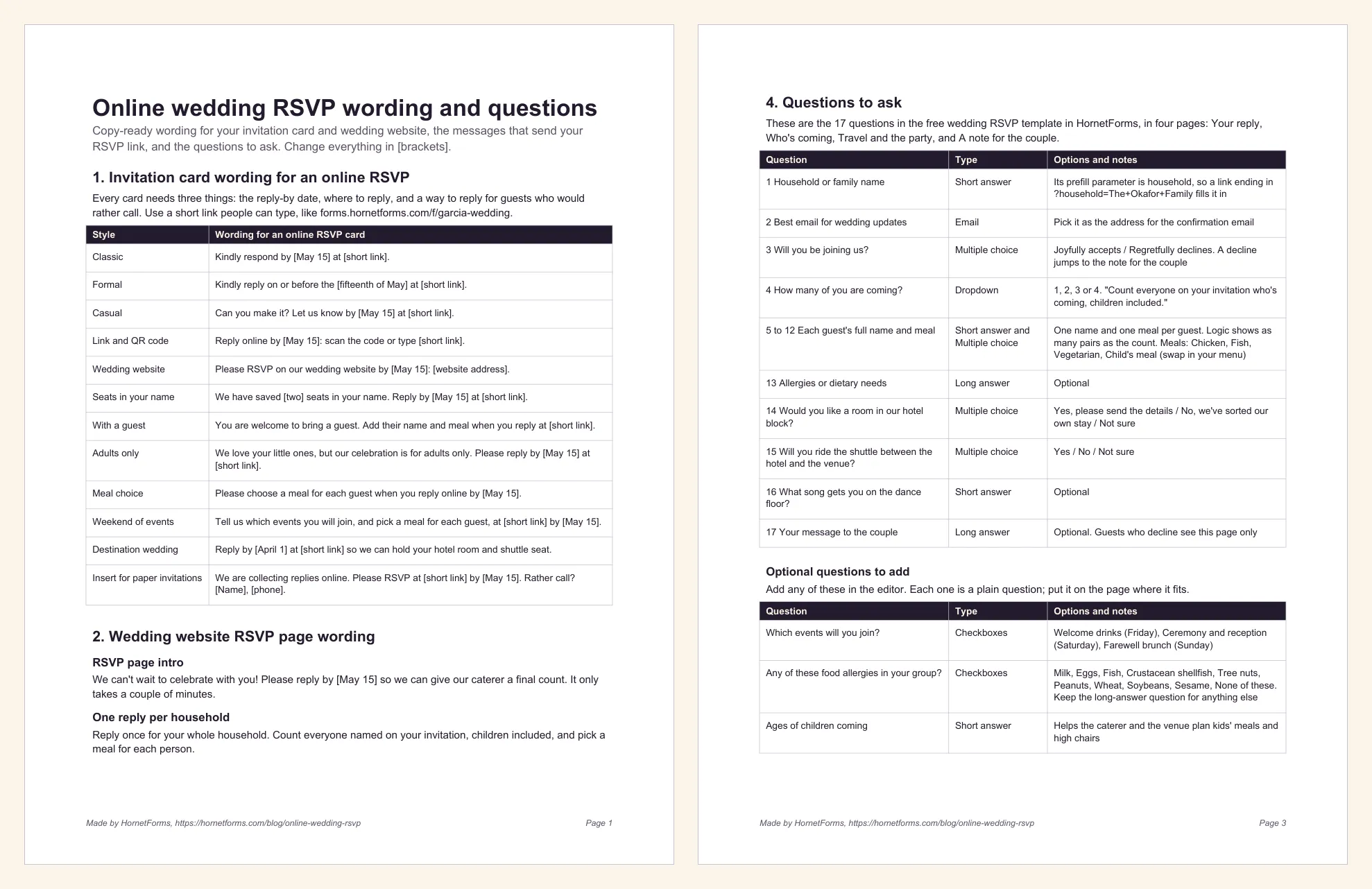
The free sheet puts everything above on four pages you can print or edit:
- Card wording: 12 lines for an online RSVP, from classic to casual, adults only, destination weddings and an insert for paper invitations.
- Website wording: an RSVP page intro, the deadline line and answers for "Can I bring a guest?", "Are children invited?", "What if my plans change?" and "I lost my invitation".
- Messages: an email and a text that send the link, a nudge for late replies, a closed-form message and a confirmation email.
- Questions: all 17 template questions with their options, plus seven add-ons and a setup checklist.
- Word (DOCX), to edit the brackets and copy lines out
- PDF, US Letter
- PDF, A4
For printable reply cards with a QR code box, grab the cards from the RSVP QR code post.
Send your RSVP link this week#
Pick your deadline, open the wedding template, swap in your menu and publish. Print the short link on your cards, put it on your wedding website, and test one reply on your own phone. Sign up for free and your online wedding RSVP is ready before you address the envelopes. Want your own domain in the link instead? That's a custom domain on Pro or Business: see the pricing page.