
On this page
Paper invitations still feel special. Paper replies, less so. Reply cards come back late, half of them never come back at all, and the ones that do say "2" with no names and no meal choice. Meanwhile you're the one keeping score on the fridge door.
An RSVP QR code keeps the paper and drops the chasing. Guests point a phone camera at the card, your reply form opens, and their answer lands in a list you can sort. This guide shows how to make an RSVP QR code from your own form and print it so it scans. It also covers what to write beside it and how to handle one reply per household. At the end you'll find free printable RSVP cards with a QR code box and a reply tracker that counts heads and meals for you.
How an RSVP QR code works#
A QR code is just a link in a shape a phone camera can read. Scan it and the phone offers to open a web address. For an RSVP QR code, that address is your online reply form. For any other form, see how to make a QR code for a form. Hosting a trivia night or fundraiser quiz? See how to run a quiz with a QR code.
So the code is only as good as the form behind it. Three things matter:
- The form opens on a phone. Most guests will scan with the phone in their hand, so the form has to read well on a small screen.
- Guests reply without signing in. HornetForms never asks respondents to create an account or sign in, which matters for grandparents and busy friends alike.
- The link stays the same. Once you print the cards, the code can't change. Editing the form doesn't change its link, so you can fix a typo in a question after the cards go out and click Publish changes.
That last point is the reason to make the code from your form rather than from a page you might move. The printed code points at one address for good.
Make an RSVP QR code from your form#
You need a reply form first. Our guide to online RSVP forms covers what to ask, and two free templates make a good start:
- The RSVP form template asks for the guest's name and "Will you attend?". A yes opens a second page with "Number of guests" (not counting the person replying) and "Anything we should know?". A no ends the form right there.
- The wedding RSVP form template starts with "Household or family name", an email for updates and "Will you be joining us?" with "Joyfully accepts" or "Regretfully declines". Guests who accept say how many are coming, from one to four, and give a name and a meal for each person. Then come allergies, hotel and shuttle questions and a song request. Guests who decline skip to a note for the couple.
Then make the code. Here's how to make a QR code for an RSVP in HornetForms:
- Publish the form. Until you publish, the Share tab warns that "These links and embeds work once you publish your form."
- Open the Share tab in the form's top navigation. (Right after you publish, the "Share your form" dialog also has a More sharing options button that takes you there.)
- Pick a short address. The Share tab lets you change the form's slug on every plan, so
forms.hornetforms.com/f/garcia-weddingreplaces a string of random letters. Do this before you download the code, and leave the slug alone once you print the cards, because the code holds the old address. - Download the code. The QR code card has Download PNG and Download SVG buttons. The PNG is 512 by 512 pixels. The SVG is a vector file that stays sharp at any print size, so give that one to your printer or designer.
The code holds the link chosen at the top of the Share tab. On Pro and Business, that can be your own verified domain instead of the HornetForms address. And yes, an RSVP QR code from HornetForms is free: QR codes come with every plan, Free included. DENSO WAVE, the company that created the QR code, answers "Is there a fee for using QR Code?" with a plain "No." (DENSO WAVE, QR Code FAQ, accessed 28 October 2026).
Print it: size, contrast and placement#
There's no single magic size for an RSVP QR code, because it depends on the card, the printer and the phones your guests carry. DENSO WAVE's own advice is simple: "It is recommended that QR Code symbols be printed as large as possible within the available printing area." (DENSO WAVE, "Point for setting the module size", accessed 28 October 2026). The same page adds that "The larger the module is, the more stable and easier to read with a QR Code scanner it becomes."
A few rules keep the code readable:
- Leave white space around it. DENSO WAVE says "QR Code requires a four-module wide margin at all sides of a symbol." (DENSO WAVE, "Point for determining the code area", accessed 28 October 2026). A module is one of the small squares. The downloaded image has a margin of just one module, so leave at least three more squares' worth of blank card around it.
- Dark code, light background. Print it in black or a very dark ink on white or cream card. Skip gold foil, glitter and photos behind the code.
- Keep it flat and whole. Don't put the code across a fold, and don't crop or stretch it to fit a box.
- Put it where thumbs go. Bottom right or the center of the reply card works well. Leave room for the wording beside it.
RSVP card wording with a QR code#
An RSVP QR code on its own looks like a mystery square. The words beside it tell guests what it does and by when. Every RSVP card with a QR code needs three things: the reply-by date, what the code does, and a short link for anyone who can't scan. For the rest of the card and the questions on the form, see our online wedding RSVP wording guide.
| Event | Card wording you can copy |
|---|---|
| Wedding | Kindly reply by June 1. Scan the code to RSVP and choose your meal. |
| Wedding, formal | The favor of a reply is requested by the first of June. Scan the code to respond. |
| Birthday party | Can you make it? Scan the code and tell us by May 10. |
| Baby or bridal shower | Please let us know by April 20. Scan the code to reply in a minute or two. |
| Work or club event | Save your seat: scan the code and reply by Friday, March 6. |
| No plus ones | We have reserved a seat in your honor. Scan the code to reply for the people named on your invitation. |
| Children welcome | Little guests are welcome. Count everyone in your household when you reply. |
Under the code, add the short link in plain text, like forms.hornetforms.com/f/garcia-wedding. That's where the custom slug pays off: nobody wants to type a jumble of letters. And add a phone number or "text us" line for the guests who would rather call. They exist, and they're usually the ones you most want at the party.
Our free cards already carry this wording, with a box for your code:
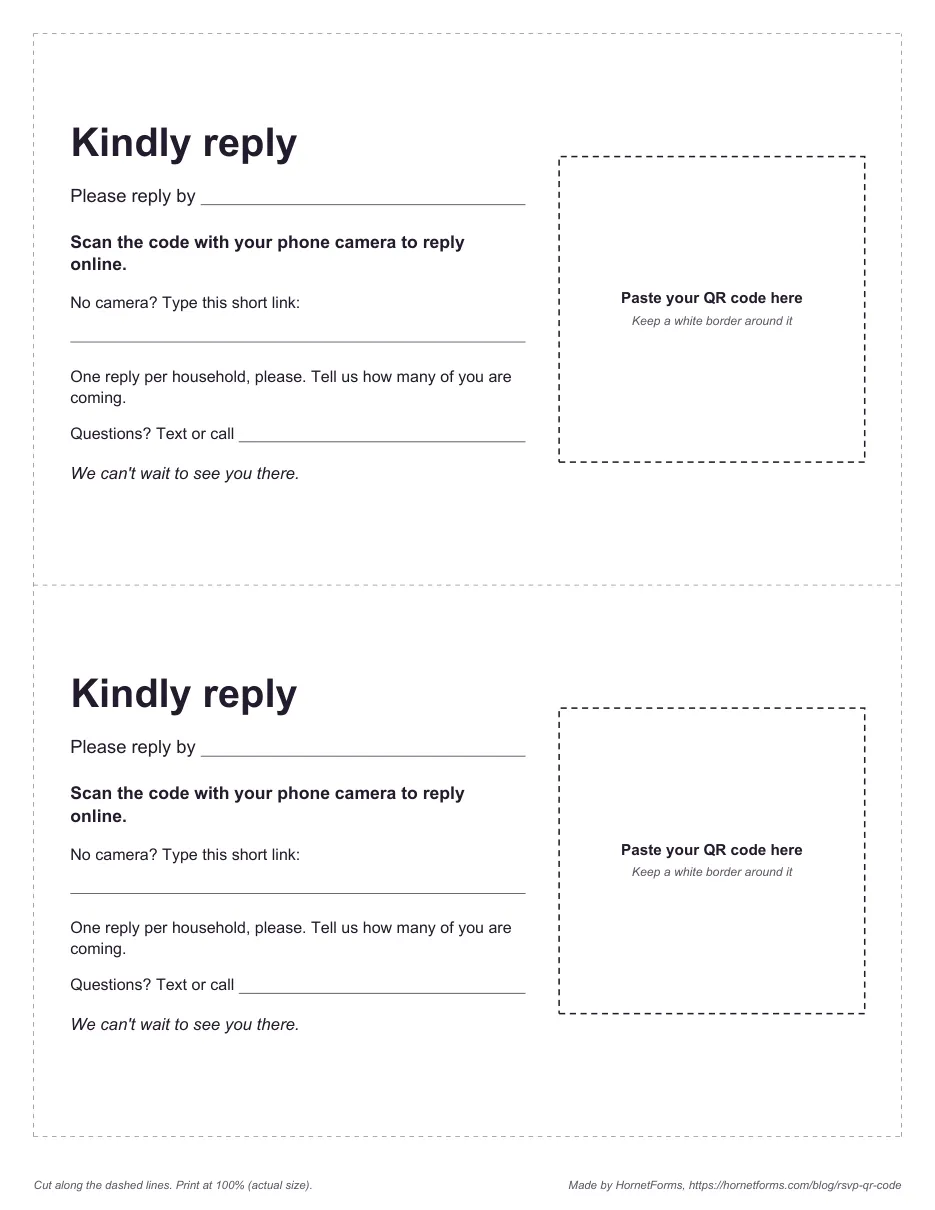
The two-per-page card. The four-per-page version keeps the date, scan wording, short link and household note, without the call line.
Test before you print#
Fifty cards with an RSVP QR code that won't scan is a bad afternoon. Test first:
- Print one page at 100%, or "actual size", on the paper you'll use. A "fit to page" setting can shrink the code.
- Scan it with three phones, an older one included, held where a guest would hold the card. Try it in normal room light, not just by a bright window.
- Send a real reply. Fill in the form from the scan, then check that the answer shows up on your Responses page.
- Type the short link into a phone browser by hand, exactly as printed.
- Check the closing setup. If you set a close date, make sure it's after your reply-by date, not before.
If the code is slow to read, make it bigger or give it more white space before you try anything clever.
One reply per household#
Here's a detail that trips people up. The code from the Share tab holds one plain link, so every guest who scans it opens the same form. That's fine, as long as the form collects one reply per household. There are two ways to do it.
One code on every card#
Print the same RSVP QR code on every invitation and let the form do the sorting. Ask for the household name and a party size. The wedding template asks "How many of you are coming?" and then a name and meal for each person. The plain RSVP template asks for the "Number of guests". Add "One reply per household, please" to the card, as our printable cards do. This is the simplest route, and it's what most people need.
A personal link for each household#
If you'd rather nobody retypes their name, send each household a personal link by text or email. HornetForms supports URL prefill and hidden fields on every plan, so a link that ends in ?household=The+Garcia+Family opens the form with that name already filled in. A link only fills a question whose Prefill parameter is set in the editor. The wedding template's household question comes with it set to household; on a question you add yourself, set it first.
https://forms.hornetforms.com/f/garcia-wedding?household=The+Garcia+Family
Keep the links in a spreadsheet and paste one into each message. Want a separate code on every printed card instead? The Share tab's code holds the plain link only. You would need a separate QR code tool to turn each personal link into its own image, then match every card to the right envelope. For most events, one shared code plus personal links by message is far less fiddly. Our post on tracking links with URL parameters shows more ways to use prefilled links.
Track who replied#
Once your RSVP QR code is out in the world, replies start arriving the day the invites land. Three settings keep you on top of them, all on every plan:
- Notifications. Turn on an email to yourself for each new response, so you see replies as they come in.
- Google Sheets. Connect the native Google Sheets integration and each reply becomes a new row. Our guide to where your form responses can go covers Slack, Discord and Notion too.
- Close date and response limit. Set the close date to the date and time on your card, and the form stops taking replies right on time. If space is tight, a response limit closes the form at your number. Either way, guests see a closed message you write yourself.
HornetForms has unlimited responses on every plan, Free included, so a long guest list won't push you to upgrade. Here's what happens when a form hits a response limit elsewhere. If you want to add your own questions, like a bus seat or a T-shirt size, here's which question type fits each one.
Then there's the question every host asks a week before the deadline: who hasn't answered? The free reply tracker answers it. List each household and how many you invited, paste your CSV export into the Responses tab, and it works out the rest.
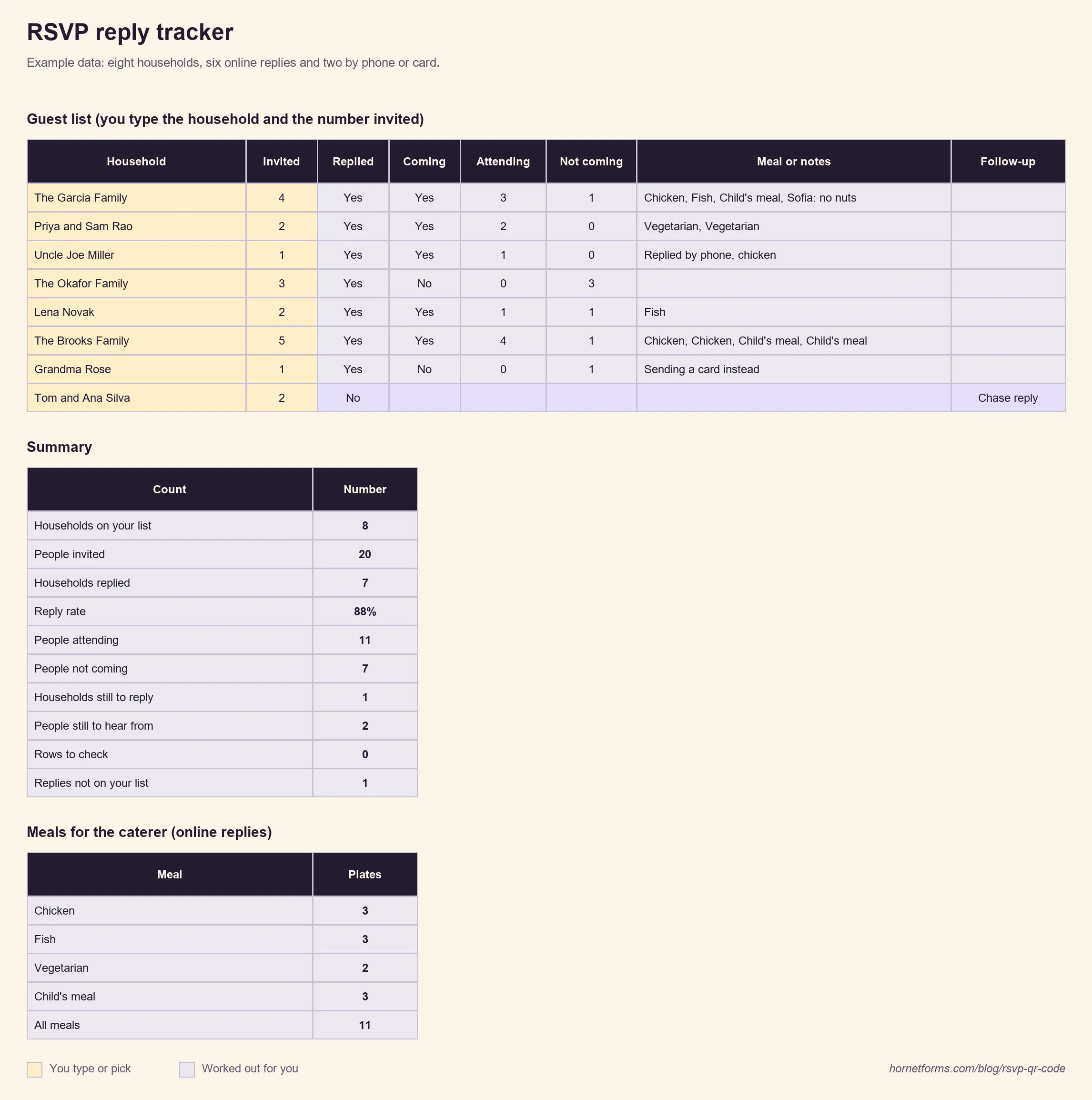
EXAMPLE data only. Clear the example rows and add your own households.
The tracker matches each online reply to a household by name. Replies by phone, text or card go in by hand, and a typed answer wins over an online one. Summary shows the reply rate, people attending and not coming, who is still to reply, and the plates of each meal from online replies. It reads the wedding template by default, and the Lists tab shows what to copy over for the plain RSVP template. Our RSVP tracker guide has more on keeping the list up to date.
Questions people ask#
How do guests RSVP with a QR code?#
They open the camera on their phone, point it at the code and tap the link that pops up. The form opens in the browser, they answer and press submit. No app and no account.
Can I use one RSVP QR code for the whole guest list?#
Yes. One code on every card is the usual setup. Ask for the household name and how many are coming, so each household sends one reply.
What should an RSVP card with a QR code say?#
The reply-by date, a short line on what the code does ("Scan to RSVP") and the short link for anyone who can't scan. A call or text line helps too.
Get the free RSVP cards and tracker#
- Printable RSVP cards, two per page: PDF, US Letter or PDF, A4.
- Printable RSVP cards, four per page: PDF, US Letter or PDF, A4.
- Editable cards: the Word (DOCX) version has both layouts, so you can type your date and link and paste your code into each box. Its last page lists the wording above and a print checklist.
- Reply tracker: the RSVP reply tracker for Excel and Google Sheets, or a plain CSV guest list for any spreadsheet app.
Every card has a dashed box that says "Paste your QR code here". Print a test page at 100% before the full run.
Print your cards this week#
Pick a template, publish it, set your slug and download the SVG. Add the code and the wording to your cards, test one, then print the lot. Check the pricing page if you want your own domain in the code. Sign up for free and your RSVP QR code is ready before the stamps are.
QR Code is a registered trademark of DENSO WAVE INCORPORATED.