
On this page
You booked the room, the food and the bus. Now 30 people owe you money, and it's arriving in four ways at once. Two paid cash at work, one sent a bank transfer with no name on it, and five said "I'll pay you Friday" three Fridays ago.
This guide shows how to collect money for an event without that mess: what you're collecting, the common ways to collect, and how to take names and money in one form, set a deadline, follow up with the people who haven't paid, and keep clean records. At the end there's a free event money tracker for Excel and Google Sheets.
How to collect money for an event: decide what you're collecting#
Before you decide how to collect money for an event, pin down what the money is for. It changes the amount, the wording and who needs a record.
| What you're collecting | The amount | Example |
|---|---|---|
| A ticket | Fixed per person, maybe with a lower price for kids or students | A school dance, a club dinner, a workshop |
| A share of a cost | The total cost divided by the people going | A reunion venue, a group trip, a team bus |
| A group gift | A suggested amount, or whatever people want to give | A leaving present, a coach's thank-you gift |
| Team or club fees | Fixed per player or per family | A season's kit, tournament entry |
| A donation | Whatever people choose | A fundraiser walk, a memorial collection |
Write the amount and the deadline in one sentence you can paste anywhere: "It's 40 per person for the dinner and drinks. Please pay by November 20." People pay faster when they don't have to ask what they owe.
If you're splitting a cost, decide what happens when fewer people sign up than you hoped. Either the share goes up, or you cover the gap. Say which in the first message, not after.
Ways to collect money for an event, and what each costs you#
There are four common ways to accept payments for an event. Each one moves the work to a different place, so the right pick depends on what you can live with. Collecting for a school, club or workplace? Check its rules on handling group money first.
| Way to collect | What's easy | Where the work goes |
|---|---|---|
| Cash and checks | Anyone can pay, with no app or account | Counting, carrying and depositing it, and writing down every name by hand |
| Bank transfer | A record at the bank for every payment | Matching transfers to people when the reference is missing or says "dinner" |
| A payment app | Quick for people who already use the same app | Not everyone has it, and the money often lands in your personal account |
| A payment form | Names, answers and money arrive together, in one list | Card processing fees, and a little setup at the start |
Two tips apply whatever you pick:
- Keep the group's money apart from your own. If it lands in your personal account, move it or log it the same day. Mixing them is how totals stop adding up.
- Write down every payment as it arrives. A name, an amount, how they paid and the date. That one line saves an evening of scrolling through messages later.
Most groups end up with a mix: a payment form for most people, plus cash from the two relatives who will never pay online. That's fine, as long as everything lands in one list. Already set on Google Forms? Our guide to a Google Form with payment walks through your options there.
Build it in HornetForms: names and money in one form#
When you work out how to collect money for an event online, a payment form does the matching for you. Each response holds the person's answers and their payment, so you never have to guess who sent what.
In HornetForms, a Payment block takes a one-time payment on Stripe's hosted Checkout page, on every plan, Free included. Here's how to take payment for an event this way:
- Connect your Stripe account. A workspace admin connects your own Stripe account once. The money goes straight to it, and you are the merchant of record.
- Build the form. Start from the paid event registration template at
forms.hornetforms.com/templates/paid-event-registration, or from a blank form. Ask for a name, an email and only what you need for the day. - Add the Payment block. Add it in the editor after your questions. Set a fixed price, or a price calculated from the answers.
- Set the deadline and the cap. Pick a close date and time, and a response limit if you have a set number of places (more on both below).
- Share the link. Paste it in the group chat, send it by email, or print the QR code for a flyer.
People answer your questions, press Submit and pay on Stripe's own page. HornetForms never sees or stores card data. Stripe's normal processing fees apply, and HornetForms adds no fee of its own. You'll find the plan details on the pricing page.
One payment for a family or a group#
To collect money for a group event, think about who pays. One response holds one person's answers, so a parent paying for three kids needs a way to pay once. Add a number question like "How many people are you paying for?" and a calculated field that multiplies it by the price. The Payment block then charges that calculated amount, and the form can show the running total before they press Submit. Our event registration form with payment guide walks through price rules like these, with a guest option.
Free places for some people#
Want some people to pay nothing, like volunteers or speakers? Hide the Payment block with logic for them, or let the price come out at 0, and the form completes normally with no payment step.
Who has paid, and who hasn't#
Emails, webhooks and integrations fire only after the payment goes through. Unpaid responses wait in an Awaiting payment tab.
If someone needs money back, refund them in your own Stripe Dashboard. HornetForms shows the refund status on their response.
Set a deadline and a cap#
A date gets people moving. A cap closes the form once the places are gone.
- Close date. Set a close date and time on the form, for example November 20 at 6 pm. After that, visitors see your own short closed-form message, like "Payments for the reunion are closed. Message Sam if you still want to come."
- Response limit. Set a response limit when places are fixed. A pending payment holds a place under the limit, so people on the Checkout page can't push the form past it.
- Count responses, not people. The limit counts replies, not heads, so a parent paying for three kids uses one place. Set the limit by responses, or keep each response to one person.
Our post on what happens when your form hits the response limit covers how the limit works. HornetForms doesn't count or cap your responses on any plan (within fair use), so any response limit is one you set yourself. If your places go to whoever signs up first, the first come, first served sign-up form guide covers caps and waitlists in more depth.
Good to know: set the form's deadline a few days before the date you really need the money. It leaves time for the last cash payments and for one round of follow-ups.
Follow up with people who haven't paid#
Every collection ends with a short list of people who said yes and haven't paid. Following up is your job, and a friendly personal note works better than a group blast.
Here's how to find them:
- On the payment form. Check the Awaiting payment tab for unpaid responses.
- Everyone else. Look in the tracker for anyone whose Status says Not paid or Part paid.
Then send your own message, by text, email or the group chat. Keep it short and include the link again:
Hi Tom! Just checking you still want a seat at the reunion dinner on Nov 28.
It's 40 per person, and payments close on Nov 20:
https://forms.hornetforms.com/f/reunion-dinner
Type the date into the tracker's "Last follow-up" column so you don't message the same person twice in a day. Two messages is plenty. After that, a phone call or a quick chat in person settles it.
To confirm a payment for them, you can turn on a confirmation email to respondents with your own subject and text. It goes out only after the payment goes through. You can turn on an email to yourself for each new response, too.
Keep records for your group#
Knowing how to collect money for an event is half the job. The other half is showing where it went, because group money is other people's money. Keep records anyone could check. Three habits cover most events:
- Export after each wave of payments. The CSV export has one row per response, with the payment columns: status, amount, currency, refunded amount, paid at and the Stripe payment ID.
- Log every cost. What it was for, who you paid, how much and whose money paid it. Keep a photo or copy of each bill.
- Share a summary at the end. Money in, money out, and what's left. If there's money left, say what happens to it before anyone asks.
If your event raises money for a charity#
If you're working out how to collect money for an event that supports a charity, there are extra rules, because part of a ticket can count as a donation. The IRS explains this in Publication 1771 (Rev. 11-2023, checked November 2, 2026):
"An organization must provide a written disclosure statement to a donor who makes a payment exceeding $75 partly as a contribution and partly for goods and services provided by the organization."
Its own example is a donor who pays $100 for a concert ticket with a fair market value of $40: "the donor’s tax deduction may not exceed $60." So if your charity dinner costs more than $75 and includes a meal, the charity may need to give buyers that statement. Rules depend on your situation, so check with your adviser before you write the ticket wording. For pledges rather than fixed tickets, our pledge form template tracks pledged, received and balance.
Get the free event money tracker#
The free event money tracker opens in Excel and Google Sheets. It keeps every payment in one list, however it arrived. It has six tabs:
- Start here. Six steps from an empty sheet to a full summary.
- Summary. Money in (total due, collected, still to collect, share collected), people by status, totals by how people paid and days to your deadline. Then money out: costs, money owed back to anyone who fronted a cost, what's left and the cost per person so far.
- People. One row per person. You type the name, an email or phone number, what they're paying for, what they've paid, how and when. Leave the amount due blank to use your default, or type a different amount. Balance, Status and "Follow up?" work themselves out.
- Spending. One row per cost, with whose money paid it, whether they've been paid back and whether you kept proof of payment.
- Settings. The amount each person owes and your money deadline.
- Lists. The dropdown options, which you can rename.
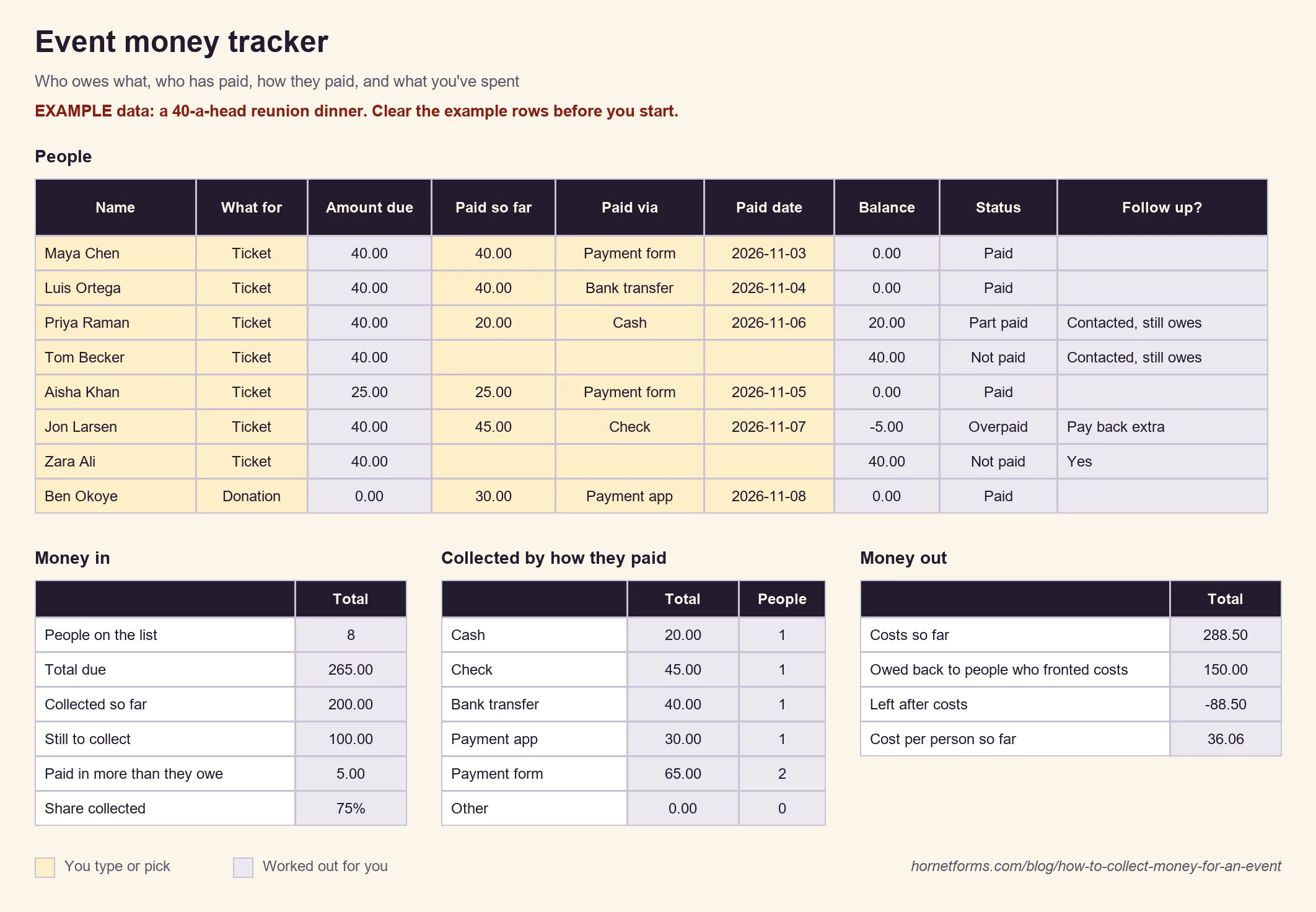
Made-up example rows. Clear them on People and Spending before you add your own.
Cash, checks, transfers and app payments go in by hand. For payments through the form, copy the Payment amount and Payment paid at columns from your CSV export. Those amounts are what people paid, before Stripe's processing fees. There's also a CSV with the People columns and four example rows, for any spreadsheet app.
Collecting at the door on the night? Print the form's QR code (PNG or SVG from the Share tab) for the table, and people can pay on their phones. Our guide on how to make a QR code for a form covers where to put it. Running a fundraiser quiz with an entry fee? The quiz with a QR code guide shows that setup. For a free event where you only need a headcount, an online RSVP and the RSVP tracker do the job.
Collect for your next event this week#
Pick what you're collecting and write the one-sentence ask. Build a form with a Payment block, set a close date a few days early, and paste the link in the group chat. Then keep the tracker open and log every payment the day it lands. That's how to collect money for an event without a single "I'll pay you Friday" slipping through. Sign up for free and collect the money for your next reunion, team trip or club dinner without chasing anyone twice.