
On this page
A pledge is a promise. Someone at your gala, your church or your capital campaign says "count me in for $1,200", and then life happens. Three months later, nobody on the committee is sure who promised what, who has given, or who to call. The promise was real. The paperwork wasn't.
A good pledge form template fixes that. It gets the promise down in the donor's own words, with an amount, a date and a signature. This guide covers what to ask, how to run paper pledge cards at an event, and how to take an optional gift on the spot. It also shows how to track pledged, received and balance in one sheet. At the end you'll find a printable pledge form and pledge cards (PDF and Word) and a free pledge tracker for Excel or Google Sheets.
What a pledge form is (and how it differs from a donation form)#
A donation form takes money now. A pledge form records a promise to give later, sometimes with a first gift today. The donor says how much they plan to give in total and how they plan to get there. Your team keeps the record and follows up. A gift of goods or time instead of money belongs on an in-kind donation form.
That difference shapes every question. A donation form needs an amount and a payment. A pledge form needs the total, the donor's own plan, a "fulfil by" date and a clear statement the donor agrees to. Payment is optional, and for many pledges it never happens in the form at all. People give later by check, bank transfer or a gift at the next event.
Pledge forms turn up in a few places:
- Capital and building campaigns, where people promise a larger amount over a year or two
- Annual appeals and church giving, where members state what they plan to give this year
- Gala and dinner pledge drives, where cards sit on every table
- Peer-to-peer and school campaigns, where a sponsor pledges toward a walk or a read-a-thon
Asking local businesses rather than individuals? A donation request form and a short letter suit that ask better.
What to ask on a pledge form template#
Keep it to what you need to record the promise, reach the donor and thank them properly. Here's the set this pledge form template uses, split over two short pages:
| Question | Type | Why it's there |
|---|---|---|
| Full name | Short text, required | For your pledge list |
| Email, required | How you reach the donor and send a thank-you | |
| Phone | Phone, optional | For donors who would rather get a call |
| Mailing address | Long text, optional | Only if you send thank-you letters by post |
| Name for our donor list | Short text, optional | "The Garcia family" reads better on a donor wall than a full legal name |
| Listing choice | Multiple choice | "Please list the name above" or "Please do not list my name" |
| Total amount I pledge | Number, required | The promise itself |
| My giving plan, in my own words | Short text, required | For example "all by December 31" or "part now, the rest by June" |
| I plan to finish by | Date, optional | Gives your follow-up a target |
| A gift today? | Multiple choice, required | "Yes, all of my pledge", "Yes, part of it" or "Not today" |
| Amount for today | Number, shown for "part of it" | Only when the donor gives part of the pledge now |
| Pledge statement | Checkboxes, one option, required | "I intend to give the amount above, in the way and by the date I wrote above" |
| Signature | Signature | Many pledge programs like a signed promise |
Two fields stay out of sight. A hidden campaign field records which appeal the pledge belongs to, and a calculated field called gift_today works out what to charge now, if anything. Not sure which question type fits your own extras? Here's which question type to pick.
Let donors describe their own plan#
The giving plan is a short text question on purpose. Donors know their own budgets. One wants to give everything after a bonus in December. Another wants to give part now and the rest after the house sale. Let them say it in their words. Then your team picks a next follow-up date for each pledge in the tracker.
Use the hidden field for each campaign#
One pledge form template can serve several appeals. Give each appeal its own link with the campaign value in it, and every response arrives tagged:
https://forms.hornetforms.com/f/<your-slug>?campaign=roof-appeal
https://forms.hornetforms.com/f/<your-slug>?campaign=scholarship-fund
Hidden fields arrive as their own columns in Google Sheets, so you can filter by appeal later.
Pledge cards for events#
At a gala or a church service, paper still wins. People sit at tables, a speaker makes the ask, and a card in front of each guest turns a warm moment into a written promise. The printable pledge card fits two to a page: print, cut along the line, and set them out on tables.
Each card asks for the same essentials as the online form. That means name, email or phone, the total pledge and the giving plan in the donor's words. It also asks for a finish date, a gift today and a signature. A small "For our team" line holds the pledge ID and your next follow-up date.
A QR code gives guests a second way in. Every HornetForms form gets a QR code (PNG or SVG) on its Share tab. Print it on the table card or put it on the screen during the ask, and guests who'd rather type than write can pledge on their phone. They never need an account or a sign-in.
Good to know: collect the cards before dessert, not at the end of the night. Then type each card into the tracker within a day or two, while the room is still fresh in everyone's mind.
Take an optional gift today#
Some donors want to give part of their pledge on the spot. HornetForms has a Payment block that takes a one-time payment on Stripe's hosted Checkout page, right after the last question. It works on every plan, including Free. The pledge form template only charges what the donor chooses to give today. Everything else stays a promise on your list.
Connect Stripe and set the gift from the answers#
A workspace admin connects your own Stripe account once. The money goes straight to your Stripe account, and your organization is the merchant of record. HornetForms never sees or stores card data, because donors pay on Stripe's own page. Stripe's normal processing fees apply, and HornetForms adds no fee of its own.
Then let logic set the amount. The calculated field gift_today sits on page two, where donors never see it, and three rules fill it in:
A gift today? is "Yes, all of my pledge"   → gift_today = Total amount I pledge
A gift today? is "Yes, part of it"         → show and require "Amount for today",
                                             gift_today = Amount for today
A gift today? is "Not today"               → hide the Payment block
Add a Payment block after the last question, set its price to come from gift_today, and pick your currency. Each form has one Payment block and one currency. When "Not today" hides the Payment block, the form completes normally with no payment step, so a pledge-only response is just a pledge. Our logic, piping and calculations guide walks through rules like these step by step.
What happens while someone pays#
Until a donor finishes on Stripe's page, their response waits in an Awaiting payment tab, apart from your finished pledges. Emails, webhooks and integrations fire only after the payment goes through. Refunds happen in your own Stripe Dashboard, and HornetForms shows the refund status on the response.
The event registration form with payment walks through the same Payment block for a paid event, and the silent auction donation form covers the item side of a fundraising night.
Track pledges against gifts in your sheet#
Every pledge form template needs a list behind it. The free pledge tracker opens in Excel and Google Sheets. It has two typing tabs and works out the rest.
- Pledges. Give each pledge an ID of your own (P-001, P-002 and so on). Type the donor, the amount pledged, the giving plan in the donor's words and the fulfil-by date. Take them from the form's Responses page or from a paper card.
- Next follow-up date (your own). Type the day you plan to contact each donor next. You pick it, and your team gets in touch on that day.
- Gifts. Each time money comes in, type the date, the pledge ID and the amount. For gifts made in the online form, copy Payment paid at and Payment amount from your CSV export. Type the date you send each acknowledgment, too.
- Read the status. Each pledge gets Received, Balance, Days to follow-up and a status.
The statuses tell you who to call this week:
- Paid in full when the gifts reach the amount pledged
- Follow up soon when your follow-up date is within 14 days (change the window on Settings)
- Follow-up overdue once that date has passed
- Past fulfil-by date when a balance is left after the donor's own date
- Add a follow-up date for open pledges with no date yet
- Closed when you type Y because the pledge ended before it was paid in full
- On track for everything else
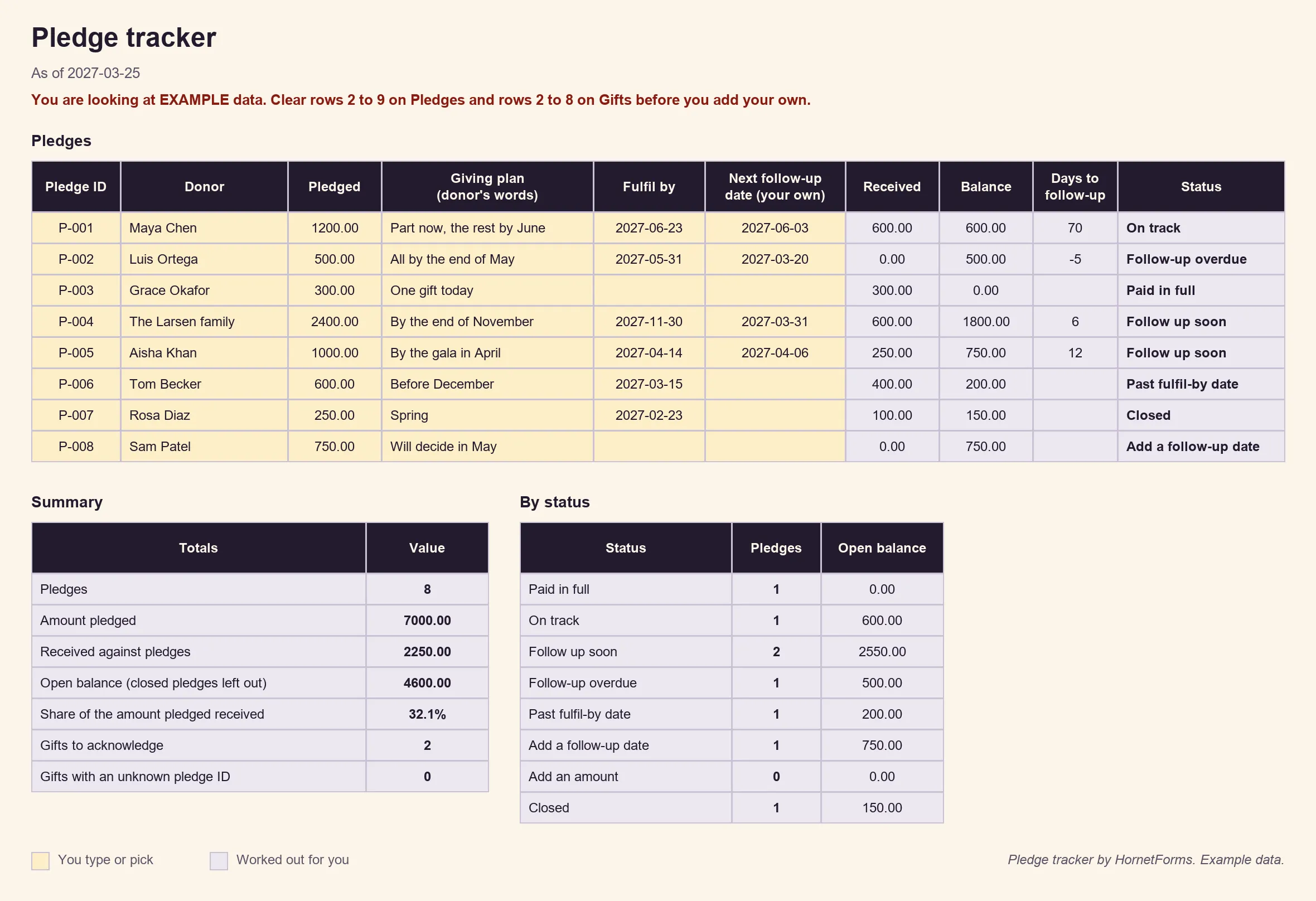
EXAMPLE data only: the people, dates and amounts are made up. Clear the example rows before you add your own.
The Summary tab adds up the amount pledged, what you've received, the open balance and the share received. It also counts gifts you still need to acknowledge and gifts typed against a pledge ID that doesn't exist. There's also a CSV with just the pledge list headers if you'd rather build a list of your own.
Prefer rows that arrive on their own? Connect Google Sheets, on every plan, and each finished pledge lands as a new row with a "Response ID" and a "Submitted at" column. You can also turn on an email to yourself for each new response, or send pledges to Slack. Here's how to send form responses to Google Sheets, Slack or Notion.
Acknowledge gifts in writing#
In the US, the IRS sets out what a written acknowledgment for a charitable gift looks like in Publication 1771. The rule that matters most for a pledge drive is the $250 line:
"A donor cannot claim a federal income tax deduction for any single contribution valued at $250 or more unless the donor obtains a contemporaneous written acknowledgment of the contribution from the donee charitable organization."
(IRS Publication 1771, Charitable Contributions: Substantiation and Disclosure Requirements, Rev. 11-2023, accessed 28 October 2026)
The same publication lists what the written statement contains. In the IRS's words, it includes "the name of the organization", "the amount of any monetary contribution" and "a statement that no goods or services were provided by the organization in return for the contribution, if that was the case". It also gives sample wording you can adapt:
"Thank you for your cash contribution of $300 that (organization’s name) received on December 12, 2015. No goods or services were provided in exchange for your contribution."
Two more lines from Publication 1771 help with the how. "Letters, postcards, or computer-generated forms with the above information are acceptable." And an organization "can provide the acknowledgment electronically, such as via an email addressed to the donor."
That's why the tracker logs an acknowledgment date for each gift that comes in, not for the pledge. A pledge is a promise; the gifts are what your organization receives. Rules differ by country and by situation, so check with your adviser before you settle your own acknowledgment wording.
For a gift made in the online form, you can turn on the respondent confirmation email. Pick the Email question in the notification settings and write your own subject and message. With a Payment block, it goes out only after the payment goes through.
Get the pledge form template#
Build the online version from a blank form, with the table above as your list:
- Add the "About you" questions on page one and the pledge questions on page two.
- Add the hidden
campaignfield and the calculated fieldgift_today. - Add the three rules for "A gift today?".
- Optional: add the Payment block with its price from
gift_today. - Set a close date for the end of the campaign, if it has one.
That's your pledge form template, online. Then grab the downloads:
- The pledge tracker: pledge-tracker.xlsx for Excel and Google Sheets
- The printable pledge form: PDF, US Letter, PDF, A4 or Word (DOCX), so you can add your logo and campaign name
- The pledge cards, two per page: PDF, US Letter, PDF, A4 or Word (DOCX)
The printable pledge form ends with a "For our team" box: pledge ID, date received, who took it, any gift today, your next follow-up date and the date you acknowledged the gift. It asks the same questions as the online form, so paper and online pledges sit side by side in the tracker.
Running a membership drive too? A membership application form works the same way: a form for the people, a sheet for the money. And if your volunteers fill in a volunteer application form, the same tracker habits carry over. Collecting ticket money for the gala itself? See how to collect money for an event.
HornetForms has unlimited responses within fair use on every plan, so a busy pledge night never stops at a plan's response cap. On the Free plan, the form shows a small "Made with HornetForms" badge. On the Pro and Business plans, you can remove it and add your logo and a cover image. The pricing page lists what each plan includes.
Open your pledge form this week#
A pledge form template that works asks for the total, the donor's own plan, a date and a signature. It can take an optional gift today on Stripe's page, and it feeds a tracker that shows pledged, received and balance at a glance. Your team picks the follow-up dates and makes the calls. The features page has the wider tour. Sign up for free and open your pledge form today.