
On this page
Not every gift arrives as money. A bakery offers bread for the spring fair. A parent drops off a box of children's books. A local firm has two laptops it no longer needs, and a volunteer offers an afternoon of face painting. Each gift needs the same things from you: a record of what it is, a plan to get it in the door, and a thank-you that says the right thing.
An in-kind donation form handles the first two. It asks every donor the same questions, in the same order, so nothing gets lost in a text thread. This guide covers what to ask, how goods and services differ, what the IRS says a written acknowledgment should contain, and how to keep a log of every gift. At the end you'll find a free printable form (PDF and Word) and an in-kind gift log for Excel or Google Sheets.
What counts as an in-kind donation#
An in-kind gift is anything a donor gives that isn't money. It falls into two groups:
- Goods: food, clothing, books, furniture, laptops, printing, raffle prizes, a piano.
- Services: time and skills, like face painting at an event, a free legal review or a website build.
The difference matters for your form and for the thank-you. With goods, you need to know what the item is, what shape it's in and how it reaches you. With services, you need to know what the person will do and when. The IRS treats the two differently too, which we'll get to below.
What to ask on an in-kind donation form#
Ask what you need to plan for the gift, collect it and thank the donor. Here's the set we use in this guide, over two short pages:
| Question | Type | Why it's there |
|---|---|---|
| Who is giving? | Multiple choice | A person or a business. Businesses get one extra question |
| Business or organization name | Short text, shown to businesses | For your records and the thank-you |
| Your name, email, phone | Short text, email, phone | Who to call about the gift |
| Mailing address | Long text, optional | Only if you post thank-you letters |
| What are you giving? | Multiple choice | Goods or items, or services or skills. Sets which questions show next |
| What is the item? Describe it | Short text, long text | The words you'll use in the thank-you |
| Quantity and condition | Number, multiple choice | New, like new, good used or fair |
| Your estimated value | Number | The donor's own figure |
| Photos of the item | File upload, up to three | So you can say yes or no before it arrives |
| How will it reach us? | Multiple choice | Drop off, pickup or shipping |
| Pickup address and best times | Long text, shown for pickups | So a volunteer knows where to go |
| What service are you offering? When? | Long text, short text | Shown only for services |
| Anything we should know? | Long text, optional | Conditions, expiry dates, how they'd like to be thanked |
Add a hidden source field too. It records which letter, poster or volunteer brought the gift in when the link carries it, like ?source=spring-letter. Not sure which question type fits your own extras? Here's which question type to pick.
Let the donor set the value#
The "Your estimated value" question needs a short note under it: "Your own estimate. We don't value gifts." That line sets the right expectation. The donor knows what they paid and what shape the item is in. Your job is to describe the gift and thank them, not to put a price on it. The next section shows why that matters for the thank-you letter.
Ask for photos before the truck arrives#
A photo question saves a lot of awkward pickups. A file upload question takes up to 10 files, and you can limit it to image types. Three is plenty for most items. On the Free plan each file can be up to 10 MB, and Pro and Business have no plan cap. Donors never need an account or a sign-in to fill in the form or upload a photo.
Goods vs services: one form, two paths#
A single "What are you giving?" question does the sorting. Then a few logic rules show the right questions to each donor:
What are you giving? is "Goods or items"
  → show: What is the item?, Describe it, Quantity, Condition,
          Your estimated value, Photos of the item, How will it reach us?
What are you giving? is "Services or skills"
  → show: What service are you offering?, When can you offer it?
How will it reach us? is "Please pick it up"
  → show and require: Pickup address and best times
Who is giving? is "A business or organization"
  → show and require: Business or organization name
Logic can show, hide and require questions on every plan. Our logic, piping and calculations guide walks through rules like these step by step.
Why no value question for services? IRS Publication 1771 puts it plainly: "Generally, donors cannot deduct the value of services donors give to a charitable organization." (IRS Publication 1771, Rev. 11-2023, accessed 28 October 2026). So your in-kind donation form asks what the service is and when, and the thank-you describes the work.
Acknowledgment and receipt wording from the IRS#
This is the part most groups get wrong, so here is what the IRS's own guide for charities says. All quotes come from IRS Publication 1771 (Rev. 11-2023), accessed 28 October 2026.
First, when a written thank-you is needed: "Donors are responsible for obtaining a contemporaneous written acknowledgment from a charitable organization for any single monetary contribution or noncash contribution valued at $250 or more before donors can claim a charitable deduction on their federal income tax returns."
Second, what goes in it. The organization provides a statement containing, among other things, "a description (but not the fair market value) of any contribution of property". It also says whether you gave the donor anything in return. If you gave nothing, say so. If you gave something, like event tickets, describe it and give a "good faith estimate of the fair market value" of what you gave.
Third, the form it takes: "Letters, postcards, or computer-generated forms with the above information are acceptable." An email to the donor works too. And on timing: "Charities typically send written acknowledgments to donors no later than January 31 of the year following the donation."
The Publication even gives sample wording for goods:
"Thank you for your contribution of a used oak baby crib and matching dresser that (organization's name) received on March 15, 2015. No goods or services were provided in exchange for your contribution."
Notice what's missing: a dollar figure. The acknowledgment describes the crib. It doesn't value it. So the donor's estimate from your in-kind donation form stays in your records, and the letter carries the description.
Bigger gifts and Form 8283#
Gifts with a high value bring in one more IRS form, and it's the donor's form, not yours. The Instructions for Form 8283 (Rev. December 2025, accessed 28 October 2026) say: "You must file one or more Forms 8283 if the amount of your deduction for each noncash contribution is more than $500." Section B covers "donations of property for which you claimed a deduction of more than $5,000 per item or group of similar items." For those, "The donee organization that received the property described in Part I of Section B must complete and sign the Donee Acknowledgment in Part V."
In plain terms: for a gift like a piano, a donor may bring you a Form 8283 to sign. Your gift log flags those rows so the request doesn't surprise you.
Good to know: this is general information from IRS publications, not tax advice. US rules only. The donor values the gift, and the response to your form is a record of their offer, not a tax receipt. Check with your adviser for anything beyond that.
What happens after someone fills in the form#
An in-kind donation form is an offer. The gift isn't yours until it arrives, so a few settings help in between:
- Thank them for the offer. Turn on the respondent confirmation email, pick the Email question and write your own subject and message, like "Thanks for offering a gift. We'll be in touch about drop-off." It goes out when they submit, so keep it about next steps. Send the written acknowledgment yourself once the gift arrives, with the date you received it.
- Hear about new offers. Owner notifications start off. You can turn on an email to yourself for each new response, or send each one to a Slack or Discord channel.
- Hand pickups a PDF. Download any response as a PDF on every plan. Give it to the volunteer who collects the item, so they know what to pick up and where. It's a copy of the donor's answers for your records.
- Close it for a drive. Running a coat drive with an end date? Set a close date in the form settings, and visitors see your own short message once it closes.
HornetForms has unlimited responses within fair use on every plan, so a busy drive never stops at a plan's response cap.
Log every gift in Google Sheets or Excel#
Offers come in through the form. The rest happens in a sheet: the item arrives, someone signs for it, and someone sends the thank-you. The free in-kind gift log keeps all of that in one place. It opens in Excel and Google Sheets.
- Export your responses. Open the form's Responses page and download the CSV. Or connect Google Sheets on any plan, and each response lands as a new row with a "Response ID" and "Submitted at" column. Either layout works, because the log finds columns by their names.
- Paste them in. Paste the CSV at cell A1 of the Gifts tab, headers included. Paper forms go on new rows under the same headers.
- Type what happened. In the yellow columns, type the date each gift arrived, who took it in, anything you gave in return and the date you sent the acknowledgment.
- Set your details. On the Settings tab, type your organization's name and how many days you give yourself to send an acknowledgment. That window is your choice.
- Work the Status column. Each gift shows Waiting for the gift, Send acknowledgment, Past your window or Acknowledged.
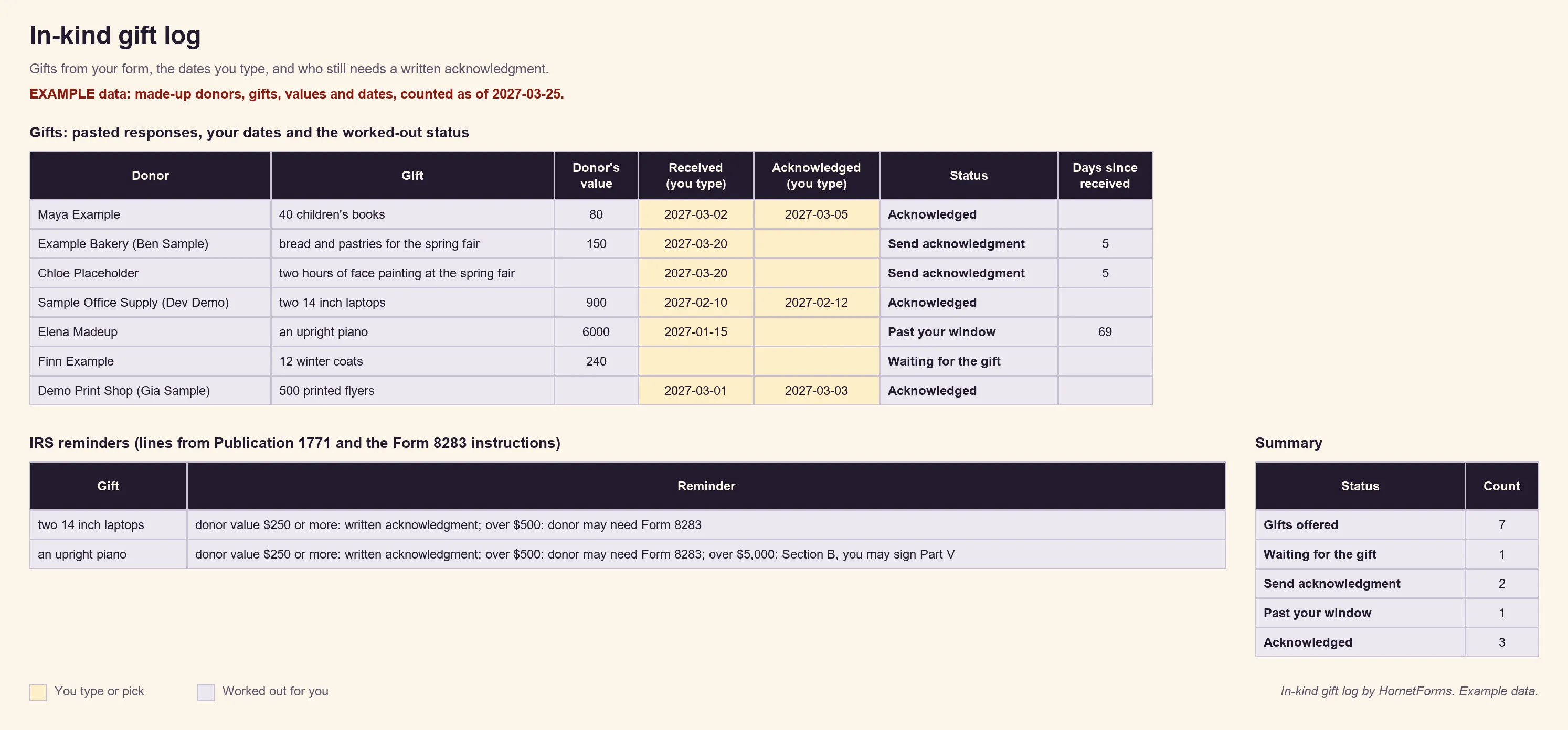
EXAMPLE data only: the donors, gifts, values and dates are made up. Clear the example rows before you paste your own.
Two grey columns do the IRS homework for you. IRS reminders flags gifts where the donor's own value is $250 or more, over $500 (the donor may need Form 8283) or over $5,000 (Section B, so you may be asked to sign Part V). Draft acknowledgment writes a first sentence in the Publication 1771 style once you type a received date, like "Thank you for your contribution of 40 children's books that Example Community Pantry received on March 2, 2027. No goods or services were provided in exchange for your contribution." It never includes the donor's value. Edit it before you send it.
The Summary tab counts gifts by status and adds up the donors' own estimates for gifts you've received. Those totals are the donors' figures, not an appraisal. There's also a CSV with just the column headers if you'd rather build a sheet of your own. For other places your answers can go, here's how to send form responses to Google Sheets, Slack or Notion.
Printable in-kind donation form#
Plenty of in-kind gifts get offered in person: at the front desk, at a food drive table or on a visit to a local shop. The printable version of this in-kind donation form asks the same questions, so paper and online gifts fit the same log:
- PDF, US Letter
- PDF, A4
- Word (DOCX), so you can add your logo and your contact details
The form ends with a signature line and a box for the office: received on, received by, anything given in return and the date you sent the acknowledgment. Its last page holds two acknowledgment samples built on the Publication 1771 wording, one for when you gave nothing in return and one for when you did, plus a short checklist to read before you send it.
A QR code helps here too. Every form gets one (PNG or SVG) and a custom slug, so a poster at the drop-off point can send donors straight to the online form. At a fair, send the link to the stallholders from your vendor application form too, in case they'd like to give a raffle prize.
Get the in-kind donation form template#
Build this one from a blank form, with the table above as your list:
- Add the About you questions on page one, plus the hidden
sourcefield. - Add "What are you giving?" on page two, then the goods questions and the services questions.
- Add the logic rules from the goods vs services section.
- Write the confirmation email and choose who hears about new offers.
That's your in-kind donation form, online. Then grab the downloads:
- The gift log: in-kind-gift-log.xlsx for Excel and Google Sheets
- The printable form: the Letter PDF, A4 PDF or Word file
Collecting items for an auction instead? The silent auction donation form covers catalogue text, opening bids and bid sheets. Asking supporters to pledge a gift? A pledge form template does that job. Need to ask local businesses for gifts in the first place? Start with a donation request form and letter.
On the Free plan, your form shows a small "Made with HornetForms" badge. On Pro and Business, you can remove it and add your logo and a cover image. The pricing page lists what each plan includes.
Start collecting in-kind gifts this week#
A good in-kind donation form asks what the gift is, what shape it's in and how it reaches you, and lets the donor set the value. Goods and services each get their own questions. Once a gift arrives, the log tells you who still needs a written thank-you, and the IRS wording keeps it to a description. The features page has the wider tour. Sign up for free and open your in-kind donation form today.