
On this page
Every silent auction starts with an item hunt. Someone from the committee walks down the high street with a stack of paper forms. Half come back without a value, a few come back without a description, and nobody has a photo. Then the night before the event, somebody types the whole catalogue from scratch.
A silent auction donation form fixes the first part of that. Every donor tells you the same things in the same shape: what the item is, what it's worth, what strings come with it and how it reaches you. This guide covers what to ask, how to use the donor's estimate for opening bids, and how to collect items by a deadline. At the end you'll find a free template, a printable donor form, bid sheets and a workbook that turns the answers into a catalogue.
What a silent auction donation form should ask#
Ask what you need to catalogue the item, thank the donor and get the item into the room. Here's the full list from our template:
| Question | Type | Why you need it |
|---|---|---|
| Who is donating? | Multiple choice | A person or a business. Businesses get two extra questions |
| Business or organization name | Short text, shown to businesses | For the catalogue credit and your thank-you note |
| Your name, email, phone | Short text, email, phone | Who to call about the item |
| How should we credit you? | Multiple choice | The name above, a different name, or no public credit |
| Name to print in the catalogue | Short text, shown when needed | "The Sample Family" instead of one person's name |
| Business logo for the catalogue | File upload, shown to businesses | So the donor's logo can sit next to their item |
| Item name | Short text | The title bidders see first |
| Describe the item as bidders should read it | Long text | This becomes the catalogue text |
| Estimated value | Number | The starting point for the opening bid |
| Restrictions or expiry | Long text | Dates, blackout days, "for two people" |
| Photo of the item | File upload, up to three | For the catalogue, the display table and your posts |
| How will the item reach us? | Multiple choice | Drop off, pickup, or a voucher by email |
| Pickup address and best times | Long text, shown for pickups | So a volunteer knows where to go and when |
About the donor#
Start with one question: "Who is donating?" with "Me personally" or "A business or organization". When a business answers, the form shows a required business name and an optional logo upload. Everyone else never sees them. A rule like this takes one line of conditional logic, and our logic, piping and calculations guide shows how it works.
Then ask how the credit should read. Some donors want their shop name in big letters. Others want a family name, and some want no credit at all. When someone picks "Use a different name", the form asks for the exact name to print in the catalogue and makes it required.
About the item#
The item questions do the catalogue work. Ask for a short item name with an example in the placeholder, like "Dinner for two at Rosa's". Then ask for a description written for bidders, not for you.
Good to know: ask for the description in the donor's own words, then edit it. Your catalogue is only as good as this field, and the donor knows what makes the item special.
Add "Restrictions or expiry" as its own question. Expiry dates and blackout nights are easy to miss on a busy night, so get them in writing before the item goes on a table. A photo upload helps too: the template allows up to three photos, and the field says they're optional. Not sure which question type fits a field? Here's which question type to pick.
Finish with delivery. "I'll drop it off", "Please pick it up" or "It's a voucher or certificate I'll email". When someone needs a pickup, the form asks for the address and the best times, and makes that answer required.
Values, opening bids and what the estimate is for#
The "Estimated value" question is a number, with a short note under it: "Your best estimate in your local currency. We use it to set the opening bid." That note matters, because it tells the donor why you're asking.
One simple approach: set the opening bid as a share of the estimate, then raise bids in fixed steps. There's no standard share, so it's your call. Start low and more people may write a first bid. Start high and the item won't go for far less than it's worth. You may want bigger steps for bigger items, so a weekend away doesn't crawl up a few dollars at a time.
Our silent auction workbook leaves those choices to you. Its settings for the opening bid share, two value limits and three bid steps ship empty. Next to them sit an "Example" column with sample numbers and an "In use" column that shows the number the sheet is using. If you leave a setting empty, the opening bids stay blank once you clear the example rows. The sheet never works out a bid from a number you didn't type.
For US groups, one note on what the estimate is not. The IRS page on written acknowledgments covers contributions of $250 or more. It says an acknowledgment includes a "description (but not value) of non-cash contribution" (IRS, Charitable contributions: written acknowledgments, page last updated 28 June 2026, accessed 27 October 2026). So the donor's estimate on your silent auction donation form is a number for setting bids. This is general information, not tax advice, so ask your accountant about anything beyond that.
Collect auction items by a deadline#
A silent auction donation form needs a finish line, because the catalogue has to go to print. Set two dates in the form settings, both on every plan:
- A scheduled opening date. The form opens at the date and time you choose, so you can share the link early. Visitors see a notice until then.
- A close date. The form stops taking responses at your item deadline. We'd suggest closing it a couple of weeks before the event, so there's time to write the catalogue and chase missing photos. That's our suggestion, not a rule.
Then get your silent auction donation form in front of donors. A QR code for the ask letter and a custom slug for the flyer both work on every plan. Need words for the letter itself? Our donation request form guide includes one. The template also has a hidden source field, so each response records which letter or volunteer brought the item in when the link carries it:
https://forms.hornetforms.com/f/<your-slug>?source=board-letter
https://forms.hornetforms.com/f/<your-slug>?source=volunteer-sam
To hear about items as they arrive, turn on owner email notifications. A message to the committee's Slack or Discord channel works too, and hidden fields like source show up in it. Here's how to send form responses to Google Sheets, Slack or Notion. If the link sits on a public flyer, it's worth a look at spam protection that doesn't annoy humans.
Every response lands in the responses table, which has search and filters. HornetForms has unlimited responses on every plan, so a big item drive never runs into a response cap halfway through.
From responses to bid sheets in one paste#
The free silent auction workbook turns your silent auction donation form responses into a catalogue, bid sheets and a thank-you list. It opens in Excel and Google Sheets.
- Fill in your settings. On the Start here tab, type your event name, currency symbol, opening bid share, value limits and bid steps in the yellow cells.
- Export your responses. In HornetForms, open Responses, then Export, then CSV.
- Paste them in. On the Items tab, clear the EXAMPLE rows, then paste the CSV at cell A1, headers included. The sheet finds columns by their names, so the order doesn't matter.
- Check each item. Grey columns show the item number, bid increment, opening bid and credit line. A "Check this item" column flags a missing value or a description that's too short, so you know whom to ask.
- Print. The Catalogue tab lists every item by number. On the Bid sheets tab, type an item number in the yellow cell and print, then change the number and print again.
Item numbers follow the order items came in, oldest first, so pasting a newer export keeps the old numbers. The workbook has room for 200 items.
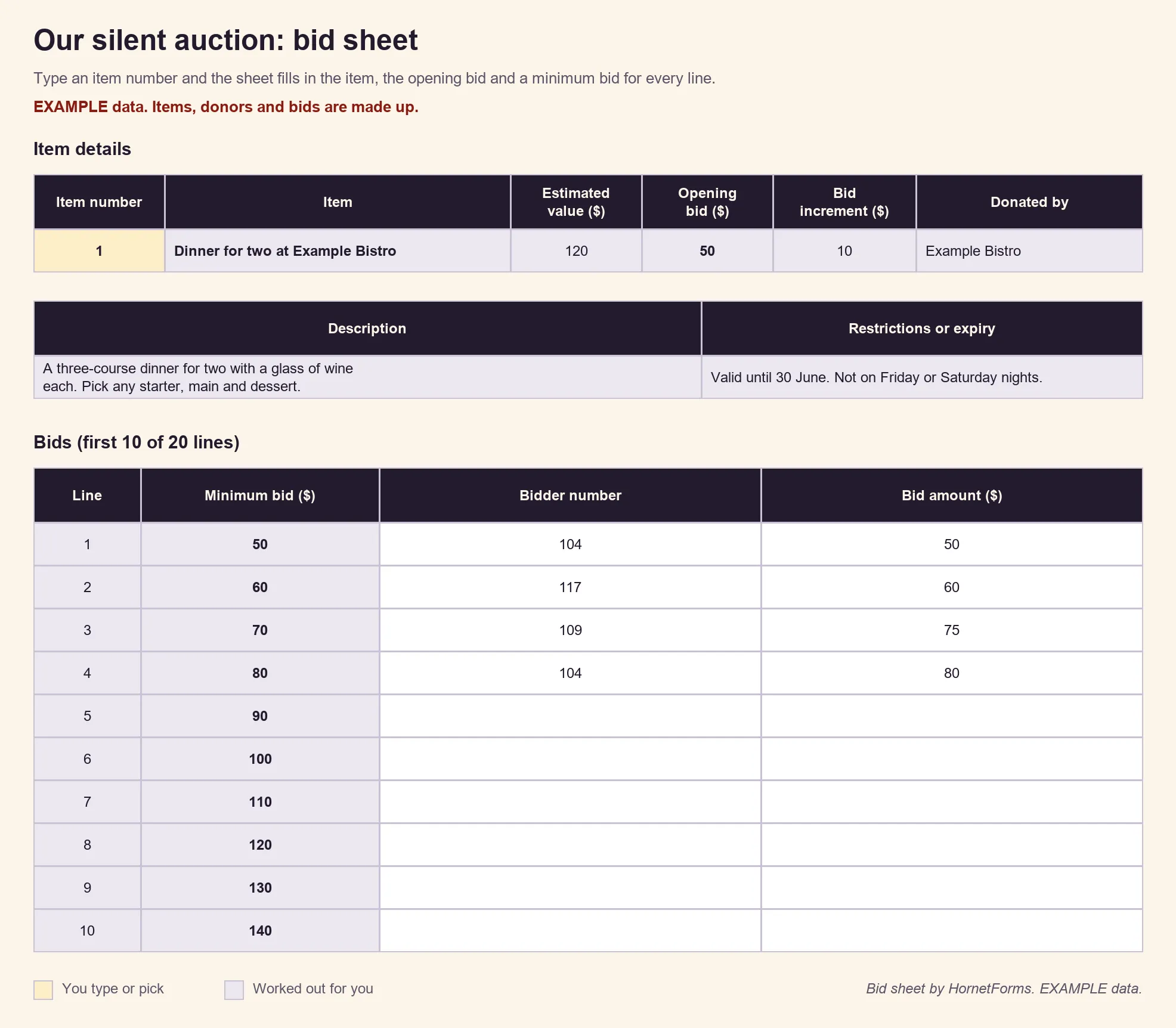
EXAMPLE data only: the item, the donor, the bidder numbers and the bids are made up, and so are the example settings that produced the opening bid. Clear the example rows and type your own settings before you print.
Each bid sheet has 20 lines, and every line shows a minimum bid one step above the line before. The rules on each sheet are short: write your bidder number and a bid of at least the amount on your line, and beat the bid above it. Short on time? Print the blank bid sheet (PDF, US Letter, PDF, A4 or Word) and fill in each item by hand. If the night also has a live ask, a pledge form template puts a pledge card on every table.
The Thank-you list tab shows every donor, their email, their item and the credit they picked. Mark "Thank-you sent" as you go, and add a note if you like. It's for the committee's own thank-you notes. There's also a CSV with just the column headers if you'd rather start a sheet of your own.
One more handy step: you can download any response as a PDF on every plan. Hand it to the volunteer who picks up an item, so they know exactly what they're collecting.
A free silent auction donation form template#
Our silent auction donation form template has two short pages, About you and About the item, with three logic rules:
- Businesses see a required business name and a logo upload.
- "Use a different name" shows the catalogue name and makes it required.
- "Please pick it up" shows the pickup address and makes it required.
Three ways to use it:
- Open it in HornetForms. The template page at
forms.hornetforms.com/templates/auction-item-donationhas a Use this template button that takes you through sign-up and opens your own copy. Already have an account? It's in the template gallery under Other, as "Silent auction item donation". - Print it. For business visits on the high street, download the PDF, US Letter, the PDF, A4 or the Word (DOCX) version if you want to add your logo. The printed form marks each follow-up question with the answer that needs it, and each section has a short "why we ask" line.
- Build the catalogue. Use the silent auction workbook from the section above.
A few things help once the silent auction donation form is live:
- Photos and logos: donors never need an account or a sign-in to answer or upload. The template takes up to three item photos and one logo, 10 MB per file.
- Your look: forms on Free show a small "Made with HornetForms" badge. Pro adds your logo and a cover image and removes the badge, so businesses see your event and not ours. The pricing page has the details.
Start collecting auction items#
A good silent auction donation form asks for the description in the donor's words and a value you can set bids from. It gets the restrictions in writing and a plan to get the item to you. Close it at your item deadline, paste the answers into the workbook, and the catalogue and bid sheets fall out the other end. Offered goods or services that won't go into the auction? Record them with an in-kind donation form. The Free plan is free forever, and the features page has the wider tour. Sign up for free and send your item ask this week.