
On this page
Most boards recruit the same way. A member asks a friend, the friend asks a colleague, and a year later the board has three more accountants and nobody who has run a fundraising campaign. Nobody planned it. The board just fished in the same three ponds.
A nonprofit board member application helps you fish wider. Every applicant answers the same questions, and nominations from members land in the same place. This guide covers what to ask, how to take nominations in the same form, and how to handle conflicts of interest. At the end you'll find a free template, printable copies and a board recruitment matrix that compares candidates with what your board lacks.
Start with a board recruitment matrix, not a form#
Before you write a single question, decide what the board needs next. A board recruitment matrix is a simple grid: the skills your board needs and the members who have them. Count each skill, and the gaps tell you who to look for.
In England and Wales, the Charity Commission calls this a skills audit. Its guidance says that regularly exploring what your charity needs from its trustee board "can help you to" do two things, including "identify any gaps that you need to recruit for". It adds: "You don't need to wait for a vacancy before you carry out this process." (Charity Commission, Finding and appointing new trustees (CC30), updated 14 May 2025, accessed 27 October 2026.)
Do the matrix first, and the application writes itself. If the board lacks legal and fundraising skills, your nonprofit board member application should list "Legal" and "Fundraising" in exactly those words. Then every answer lines up with a row in the matrix.
Questions for a nonprofit board member application#
Ask what helps the nominating committee decide whether to call someone, and nothing more. Here's the full set from our free template:
| Question | Type | Why you ask it |
|---|---|---|
| Are you applying or nominating someone? | Multiple choice | It sends applicants and nominators to different pages |
| Your full name, email and phone | Short text, email, phone | So the committee can reach them |
| Where do you live, or which community are you part of? | Short text | Shows the ties a candidate has to the people you serve |
| LinkedIn or website, and a CV or résumé (optional) | Website URL, file upload | Context for the first conversation, never a must |
| Which skills would you bring? | Checkboxes, with Other | Each option matches a row in your board recruitment matrix |
| Have you served on a board or committee before? | Multiple choice, with a follow-up | Useful context, not a requirement |
| Which committees interest you? | Checkboxes, with Other | Finance, fundraising, governance and nominating, programs, events |
| How many hours a month could you give? | Multiple choice | Board work takes time, so ask up front |
| Why do you want to join our board? | Long text | The answer the committee reads first |
| Any potential conflicts of interest? | Long text | So you can talk it through before anyone joins |
| May we contact you for a conversation and a reference? | Multiple choice | Their consent before you pick up the phone |
About the candidate#
Make name and email required and leave the phone optional. The community question helps when your bylaws ask for members from the area you serve. Keep the CV upload optional too: plenty of good board members don't keep a CV up to date.
Ask only what the role needs. Skip questions about age, health, family status or religion. They don't tell you whether someone can read a budget or chair a meeting, and your bylaws and local rules may limit what you can ask. Our guide on how to make an application form people finish has more on keeping it short.
Skills, experience and time#
The skills question uses checkboxes with the hint "Select all that apply" and an Other option. Edit the options so they match your matrix word for word.
The question about earlier board service is optional, and its follow-up box only appears when someone answers Yes. The Charity Commission's list of ways to widen your pool includes "only asking for previous board experience if you're sure you need it".
The template offers four bands of hours a month: "Up to 3", "4 to 6", "7 to 10" and "More than 10". If your board expects members to give or raise a set amount each year, say so above this question, in your own words. Nobody likes that surprise at the first meeting. If board members help write funding bids, our grant application questions guide is a good primer.
Then one open question, "Why do you want to join our board?", tells you more than any checkbox. The last question asks for consent to a conversation and a reference, with a single required "Yes", so nobody gets a call they didn't agree to.
Take nominations in the same form#
Many boards also ask members and partners to suggest people. You don't need a separate board nomination form for that. The first question of the nonprofit board member application asks, "Are you applying or nominating someone?", and the form sends each person down a different path.
- Nominators see a short page called "Your nominee". It asks for the nominee's full name and email, "Why would they be a good board member?" and whether the nominee knows about the nomination. All four are required, and a jump rule then sends the nominator to an ending called "Nomination received": "We'll contact your nominee and let you know if they join the process." Nominators never see the applicant questions.
- Applicants skip the nominee page and go straight to "About you". Their thank-you screen says: "The nominating committee reads every application and will contact you after the closing date."
Asking whether the nominee knows saves you an awkward first call. Both routes land in the same responses table. Show and hide rules, jumps and up to 20 endings work on every plan, and our logic, piping and calculations guide shows how to set them up.
Ask about conflicts of interest early#
A conflict of interest isn't a reason to turn someone away. It's a reason to talk early. The template asks "Any potential conflicts of interest?" with the hint "Roles, businesses or relationships connected to our work. Write none if there are none." It's optional in the template, and you can make it required in the editor.
The Charity Commission puts it plainly: "If they declare a potential conflict, this does not mean that you should not appoint them. Conflicts of interest are common." (CC30, accessed 27 October 2026.)
In the US, the IRS asks about the same topic on Form 990. Part VI, line 12a reads: "Did the organization have a written conflict of interest policy?" Line 12b asks: "Were officers, directors, or trustees, and key employees required to disclose annually interests that could give rise to conflicts?" (IRS, Form 990 (2025), accessed 27 October 2026.) If your organisation has a policy like that, the answer on the application is a good place to start the conversation.
Good to know: this is general guidance, not legal advice. Governance and conflict of interest rules vary by country, state and organisation. Check your bylaws, your own policy and local rules before you finalise the questions.
Open the call, close it and share it with the committee#
Most boards recruit on a calendar, with a vote at the annual meeting. These settings match your nonprofit board member application to that rhythm, on every plan unless it says otherwise:
- A scheduled opening date. The form opens at the date and time you set, and visitors see a notice until then.
- A close date and your own closed message, like "Nominations for this year have closed. Our next call opens in March."
- Email notifications. You can turn on an email to yourself for each new response, and the person who filled in the form can get a confirmation in your own words.
- Search and filters. Filter the responses table on the first question to see only applications or only nominations.
- A PDF of any response for the committee pack. Pro and Business can also attach a PDF copy to each notification email.
- Google Sheets, Slack, Discord or Notion, so the committee sees new names where it already works. Here's how to send responses to Google Sheets, Slack or Notion.
Candidates never need an account or a sign-in to answer or to upload a CV, and Free allows files up to 10 MB each (Pro and Business have no plan cap). Google's help page for the Google Forms file upload question says: "To answer this question, responders need to sign in to a Google Account." (Google Docs Editors Help, accessed 27 October 2026.) Here's a fair comparison with Google Forms. Every plan has unlimited responses, so a busy call never hits a response cap halfway through.
Compare candidates with the board recruitment matrix#
Your nonprofit board member application tells you who's interested. The free board recruitment matrix shows which of them fill the gaps you found at the start. It opens in Excel and Google Sheets.
- List the skills. On the Skills tab, edit the yellow skill names (up to 12). They start with eight skills from the form's options. Type how many members you want with each, or leave it empty for at least one.
- Mark the current board. On the Current board tab, type each member's name and an x under each skill they have. The Skills tab then shows each gap: members wanted minus members who have it, never below zero.
- Paste your responses. In HornetForms, open Responses, then Export, then CSV. Paste it at cell A1 of the Candidates tab, headers included. The sheet finds columns by their names, so the Google Sheets sync layout works too.
- Add what the form can't tell you. Nominees don't answer the skills question, so type an x in the yellow "Add" columns for skills you know they have. Then pick a status: New, Conversation booked, Recommended or Not this year.
- Read the Ranking. The Ranking tab lists every candidate by how many gaps they fill, with the gaps named.
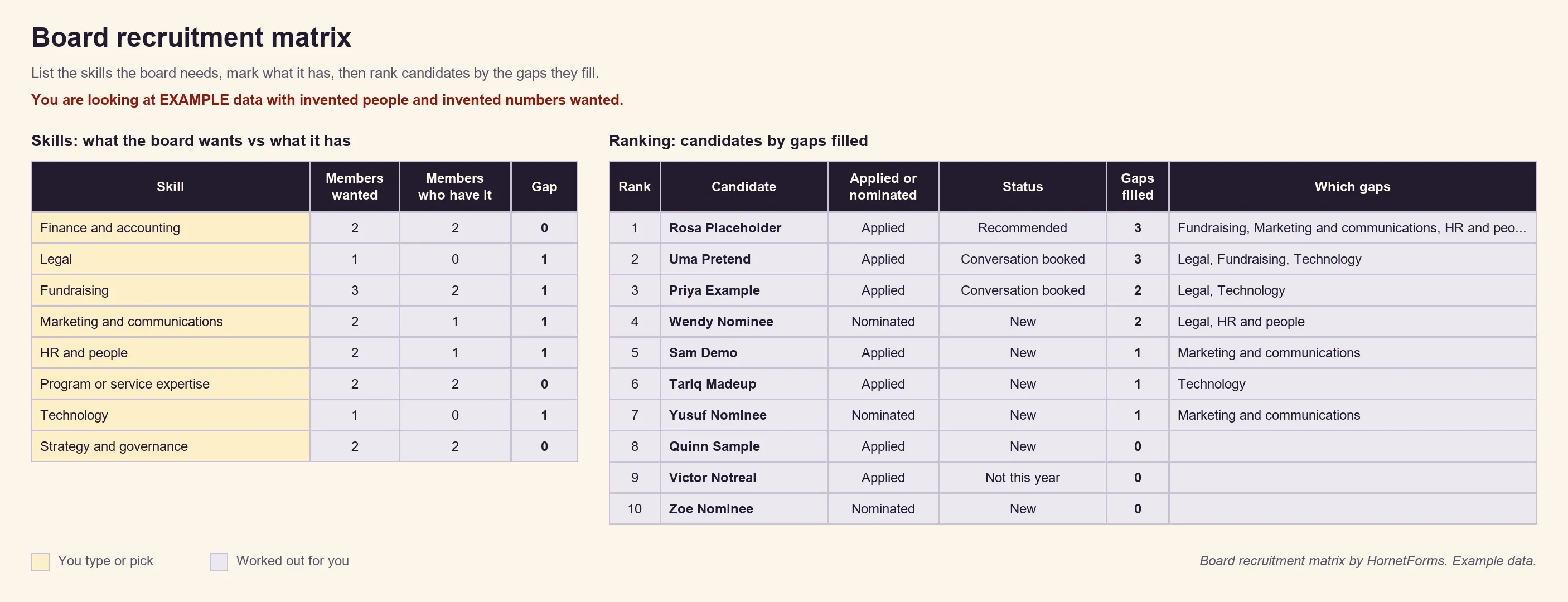
EXAMPLE data: we made up the people, the skills they hold and the numbers wanted. Delete the example rows before you paste your own.
The sheet calls the ranking "a starting point for a conversation, not a decision", and that's the right way to read it. It only counts where your skill names appear in each answer, and it never marks anyone as chosen. Your committee still talks to people, checks references and decides. One quirk: a skill named "Legal" also matches "Paralegal", so type the x yourself when that matters. Our scholarship application form guide uses the same idea: a shared rubric gives the panel numbers to compare, and people still make the call.
A nomination row shows the nominee, not the person who nominated them. The sheet never reads the community, conflict of interest, LinkedIn or CV answers. It does hold names, emails and phone numbers, so keep it where only the nominating committee can open it. There's also a CSV with just the column headers if you'd rather build your own sheet.
Get the free template and printable copies#
Our board member application template has three short pages: Your details, Your nominee and About you. Nominators see the first two, and applicants see the first and the last. A hidden source field records where each person came from. Add it to the links you share:
https://forms.hornetforms.com/f/<your-slug>?source=annual-report
https://forms.hornetforms.com/f/<your-slug>?source=nominated
Send the second link to a nominee who agrees to apply.
Three ways to use it:
- Open it in HornetForms. The template page at
forms.hornetforms.com/templates/nonprofit-board-member-applicationhas a Use this template button that takes you through sign-up and opens your own copy. Already have an account? It's in the template gallery under Other, as "Board member application". - Print it. Some boards hand out paper copies at the annual meeting. Download the nonprofit board member application as a PDF, US Letter, a PDF, A4 or, if you want to add your logo, Word (DOCX). The printed copy asks people to return it to the board secretary by the closing date, adds a short "why we ask" line to each page and tells nominators where they can stop.
- Compare candidates. Use the board recruitment matrix from the section above.
Want to change a question? Here's which question type to pick. Forms on Free show a small "Made with HornetForms" badge. Pro adds your logo and a cover image and removes the badge, and the pricing page shows what each plan includes. QR codes work on every plan, so a flyer at your annual meeting can point straight at the form.
Open your board call this month#
Start with the matrix, so you know which skills to look for. Then share one nonprofit board member application that takes applications and nominations, asks about conflicts early and closes on your timeline. The Free plan is free forever with unlimited forms and responses. Sign up for free and open your board call this month.