
On this page
Someone clicks "Book a demo" on your pricing page. They fill in a name and an email, and then they wait. Two days later a sales rep emails to ask how big the company is. By then the lead has booked a call with someone else.
A good demo request form template does three jobs in one go. It asks the few questions that tell you who the lead is. It turns two of those answers into a simple score. Then it lets good-fit leads book the call right inside the form, and gives everyone else a kind next step.
This guide walks through each part: the questions, the score, the booking page, the polite ending and where the lead goes next. At the end you'll find a free template, a lead qualification scorecard and a printable call sheet.
What a demo request form should ask#
Every question on a demo form costs you a little. Each extra box gives a busy buyer one more reason to close the tab. So each question has to earn its place.
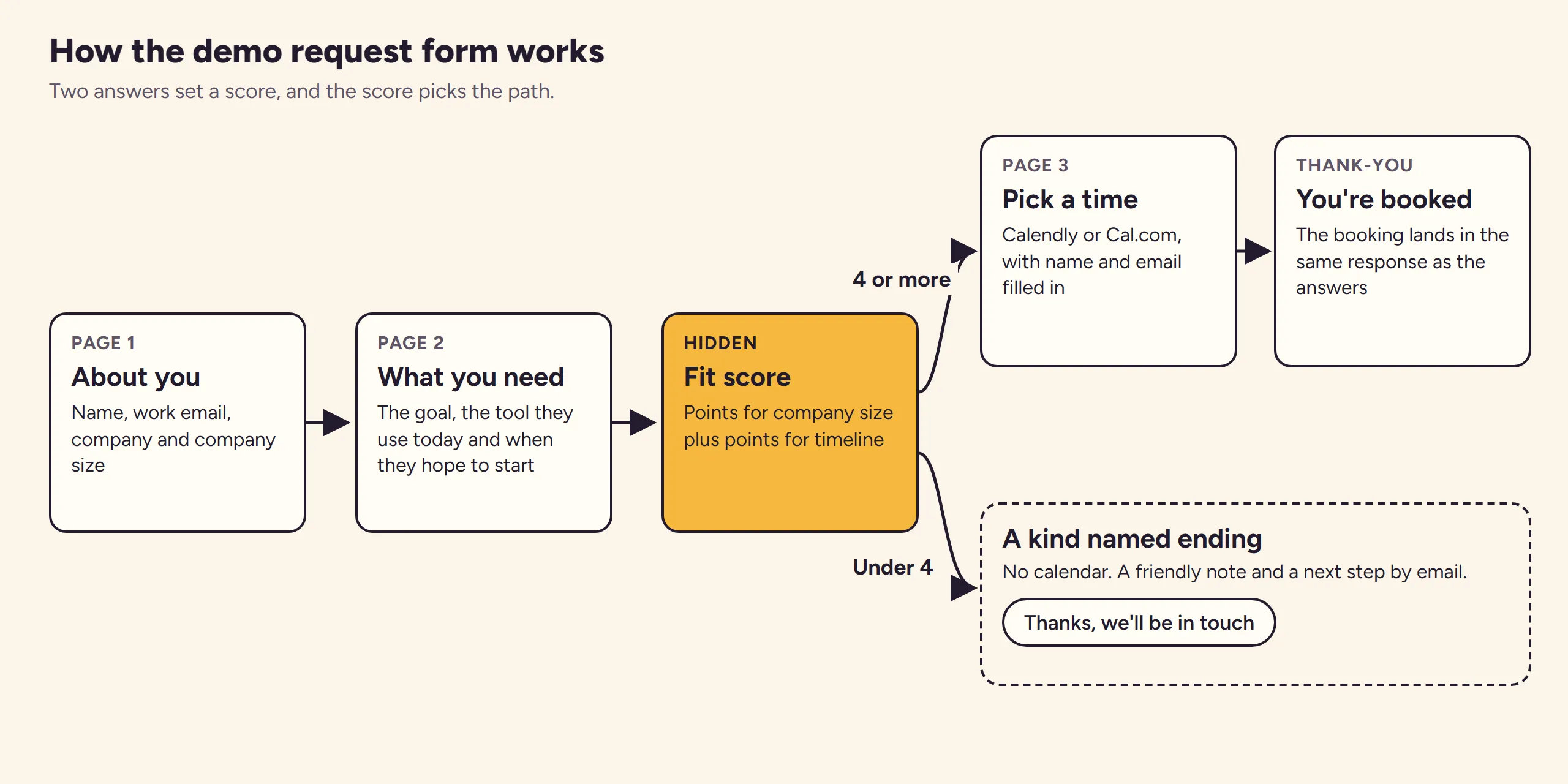
Here's the set in our demo request form template, split across two short pages before the calendar:
| Question | Type | Why it's there |
|---|---|---|
| Full name | Short text, required | So the rep can greet them by name, and the calendar fills it in |
| Work email | Email, required | Where the invite and follow-up go |
| Company | Short text, required | So the rep can look them up before the call |
| Company size | Dropdown, required | Feeds the score and decides who takes the call |
| What would you like to get done? | Long text, required | Becomes the first sentence of the call |
| What are you using today? | Dropdown | Tells the rep what they're replacing |
| When are you hoping to start? | Dropdown, required | Feeds the score: soon beats someday |
Not sure whether a dropdown or multiple choice suits a question? Here's a guide to which question type to pick.
Keep the fields that change routing or the first sentence of the call#
RevenueHero, a company that builds demo scheduling software, gives a neat test for every field in its post on lead qualification questions that improve demo quality (published August 1, 2026). It says to ask: "does this change the routing or the rep's first sentence? If not, cut it."
Run each field through that test. Company size changes routing. "What would you like to get done?" changes the first sentence. A phone number, a job title and "How did you hear about us?" often change neither, so leave them off unless your team really uses them.
Turn the answers into a lead qualification score#
A lead qualification form doesn't need a scoring engine. Two answers do most of the work: how big the company is and how soon they want to start. Give each answer a few points, add them up, and draw a line.
Points for company size and timeline#
Our template uses these points. They are example numbers, so swap in your own once you know which leads turn into customers.
| Answer | Points |
|---|---|
| Company size: Just me | 0 |
| Company size: 2 to 10 | 1 |
| Company size: 11 to 50 | 2 |
| Company size: 51 or more | 3 |
| Start: This month | 3 |
| Start: In the next three months | 2 |
| Start: Later this year | 1 |
| Start: Just exploring | 0 |
In HornetForms, the score is a calculated field the respondent never sees. Six logic rules add the points, one rule per answer that scores. You can open each rule and change the number, so the score is never a black box.
Draw the line at 4#
A score of 4 or more counts as a good fit. A team of 11 to 50 that wants to start within three months scores 4 and sees the calendar. A solo founder who wants to start this month scores 3 and gets the kind ending instead. Move the line up or down until it matches the calls your team wants.
One detail matters for trust. HornetForms works out every calculated value again on its server when the form is sent. Someone who edits the page in their browser can't send you a fake score. The logic, piping and calculations guide covers calculated fields in more depth.
Let qualified leads book the call inside the form#
Every lead who reaches page three has already passed the score. That makes it the right moment for a calendar. The template's last page has a Scheduling question called "Book your demo", set up for Calendly. Paste your own Calendly or Cal.com booking link into it and the lead picks a time without leaving the form.
The question also reads the name and email from page one. In its settings, "Prefill name from" points at Full name and "Prefill email from" points at Work email, so nobody types them twice. Calendly or Cal.com then sends the invite as usual.
The booking lands in the same response as the answers and the score. Your rep opens one response and sees who they're meeting, why and when. Logic rules can also check whether the question "is booked" or "is not booked", if you want to branch on it.
To test the page before you publish, open the form in preview. The calendar shows a placeholder there with a "Simulate a booking" button, so you can walk the whole path without making a real booking.
Good to know: the booking widget reports the booking to HornetForms from the lead's browser. Treat the response as a strong hint that a call is on the calendar, and treat your Calendly or Cal.com calendar as the record.
The template ships with a sample booking link. When you publish, HornetForms warns you to replace the sample booking link, so swap in your own first.
Give everyone else a useful ending#
A good demo request form template doesn't leave early leads with a dead end. A lead who scores under 4 isn't a bad lead. They're early. A logic rule sends them to a named ending for early leads instead of the calendar. It says:
Thanks, we'll be in touch. We'll email you within one business day with a short tour and the next step that fits where you are.
That keeps your reps' calendars for buyers who are ready. And it still gives early leads a reason to stay warm, which beats a silent form every time. Change the wording to match what you really send, such as a recorded tour or a link to your help docs.
Some teams offer a free guide before a demo, so early leads get something useful straight away. A lead capture form collects their email for that first step.
For guide topics, these lead magnet ideas for coaches adapt well to other small businesses.
Know which campaign sent each lead#
Your demo request form template should also tell you which ad, post or email brought each lead. The template has three hidden fields named utm_source, utm_medium and utm_campaign. Respondents never see them, but the values arrive with each response. Tag the links you share:
https://forms.hornetforms.com/f/<your-slug>?utm_source=linkedin&utm_medium=paid-social&utm_campaign=2026-10-demo
When you embed the form on your pricing page with the HornetForms embed script, it passes the page's utm_* parameters into the form for you. The built-in analytics also show views, completions and the completion rate for each source, medium and campaign. Capturing UTM parameters in forms has a few more tricks, like naming rules and a fallback question, that are worth their own guide.
Get the lead to sales the same day#
A demo request that sits unread is a lost deal, however good your demo request form template is. Send each one where your team already looks, on every plan:
- Email notifications you can turn on, to a sales inbox, for each new response.
- Slack: a message in a #demo-requests channel with the answers.
- Google Sheets: one row per lead, with each hidden UTM field in its own column.
- Zapier: a "New Form Response" trigger that can create a deal in your CRM.
- Signed webhooks for anything else your team runs.
For setup steps, see how to send form responses to Google Sheets, Slack or Notion, or browse the integrations page.
Bots love demo forms too. Every HornetForms plan includes a honeypot field, a time check and rate limits. Pro and Business add email verification with a 6-digit code. Our guide on how to keep bots out of your forms explains each one. And every plan has unlimited responses, so a busy launch week never closes the form.
A free demo request form template#
We built this demo request form template as a three-page HornetForms form:
- About you: full name, work email, company and company size.
- What you're looking for: the goal, the current tool and the timeline, plus the hidden fit score and the three UTM fields.
- Pick a time: the "Book your demo" Scheduling question with name and email filled in.
It also has the named ending for early leads and a "You're booked" thank-you screen. You'll find it in the template gallery under Lead generation, or on its own page at forms.hornetforms.com/templates/demo-request. Click Use this template, sign up if you're new, and your own copy opens ready to edit.
There are two downloads to go with it.
A lead qualification scorecard to see which campaigns send good-fit leads: lead qualification scorecard (Excel), which opens in Excel and Google Sheets. Paste your CSV export into the Leads tab. The sheet works out each lead's score from the answers, using points you set on the Your points tab. Then it counts leads, qualified leads, bookings, calls held and deals for each source and campaign. A CSV with the export's column headers is there too.
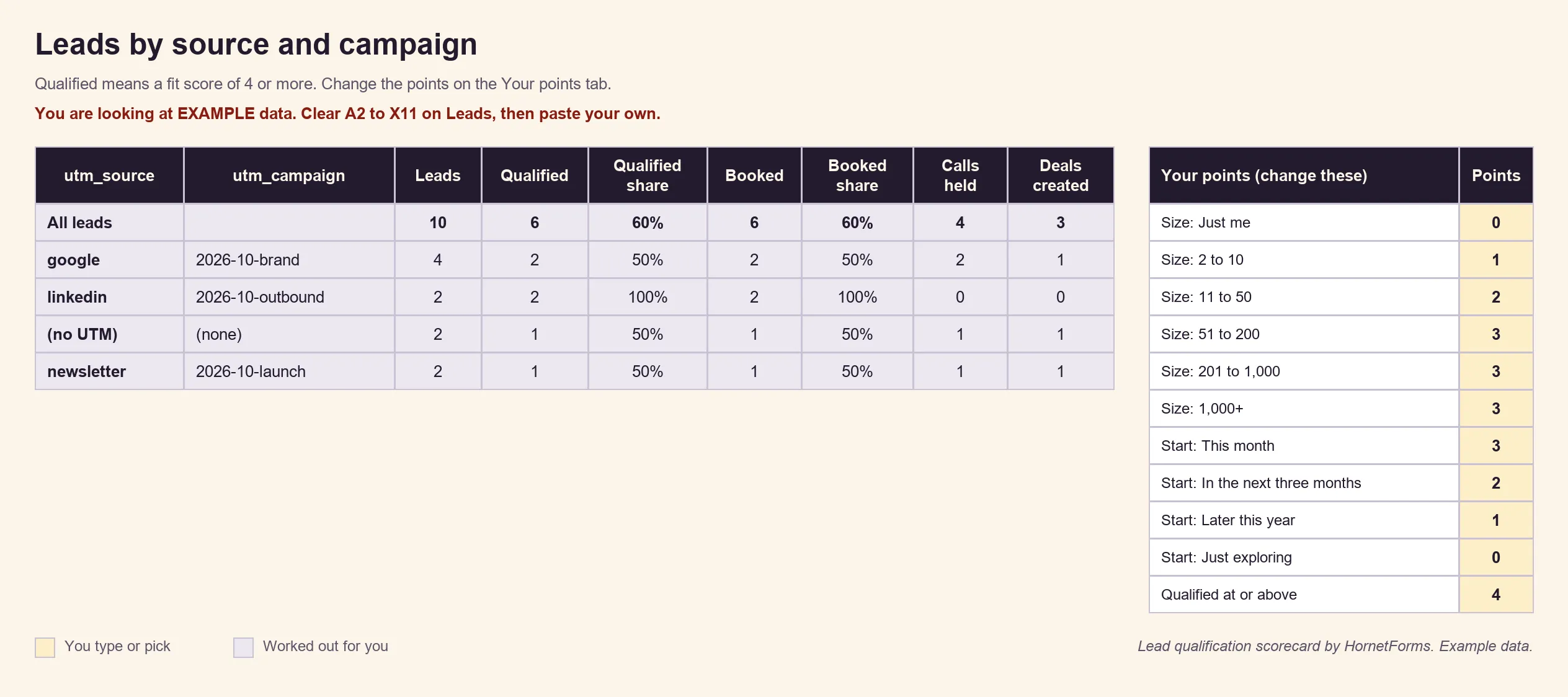
Example data only. Clear the example rows and swap in your own numbers.
A printable call sheet for leads who phone or email instead: PDF, US Letter, PDF, A4 or Word (DOCX) to add your logo. It has the same questions and the same scoring rule, so a rep can qualify a lead during a phone call.
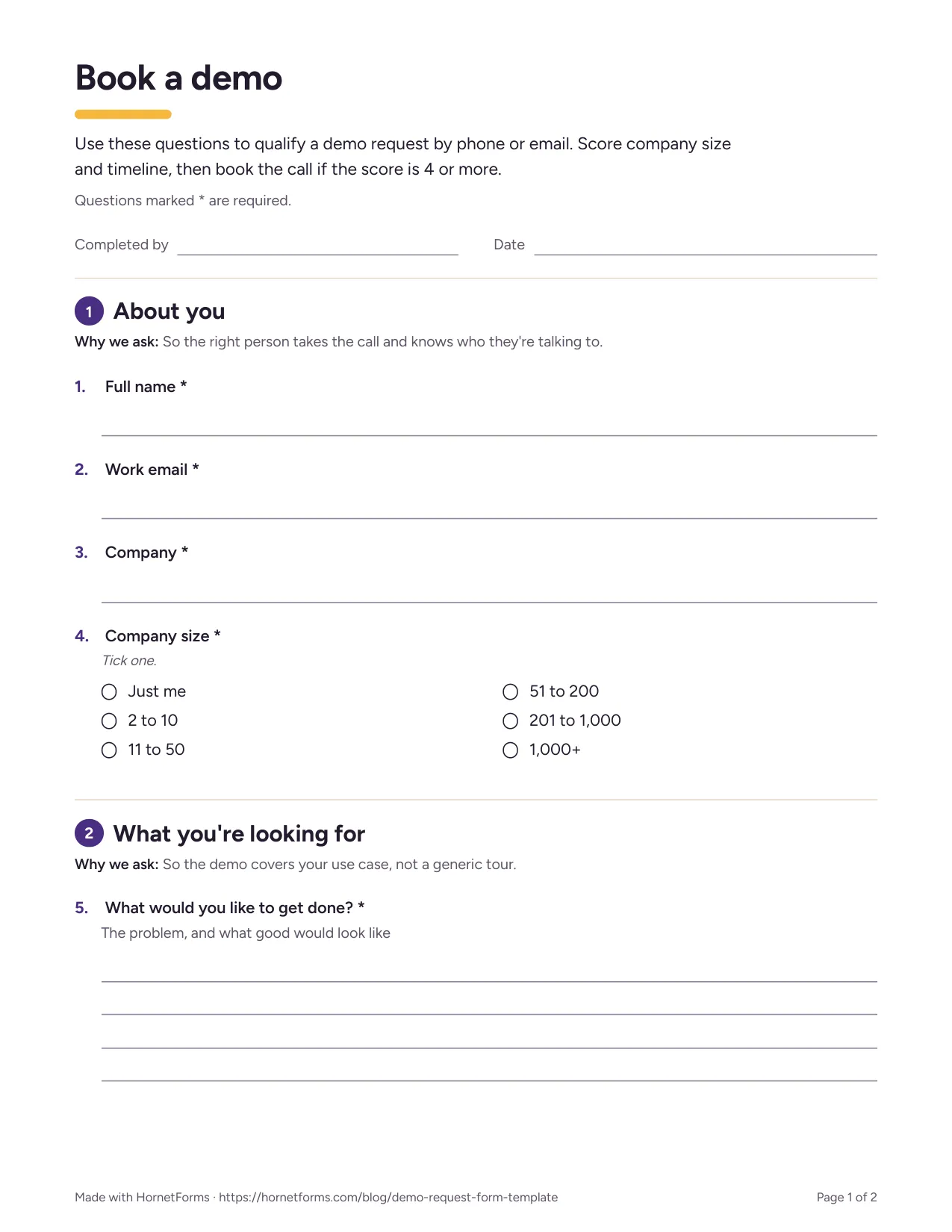
The first page of the printable version.
Put it on your pricing page this week#
Pick the page where people already ask for demos. Copy the demo request form template, set your points and your line, paste your booking link and embed it. Then watch the scorecard for a few weeks and move the line if you need to. Sign up for free and set up your first demo request form.