
On this page
You set aside half an hour for a discovery call. By minute 10, it's clear the person wanted free advice, or wants to start next year, or needs a different kind of help. Nice chat. Wrong call.
A coaching application form stops that before it starts. People apply first, you read their answers, and only good fits get a call or a first session. Some coaches already work this way. One coach's public application says up front that they take six clients at a time, at most. The application helps them see who would be a good fit.
This guide covers the questions that sort good fits from the rest, where to send each answer, and how to take payment for a first session before the booking. A free template, a printable copy, a review sheet and reply scripts wait at the end.
Application, discovery call or intake form: which comes first#
Three steps sit around a first meeting, and each does a different job. Mix them up and a short application turns into 40 questions of homework. For the middle step, see our discovery call questions.
| Step | When it happens | What it decides |
|---|---|---|
| Application form | Before any call | Whether a call is worth both your time |
| Discovery call | After you read the application | Whether you'll work together |
| Intake form | After they say yes | Where the first session starts |
The application is the short one. Josh Spector suggests asking three questions by email before a free discovery call, starting with "Tell me about your situation/problem and the problem you're looking to solve." and "What have you tried to solve it so far?" He says the answers let you keep the call short, because you already know the problem before you get on it (Josh Spector, How To Qualify Clients Before A Discovery Call, published 27 April 2026, accessed 27 October 2026). A coaching application form does the same job, with every answer in one place.
Coaching application form questions that sort good fits#
Every question on a coaching application form should help you decide. If an answer wouldn't change whether you invite someone, cut the question. For other kinds of applications, see our guide on how to make an application form. Here's what each question in our template tells you:
| Question | What the answer tells you |
|---|---|
| What do you most want to change right now? | Whether it's something you coach |
| What would success look like six months from now? | Whether their idea of success is one you can help with |
| What have you already tried? | Where they're starting, and what not to suggest again |
| Have you worked with a coach before? | How much to explain about how coaching works |
| When would you like to start? | Whether to talk now, later or not at all |
| How ready are you to make this a priority? | How much time they think they'll give it |
| What are you interested in? | One-to-one coaching or a group program |
| What budget have you set aside for coaching? | Whether your fee fits, before anyone feels awkward |
What they want to change#
Two required questions open the goals page: what they most want to change, and what success would look like in six months. Read them together. "More confidence" plus "I'll have asked for a promotion" is a clear goal. A vague answer to both is worth a gentle question on the call, not an instant no.
What they've already tried#
"What have you already tried?" saves you from suggesting the journaling habit they've dropped twice. If they say they've worked with a coach before, logic shows one follow-up: "What worked, and what didn't?" People who've never had a coach skip it.
Timing and readiness#
"When would you like to start?" has four answers, from "Within two weeks" to "I'm just exploring". That last one matters most, and the next section shows where it sends people. A scale from 1 to 10 then asks how ready they are to make coaching a priority. Treat their answer as a clue rather than a verdict.
Budget, without the awkward bit#
Money is the question coaches most like to skip, and skipping it wastes the most calls. A dropdown of ranges makes an honest answer easy, from "Under $500" to "Over $5,000", plus "I'd like to talk about it first" for people who'd rather talk. Change the ranges to fit your own fees and currency.
Group programs and mastermind applications#
For a group, ask what each person brings, not only what they want. In the template, choosing "A group program" shows "What would you bring to the group?" A mastermind application can also ask how much time they can give each week.
Good to know: keep health, medical and therapy questions out of a coaching application form. Ask only what helps you decide whether to talk. If your kind of coaching needs more than that, follow the guidance from your insurer or professional body.
Send each applicant to the right next step#
A coaching application form earns its keep at the end, when each person lands on the right next step. Conditional logic does the sorting, on every plan. The template has two ways out:
- Ready to start: anyone who picks a start date reaches the last page, "Let's talk". It shows your Calendly or Cal.com booking page inside the form, so they pick a time for a short call without leaving. Bookings appear in the response, next to the answers.
- Just exploring: "I'm just exploring" jumps straight to the "Not now" ending: "Thanks, I've got your details." Nothing lands in your calendar.
A form can have up to 20 endings, so you can add your own, like a "not a fit" ending that points to a free guide. Need one? Start with these lead magnet ideas for coaches. Our logic, piping and calculations guide shows how rules like these work. The template ships with a sample booking link, so paste your own Calendly or Cal.com link before you publish.
Want to know which podcast or post sends your best applicants? The template has a hidden field called source. Add it to each link you share:
https://forms.hornetforms.com/f/<your-slug>?source=podcast
Applicants never see it, and the value arrives with their answers. Adding a question of your own? Here's which question type to pick.
Charge for the first session before the booking#
Some coaches skip the free call. People apply, pay for a first session, then book it. A coaching application form can handle all three, as long as the payment comes before the booking.
Why not just send a payment link? It tells you a name and an email, not why someone wants coaching. Stripe's own docs warn against using a payment link's extra fields for personal details: "Don't use custom fields to collect personal, protected, or sensitive data, or information restricted by law." (Stripe Docs, Customize checkout with Payment Links, accessed 27 October 2026). So the questions belong in your form, and the payment can sit at the end of it.
Add the Payment block and send people to your booking page#
In HornetForms, a Payment block takes a one-time payment on Stripe's hosted Checkout page. It works on every plan, Free included. A workspace admin connects your own Stripe account once, and the money goes straight to it. HornetForms adds no fee of its own, and Stripe's processing fees apply. HornetForms never sees or stores card data, because people pay on Stripe's own page.
Here's how to change your copy of the template:
- On the "Let's talk" page, delete the "Book a short call" question. If it stayed, people would pick a time before they pay.
- Add a Payment block in its place, set a fixed price for the first session and pick your currency.
- Change the line under "Let's talk" to say what they're paying for, like "Pay for your first session, then pick a time that suits you."
- Add a logic rule that sends people to your booking page once they've paid:
When would you like to start? is not "I'm just exploring" → redirect to your booking page
Use a logic rule here, not the form-wide redirect URL. The form-wide setting sends everyone who finishes to that page, including people on the "Not now" ending.
What happens when they pay#
After the last question, applicants go to Stripe's Checkout page. Until they finish paying, their application waits in an Awaiting payment tab. Emails, webhooks and integrations fire only after the payment goes through, so you never get a "new client" email for a session nobody paid for. Then Stripe returns them through HornetForms, which sends them on to your booking page to pick a time.
People who pick "I'm just exploring" never reach the Payment block, so they finish on the "Not now" ending without paying. If you need to refund someone, do it in your own Stripe Dashboard, and HornetForms shows the refund status on the response.
When you're full: run a coaching waitlist#
When your client list fills up, people keep applying. Close the application, point them to a short waitlist form, and email them yourself when a place opens.
- Close the application. Set a close date, then write your own closed message of up to 500 characters. For example: "My client list is full right now. Join the waitlist and I'll email you when a place opens." Add the waitlist form's address to the message.
- Or let it close itself. Set a response limit to the number of places you have. On a paid application, people who are on the payment page count toward that limit, so two people paying at the same moment can't take you past it.
- Use the waitlist template. Our coaching waitlist template is one short page: name, email, what they'd like help with and when they'd like to start. Its hidden field
programrecords which program someone wants, from a link ending in?program=leadership.
When a place opens, email the people on your list in the order they joined.
Review coaching applications in one place#
Applications are easiest to judge in one sitting, with every answer side by side:
- An email for every application, on every plan. You can also turn on the email to the applicant and write your own subject and message, like "Thanks for applying. I'll reply within a few days." On a paid form, both go out only after the payment.
- The responses table, with search and filters, on every plan.
- Google Sheets or Slack, built in on every plan. In Google Sheets, the hidden
sourcefield gets its own column. - Partial responses (Pro and Business) show who started an application but didn't finish it.
For setup steps, see how to send form responses to Google Sheets, Slack or Notion, or browse the integrations page. HornetForms has unlimited responses on every plan, so a busy launch week never runs into a plan's response cap.
To decide who to invite, use the free application review sheet (Excel), which opens in Excel and Google Sheets. Paste your CSV export into the Applications tab. Give each person three scores from 1 to 5, for fit, readiness and goals, then pick Accept, Waitlist or Not a fit. The Review tab ranks scored applications, highest first, with weights you can change, and counts who you still owe a reply. A CSV with the export's column headers is there too.
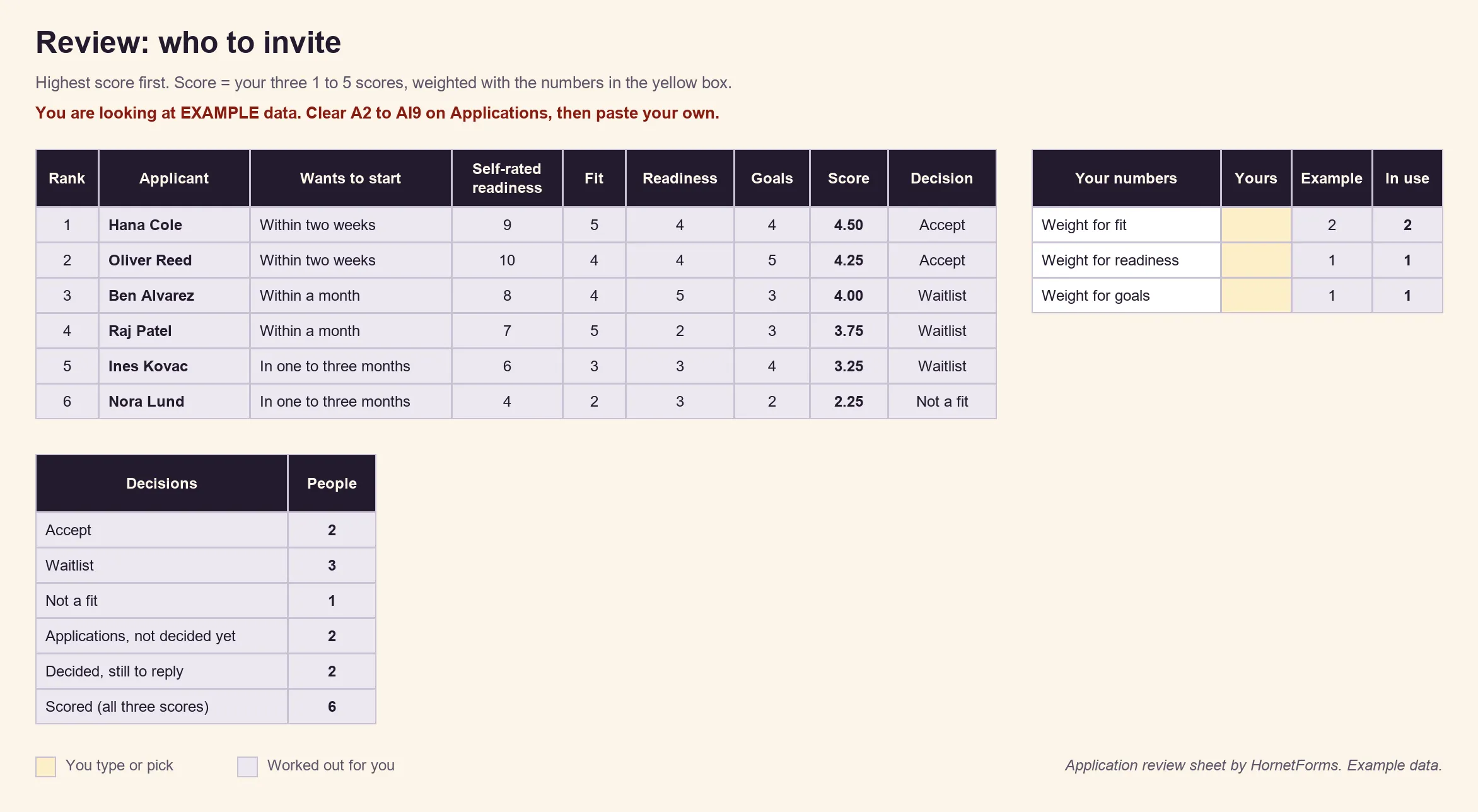
EXAMPLE data only: we invented these applicants. Clear the example rows before you paste your own.
One plain point on access: anyone with access to your workspace can read the answers, and the sheet holds names, emails and goals. Keep both where only you, or people who should see them, can open them.
A free coaching application form template#
Our coaching application form template has four short pages:
- About you: name, email, time zone, how they heard about you and the hidden
sourcefield - Your goals: what they want to change, success in six months, what they've tried, and past coaching with its follow-up
- Timing and fit: start date, the readiness scale, one-to-one or group (with the group follow-up), budget and anything else
- Let's talk: the booking question, for everyone who isn't just exploring
You'll find it in the template gallery under Lead generation, or on its own page at forms.hornetforms.com/templates/coaching-application. Click Use this template, sign up if you're new, and your own copy opens ready to edit. The waitlist template sits beside it at forms.hornetforms.com/templates/coaching-waitlist. The features page shows what else you can add.
Besides the review sheet, two downloads go with it:
- A printable application for people who'd rather write by hand. Each section has a short "why we ask" line. Get the PDF, US Letter, the PDF, A4 or the Word (DOCX) version to add your own logo.
- Reply scripts: four short emails to copy and edit, for accept, waitlist, not a fit, and next steps for a paid first session. Get the PDF, US Letter, the PDF, A4 or the Word (DOCX) version.
Open applications for your next client#
Copy the template and set your budget ranges. Then pick your next step: a free call booked inside the form, or a paid first session with the booking after the payment. Share the link wherever people find you. Sign up for free and send your next applicant a coaching application form instead of a calendar link.