
On this page
Every community group has a list of things it could work on. Rent, buses, the clinic with the long wait, nowhere for teenagers to go. The hard part is picking which one comes first, and showing funders and neighbors that you picked it for a reason.
A community needs assessment survey asks the people who live there. This guide covers how to plan one with partners, which questions to ask in eight common areas, and how to reach people who won't open a link. It also covers how to count the answers and share them back. At the end you'll find a free template in Word and PDF, a CSV that turns it into an online form, and a tally sheet that ranks the top needs.
What a community needs assessment survey is#
The University of Kansas Community Tool Box puts it simply. A needs assessment survey is "a way of asking group or community members what they see as the most important needs of that group or community. The results of the survey then guide future action." (Community Tool Box, Conducting Needs Assessment Surveys, University of Kansas, accessed 28 October 2026.)
The same section lists what real needs assessment surveys have in common. One line is worth printing above your desk: "The results of the survey are tabulated, summarized, distributed, discussed, and (last, but not least) used."
That last word is the whole point. A community needs assessment survey is a short, honest way to ask "what should we work on first?" and then act on the answer. It also gives you something funders often ask for. The Tool Box lists "To document your needs, as is required in many applications for funding" among the reasons to run one, which ties straight into grant application questions about need.
A needs survey is different from a public comment form. Public comment asks people to react to a proposal that already exists, item by item. A needs survey comes earlier, before there's a proposal at all.
Plan it with partners#
You can write a survey alone, but the Tool Box advises against it: "a needs assessment survey will be more effective and more useful if it is designed and carried out by a group." Its planning chapter goes further and says to "Recruit a planning group that represents all stakeholders and mirrors the diversity of the community" (Community Tool Box, Developing a Plan for Assessing Local Needs and Resources, accessed 28 October 2026).
Five to eight people is plenty: a few residents from different parts of the area, someone from a service people use (a pantry, a clinic, a library), and someone who speaks each main language spoken at home. Before you write a single question, agree on what you want to learn, who you need to hear from, and what you'll do with the results. The Tool Box asks it plainly: "What do we want to get out of it? How will the results be used?"
Then test the draft. The Tool Box says "A test group will let you know if your instructions are clear and if your questions make sense." Five neighbors will find the question everyone reads differently. Our guide to writing survey questions people actually answer covers the wording side of that test.
Community needs assessment survey questions by area#
Most community surveys cover the same areas. Our template asks one question per area, with the same four answers every time: Big problem, Small problem, Not a problem and Not sure. Using one scale makes the answers easy to compare and easy to count.
| Area | What the question covers | A follow-up from the question bank |
|---|---|---|
| Housing | Cost, repairs, finding a place | If you had to move, could you find a place you can afford nearby? |
| Food | Affording enough healthy food | Do you know where to get free or low cost food nearby? |
| Health care | Getting a doctor, dentist or mental health care | In the past 12 months, did you put off care because of cost or distance? |
| Getting around | Buses, rides, safe walking routes | Is there a place you need to get to but often cannot reach? |
| Jobs and training | Finding work, learning new skills | What gets in the way of taking a class or training? |
| Children and youth | Childcare, after-school activities | Can you find childcare you can afford when you need it? |
| Older adults | Help at home, staying connected | What would help older adults stay in their homes longer? |
| Safety | Feeling safe at home and on the street | Do you feel safe walking in your neighborhood after dark? |
Each question reads like this: "Housing (cost, repairs, finding a place): how big a problem is this where you live?" The words in brackets matter, because "housing" alone means rent to one person and a leaking roof to another.
After the eight areas, two questions turn a list into a priority:
- "Which one of these needs should come first?" People pick one area, or "Something else". Picking one is far easier than ranking eight.
- "Why does that need matter most to you?" One open box. These answers are the ones you'll quote in your report.
Adding your own question? Here's which question type to pick. For more topics to ask about, browse our survey ideas.
Strengths, not only needs#
A survey that only asks about problems misses half the picture. The Tool Box makes the case at the end of its needs survey section: needs "are just part of the picture." The other part is community assets, "the skills, interests, capacities, and other resources that can be found in any community. Those assets ought to be identified, just as thoroughly as needs."
Its assets chapter defines one broadly: "A community asset (or community resource, a very similar term) is anything that can be used to improve the quality of community life." (Community Tool Box, Identifying Community Assets and Resources, accessed 28 October 2026.)
So the template asks three things about what already works:
- "What does your neighborhood already do well?" Checkboxes: neighbors who help each other, parks, schools, local shops, faith and community groups, the library or community center.
- An overall rating from 1 (poor) to 5 (great) for the neighborhood as a place to live.
- "What would help you take part in community programs?" Evening or weekend sessions, childcare, a ride or bus pass, information in your language, free or low cost, online options.
If half your respondents say "childcare during sessions", your results meeting needs a childcare corner. The question bank ends with "Would you give time to help with any of these needs?" A yes there is a lead for your volunteer application form.
Keep the "about you" questions short#
You need a few facts about who answered, to see whether you heard from every part of the community. The template asks five questions, and every one is optional with a "Prefer not to say" answer:
- Which neighborhood or area you live in
- Age group
- Whether you rent or own your home
- Whether children under 18 live in your home
- The language you mostly speak at home
Put them at the end, after the questions people came to answer. The template has no name question. The only contact question is an optional email for people who want the results. An email can still identify someone, so delete that column before you share raw answers. If you want more detail on wording these questions, our post on demographic survey questions goes deeper.
Reach people offline#
An online community needs assessment survey only hears from people who are online, and who see your link. The Tool Box notes that for a large area "you can make your survey available to everyone who wants to answer it", but a link alone won't reach everyone. So plan at least three ways in:
- Paper copies. Print the template and leave a stack, with a box, at the library, the pantry, the clinic waiting room and places of worship. A volunteer types each one into the online form afterwards and picks "Paper copy" for "How did you get this survey?" so every answer lands in one place.
- QR codes on posters. Every HornetForms plan includes QR codes, as a PNG or an SVG file to drop into your poster. Put one on posters at bus stops, laundromats and school gates. Here's more on using a QR code on printed material.
- A shared tablet. Open the form link on a tablet at a table at community events, and help people who want it. Respondents never need an account or a sign-in to answer.
Ask "How did you get this survey?" on every copy, so you can see which channel reached whom. HornetForms has unlimited responses within fair use, so a big push never runs into a response cap halfway through.
Good to know: a survey anyone can answer tells you about the people who answered, not the whole community. Compare who replied (neighborhood, age group) with who lives there, and say so in your report.
Offer the survey in more than one language#
If many people in your area speak another language at home, translate the survey before you print it, and have a native speaker check it.
Online, every HornetForms form shows its respondent-side buttons and messages in 12 languages, with right-to-left support, on every plan. To translate your own questions too, Pro and Business offer form translations into up to 10 languages, with AI or CSV. On paper, print each language as its own stack and mark the stacks clearly.
Tally the results and share them back#
The Tool Box's advice on counting is short: "For closed-ended questions, this can often be a matter of counting and summarizing responses. For open-ended questions, you can code the results into categories."
The counting part is what the free community needs assessment tally does. It opens in Excel and Google Sheets:
- Export your responses. On the Responses page, download the CSV (every plan). Or connect Google Sheets so each response lands as a new row. Here's how to send form responses to Google Sheets, Slack or Notion.
- Paste at A1 of the Responses tab, headers included. The sheet finds columns by their names, so the order doesn't matter.
- Read Top needs. Each area gets its count of Big problem, Small problem, Not a problem and Not sure answers, plus how many people said it should come first. A ranked list puts the biggest needs on top.
- Filter by neighborhood or age group to see whether a need is everywhere or in one place. The By neighborhood tab shows each neighborhood's top need and average rating.
A Strengths and access tab counts the checkbox answers, the survey channels and the languages. A CSV with just the column headers is there too.
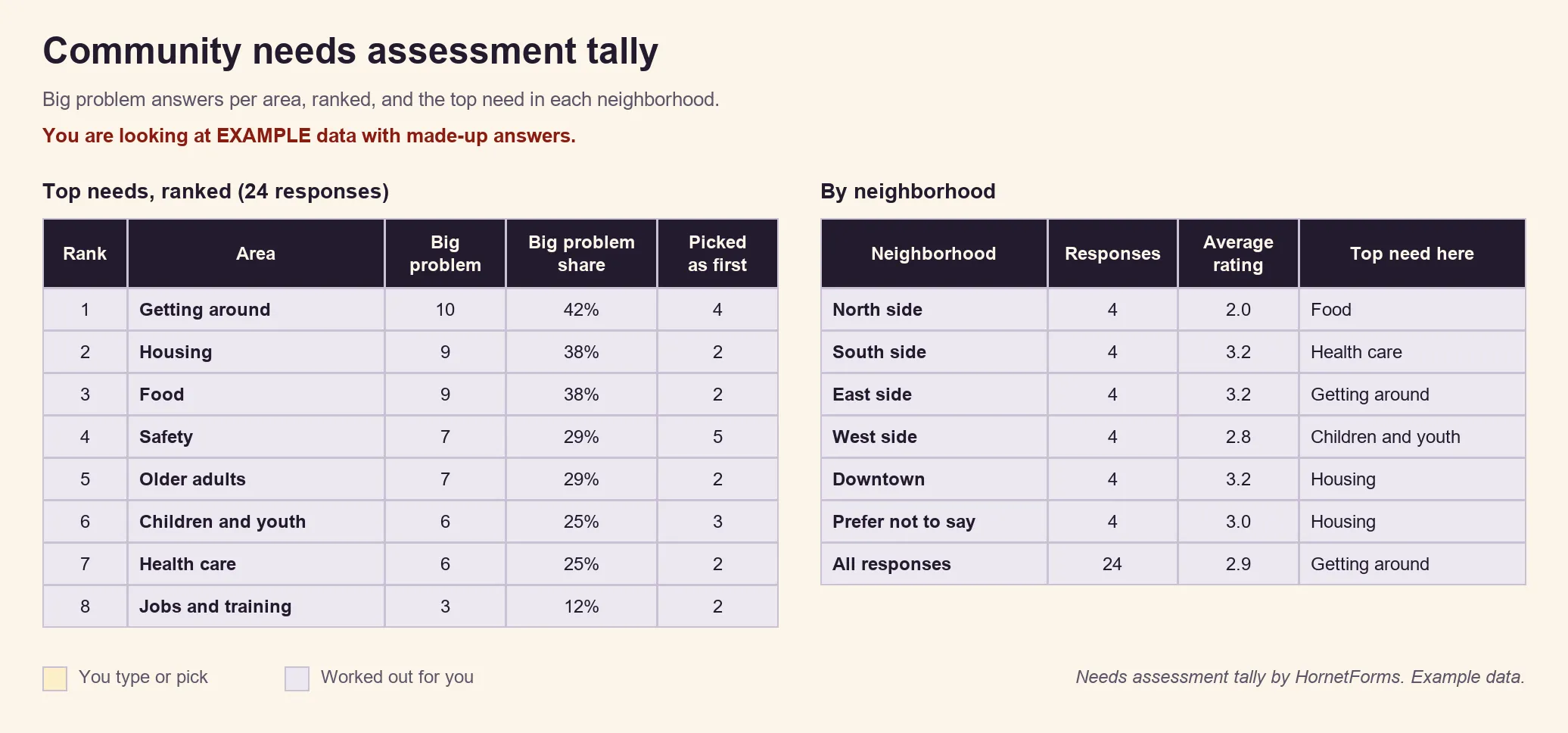
EXAMPLE data only: we made up all 24 responses. Clear the example rows before you paste your own.
For a quick look first, the Summary tab shows the answers to each question at a glance, on every plan. The response filters let you look at one neighborhood at a time.
Then share the results back, soon. The Tool Box warns that "Asking for community input and then failing to act on or respond to it can be more frustrating than asking for input in the first place." A one-page summary is enough: the top three needs, a few quotes from the "why" answers and what you'll do next. Email it, post it where the paper copies were, and talk it through at a community meeting. To hear what people thought of that meeting, borrow from our feedback form questions. And run the community needs assessment survey again in a year or two, because, in the Tool Box's words, "Community needs can change; you want to be sure you know if, when, how, and why they do."
Free community needs assessment survey template and question bank#
Everything here is free to download and change:
- The survey, printable. PDF, US Letter, PDF, A4 or Word (DOCX) to add your logo, your neighborhood names and your return date. It has four parts (needs, what already works, taking part and about you) and ends with a question bank: three more questions for each area, plus three on strengths and ideas.
- The CSV import file. The community needs assessment survey CSV has the 21 questions as column headings and 24 example rows.
- The tally sheet from the section above.
The CSV builds the community needs assessment survey for you. On the Import a form screen, drop in the file. HornetForms reads it in your browser, for free on every plan, and uses the example rows to guess each question's type. We ran the importer's own code on this file. The area questions came out as multiple choice, the "comes first" question as a dropdown, the "pick all that apply" questions as checkboxes, the rating as a 1 to 5 rating and the open questions as long text. The example rows only guide the types; they never become responses.
After the import, take five minutes in the editor. Rename the neighborhoods, move the email question onto the page before it (the importer puts 10 questions on each page), and add a short welcome that says who's asking. To hear about responses as they arrive, turn on an email to yourself for each new response. The features page has the rest of the tour.
Start your needs survey this week#
Gather a small planning group, test the survey on five neighbors, and open it on paper, by QR code and on a shared tablet. When the answers come in, tally them, share them back, and pick the first need to work on. Track the time people give with a volunteer hours log template, and if your group takes members, start with a membership application form.
The Free plan is free forever, with unlimited forms and unlimited responses within fair use. Sign up for free and import your community needs assessment survey today.