
On this page
You send a survey, 200 people answer, and the results look great. Then you try to decide something with them and realize the answers don't tell you much. "Satisfied" with what? "Regularly" meaning how often? It usually isn't the people. It's the questions.
This guide shows you how to write survey questions that people can answer quickly and honestly, and that you can act on afterwards. You'll learn the seven wording mistakes that bend answers, how to pick between open, closed and scale questions, how to order them so people finish, and how to test the whole thing on five people. At the end there are 60 effective survey questions grouped by goal, in a free spreadsheet, plus a one-page checklist that fixes bad questions. The same rules work whether you call it a survey or a questionnaire, and our guide to survey vs questionnaire explains the difference.
How to write survey questions that lead to a decision#
Before you write a single question, write one sentence: "We'll use this survey to decide ___." Maybe it's which feature to build next, whether to keep the Saturday workshop, or why visitors leave your pricing page. Need a topic first? See our survey ideas.
That sentence is your filter. For every question, ask: "Will the answer change what we do?" If not, cut it. Every question you keep costs your respondents time, so make each one earn its place.
A few habits help here:
- Write the report first. Sketch the chart or the sentence you want at the end ("Most customers found the checkout easy"). Then write the question that fills it in. Our guide on how to analyze survey data shows what that report can look like.
- Ask about one thing at a time. One survey, one decision. A customer survey that also tries to be a market study and a hiring poll does all three badly.
- Don't ask what you already know. If you know the customer's plan or the page they came from, pass it in through the link with a hidden field instead of asking for it.
Seven wording mistakes that bend answers#
Many bad questions break one of seven simple rules. Learning how to write survey questions is mostly learning to spot these seven.
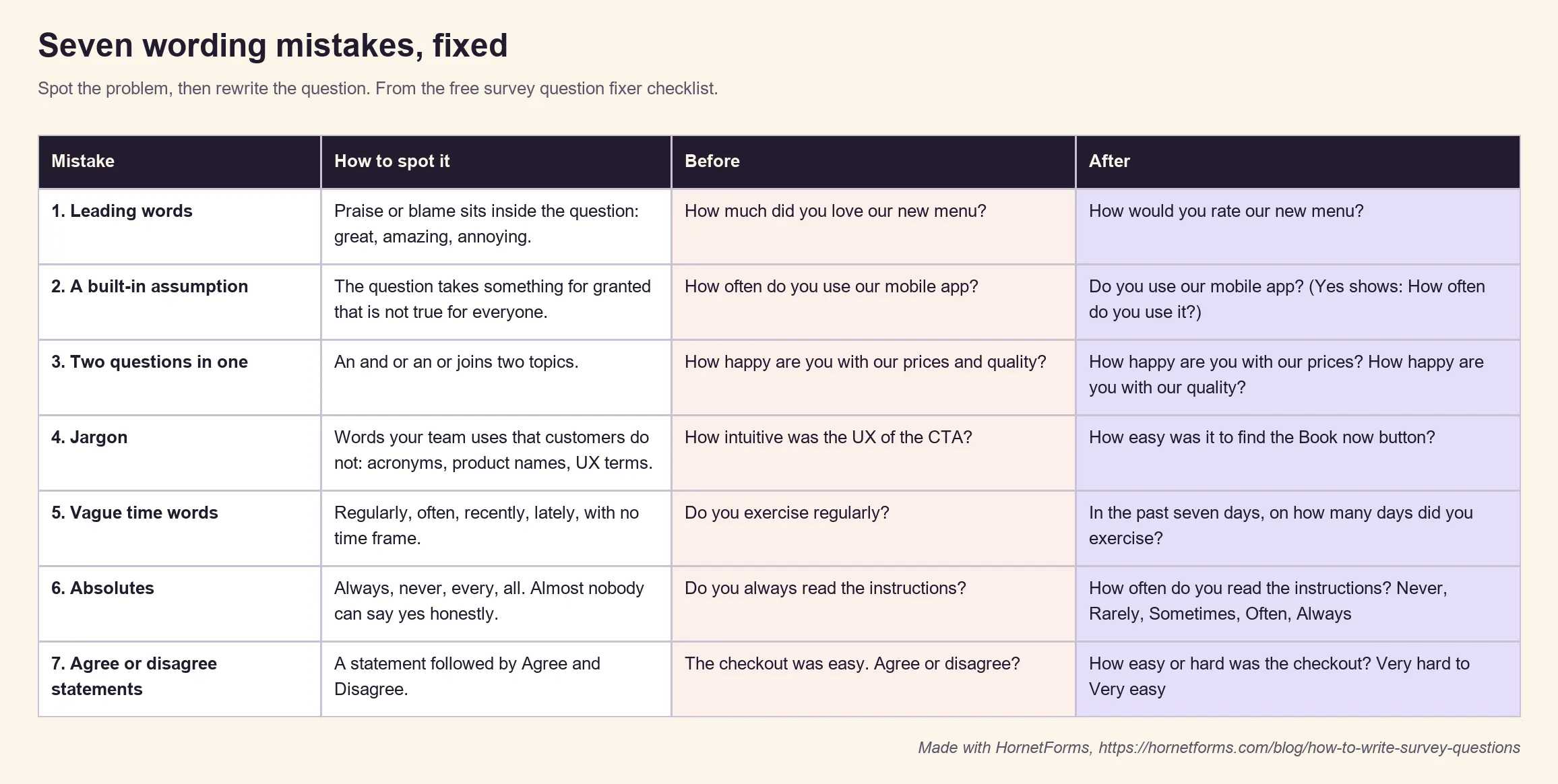
- Leading words. "How much did you love our new menu?" tells people the answer you hope for. Take the opinion out: "How would you rate our new menu?"
- A built-in assumption. "How often do you use our mobile app?" assumes everyone has it. Ask "Do you use our mobile app?" first, then show the follow-up only to people who say yes.
- Two questions in one. Someone who loves your prices and hates your quality can't answer "How happy are you with our prices and quality?" Pew Research Center says these double-barreled questions "are difficult for respondents to answer and often lead to responses that are difficult to interpret" (Pew Research Center, writing survey questions, accessed 28 October 2026). Split it into two.
- Jargon. "How intuitive was the UX of the CTA?" is how your team talks, not your customers. Try "How easy was it to find the Book now button?"
- Vague time words. "Regularly" means daily to one person and monthly to another. Give a time frame and ask for a count: "In the past seven days, on how many days did you exercise?"
- Absolutes. Almost nobody "always" reads the instructions, so "Do you always read the instructions?" gets a guilty no. Ask how often, on a scale from Never to Always.
- Agree or disagree statements. "The checkout was easy. Agree or disagree?" looks neutral, but it isn't. Pew reports that "less educated and less informed respondents have a greater tendency to agree with such statements", a pattern sometimes called acquiescence bias. Its advice: "A better practice is to offer respondents a choice between alternative statements." So ask directly: "How easy or hard was the checkout?"
The free checklist at the end of this post has all seven, plus three answer option mistakes, with a before and after for each.
Closed, open or scale: when each works#
Knowing how to write survey questions also means picking the right shape. Effective survey questions get both the words and the shape right. You have three basic shapes, and each answers a different kind of question.
| Shape | Best for | Example | Watch out for |
|---|---|---|---|
| Closed (pick one or several) | Counting and comparing groups | "What brought you to the site today?" | Missing options push people into a wrong answer |
| Scale (rating, linear scale) | Tracking a feeling or opinion over time | "How easy was the site to use?" on 1 to 5 | Unlabeled ends that mean different things to different people |
| Open (short or long answer) | The why behind a score, and ideas you didn't think of | "What is the main reason for your score?" | Too many of them tire people out |
The shape also changes the answers you get. In one Pew experiment, voters got the same question in either a closed or an open version. "When explicitly offered the economy as a response, more than half of respondents (58%) chose this answer; only 35% of those who responded to the open-ended version volunteered the economy." A list of options reminds people of answers they might not have thought of. That can help or hurt, so choose on purpose.
A good pattern for most surveys: a scale question for the number, then an open question for the reason. For the full list of shapes, see every question type, and when to reach for it.
Label both ends of every scale#
A bare 1 to 5 means something different to everyone. Is 3 "fine" or "bad"? In HornetForms you can label the ends of a linear scale (up to 100 characters each), for example "Not at all useful" and "Extremely useful". The NPS (0 to 10) and CSAT (five faces) presets give you the two classic customer scores, and HornetForms works them out for you in the built-in analytics and the Summary tab.
Answer options that cover everyone#
Most advice on how to write survey questions stops at the wording. For a closed question, the options matter just as much. Check three things:
- No overlaps. "18 to 25" and "25 to 34" leave a 25-year-old with two right answers. Make each range stop before the next one starts: "18 to 24", "25 to 34".
- A way out. If some people have no true answer, add "Other", "None of these" or "Does not apply". Without it, they may pick a wrong answer or quit.
- A balanced scale. "Poor, Good, Very good, Excellent" has three good options and one bad one. Give both sides the same number of steps: "Very poor, Poor, Fair, Good, Very good".
Order matters inside a question too. Pew notes that in self-administered surveys, people "tend to choose items at the top of the list". So keep long lists in a natural order (alphabetical, smallest to largest), and don't always put your favorite answer first.
Order questions so people finish#
Part of how to write survey questions well is deciding where each one goes. Pew warns that "questions asked earlier in a survey may influence how people respond to later questions". For example, a run of complaint questions can color the overall rating that comes after it. So:
- Start easy. Open with a simple closed question that everyone can answer in a second.
- Go general before specific. Ask for the overall rating before you ask about each part of the experience.
- Group by topic. Keep the website questions together, then the delivery questions. Jumping around feels longer than it is.
- Put personal questions last, and keep them optional. Age, income and job title land better once people have seen why you're asking.
- Skip what doesn't apply. With conditional logic, a question only shows when an earlier answer makes it relevant. Someone who says "I don't use the app" never sees five app questions. HornetForms show and hide rules work on every plan, and our guide to logic, piping and calculations walks through a real one.
On a long survey, split it into pages with a progress bar, so people can see the end coming.
Test it on five people first#
Pew calls pretesting "an essential step in the questionnaire design process". No guide on how to write survey questions beats watching real people answer yours, and you don't need a lab. Send your draft to five people who match your audience, and ask them to take it while you watch, or to think out loud on a call.
Listen for:
- Pauses and rereads. The question is unclear.
- "It depends." The question needs a time frame or a split.
- "None of these fit me." An option is missing.
- Skipped questions. The question feels too personal or too much work.
After you send the real thing, keep watching. The built-in analytics in HornetForms show views, starts and completions, plus approximate drop-off (the last question a visitor touched). That gives you a good hint about which question to rewrite for the next round.
60 survey question examples by goal#
Now that you know how to write survey questions, you still need a starting point. Need survey question ideas? The free survey question bank (Excel) has 60 good survey questions to ask, grouped by goal:
- Customer satisfaction (nine questions), from a CSAT score to "What one thing should we improve first?"
- Product feedback (nine), including a ranking question for your roadmap
- Website feedback (nine), built around "Did you find what you were looking for?"
- Event feedback (eight). For more on events, classes and services, see our list of feedback form questions.
- Course or training (nine)
- Employee check-in (eight), with a note to tell people up front who reads the answers
- Market research (eight), with spending and time bands that never overlap
Each row has the question, a suggested question type, the answer options or scale labels, and a short note on why it's worth asking. Filter by goal, mark the ones you want in the "Use it?" column, then filter again to see your survey. Prefer plain text? There's a CSV copy too. To see whole question sets in context, browse our questionnaire examples.
Here are five from the bank to show the style:
| Goal | Question | Type and options |
|---|---|---|
| Customer satisfaction | How easy was it to get what you needed from us? | Linear scale, 1 to 5, Very hard to Very easy |
| Product feedback | What would you use instead if [product] disappeared tomorrow? | Short answer |
| Website feedback | Did you find what you were looking for? | Multiple choice: Yes, Partly, No |
| Course or training | How much of the course can you use straight away? | Multiple choice: Most of it, Some of it, A little, None of it |
| Market research | How much time do you spend on [task] in a typical week? | Multiple choice: Under 1 hour, 1 to 3 hours, 4 to 7 hours, 8 hours or more |
Before you send anything, run each question past the one-page survey question fixer checklist (PDF, US Letter), also in A4. It has the seven wording mistakes, three answer option mistakes and a short "before you send" list. If you'd rather start from a full ready-made set, see our questionnaire guide, and for events, our post-event survey questions.
Try your questions on a real survey#
You know how to write survey questions now. The fastest way to use them is to start from a form that already follows these rules. Our customer satisfaction survey template pairs a CSAT question with a follow-up that only shows to unhappy customers, then asks the NPS question. For your site, the website feedback survey asks why people came and whether they found what they were looking for, and only asks what they were after when they didn't, or only partly did. Still choosing a tool? See how to pick a free survey maker.
HornetForms is free forever on the Free plan, with unlimited forms and responses and 20+ question types. You can export every answer as a CSV, and the features page has the rest. Sign up for free and send your first survey this week.