
On this page
Most questionnaires that fail don't fail because of one bad question. They fail before anyone writes a question at all. Nobody agreed what the answers were for, who should answer, or how. By the time the results come in, it's too late to fix any of it.
This guide shows you how to create a questionnaire in eight steps, from the first goal to the last chart. It works for a customer survey, a class project, a member poll or a small research study. Each step ends with something you write down. The free questionnaire planning worksheet has a place for all of it: goal, audience, mode, question list and a pretest log.
How to create a questionnaire: the eight steps at a glance#
Pew Research Center, the US research group, puts it plainly: "Questionnaire design is a multistage process that requires attention to many details at once" (Pew Research Center, Writing survey questions, accessed 28 October 2026). Breaking it into steps keeps those details from piling up at once.
| Step | What you decide | What you end up with |
|---|---|---|
| 1. Decide what you need to learn | The decision the answers feed | One goal sentence and up to three things to learn |
| 2. Choose who answers and how many | Your audience and a target number | A "who answers" line and an invite count |
| 3. Choose the mode | Paper, online or interview | One mode, with a reason |
| 4. Draft the questions | Wording and answer types | A question list where every question has a job |
| 5. Order and format them | Sections, flow and length | A draft that reads like a conversation |
| 6. Pretest with five people | What confuses real people | A pretest log and a fixed draft |
| 7. Send and follow up | Dates, reminders, a close date | A send plan |
| 8. Analyze the answers | Counts, themes and the decision | The decision you set out to make |
A questionnaire is the set of questions; a survey usually means the wider study that uses one. Our guide to survey vs questionnaire sorts out the difference. These steps work for both.
Step 1: decide what you need to learn#
Every good questionnaire starts with one sentence: "We will use the answers to decide ___." Maybe it's whether to add evening classes or what to change about a workshop. Of the many stages, Pew says "The first is identifying what topics will be covered in the survey." The goal sentence is how you pick them.
Then write down two short lists:
- What you need to learn. Three things at most. Say a yoga studio wants to decide on evening classes. It needs to learn which evenings members could come, how often, and what stops them coming now.
- What you already know. Don't ask it again. The studio already knows each member's plan from the sign-up list, so the questionnaire skips it.
This is the step most people skip when they work out how to create a questionnaire. Every extra topic adds questions, and every question costs your respondents a little patience. Still choosing a topic? Our list of survey ideas can help.
Step 2: choose who answers and how many#
Part of how to create a questionnaire is deciding who it's for. Write down who should answer and who shouldn't. "Our customers" is too loose. "People who bought from us in the last six months" is something you can act on.
Then decide how many answers you need:
- A small group? If it's a class of 25 or a team of 12, ask everyone.
- A big group? If you want results that describe a large group with known accuracy, you need a sample size. Our guide to survey sample size covers it.
- Invite more than you need. Not everyone answers. Your own past response rate is the best guide to how many people to invite.
Last, note how you'll reach them: an email list, a link in a newsletter, a QR code on a poster or paper copies at the front desk.
Step 3: choose the mode: paper, online or interview#
The "mode" is how people answer, and it changes more than you'd think. When you work out how to create a questionnaire for your group, pick the mode early. Pew notes that "question wording and responses can vary based on the mode used to survey respondents". So pick one mode on purpose, and keep it the same if you want to compare rounds over time.
| Mode | Works well when | Watch out for |
|---|---|---|
| Paper | People are in one room (a class, a waiting room, an event) or offline | Someone has to type the answers up later |
| Online form | People are spread out, and you want answers in a sheet with no typing | People who rarely go online; you need a link, a list or a QR code |
| Phone or face to face | Questions need explaining, or people find forms hard to fill in | Staff time, and people answering to please the interviewer |
That last point is real. Pew says "social desirability bias can be greater when an interviewer is present". The order of answer options plays out differently too. In phone surveys, people "more frequently choose items heard later in a list", while "in self-administered surveys, they tend to choose items at the top of the list". If you use long lists online or on paper, keep them in a natural order, like A to Z or smallest to largest.
Step 4: draft the questions#
This is the part most people picture when they think about how to create a questionnaire. Take each thing you need to learn from step 1 and write the fewest questions that answer it. In the worksheet, each question gets a "job" column: the decision or fact it feeds. If you can't fill in the job, cut the question.
When you design your own questionnaire, these rules catch most problems:
- One idea per question. "How happy are you with our prices and service?" is two questions.
- No leading words. "How much did you enjoy..." hints at the answer you want.
- A time frame. "In the past month" beats "regularly".
- Options that cover everyone. No overlapping ranges, and an "Other" or "Does not apply" where needed.
- A "why" after scores that matter. A rating tells you what. A short open question tells you why.
Our guide on how to write survey questions goes deeper on wording, with seven common mistakes and a fix for each. To pick the right answer format (multiple choice, rating, ranking, matrix and more), see every question type and when to use it.
You don't have to start from a blank page. Our questionnaire examples show finished sets you can borrow from, and the questionnaire template post has a free Word file with 12 questions in four sections.
Step 5: order and format the questions#
Questionnaire design is as much about order as wording. Pew's advice is simple: "A questionnaire, like a conversation, should be grouped by topic and unfold in a logical order." In practice:
- Start easy. Pew says it is "often helpful to begin the survey with simple questions that respondents will find interesting and engaging."
- Go general before specific. Ask for the overall rating before the detail questions, so the details don't color the big picture.
- Group by topic. Keep the class-time questions together.
- Put personal questions last, and make them optional. Age or income lands better once people see why you're asking.
- Skip what doesn't apply. Someone who never comes in the evening doesn't need five questions about evening classes.
Then frame the questions. Open with a short introduction: who's asking, why, how long it takes and by when. Use a heading for each section. Label both ends of every scale, for example "Not at all likely" and "Extremely likely". Close with a one-line thank-you that says what happens next. Our guide to questionnaire format covers each of these parts.
Step 6: pretest it with five people#
Pew calls pretesting "an essential step in the questionnaire design process". The US Census Bureau goes further for its own surveys. Its quality standard says survey forms "must be pretested with respondents to identify problems" before they go out. It adds that "Pretesting must involve respondents or data providers who are in scope for the data collection" (US Census Bureau, Statistical Quality Standard A2, accessed 28 October 2026). In plain words: test it on the kind of people who'll answer it for real, then fix what they trip over.
Why bother? The Census Bureau's testing guide puts it this way: "Pretesting is critical to the identification of problems for both respondents and interviewers with regard to question content, order/context effects, skip instructions, and formatting" (US Census Bureau, Appendix A2: Questionnaire Testing and Evaluation Methods for Censuses and Surveys, accessed 28 October 2026).
If you remember one thing about how to create a questionnaire, make it this step. You don't need a lab. One method in the Census Bureau's guide is the cognitive interview: "one-on-one interviews using a draft questionnaire in which respondents describe their thoughts while answering the survey questions." Here's a small version of that:
- Find five people from your audience.
- Ask each one to fill in the draft while they think out loud, on a call or next to you.
- Time them. If the introduction says "five minutes" and it takes 12, fix one or the other.
- Write every problem in the pretest log: the question number, what happened and your fix.
Listen for pauses and rereads (the question is unclear), "it depends" (it needs a time frame or a split) and "none of these fit me" (an option is missing). If you changed a lot, test the new draft on two or three new people.
Step 7: send it and follow up#
Before you send, put three dates in the worksheet: the send date, one reminder date and a close date. Then:
- Share it where your people already are. Email the link, post it in a newsletter, or print a QR code for posters and paper handouts.
- Send one reminder yourself to the whole list a few days before the close date. It gives anyone who meant to answer a second nudge.
- Read the first answers early. If a question gets skipped a lot, you still have time to fix it.
Step 8: analyze the answers and act#
The last part of how to create a questionnaire is the one that pays for the rest. Start with the simple numbers. For each closed question, count the answers and work out percentages. Then compare groups, for example members who come weekly against members who come monthly. For open answers, read them all once, then sort them into three or four themes and count each theme.
Our guide on how to analyze survey data takes it from there. For rating scales, our Likert scale guide shows how to score them.
Then go back to the goal sentence from step 1 and finish it with what you decided. Share a short summary with the people who answered. It's polite, and it shows people their answers went somewhere.
How to make a questionnaire in Word or Google Docs#
Paper still wins at a reception desk, in a classroom or in a hall with patchy Wi-Fi. Here's how to make a questionnaire in Word that's easy to fill in:
- Title and introduction at the top. Who's asking, why, how long and by when.
- A heading for each section and numbered questions, so people can see their progress.
- Tick boxes for choice questions. Type a box symbol in front of each option, or put the options in a table.
- A table for rating grids, with the scale across the top and one statement per row.
- Lines for open answers. Three lines is a good start.
- Save a PDF for printing, so the layout doesn't shift on another computer.
Working in Google Docs? Upload the Word file to Google Drive and open it with Google Docs to edit it there with your team.
The catch with paper is typing it all up afterwards. An online form skips that. You have three ways to get there in HornetForms, all on the Free plan:
- Import the Word file or a PDF. Upload it on the import screen and HornetForms' AI rebuilds it as a form for you to review. Each file uses one AI generation from your monthly allowance (the Free plan includes three a month).
- Import a CSV. Bring your questions in from a CSV or TSV file. HornetForms reads the file in your browser, and this route is free. The "Improve with AI" step is optional.
- Start from a ready-made form. For customer feedback, the customer satisfaction survey template is already built and ordered. Browse the rest on the templates page.
Online, you can split a long questionnaire into pages with a progress bar and use any of the 20+ question types. Show and hide rules let a question appear only when an earlier answer makes it relevant, which handles the "skip what doesn't apply" rule from step 5. Every form gets a link and a QR code (PNG or SVG), and you can set a close date and time. For the full walk-through, see how to create an online form.
Get the questionnaire planning worksheet#
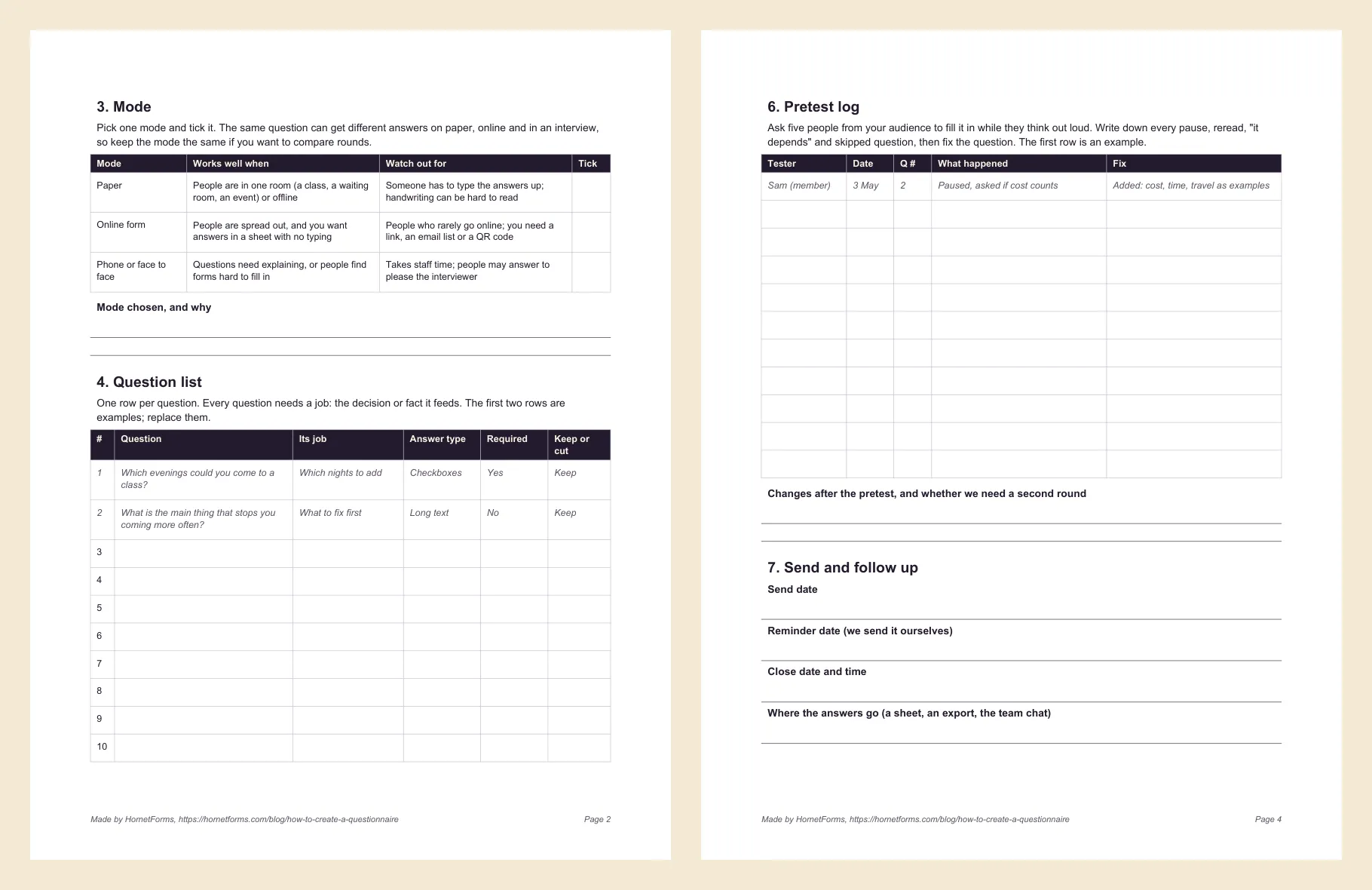
The free worksheet turns the steps for how to create a questionnaire into a fill-in-the-blanks job, one section per step. It has space for your goal sentence, who answers and a mode table to tick. Then come a 17-row question list with a job column and a checklist for each question, an order and length section, a pretest log and a send plan. Example rows show how to fill it in.
- Word (DOCX), the easiest one to edit
- PDF, US Letter
- PDF, A4
Designing a questionnaire goes faster when the people involved agree on the goal before anyone writes question one.
Create your first questionnaire this week#
Decide, choose, draft, order, pretest, send and analyze. The worksheet keeps all eight steps on a few pages.
When the answers come in, HornetForms' Summary tab sums up the answers to each question. You also get CSV export on every plan, Excel export on Pro and Business, and live rows in Google Sheets. You can turn on an email to yourself for each new response, and the built-in analytics show roughly where people stop. Every plan takes unlimited responses within fair use, so you won't hit a response limit halfway through a study.
HornetForms is free forever on the Free plan. See everything it does on the features page, or sign up for free and build your first questionnaire today.