
On this page
A blank page is the hardest part of any questionnaire. You know what you want to learn, but the first question won't come, and the ones that do sound stiff. Good questionnaire examples fix that. You see how someone else opened, ordered and closed the thing, then you swap in your own words.
Below are 10 questionnaire examples for real jobs, from customers and courses to a team pulse and a health check-in. Each comes with its questions, answer formats and a line on why it works. Then come the basic questionnaire questions almost every survey needs, a few introductions and a free pack with all 10 in Word and PDF.
What makes good questionnaire examples#
A sample questionnaire is only useful if you can copy its habits, not just its words. The best questionnaire examples share five habits:
- One goal. Every question helps answer one thing you need to decide. If a question won't change what you do, it goes.
- Plain words. Pew Research Center, which runs large US surveys, puts it simply: "In general, questions that use simple and concrete language are more easily understood by respondents" (Pew Research Center, Writing survey questions, accessed 28 October 2026).
- Short answer lists. Pew advises keeping answer choices to "just four or perhaps five at most", especially when someone reads them out on the phone. Most lists below stay at five or fewer.
- Big picture first. Pew notes that "the order in which questions are asked can influence how people respond". So the examples ask for an overall rating before the detail.
- A reason after every score. A 3 out of 5 tells you something is off. The open "why" question after it tells you what.
Not sure whether you need a survey or a questionnaire? Read our guide to survey vs questionnaire. Searched for survey examples? These questionnaire examples work for that too.
10 sample questionnaires you can copy#
These examples of questionnaire design show the main questions, with the answer format in brackets. The free pack has the full version of each. Words in square brackets are yours to replace.
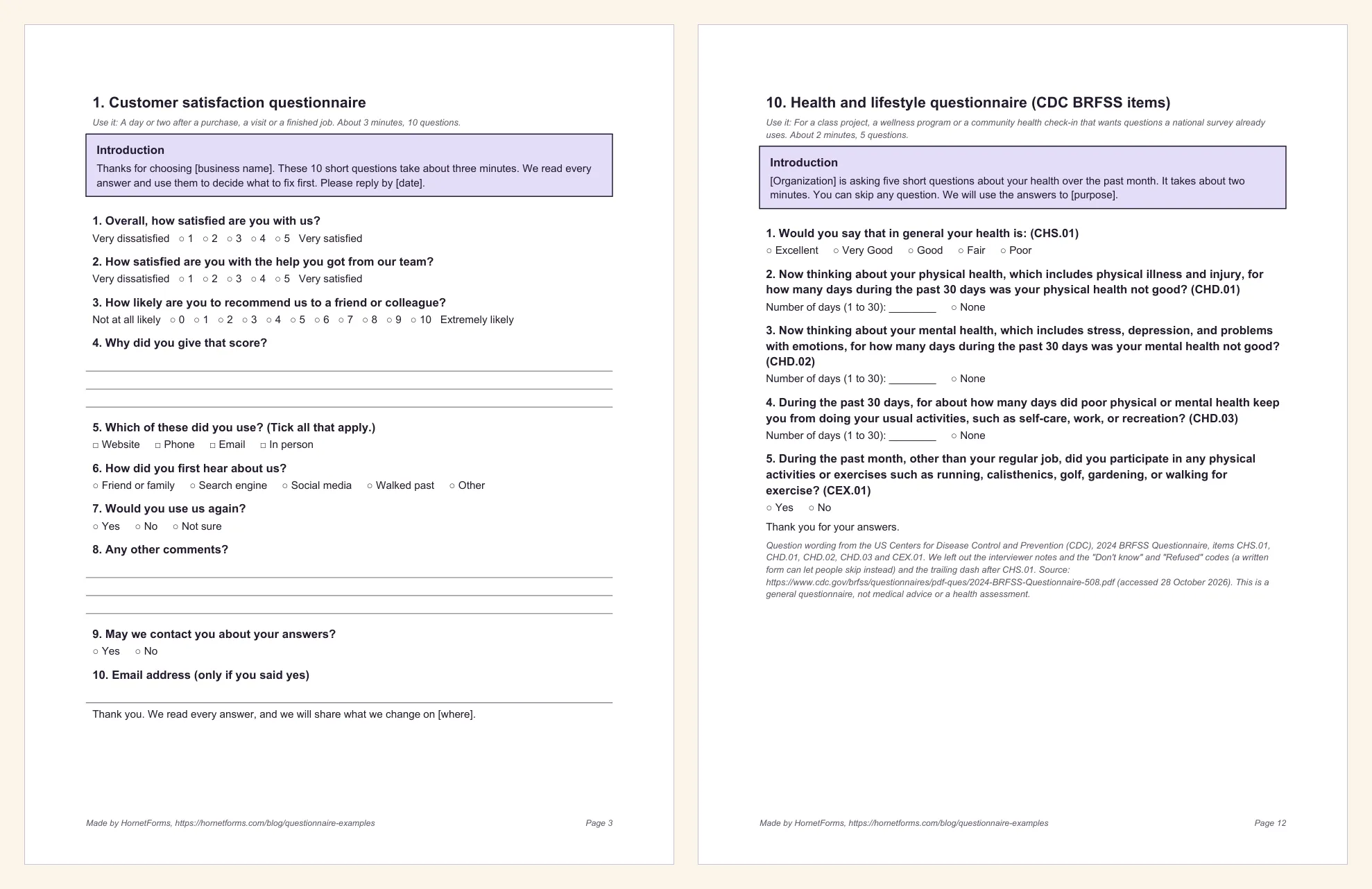
1. Customer satisfaction questionnaire#
Send it a day or two after a purchase, a visit or a finished job.
- Overall, how satisfied are you with us? (1 to 5, Very dissatisfied to Very satisfied)
- How likely are you to recommend us to a friend or colleague? (0 to 10)
- Why did you give that score? (written answer)
- How did you first hear about us? (pick one)
- Would you use us again? (Yes, No, Not sure)
- May we contact you about your answers? (Yes or No, then an email line)
Why it works: two scores to track over time, one reason, and contact details only from people who said yes. It's also the example in the free CSV.
2. Event feedback questionnaire#
Use it at the end of an event, or in the thank-you email the next morning.
- Overall, how would you rate the event? (1 to 5)
- Which sessions did you attend? (tick all that apply)
- Which part was most useful to you, and why? (written answer)
- What one thing should we change next time? (written answer)
Why it works: the sessions question lets you split the ratings later. For more ideas, see our list of post-event survey questions, or start from the event feedback form template.
3. Course evaluation questionnaire#
Run it in the last session, or halfway through while you can still adjust.
- How clear were the goals of this course? (1 to 5)
- How was the pace of the course? (Too slow, About right, Too fast)
- Outside class, about how many hours a week did you spend on this course? (0 to 2, 3 to 5, 6 to 8, 9 or more)
- What helped you learn the most? (written answer)
- What one change would improve this course? (written answer)
Why it works: it asks about the course, not the person, and the hours question uses ranges people can answer without a diary. Our course evaluation form template has a ready-made online version.
4. Market research questionnaire#
Use it before you launch, to learn how people handle the problem today.
- How often do you [do the task]? (Daily, Weekly, Monthly, Less often)
- How do you handle it today? (pick one: by hand, a spreadsheet, a paid tool, someone else does it)
- How frustrating is the way you handle it now? (1 to 5)
- What is the hardest part? (written answer)
- In the past year, have you paid for anything to help with this? (Yes, No, Not sure)
Why it works: it asks about what people do now, which they know, instead of what they might buy, which they don't. The HornetForms template gallery also has a Market research survey under Surveys.
5. Community needs questionnaire#
For a group, library, school or council that wants to know what local people need most.
- How long have you lived or worked in [area]? (pick one)
- Which issues matter most to your household? (tick up to three: housing costs, food access, transport, jobs, activities for young people, getting health care, safety)
- What does [area] do well that we should keep? (written answer)
- What is one thing that would make [area] a better place to live? (written answer)
Why it works: "tick up to three" makes people choose what matters most, and the strengths question keeps it from reading like a complaints box.
6. Employee pulse questionnaire#
Send it every two to four weeks to spot workload and clarity problems early.
- How clear are your priorities for the next two weeks? (1 to 5)
- How is your workload right now? (Far too light to Far too heavy, five steps)
- How supported do you feel by your team? (1 to 5)
- What is one thing getting in the way of your work? (written answer)
- What is one thing we should keep doing? (written answer)
Why it works: it's short enough to answer every few weeks, and its introduction promises something you can deliver: "We'll share what we heard, and what we'll change, at the next team meeting."
7. Student questionnaire: study habits#
A sample questionnaire for a class project or a school club.
- On a school night, about how long do you spend on homework? (Less than 1 hour, 1 to 2 hours, 2 to 3 hours, More than 3 hours)
- Where do you usually study? (pick one)
- What gets in the way of studying? (tick all that apply: my phone, noise, feeling tired, other activities, nothing much)
- What one study tip would you give a younger student? (written answer)
Why it works: students answer from their own week, the options cover the real places and distractions, and the last question is fun to read out in class.
8. Website feedback questionnaire#
Show it as a short pop-up or a link at the bottom of key pages.
- What did you come here to do today? (pick one)
- Were you able to do it? (Yes, Partly, No)
- How easy was our site to use? (1 to 5)
- What, if anything, got in the way? (written answer)
Why it works: four questions, about two minutes, and the "Partly" option catches the visitors who almost made it.
9. Product feedback questionnaire#
For people who have used your product or app for at least a few weeks.
- Which features do you use? (tick all that apply)
- How would you feel if you could no longer use [product]? (Very disappointed, Somewhat disappointed, Not disappointed)
- What is the main benefit you get from [product]? (written answer)
- What should we improve first? (written answer)
Why it works: question 2 is the classic product-market fit question. Our guide to the product-market fit survey shows how to score it.
10. Health and lifestyle questionnaire#
This one borrows its questions from the US Centers for Disease Control and Prevention (CDC). Its Behavioral Risk Factor Surveillance System (BRFSS) is "the nation's premier system of health-related telephone surveys" (CDC, Behavioral Risk Factor Surveillance System, accessed 28 October 2026). Three of the five items, word for word from the 2024 BRFSS Questionnaire (accessed 28 October 2026):
- "Would you say that in general your health is" (Excellent, Very Good, Good, Fair, Poor; item CHS.01)
- "Now thinking about your physical health, which includes physical illness and injury, for how many days during the past 30 days was your physical health not good?" (number of days, or None; item CHD.01)
- "During the past month, other than your regular job, did you participate in any physical activities or exercises such as running, calisthenics, golf, gardening, or walking for exercise?" (Yes or No; item CEX.01)
The pack adds the two other Healthy Days items (CHD.02 on mental health and CHD.03 on days lost to poor health) and a source note.
Why it works: the questions already run in a national survey, and Pew notes that to track change "it is important to use the same question wording". Tell people they can skip any question, and treat it as a check-in, not medical advice.
Basic questionnaire questions almost every questionnaire needs#
Look across the 10 questionnaire examples and the same building blocks keep showing up. These are the basic questionnaire questions to reach for first. Pick the ones your goal needs, then add the questions only your topic can ask.
| Job | Sample question | When to use it |
|---|---|---|
| Who is answering | "Which best describes you?" | Only when you'll split the results by group |
| The big picture | "Overall, how satisfied are you with...?" (1 to 5) | Near the start, before the detail |
| The reason | "Why did you give that score?" | Straight after any score that matters |
| The fix | "What one thing should we change?" | Once, near the end. One open box beats five |
| Who they are | Age band, role or area, with "Prefer not to say" | Only what you'll use, near the end |
| Follow-up | "May we contact you about your answers?" | Ask for an email only after a yes |
| The catch-all | "Anything else you'd like to tell us?" | Last, and always optional |
When you borrow sample questions for questionnaire use, two rules apply. Ask each question about one thing only. And make every answer list cover everyone, with an "Other" or "Not sure" where people need it. Our guide on how to write survey questions covers the wording traps in detail, and every question type and when to use it helps you match each question to the right format.
Good to know: a questionnaire only tells you about the people who answered it. Before you send one to a whole customer list or a school, check how many responses you need for the answers to mean something.
Example introductions#
The introduction decides whether people start. A good one says who's asking, why, how long it takes and what happens next. Here are three short ones from the pack, each for a different crowd:
- A class project: "Hi, I'm [name] from [class]. For a class project, I'm asking students how they study. It takes about three minutes. I'll share the results in class on [date]."
- A team pulse: "Six quick questions about the last two weeks. It takes about two minutes. We'll share what we heard, and what we'll change, at the next team meeting."
- Pre-launch research: "We're building [product or service] for people who [do the task]. We'd like to learn how you handle it today. Nine questions, about four minutes. We won't try to sell you anything."
Each says what happens to the answers next, and that's a promise you can keep. Our questionnaire template post has six more introductions, from customers and members to parents at a school club.
Download the questionnaire examples pack#
All 10 questionnaire examples come in one free pack. Each sits on its own page with an introduction, every question and answer option, writing lines and a thank-you line. The last page matches each paper answer style to an online question type.
- Questionnaire examples pack, Word (DOCX), the easiest to edit
- Questionnaire examples pack, PDF, US Letter
- Questionnaire examples pack, PDF, A4
- Customer satisfaction example as a CSV for import
Want one in Google Docs? Upload the Word file to Google Drive and open it with Google Docs. To print a single questionnaire, print just its page from the PDF. Building in Google Forms? See our Google Forms examples.
Turn one into an online form#
Paper works for a room full of people. For anything bigger, an online form saves you typing up every answer. You have three ways to put these questionnaire examples online with HornetForms, all on the Free plan.
1. Import the CSV. The customer satisfaction CSV has the 10 questions as column headings and 10 example rows. Drop it on the Import a form screen. HornetForms reads it in your browser and uses the example rows to guess each question's type. We ran a copy of the importer's rules on the file, and every column landed as planned:
- The two satisfaction questions become 1 to 5 ratings, and the recommend question a 0 to 10 scale.
- The two open questions become long text, and the email line an email question.
- "Which of these did you use?" becomes checkboxes; the other choice questions become multiple choice.
The example rows only guide the types; they don't become responses. Afterwards, label the ends of the 0 to 10 scale ("Not at all likely" and "Extremely likely"), and add a show rule so the email question appears only after a "Yes". Prefer the scores worked out for you? Swap in the NPS preset (0 to 10) and the CSAT preset (five faces), and HornetForms scores both in the built-in analytics and the Summary tab.
2. Import the Word file. Edited one of the other nine in the DOCX? Upload it on the same screen and HornetForms' AI rebuilds it as a form for you to review. Each file uses one AI generation from your monthly allowance (the Free plan includes three a month).
3. Start from a ready-made form. The customer satisfaction survey template, the event feedback form template and the course evaluation form template are ready-made online forms for the same jobs as examples 1 to 3.
Whichever you pick, the online version can use any of the 20+ question types, split long questionnaires into pages with a progress bar, and share a QR code for the paper crowd. You get unlimited responses within fair use on every plan, so you won't hit a response limit halfway through. Turn on an email to yourself for each new response if you like to read them as they come in, or send them to Google Sheets, Slack and other tools.
Pick the example closest to your job, cut it to the questions you'll act on, and test it on five people before it goes out. See the rest on the features page, or sign up for free and import the customer satisfaction CSV in the next five minutes.