
On this page
You need feedback, and you need it this week. So you search for a questionnaire template, open the first one, and find 40 questions about things you'll never act on. Or a blank page with "Question 1" on it. Neither helps.
This guide gives you a questionnaire template you can use today. It has 12 questions in four sections, three ready-made introductions, and a page that tells you what kind of answer each question needs. It comes as a Word file and a PDF for paper, plus a CSV that turns the same questions into an online survey in a few clicks. Along the way, you'll see six introduction examples and how to read the answers without a spreadsheet headache. Not sure whether you need a survey or a questionnaire? Our guide to survey vs questionnaire explains the difference.
What a good questionnaire template includes#
A questionnaire is just a set of questions in a set order, with a short note at the top. A good questionnaire template gets five things right:
- An introduction. Who's asking, why, how long it takes, and what happens to the answers.
- Sections. Group questions by topic so people know where they are. "About you", then "Your experience", then "What comes next" feels like a conversation.
- One idea per question. The US research group Pew Research Center warns about questions that "ask respondents to evaluate more than one concept (known as double-barreled questions)". It says they are "difficult for respondents to answer and often lead to responses that are difficult to interpret" (Pew Research Center, Writing survey questions, accessed 28 October 2026).
- The right answer format. A scale when you want to compare, a list when you know the options, a text box when you don't.
- A clear end. A thank-you line that says what you'll do next.
Order matters too. Pew notes that "questions asked earlier in a survey may influence how people respond to later questions". That's why the template asks for an overall rating before the detail questions, so people give their big-picture view first.
Write the introduction first: six examples#
Most people skip the introduction. Don't. It's the first thing a respondent reads, and it decides whether they keep going. A good introduction to a questionnaire answers four questions in three or four sentences:
- Who is asking?
- Why are you asking, and what will you do with the answers?
- How long will it take?
- By when, and who can they contact?
Keep it honest. Say what you'll use the answers for, and don't make promises about privacy you haven't checked. If you'll follow up with people, say so.
Here are six introduction examples. The first three are in the free download, ready to edit.
Customers:
Thanks for choosing [business name]. We'd love to hear how we're doing. This questionnaire has 12 short questions and takes about five minutes. We read every answer and use them to decide what to fix first and what to keep. Please reply by [date]. Questions about it? Email [contact email].
Members or a community group:
Hi [first name]. As a member of [group name], you help decide what we do next. These questions take about five minutes. We will share a summary of what we heard at [next meeting or in the next newsletter] and use your answers to plan [the next season]. Please reply by [date].
An event or course:
Thanks for joining [event or course name] on [date]. Tell us what worked and what didn't, so the next one is better. It takes about five minutes. We will use your answers to plan [the next event or course]. Please reply by [date]. Questions? Contact [name] at [email].
Three more for other jobs:
- Website visitors: "Got two minutes? Tell us what you came here to do today and whether you found it. We'll use your answers to fix the pages that get in the way."
- Clients of a studio or agency: "Our project together has wrapped up, and we'd like to know how it went for you. Five questions, about three minutes. Your answers shape how we run the next project."
- Parents at a club or school activity: "This term is nearly over. Help us plan the next one by answering eight quick questions about times, cost and what your child enjoyed. Please reply by Friday."
Notice what the three full introductions share: a reason, a time, a date and a person to contact. The short ones keep the reason and add a time or a date. That's enough.
The free questionnaire template, section by section#
We named the download Feedback questionnaire. It's three pages, works for customers, members or attendees, and takes about five minutes to fill in. For other finished sets to compare it with, see our questionnaire examples.
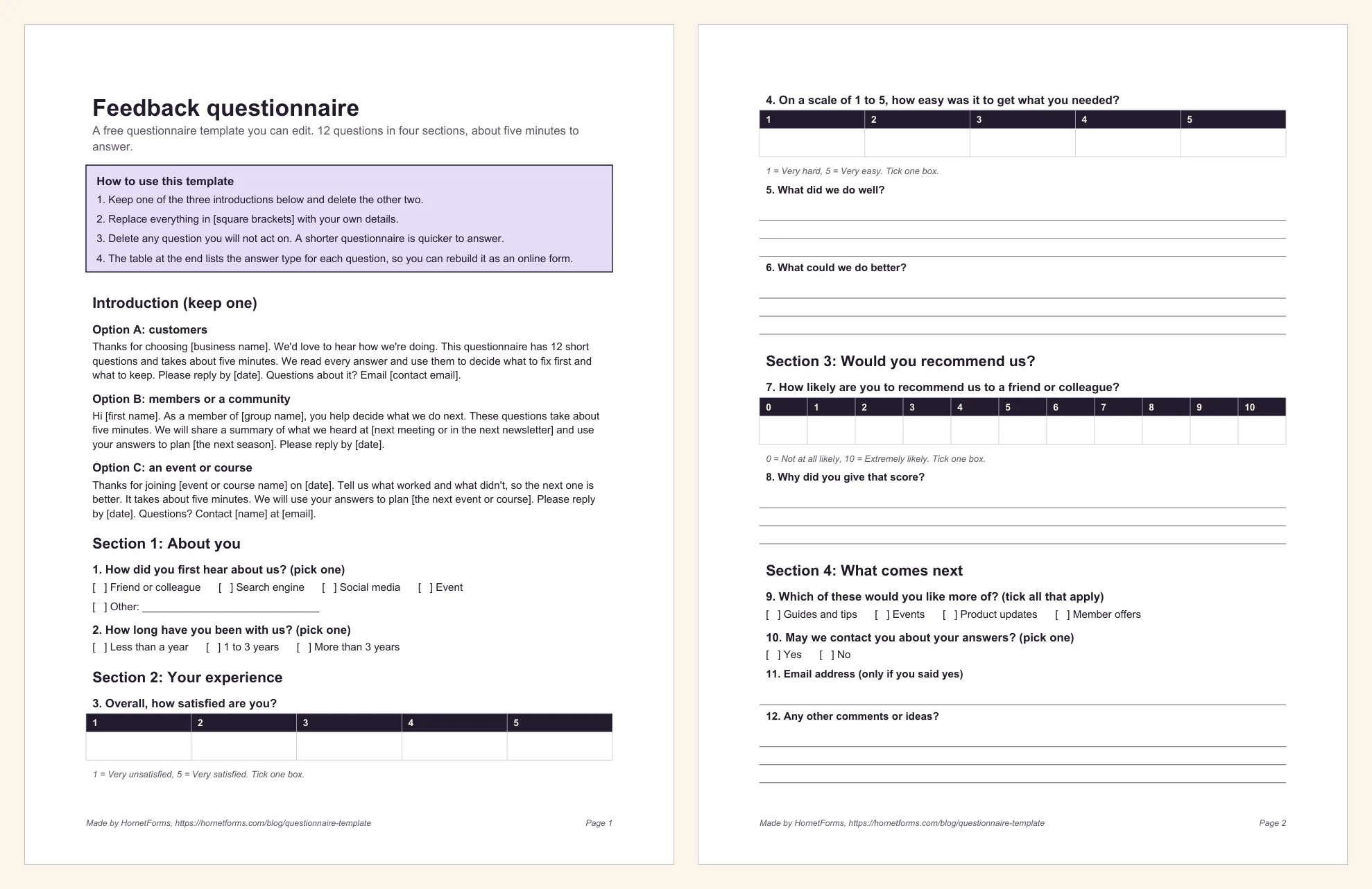
Here's what's inside the questionnaire template:
- How to use this template. Keep one introduction, replace everything in square brackets, and delete any question you won't act on.
- Section 1, about you. How did you first hear about us? How long have you been with us? Both are pick-one lists.
- Section 2, your experience. An overall satisfaction score from 1 to 5, a 1 to 5 score for how easy it was to get what they needed, then two open questions: what did we do well, and what could we do better?
- Section 3, would you recommend us? The classic 0 to 10 "how likely are you to recommend us" question, followed by "Why did you give that score?" The follow-up is where the useful detail lives.
- Section 4, what comes next. What they'd like more of (tick all that apply), whether you may contact them about their answers, an email line for those who say yes, and a last box for other comments.
- Thank you. One line on what happens next.
- Answer types for an online version. A table that lists the right online question type for each of the 12 questions. Delete it before you print copies.
Download it in the format you need:
- Word (DOCX), the easiest one to edit
- PDF, US Letter
- PDF, A4
- CSV for the online version (more on this below)
Match each question to the answer you need#
The most common questionnaire mistake isn't bad wording. It's asking a question in a format you can't use. If you want to compare this month with last month, you need a number. If you want ideas, you need words.
The format also changes the answers you get. Pew describes a poll after the 2008 US presidential election that asked people which issue mattered most, in two versions. When the list offered the economy, "more than half of respondents (58%) chose this answer; only 35% of those who responded to the open-ended version volunteered the economy" (Pew Research Center). Lists remind people of options. Open boxes show you what's already on their mind.
Every question in the questionnaire template uses one of these formats. Use this table to pick:
| If you want to know... | Use | Example from the template |
|---|---|---|
| Which option people picked, from a short list | Multiple choice (pick one) | How did you first hear about us? |
| Everything that applies | Checkboxes (tick all that apply) | Which of these would you like more of? |
| How good or bad something was, to compare over time | Rating, 1 to 5 | Overall, how satisfied are you? |
| Whether people would recommend you | 0 to 10 scale | How likely are you to recommend us to a friend or colleague? |
| The reason behind a score | Long text | Why did you give that score? |
| How to reach someone who agreed to it | Email address (only if you said yes) |
Two rules of thumb. Put an open "why" question straight after any score that matters. And never ask for contact details people didn't agree to give. For a deeper look at every format, see every question type and when to use it.
Use the Word or PDF version on paper#
A printed questionnaire template still wins in some places: a reception desk, the end of a workshop, a community hall with patchy Wi-Fi. If you searched for a survey template in Word, the DOCX is for you. Open it, edit the brackets, delete what you don't need and print. Want people to type into the Word copy instead? See how to make a fillable form.
A few tips for paper:
- Print the PDF if you won't edit it. The Letter and A4 versions keep the layout exactly as designed.
- Want it in Google Docs? Upload the Word file to Google Drive and open it with Google Docs to edit it there with your team.
- Leave space to write. The open questions have three lines each. If your crowd likes to talk, add more.
- Collect them in one place. A labelled box by the door makes handing a form back easy.
The catch with paper is typing the answers up afterwards. For anything over 20 or so responses, the online version can save you an afternoon.
Turn it into an online survey#
You have three quick ways to put this questionnaire template online in HornetForms. All three work on the Free plan.
1. Import the CSV. The questionnaire CSV has the 12 questions as column headings and six example rows. On the Import a form screen, drop in the file. HornetForms reads it in your browser, turns each column into a question and guesses the question types from the example rows. We ran the importer's own code on this file, and every column came out as planned:
- The two "about you" questions become multiple choice, and the satisfaction and ease questions become 1 to 5 ratings.
- The recommend question becomes a 0 to 10 scale.
- The open questions become long text, the "more of" question becomes checkboxes and the contact question becomes a Yes or No choice.
- The email line becomes an email question.
The example rows only guide the types. They don't become responses. After the import, take two minutes to finish it off in the editor. Add the missing options ("Event" and "Other") to the first question, and label the ends of the 0 to 10 scale (for example "Not at all likely" and "Extremely likely"). Then add a show rule so the email question appears only when someone answers "Yes" to "May we contact you about your answers?" Our guide to conditional logic walks through it.
Good to know: want the scores worked out for you? Swap the satisfaction question for the CSAT preset (five faces) and the recommend question for the NPS preset. HornetForms scores both for you in the built-in analytics and the Summary tab.
2. Import the Word file. Edited the DOCX already? Upload it on the same screen and HornetForms' AI rebuilds it as a form for you to review. Each file uses one AI generation from your monthly allowance (the Free plan includes three a month).
3. Start from a ready-made form. If your questionnaire is about customers, our customer satisfaction survey template already has the CSAT faces, a rating grid and the recommend question set up, with a follow-up box that appears for unhappy customers. Browse the rest on the templates page.
However you start, the online form can run over several pages with a progress bar, use any of the 20+ question types and take unlimited responses on every plan. That last one matters more than it sounds if you've ever hit a response limit halfway through a survey.
Read the answers without a spreadsheet headache#
Collecting answers with a questionnaire template is the easy part. Making sense of them is where most questionnaires die. Our guide on how to analyze survey data walks through it step by step. HornetForms gives you a few ways in, all on the Free plan unless marked:
- The Summary tab sums up the answers to each question in one place, so you see the pattern before you read a single comment.
- Filters in the responses table narrow things down, for example the people who gave a low score on the recommend question. Read their "Why did you give that score?" answers first.
- CSV export on every plan, and Excel export on Pro and Business.
- Google Sheets, Slack, Discord and Notion connect natively on every plan, so each new response can land where your team already works. Our post on where your form responses can go compares them.
- Email alerts. Turn on an email to yourself for each new response if you like to read them as they come in.
A simple routine works well: read the low scores first, sort their comments into three or four themes, then fix the most common one. If you ran the questionnaire after an event, our list of post-event survey questions has more ideas for next time.
Send your first questionnaire this week#
Pick an introduction, cut the template down to the questions you'll act on, and send it to 10 people before you send it to everyone. If anyone stumbles on a question, fix the wording and go. Pew calls pretesting a survey "an essential step in the questionnaire design process", and 10 friendly testers count. Need a different topic next time? Browse our survey ideas.
HornetForms is free forever on the Free plan, with unlimited forms and responses. See everything it does on the features page, or sign up for free and import your questionnaire template in the next five minutes.