
On this page
"Do we have product-market fit yet?" Every founder asks it. Most answer with a feeling: a good week of sign-ups, one glowing tweet, a churn spike that ruins the mood. A product market fit survey swaps the feeling for a number you can track.
It's one question, sent to the right people, scored in a specific way. This guide covers who to send it to, the full question set, how to score it against the 40% benchmark, and how to turn the answers into next quarter's roadmap. At the end there's a free calculator that does the scoring for you, split by role, usage and plan.
The one question behind it#
The product market fit survey comes from Sean Ellis, the growth marketer who later co-wrote the book Hacking Growth. In a 2009 post he described the test in his own words:
"I ask existing users of a product how they would feel if they could no longer use the product. In my experience, achieving product/market fit requires at least 40% of users saying they would be "very disappointed" without your product. Admittedly this threshold is a bit arbitrary, but I defined it after comparing results across nearly 100 startups."
That's Sean Ellis in The Startup Pyramid (his blog, 27 July 2009, accessed 28 October 2026). The question offers three answers:
- Very disappointed
- Somewhat disappointed
- Not disappointed
Why does a product market fit survey work? It asks about loss, not love. People are polite when you ask if they like something. They're more honest about what they'd miss. "Very disappointed" means the product has a real place in someone's week.
Note the word "arbitrary" in his own quote. The 40% line is a rule of thumb from one person's work with startups, not a law. It's still the most useful rule of thumb most founders have, because it gives a fuzzy question a target.
Who to send it to, and who to skip#
A product market fit survey is only as good as the people who answer it. Send it to the wrong crowd and you'll measure the wrong thing. No users yet? Before launch, start with market research survey questions instead.
Rahul Vohra, the founder of the email app Superhuman, wrote up how his team ran this survey for First Round Review. On who to ask, he wrote: "We identified users who recently experienced the core of our product, following Ellis' recommendation to focus on those who used the product at least twice in the last two weeks." (First Round Review, "How Superhuman Built an Engine to Find Product/Market Fit", 12 November 2018, accessed 28 October 2026.)
So, in practice:
- Send it to active users. People who've used the core feature recently, more than once.
- Skip sign-ups who never got going. They never saw the product work, so their "not disappointed" tells you about onboarding, not fit.
- Skip your friends, investors and team. They want you to win, and that bends the answers.
- Ask each person once. Vohra's team "were careful to ensure that we didn't survey users more than once, so as to not throw off the 40% benchmark."
How many answers do you need? Fewer than you'd think. Vohra again: "you start to get directionally correct results around 40 respondents, which is much less than most people think." Under 40, read the score as a hint, not a result. If you need a known margin of error, our guide to survey sample size does the maths.
The full question set#
One question gives you the score. A few more tell you what to do with it. Superhuman asked four: the disappointment question, what type of people would most benefit, the main benefit, and how to improve the product.
HornetForms has a product market fit survey template built on the same idea, with nine questions on one page. Here's what's in it:
| Question | Type | Who sees it |
|---|---|---|
| How would you feel if you could no longer use the product? | Multiple choice, required (very, somewhat or not disappointed) | Everyone |
| What's the main benefit you get from it? | Long answer | Only "Very disappointed" |
| What type of person would benefit most from it? | Long answer | Only "Very disappointed" |
| What would it take to make it genuinely useful to you? | Long answer | Only "Not disappointed" |
| What would you use instead if it went away? | Long answer | Everyone |
| How could we improve it for you? | Long answer | Everyone |
| How often do you use it? | Dropdown: every day, a few times a week, a few times a month, rarely | Everyone |
| What's your role? | Dropdown: founder, engineering, product, design, marketing, sales, operations, something else | Everyone |
| How did you first find us? | Dropdown: friend, search, social, newsletter or blog, ad, can't remember | Everyone |
The "Who sees it" column is conditional logic: show rules that hide a question until the first answer matches. Your biggest fans get asked what they love. People who wouldn't miss you get asked what's missing. Logic works on every plan, and our conditional logic guide shows how the rules work.
Only the first question is required. Everything else is optional, which keeps the form quick to finish. If you want help with wording your own follow-ups, our guide on how to write survey questions covers the common traps.
Add who answered without asking#
The template has no hidden fields, but you can add them in the editor. Two help a lot here:
user_id: your own ID for the person, so you can spot repeat answers and join responses to your product data.plan: the plan they're on, so you can see whether paying customers feel differently.
Then send the survey from a link your app builds, with the values filled in:
https://forms.hornetforms.com/f/<your-slug>?user_id=u_8f3k&plan=pro
Respondents never see hidden fields, and they don't need an account to answer. Our feature request form guide shows the same trick with a few lines of JavaScript.
Good to know: anyone can edit the values in a URL before they send the form. Treat them as labels for sorting, not proof of who someone is. Use an opaque ID like
u_8f3k, never an email address.
Score it, and what 40% means#
Scoring a product market fit survey takes simple math. Count everyone who picked one of the three answers. Divide the "very disappointed" count by that total. Leave out anyone who skipped the question.
| Answers counted | Very disappointed | Score | Against 40% |
|---|---|---|---|
| 40 | 14 | 35% | Five points below |
| 40 | 16 | 40% | At the line |
| 120 | 58 | 48% | Eight points above |
What does a low score mean? Not that you should quit. Superhuman's first result was low. Vohra wrote: "With only 22% opting for the 'very disappointed' answer, it was clear that Superhuman had not reached product-market fit." He didn't give up. In his words, "I was instead energized," because now he had a number to move.
A few rules keep the score honest:
- Compare like with like. Score the same kind of users each time, or the trend means nothing.
- Don't round up. 38% is below 40%. That's useful to know.
- Watch small groups. With 10 answers, one person moves the score by 10 points.
You can read the split right in HornetForms. The Summary tab on the Responses page shows how the answers to each question break down, on every plan. To score it by role or usage, export the responses as CSV (every plan) or Excel (Pro and Business) and drop them into the free calculator below.
Dig into the "very disappointed" group#
The score is the headline. The real work starts when you read only the answers from the people who'd be very disappointed.
Use a response filter to show only "Very disappointed" answers, then read two questions closely:
- "What type of person would benefit most from it?" Fans describe your best customer for you. Superhuman used this answer to narrow its market. In Vohra's words, after "segmenting to focus on the very disappointed set of users, we were at 33%." Same product, same answers, a sharper idea of who it's for.
- "What's the main benefit you get from it?" Look for the words that repeat. For Superhuman it was speed. Those words become your positioning and your onboarding copy.
Then split the score by group. A 35% overall score can hide a 60% score among founders and a 14% score among marketers. That's a very different story from "we're at 35%".
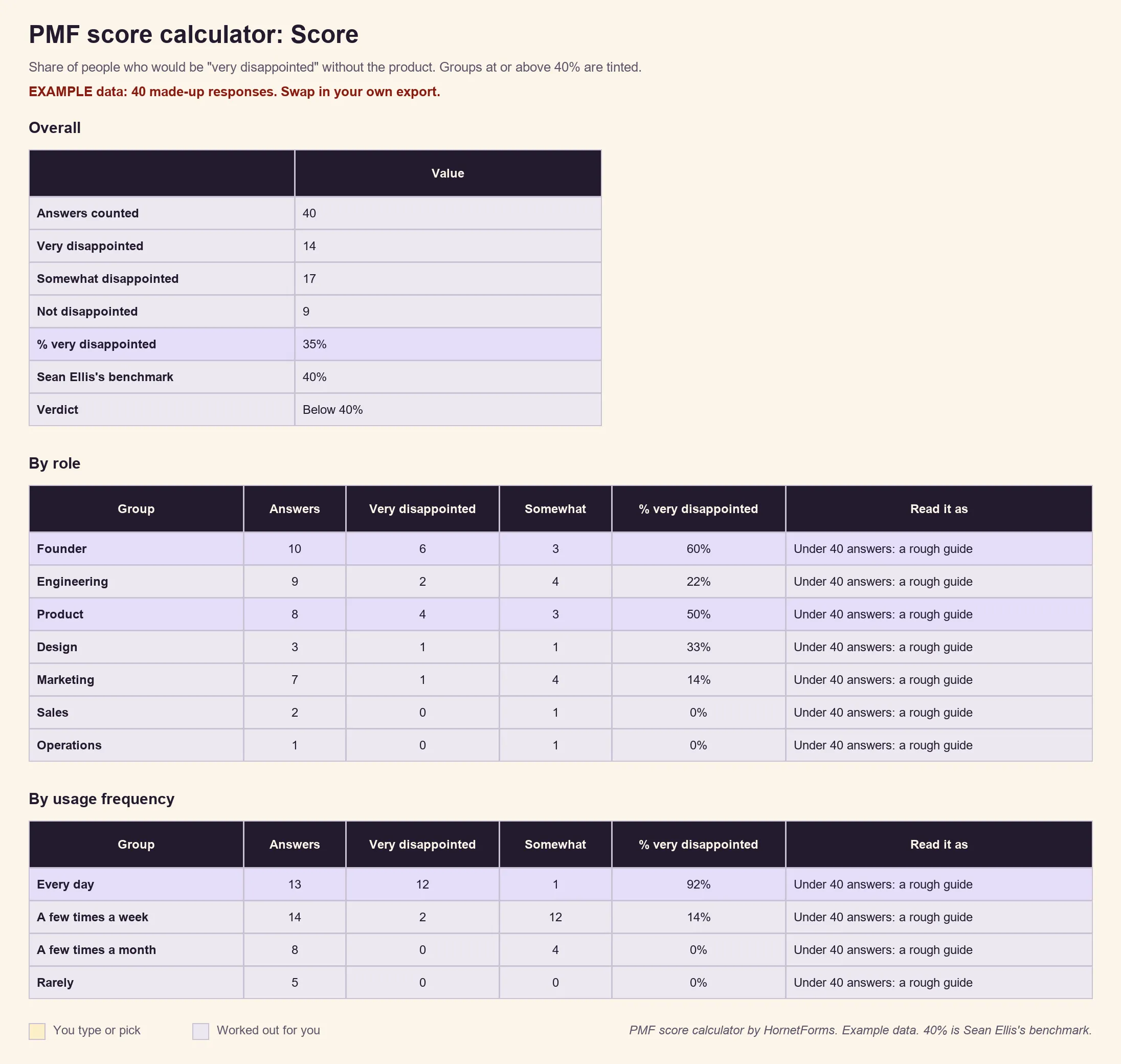
Example data only: 40 made-up responses.
In this example, the product isn't at 40% overall. But daily users and founders clearly love it. That's where to focus.
Turn answers into a roadmap#
Superhuman split its roadmap in two. Vohra's rule: "spend half your time doubling down on what users already love and the other half on addressing what's holding others back."
Your product market fit survey gives you both halves:
- What fans love. The main benefit answers from the very disappointed group. Make that benefit faster, clearer and easier to find.
- What holds others back. The improvement answers from the somewhat disappointed group. These people are close. Something small often stands in the way.
One tweak helps with step two. Superhuman split the somewhat group by benefit: people who named speed got close attention, and the rest got a polite pass. In the template, the benefit question only shows for "Very disappointed". To copy Superhuman's split, edit that show rule so "Somewhat disappointed" also sees it.
What about the "Not disappointed" group? Read their "genuinely useful" answers, but don't build your roadmap around them. Many aren't your customer, and that's fine.
If you get lots of improvement ideas, a dedicated feature request form keeps them in one place, stamped with who asked.
Run it again each quarter#
One product market fit survey is a snapshot. The trend is what tells you if the work is paying off. Superhuman tracked the score "on a weekly, monthly and quarterly basis" and wrote that "we rebuild our roadmap every quarter using this process." The payoff, in Vohra's words: "When we started this journey in the summer of 2017, our product-market fit score was 22%. After segmenting to focus on the very disappointed set of users, we were at 33%. Within just three quarters of our work to improve the product, the score nearly doubled to 58%."
A simple rhythm that works for small teams:
- Each quarter, send the survey to users who've become active since the last round.
- Keep the questions the same, so the scores compare.
- Use
user_idto make sure nobody answers twice. - Score it, split it, and write down the overall score and the best group's score.
The form takes no maintenance. HornetForms has unlimited responses on every plan, so a bigger user base never stops the survey mid-quarter. If you've hit a cap with another tool before, our post on what happens when your form hits a response limit explains why that matters.
Get the free PMF score calculator#
The free PMF score calculator (Excel) does the scoring for you:
- Paste your export into the Responses tab, headers included. It finds the columns by their names.
- Read the Score tab: the overall share of "very disappointed", the counts for all three answers, and the 40% line labelled as Sean Ellis's benchmark.
- See the splits: the same score by role and by how often people use the product, plus by plan if you added a
planhidden field. - Spot thin data: the sheet labels any group under 40 answers a rough guide.
It ships with 40 example rows so you can see how it works. Delete them, then paste your own. There's also a CSV with just the column headers if you want to check the layout first.
Prefer to test the questions on paper first? Download the template as a printable PDF (US Letter).
Run your first product market fit survey#
Pick your active users, send the survey, and score the answers once 40 or so are in. The product market fit survey template has the questions and logic ready to go, and the features page shows what else HornetForms does. Want to go deeper on scales for future surveys? Our Likert scale survey guide covers them. HornetForms is free forever on the Free plan, with unlimited forms and responses. Sign up for free and send your first round this week.