
On this page
You booked six user interviews. Two people never showed up. Two had never done the thing you wanted to ask about. One mostly wanted to tell you about their own startup. Good screener survey questions fix most of that before anyone lands in your calendar.
Below: who to let in, 25 screener survey questions to copy (each with its rule), how to hide what you're looking for, and how to build, book and track it all. The question bank and a participant tracker are free downloads.
What a screener survey does#
A screener is a short form people fill in before you invite them to a study. The Nielsen Norman Group puts it this way: "Screening surveys (also known as 'screeners') are questionnaires that gather information about candidate participants' experiences." The point, they write, is to "exclude any candidates who may not be a 'good fit' for your research study." (Nielsen Norman Group, "Recruiting and Screening Candidates for User Research Projects", Therese Fessenden, 7 November 2021, accessed 28 October 2026.)
So a screener does two jobs:
- It keeps out people who can't help. Someone who has never booked a trip online can't tell you why your booking flow confuses them.
- It sorts the people you keep. New users and power users, buyers and everyday users. You want a mix, on purpose.
Keep it short. Most screeners need five to ten of the questions below, not all 25.
A screener finds people to talk to. If you want short answers from many people instead, start with market research survey questions.
Who you want, and who you don't#
Write your criteria down before you write a single question. Split them into four kinds:
- Must-haves. The behaviour your study is about, for example "orders groceries online at least twice a month".
- Screen-outs. People too close to the topic. NN/g's advice: "In general, you should also screen out UX professionals (or those who are 'UX-adjacent' with an interest in interface design) since they will be too sensitive to UX issues and more likely to offer an expert review than realistic user feedback."
- Quotas. The mix you want, such as half free users and half paying ones.
- Flags. Answers you read yourself rather than act on automatically.
Don't overdo the screen-outs. The same NN/g article warns that a question like "When did you last participate in a research study?" can make you "exclude more participants than necessary". Treat it as a flag, not a gate.
If you're recruiting from your own customers, your existing surveys are a good place to start. People who scored you low on an NPS survey often make great interviews, and our guide on how to calculate NPS shows how to sort them. A customer onboarding survey points you to brand-new customers who are still forming habits. A customer satisfaction survey works the same way: happy and unhappy customers both make good interviews.
Question types that filter well#
Some question types screen better than others. Our guide to every question type covers the rest.
| Question type | Good for |
|---|---|
| Checkboxes | Hiding your real target among distractors (question 1) |
| Multiple choice | Frequency, recency and yes or no logistics (questions 2 and 21) |
| Number | Cross-checking another answer (question 4) |
| Long answer | Checking people can describe their experience (question 16) |
25 screener survey questions to copy#
Here are the 25 screener survey questions from the free question bank, grouped by job. Swap the words in square brackets for your own. The rule says what to do with each answer.
Behaviour#
| No. | Question | Type | Rule |
|---|---|---|---|
| 1 | Which of these have you done in the last four weeks? | Checkboxes | Qualify: picks [Your target task]. Screen out: picks only None of these. |
| 2 | How often do you [task]? | Multiple choice | Qualify: a few times a month or more. Screen out: Never. |
| 3 | When did you last [task]? | Multiple choice | Qualify: in the last month. Near match: one to six months ago. |
| 4 | Roughly how many hours a week do you spend on [task]? | Number | Flag: the hours do not fit the frequency they picked (Every day but 0 hours). |
| 5 | Which of these tools have you used in the last three months? | Checkboxes | Screen out: picks the made-up tool. Segment by the real tools they pick. |
Who they are#
| No. | Question | Type | Rule |
|---|---|---|---|
| 6 | What's your role? | Dropdown | Quota: decide how many people from each role you want. |
| 7 | How many people work at your organisation? | Multiple choice | Qualify: the sizes in your target range. |
| 8 | Who decides which [type of tool] your team uses? | Multiple choice | Qualify: I decide or I help decide (buying studies only). |
| 9 | Do you, or does anyone in your household, work in any of these fields? | Checkboxes | Screen out: market research, UX or product design, or [Your industry]. |
| 10 | Which country do you live in? | Dropdown | Qualify: the countries you serve. |
Product use#
| No. | Question | Type | Rule |
|---|---|---|---|
| 11 | How long have you used [product]? | Dropdown | Segment: new (under a month) or experienced (six months or more). |
| 12 | How often do you use [product]? | Dropdown | Qualify: a few times a month or more, for most studies. |
| 13 | Which plan are you on? | Multiple choice | Quota: a mix of Free and Paid. |
| 14 | Have you stopped using a [type of tool] in the last six months? | Multiple choice | Qualify: Yes (switching and churn studies only). |
| 15 | Which device do you mostly use for [task]? | Multiple choice | Qualify: the device in your study. |
Articulation#
| No. | Question | Type | Rule |
|---|---|---|---|
| 16 | Tell us about the last time you [task]. What happened? | Long answer | Flag: one-word, off-topic or pasted answers. |
| 17 | What's the hardest part of [task] for you right now? | Long answer | Prioritise: specific, concrete answers. |
| 18 | How confident do you feel when you [task]? | Linear scale | Quota: a mix of low (1 to 2) and high (4 to 5). |
| 19 | When did you last take part in a research study, interview or paid survey? | Multiple choice | Flag, do not screen out on its own: in the last month. |
Logistics#
| No. | Question | Type | Rule |
|---|---|---|---|
| 20 | When are you usually free? | Checkboxes | No rule. Use it to offer times. |
| 21 | Is a video call okay? | Multiple choice | Qualify: Yes, when you need to see their face or screen. |
| 22 | Can you share your screen from a computer during the call? | Multiple choice | Qualify: Yes or I'm not sure. |
Consent and contact#
| No. | Question | Type | Rule |
|---|---|---|---|
| 23 | May we record the call? | Multiple choice | Your choice: decide before you launch whether No still qualifies. |
| 24 | What's your first name? | Short answer | No rule. |
| 25 | What's your email? | Required for everyone who qualifies. |
The spreadsheet adds answer options, purpose and notes. Short on space? Start with numbers 1, 2, 9 and 16.
Hide what you're screening for#
People want to make the cut. If your screener makes the "right" answer obvious, some will give it. NN/g explains the problem with a yes or no question: "Do you play video games? hints that the study might be related to video games and that the desirable answer is yes." Their fix is a list: "Having distractor answers keeps respondents honest and prevents them from gaming the questionnaire."
Four habits keep your screener survey questions honest:
- Bury the target. Question 1 mixes your task in with everyday activities, so nobody can guess the topic.
- Add a trap. Question 5 lists a made-up tool. Anyone who claims to use it gets screened out.
- Ask twice. Question 4 checks question 2. "Every day" and zero hours a week don't match.
- Read the open answers. NN/g suggests checking that answers "are reasonable and honest (e.g., participants did not type 'abc' instead of a meaningful sentence)."
Order matters too. NN/g again: "Place your most important exclusion criteria near the beginning of the survey so that you can quickly eliminate obvious misfits without wasting their time."
Ask consent to record, in plain words#
Ask about recording in the screener, not at the start of the call. People decide better without a stranger waiting on camera. Keep the question short and the explanation plain. Ask "May we record the call?" with Yes and No, then add a short description under it, such as: "[Who will watch it] will use the recording to [how you will use the recording], and we'll delete it after [how long you'll keep it]." Fill in the brackets yourself, and only promise what you will really do. Starting from the HornetForms User interview sign-up template? Its recording question has sample wording, so replace it with your own.
Decide before you launch whether "No" still qualifies. For most interviews, notes work fine.
Good to know: this is a plain-language question, not legal advice. Rules on recording differ by place, so check the ones that apply to you and to your participants.
Build the screener as a form#
You can build a screener in any form tool. Here's how it works in HornetForms, where logic and endings are on every plan, including Free.
Page one: the must-haves. Put your screen-out questions first. Add a jump rule that sends anyone who fails one to a named ending. HornetForms allows up to 20 endings, so you can write one for "not a match this time" and another for near matches ("We'll be in touch if a spot opens up"). Our conditional logic guide walks through the setup.
Page two: segment questions, one or two open questions and logistics.
Page three: booking. A scheduling question shows your Calendly or Cal.com booking page inside the form. It can prefill the name and email from earlier answers, so people don't type them twice. Only people who pass the first page ever see it.
Not sure everyone who passes is a real fit? Skip the booking page and review first. NN/g suggests you "review the survey responses of both qualified and disqualified candidates before finalizing your approved list of participants." Then email your invites.
A few more pieces help:
- Hidden fields. Add a hidden field such as
plan, send the link from your app with the value filled in, and you can drop question 13. Our feature request form guide shows the trick. - Notifications. You can turn on an email to yourself for each new response.
- Google Sheets. The native integration adds each response as a row. Our post on where your form responses can go covers Slack, Notion and the rest, and the integrations page lists them all.
- Filters. On the Responses page, filter by up to 10 conditions to see only the people who match.
Want a head start? The User interview sign-up template has 10 questions on one page, most of them from the bank above: name, email, role, usage, availability, video and recording. The template has no logic, so add your screen-out questions and rules on top. Find it in the template gallery under Feedback, or at forms.hornetforms.com/templates/user-interview.
Schedule sessions and track who you picked#
Once responses come in, the job shifts to juggling. Who did you pick? Who's booked? Who never showed? The free participant tracker keeps it in one place.
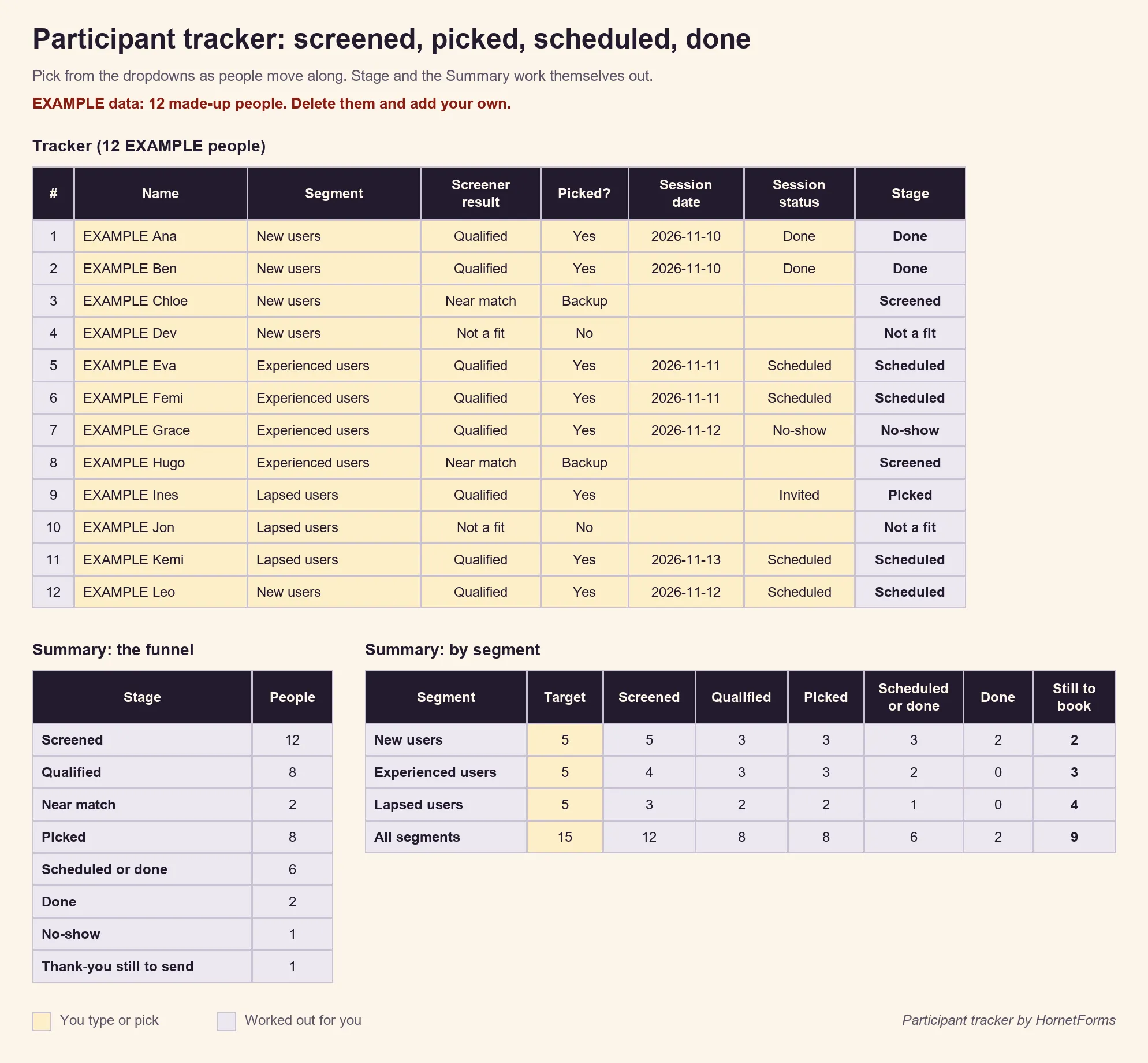
Example data only: 12 made-up people.
How many people do you need? For usability tests, Jakob Nielsen's long-standing advice is short: "The best results come from testing no more than 5 users and running as many small tests as you can afford." (Nielsen Norman Group, "Why You Only Need to Test with 5 Users", 18 March 2000, accessed 28 October 2026.) Testing very different groups? The same article says to test more people, so the tracker sets a target per segment.
Two habits save a lot of rescheduling:
- Keep backups. Mark near matches as Backup. If someone cancels, you have a name ready.
- Only book people you're sure about. NN/g puts it plainly: "Avoid scheduling anything with semiqualified candidates unless you know for sure you will invite them to the study."
Get the free screener survey template and tracker#
Both files work in Excel and Google Sheets:
- Screener question bank (Excel). All 25 questions with options, purpose, rule and notes. Pick Yes for the ones you want, and a summary counts your picks and warns you past ten. There's also a CSV version.
- Participant tracker (Excel). One row per person, with dropdowns for segment, screener result, picked and session status. The Summary tab shows the funnel from screened to done and how many sessions each segment still needs. Delete the 12 example people and add your own. The CSV has just the column headers.
Try it on a real form#
Write down your must-haves, pick five to ten screener survey questions from the bank, and put the screen-outs on page one. HornetForms gives you unlimited forms and unlimited responses within fair use on the Free plan, with logic, endings and booking included. Hit a response cap with another tool before? Here's what a response limit costs you. The features page shows the rest. Sign up for free and send your first screener this week.