
On this page
You have an idea, a rough plan and a nagging worry: will anyone actually want this? Asking a few friends won't settle it, because friends are kind. The right market research survey questions, sent to the people you hope will buy, can tell you who has the problem, what they use today, what they'd pay and where to find more of them.
This guide gives you 50 market research survey questions in eight groups, in the order you'd ask them. Each group says what it tells you and how to set it up in a form. At the end there's a free question bank with all 50, plus a ready-made template you can copy.
What you want to learn before you launch#
Market research before a launch has one job: to check the idea against real people before you spend months building it. The US Small Business Administration puts it simply: "Market research blends consumer behavior and economic trends to confirm and improve your business idea." Its guide lists six questions every new business should answer (SBA, "Market research and competitive analysis", accessed 28 October 2026):
- Demand: "Is there a desire for your product or service?"
- Market size: "How many people would be interested in your offering?"
- Economic indicators: "What is the income range and employment rate?"
- Location: "Where do your customers live and where can your business reach?"
- Market saturation: "How many similar options are already available to consumers?"
- Pricing: "What do potential customers pay for these alternatives?"
Some of these you can answer from existing data, like census figures or industry reports. Others only your future customers can answer. The SBA is honest about the trade-off: asking people yourself gives you "a nuanced understanding of your specific target audience," but "direct research can be time consuming and expensive." A short online survey is the cheapest way to do it.
Before you write a single question, write down the two or three decisions the survey should help you make. For example: which customer to build for first, which three features go in version one, and roughly what to charge. Every question below should feed one of those decisions. If it doesn't, cut it.
One note on scope. These market research survey questions are for the stage before you have a product, or right before you launch it. Once people use your product every week, a product market fit survey is the better tool.
Screening and profile questions#
Start by finding out who's answering. These market research survey questions come first so you can end the survey early for people outside your audience, and so you can split every later answer by group.
| No. | Question | Type and options |
|---|---|---|
| 1 | Which of these best describes your role? | Multiple choice: founder or owner, manager, individual contributor, freelancer, student, something else |
| 2 | How many people work at your organization? | Multiple choice: just me, 2-10, 11-50, 51-200, 201 or more |
| 3 | Which industry do you work in? | Dropdown: the industries you plan to sell to first, plus Other |
| 4 | In the last three months, how often did you [do the task your product helps with]? | Multiple choice: every day, every week, every month, less often, never |
| 5 | Where are you based? | Dropdown: the countries or regions you can serve |
| 6 | Who makes the final call when your team buys a tool for [task]? | Multiple choice: I do, I recommend and someone else decides, a group decides, I'm not involved |
| 7 | Which age range are you in? | Dropdown with "Prefer not to say", optional |
Question 4 is the most useful one on this list. It asks about past behavior, not interest, so it filters out people who like the idea but never do the task. In HornetForms, a jump rule can send anyone who picks "Never" straight to a short thank-you ending. Forms can have up to 20 endings, and logic works on every plan. Our conditional logic guide shows how the rules work.
Only ask about age, income or other personal details if they change what you build or where you market. Our guide to demographic survey questions covers the answer options, and why "Prefer not to say" belongs on every one.
Problem and current workaround questions#
This is the heart of the survey. You want to know if the problem is real, how often it bites, and what people do about it today. Ask these before you describe your idea, so your pitch doesn't color the answers.
- What is the hardest part of [task] for you today? (long answer)
- When did you last run into that problem? (this week, this month, in the last six months, longer ago, can't remember)
- How do you handle [task] today? (checkboxes: spreadsheets, pen and paper, a tool built for it, someone does it for me, I skip it, other)
- Walk us through the last time you did [task], step by step. (long answer)
- How much time does [task] take you in a typical week? (under 1 hour, 1 to 3 hours, 4 to 8 hours, more than 8)
- How big a problem is this for you? (linear scale, 1 to 5, from "Minor annoyance" to "Major problem")
- What have you tried to fix it? (long answer)
- What happens if this problem never gets solved? (long answer)
Question 10 shows your real competition. It's often a spreadsheet, or nothing at all. Question 15 tests urgency. If most people say "nothing much", that's worth hearing now, not after launch.
Keep the open questions short and few. Two or three long answers per survey is plenty, or people start to skip them. Our guide on how to write survey questions covers the wording traps that bend answers.
Willingness to pay: ask for ranges#
Pricing questions are the hardest market research survey questions to get right. People can't tell you an exact price they'd pay for something they've never seen. What they can tell you is what they spend now, who pays, and what range feels sensible. So ask for ranges, and treat every answer as a guide, never a promise to buy.
| No. | Question | Type and options |
|---|---|---|
| 16 | How much does your team spend on tools for [task] each month today? | Multiple choice: nothing, under $20, $20 to $99, $100 to $499, $500 or more, not sure |
| 17 | Who pays for tools like this where you work? | Multiple choice: I pay myself, my team's budget, a company-wide budget, not sure |
| 18 | If a product solved this problem well, what monthly budget would you consider? | Multiple choice: under $10, $10 to $29, $30 to $99, $100 or more, I wouldn't pay for this |
| 19 | At what monthly price would this feel too expensive to consider? | Number |
| 20 | At what monthly price would it seem so cheap that you'd doubt the quality? | Number |
| 21 | How would you prefer to pay? | Multiple choice: monthly, yearly, one-time purchase, pay per use, no preference |
The dollar ranges above are examples. Set your own to fit your market and currency, and keep them the same width so no option looks like the "right" one.
Question 16 answers the SBA's pricing question directly: what people pay for the alternatives today. Questions 19 and 20 work as a pair. The gap between "too expensive" and "too cheap" shows the price band people find believable. It doesn't tell you what to charge. It tells you which prices to test first.
Feature priorities: make people rank#
Ask people whether they want a feature and they'll say yes to almost everything. Ranking fixes that, because it forces a trade-off.
- Rank these features from most to least important to you. (ranking: five to seven of your planned features)
- Which one feature would make you switch from what you use today? (multiple choice, same features)
- How important is each of these to you? (matrix: features as rows; columns "Not important", "Nice to have", "Important", "Must have")
- Which of these would you never use? (checkboxes)
- Is anything missing from that list? (long answer)
- Which other tools would this need to work with? (checkboxes: Google Sheets, Slack, email, a calendar, the tools your audience uses, none)
HornetForms has a ranking question, so people put your options in their own order, and each person's ranking is in your export. The matrix in question 24 shows on the Summary tab as a table, with the count and share of answers for each row. Both question types are among the 20+ types on every plan, and our guide to every question type and when to use it explains when each one fits.
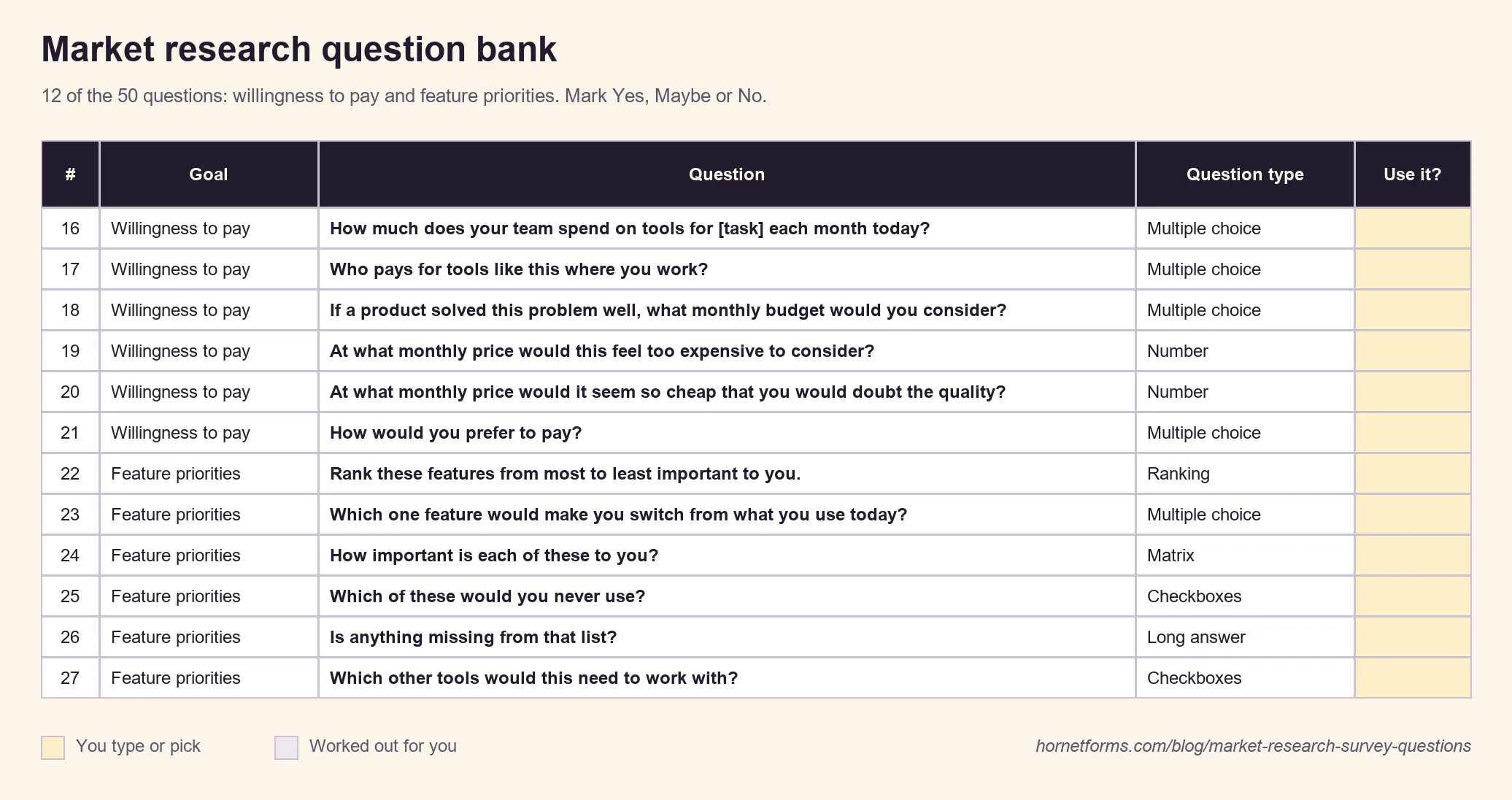
The question bank's price and feature rows. Mark the ones you want in the Use it? column.
Current tools and alternatives#
This group answers the SBA's market saturation question: how many similar options people already have, and how attached they are to them.
- Which tools have you used for [task] in the last year? (checkboxes: your known rivals, spreadsheets, none, other)
- How satisfied are you with what you use now? (linear scale, 1 to 5, "Very unsatisfied" to "Very satisfied")
- What do you like most about how you do it now? (long answer)
- What made you stop using a tool you tried before? (long answer)
- How likely are you to switch in the next six months? (linear scale, 1 to 5)
- What would stop you from switching? (checkboxes: price, time to set up, moving my data, my team knows the current tool, a contract, nothing, other)
High scores on question 29 mean switching will be hard, so your product has to be clearly better at something. Question 33 is a ready-made list of objections your launch page has to answer.
Channels and buying process#
Knowing who wants your product is half the job. The other half is knowing where to find them and how they buy. Don't skip these market research survey questions: they decide where your launch effort goes.
- Where do you look when you need a new tool for work? (checkboxes: search engines, colleagues or friends, online communities, review sites, social media, newsletters or blogs, other)
- Which communities, newsletters or podcasts do you follow for [topic]? (long answer)
- Who else gets involved before you buy a tool like this? (checkboxes: no one, my manager, finance, IT, my team, other)
- How long does it usually take from finding a tool to paying for it? (same day, within a week, within a month, longer, not sure)
- What do you need to see before you buy? (checkboxes: a free plan or trial, a demo video, prices on the website, reviews from people like me, a call with the team, other)
- How did you hear about this survey? (dropdown)
- Which device do you mostly use for [task]? (computer, phone, tablet, a mix)
- When in the year do you usually buy tools like this? (any time, start of the year, when the budget renews, when something breaks, not sure)
Question 35 gives you named places to post about your launch, which beats a guess. And you can skip question 39 entirely with a hidden field. Add one called source in the editor, then give each place you share the survey its own link:
https://forms.hornetforms.com/f/<your-slug>?source=newsletter
https://forms.hornetforms.com/f/<your-slug>?source=community
Respondents never see the value, but it lands on every response, so you can compare answers by channel. Hidden fields and URL prefill work on every plan.
Interest and next steps#
Now, and only now, describe your idea. Put a one-line description above question 42, so everyone reacts to the same pitch.
- Based on the description above, how interested are you in [product idea]? (linear scale, 1 to 5)
- What, if anything, is unclear about the idea? (long answer)
- Would you like to try an early version? (yes, maybe, no thanks)
- Would you be open to a 20-minute call about this? (yes, no)
- Pick a time for a short call. (scheduling: your Calendly or Cal.com booking page)
A survey tells you what. A call tells you why. HornetForms has Calendly and Cal.com booking inside the form on every plan, so with one show rule, only people who answer "Yes" to question 45 see the booking question. They pick a time without leaving the survey.
Then close with four short questions:
- What is your email address? (email, optional: say why you ask)
- Can we contact you about the results or an early version? (yes, no)
- Is there anything else we should know? (long answer)
- Who else should we ask about this? (short answer)
Read question 48 before you email anyone. And if question 44 turns up lots of keen people, a waitlist form is a good next step for collecting them.
Recruit the right respondents#
Fifty great market research survey questions won't help if the wrong people answer. Friends, family and your own followers want you to succeed, and that bends the results. Aim for strangers who match your screening questions.
A few places to find them:
- Communities where your audience already talks. Ask the moderators first, and share the survey as a request for help, not an ad.
- People who already do the task. Question 4 checks this, so let the jump rule do the filtering.
- Your own contacts' contacts. Question 50 asks respondents who else you should talk to.
For live interviews or a smaller, hand-picked group, use a short screener before the main survey. Our guide to screener survey questions covers qualify and screen-out rules in detail.
How many responses do you need? It depends on how sure you want to be and how big your audience is. Our guide to survey sample size walks through the formula. HornetForms gives you unlimited responses within fair use on every plan, so a survey that takes off never stops halfway. If you've hit a cap with another tool before, our post on what happens when a form hits its response limit explains why that matters.
Good to know: shorter surveys get more finished answers. Pick 15 to 25 questions from the 50, not all of them. A goal with no questions is a decision you can't make, so pick at least one or two from each group you care about.
Use the market research survey template and read the results#
HornetForms has a built-in Market research survey template you can start from. It's short: six questions on two pages.
- Page 1, "About you": age range, industry and company size.
- Page 2, "Your needs": which tools people use today, how satisfied they are with them (1 to 5), and what's missing.
- Thank-you screen: "Thanks for your time! Your answers help us understand what people really need."
Think of it as a skeleton. Add the market research survey questions you picked from the lists above: your screening question and a jump rule, a few problem questions, a price range question and a ranking question. Two small edits help too: make the age range optional and add "Prefer not to say" to it.
- Open it in HornetForms. The template page at
forms.hornetforms.com/templates/market-research-surveyhas a Use this template button. It takes you through sign-up and opens your own copy, ready to edit. - Print it. For a pretest on paper, download the PDF, US Letter, the PDF, A4 or the Word (DOCX) version.
Once answers come in, start with the Summary tab: it shows how the answers to each question break down, with the matrix results laid out as a table. To split results by group, use the response filters (for example, only founders who do the task every week), or export to CSV on every plan and Excel on Pro and Business. Answers can also flow into Google Sheets, Slack or Notion as they arrive, and you can turn on an email to yourself for each new response. Our guide on how to analyze survey data takes it from export to a one-page report.
Read the results against the decisions you wrote down at the start. Who has the problem most? Which features made the top three? What price band came up again and again?
Get all 50 market research survey questions free#
The free market research question bank (Excel) has all 50 questions in one sheet:
- Question bank tab: each question with its goal, the HornetForms question type, the answer options or scale labels and a short note on why to ask it. Filter by goal, then mark Yes, Maybe or No in the Use it? column.
- My survey tab: counts your Yes picks per goal and gives a rough time to finish, so you can see when the survey is getting long.
- Words in brackets mark the words to swap for your own, like your task, your features and your rivals.
It opens in Excel and Google Sheets. There's also a CSV copy if you'd rather paste the questions somewhere else.
Run your market research survey this week#
Write down your two or three decisions. Pick 15 to 25 questions from the bank, put the screening questions first and the idea last, and test the survey on five people before you share it. Then send it to strangers who do the task, and book a few calls with the keenest ones. Sign up for free and have your market research survey live by Friday.