
On this page
You've built the thing, or most of it. Now you want a list of people who'd use it before you open the doors. A waitlist form template gets you that list in an afternoon, with no waitlist tool and no code.
The form is the easy part, though. A waitlist is one form plus three decisions: who gets in first, how you hear about each sign-up, and which launch post sent them. Skip those and you end up with a pile of emails, no idea who to let in first and no clue which post was worth writing.
This guide walks through all three with the exact settings. You also get a free template to copy and a tracker sheet that counts sign-ups by source.
What a waitlist form needs to ask#
Every extra question costs you a few sign-ups. So a good waitlist form template asks only what helps you pick people and reach them. One maker on Hacker News summed up the goal: "the intention is to build a waitlist to get feedback from target users" (Hacker News comment, March 2024). Your questions should help you find those target users.
| Question | Type | Why it's there |
|---|---|---|
| Email, required | How you let them in later | |
| Name | Short text | So your invite doesn't open with "Hi there" |
| Company or project | Short text | Who they are at a glance |
| What's your role? | Dropdown | Founders and engineers often want different things |
| Which platforms do you need? | Checkboxes | Tells you whether to ship web or mobile first |
| What would you use it for? | Long text, required | The problem, in their own words |
| How soon would you start? | Multiple choice, required | Your shortlist for the first round |
| Happy to give feedback on a call? | Multiple choice | Your first user interviews |
| Phone or WhatsApp | Phone, shown only after "Yes" | Lets you set up that call |
Not sure whether a dropdown beats multiple choice? Our guide on which question type to pick covers every option.
Keep the must-answer part short#
The form requires only three answers: the email, what they'd use it for and how soon they'd start. Everything else is optional. Someone in a hurry finishes in under a minute, and someone keen tells you more. Logic hides the phone question unless the person says yes to a call. Save deeper questions for later, when you can send your list a short survey built from these market research survey questions.
Two questions that pick your first users#
"What would you use it for?" and "How soon would you start?" do the sorting. A person who describes a clear problem and picks "Right away" goes near the top of your list. "Just curious for now" is an honest answer, and a useful one: those people get the launch email, not the first invite.
Decision 1: who gets in first#
Your first round should be people the product fits. A waitlist form template gives you the questions, and two settings keep the list clean enough to choose from.
Stop repeat sign-ups#
Keen people sign up twice, and bots keep trying. In HornetForms, open the form's Settings, go to Access and turn on Limit to one response per person. Then set Identify respondents by to the Email question.
From then on, HornetForms rejects a second response with the same email. It ignores capital letters and spaces at either end, so Jane@Acme.com and jane@acme.com count as one person.
For the bots, every plan has spam checks built in: a hidden honeypot field, a time check and rate limits. Pro and Business add email verification, where people confirm their address with a 6-digit code before they can send the form. Read more on how to keep bots out of your forms.
Cap a beta round#
A small first round lets you reply to everyone and fix what breaks. These four settings live under Settings, then Responses:
- Open on a date: the form shows an "opens on" notice until the time you pick.
- Close on a date: the form stops taking sign-ups at a set time.
- Limit responses: the form closes after a set number of sign-ups, like 100.
- Closed form message: what visitors read once the form closes or fills up, up to 500 characters. Something like "The first round is full. Follow us for the next one."
These settings belong to your copy of the form, so set them after you copy the template. For the next round, raise the limit or duplicate the form. Our guide to a first come, first served sign-up form covers capped spots in more detail.
The same setup works for a full coaching program or course. A free guide keeps people warm while they wait, and these lead magnet ideas for coaches give you a few to start with.
Decision 2: how you hear about each sign-up#
On launch day you'll want to watch sign-ups arrive. Pick one place you already check:
- Slack or Discord: a message for each sign-up, with the answers and the hidden fields.
- Google Sheets: a row for each sign-up, with every hidden field in its own column. The tracker sheet below reads this.
- Notion: a page in a database for each sign-up.
- Signed webhooks: each sign-up as JSON to your own server or automation tool.
All of these are on every plan, Free included. Here's how to send form responses to Google Sheets, Slack or Notion, and the integrations page lists the rest.
Then say thanks. In the form's email notifications, turn on Send respondents a confirmation email and choose the Email question. Plain beats clever here:
Subject: {{form_title}}: you're on the list

Thanks for signing up. You're on the waitlist.
We let people in a few at a time, and we'll email you when it's your turn.
{{form_title}} fills in your form's title, so name the form after your product ("Join the Acme waitlist") and the subject reads well. Keep the promise small and keep it: if you say you'll email them, email them.
Decision 3: which launch post sent them#
Launch week usually means a Hacker News post, a Product Hunt page, a few posts on X and maybe a newsletter mention. Some of those bring people who'll use the product. Tag each link and you'll know which ones.
The waitlist form template has three hidden fields: utm_source, utm_medium and utm_campaign. Visitors never see them. The link fills them in, and every response keeps them. Google's own help page on URL builders says "you should always use utm_source, utm_medium, and utm_campaign" (Google Analytics Help, checked October 2026). The same page notes that values are case sensitive, so pick lower case and stick to it.
One tagged link per channel:
https://forms.hornetforms.com/f/<your-slug>?utm_source=hacker-news&utm_medium=social&utm_campaign=launch
https://forms.hornetforms.com/f/<your-slug>?utm_source=product-hunt&utm_medium=social&utm_campaign=launch
https://forms.hornetforms.com/f/<your-slug>?utm_source=x&utm_medium=social&utm_campaign=launch
https://forms.hornetforms.com/f/<your-slug>?utm_source=newsletter&utm_medium=email&utm_campaign=launch
Founders do this in the wild. Two who posted about their products on Hacker News ended with a waitlist link tagged ?utm_source=hn (February 2025 and October 2026).
Planning a Show HN? Read the Show HN guidelines first. They list this as off topic: "blog posts, sign-up pages, newsletters, lists, and other reading material" (checked October 2026). So a waitlist page alone won't qualify. Show something people can try, and offer the tagged waitlist link to anyone who wants updates.
Catch the people with no tag#
Some people arrive from a friend's message or a search. Their link has no tags. The template asks "How did you hear about us?" only when utm_source is empty, so tagged visitors skip it and untagged ones still count. Our logic, piping and calculations guide shows how rules like this work.
HornetForms' built-in analytics also show views, completions and the completion rate for each UTM source, medium and campaign, on every plan. That tells you which post brings people who finish the form, not just people who click.
Good to know: anyone can edit the values in a link before they open it. Treat UTM tags as labels that help you sort, not as proof. And never put an email address or other personal details in a link.
A free waitlist form template you can copy#
HornetForms has a waitlist form template called "Waitlist and beta sign-up", with the questions, the logic and the hidden fields in place.
- Ten questions on one page: the nine from the table above, plus "How did you hear about us?".
- Two logic rules: the phone question shows only after "Yes" to a call, and "How did you hear about us?" shows only when the link has no
utm_source. - Three hidden fields:
utm_source,utm_mediumandutm_campaign. - The Midnight theme, which you can swap for any other theme on every plan.
- A thank-you screen: "You're on the list! We let people in a few at a time, and we'll email you when it's your turn."
To get it into your account:
- Open the template page at
forms.hornetforms.com/templates/beta-accessand try the preview. - Click Use this template. New to HornetForms? You sign up first (free, no card), and the template opens right after.
- Swap the role and platform options for your own, set the Decision 1 settings and publish.
Already have an account? You'll find it in the template gallery under Lead generation.
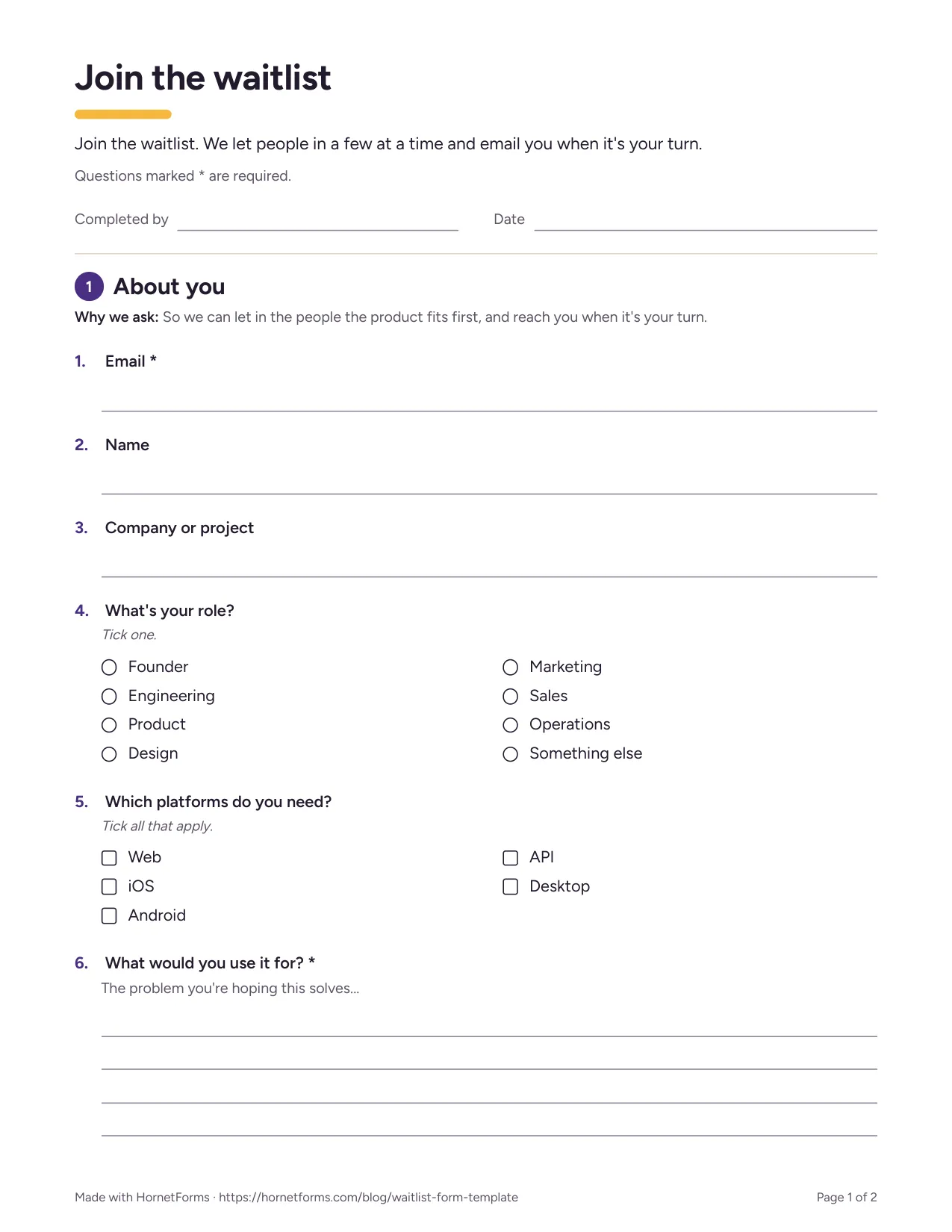
The first page of the printable version.
Taking sign-ups at a meetup or a demo day? Print the waitlist form template instead: PDF, US Letter, PDF, A4 or Word (DOCX).
Want it to look like your product? Put the form on your own domain (Pro). Remove the "Made with HornetForms" badge (Pro). The pricing page has the full list.
Track sign-ups by source in a sheet#
Grab the free launch sign-up tracker. It opens in Excel and Google Sheets, and its columns match the CSV export of the waitlist form template. There's also a CSV with just the column headers if you'd rather build your own.
- Links: type your form link once and the sheet builds a tagged link for each channel. It flags capital letters and spaces in your tags.
- Sign-ups: paste your CSV export here. Then mark each person's round, their status (Waiting, Invited, In or Not a fit) and the date you invited them.
- By source: sign-ups per source, using
utm_sourcefirst and the "How did you hear about us?" answer second. It also shows how many picked "Right away", plus a daily count for your first 14 days. - Cohorts: set your own cap for each round and see how many places are left.
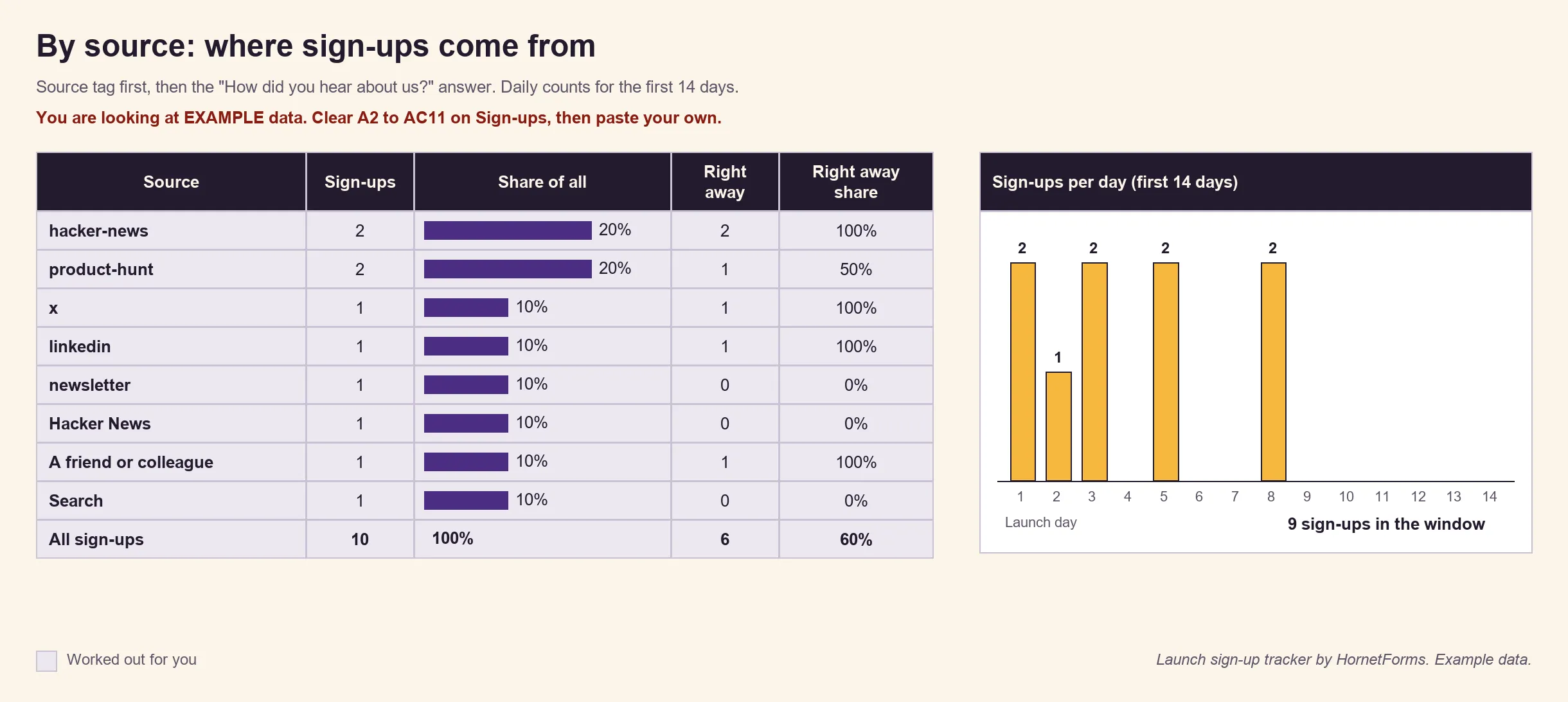
EXAMPLE data: 10 made-up sign-ups. Delete them, paste your own export, and swap in your own numbers.
"hacker-news" and "Hacker News" sit on separate rows: one came from a tagged link, the other from the fallback question. Add them together when you compare channels.
Can't I just build a waitlist with AI?#
Yes, for the form itself. A waitlist is often the cheapest way to test an idea, and an interest form template is lighter still when you only want to gauge demand. As one developer put it: "I decided to create a simple waitlist to see if others need this" (Hacker News, February 2026). Ask any AI tool for a waitlist form and you'll have a decent one in a minute. HornetForms' AI builder does it too, with 3 generations a month on Free.
The afternoon goes on everything around the form: stopping duplicates, tagging links, capping the round, setting up alerts and getting an export your tracker can read. A waitlist form template with the logic and hidden fields in place skips half of that work.
A good launch post can also bring a rush of sign-ups in a few hours. HornetForms has unlimited responses on every plan, so a big day never hits a cap. Here's why response caps bite at the worst moment.
Launch your waitlist this afternoon#
Copy the waitlist form template, turn on one response per person and set your cap. Connect Slack or Google Sheets, tag one link per channel, and drop the tracker next to it. The features page shows what else the form can do. Ready to take money before launch? See our guide to a pre-order form.
The Free plan is free forever. Sign up for free and ship your first form in five minutes.