
On this page
"Hi, how much for a clean?" That's the whole message. No size, no address, no idea whether the place had a party last night or a cleaner last week. So you reply with five questions, wait a day, and then drive over for a walkthrough that may end in "too pricey, thanks."
Here's how to quote a house cleaning job without the back and forth: ask the same few questions every time, before you reply. A short intake form collects the answers that change your price. Your own rates turn them into a range. And you save the walkthrough for the jobs that really need one.
This guide covers the questions, the reasons behind each one, a range formula you fill with your own numbers, and a free form and worksheet to do it with.
How to quote a house cleaning job in four steps#
Every cleaner who quotes well does some version of this, on paper or in their head:
- Collect the answers that change the price. Size, condition, the type of clean, extras and how often. Each one moves the time the job takes.
- Turn those answers into time and money with your own rates: an hourly rate, a flat price per home size, or a mix.
- Reply with a range and what it covers. Then confirm the final price once you've seen the place or the photos.
- Walk through only when the answers say so. An office, a size nobody knows or heavy buildup is worth a visit. A tidy two-bedroom apartment usually isn't.
The rest of this post fills in each step. Steps two and four depend on your business, so nothing here tells you what to charge. You set the numbers.
Pick a pricing method before you build the form#
Your pricing method decides which questions matter most. There are three common ways to work out how to quote a house cleaning job, and plenty of cleaners mix them.
| Method | What you need from the client | Where it fits |
|---|---|---|
| Hourly rate | Anything that changes how long the clean takes: rooms, condition, extras | Deep cleans and first visits, where time is hard to guess |
| Flat price per home | Bedrooms, bathrooms and the type of clean | Regular cleans of homes you already know |
| Price by size | An approximate size, plus condition | Larger homes, where room counts hide the real work |
Whichever you pick, write your rates down before you build anything. A form can only do the math you already do in your head.
The intake questions that change your price#
One public intake form from a small cleaning company shows the pattern well. It's called a client intake form, not a quote form. It asks for the type of home, rooms, size, condition, the last professional clean, pets, extras and how often. Then it promises a quote. That's the list most cleaners price on, and it's the heart of how to quote a house cleaning job from a form. It's also the list in our template.
| Question | Answer options | Why it moves the price |
|---|---|---|
| What type of place is it? | House, apartment or condo, townhouse, office or commercial space | Offices need a different checklist, and often a visit |
| Bedrooms; Bathrooms | Studio to 5 or more; 1 to 4 or more | Each room adds its own time, and bathrooms add scrubbing |
| Approximate size (square feet) | Ranges, plus "Not sure" | Room counts miss big open spaces |
| How would you describe it right now? | Light upkeep to "Hasn't been cleaned in a while" | Buildup adds time, whatever the size |
| Has it been professionally cleaned in the last 30 days? | Yes or No | A recent clean means a faster first visit |
| Which clean do you need? | Standard, deep, move-in or move-out, after building work | Each type has its own checklist and time |
| Any extras? | Oven, fridge, interior windows, cabinets, baseboards, laundry | Each extra adds a fixed chunk of time |
| How often would you like us? | One time to monthly | Some cleaners price regular visits differently |
Home type, size and rooms#
Ask for bedrooms and bathrooms as dropdowns, not text boxes. "3" and "three-ish" price the same in your head but not in a sheet. Give size as ranges and always add "Not sure". Plenty of renters have no idea, and a guess is worse than an honest blank.
Condition and the last professional clean#
This is the touchy one. Nobody wants to tick "Hasn't been cleaned in a while". Plain, kind labels help: light upkeep, lived-in, needs extra attention. Pair it with the yes or no question about a professional clean in the last 30 days. Together they tell you how long the first visit will really take.
Type of clean and extras#
A move-out clean and a weekly tidy are different jobs, even in the same home. Ask which clean they need, then list your extras as checkboxes. Use the names you price on, so the answers match your rate sheet word for word.
How often they want you back#
One time, weekly, every two weeks, monthly or not sure yet. If you give regular clients a different price, this answer decides which one they see.
Pets, access and the codes you never collect#
Two more questions save trouble on the day. Ask about pets, and only when the answer is yes, ask for a short description ("two friendly dogs, one shy cat"). Then ask whether someone will be home. If nobody will be, ask how you'll get in.
Good to know: never ask clients to type alarm codes, lockbox codes or key-safe numbers into a form. Arrange them by phone or in person. Our template's access question says so in its help text: "Please don't type alarm or lockbox codes here. We'll arrange them by phone."
Ask for photos instead of a first walkthrough#
Photos answer the question your condition scale can't. When you're working out how to quote a house cleaning job you haven't seen, they're the next best thing to standing in the kitchen. Add an optional file upload for a few room photos, with a line that says why: "A few photos help us quote without a visit."
In HornetForms, clients never need an account or a sign-in to answer a form or upload a file. Files can be up to 10 MB each on the Free plan, with no plan cap on Pro and Business (see the pricing page). If you're unsure whether a question works better as a dropdown, checkboxes or picture choice, here's a guide to which question type to pick. Picture choice works well for the condition question: a photo of each level makes the honest answer easier to pick.
When a walkthrough still beats a form#
Knowing how to quote a house cleaning job also means knowing when not to quote from a form. A form gets you most of the way. Some answers mean you should still go and look before you name a price:
- Office or commercial space. Opening hours, shared kitchens and floor types vary too much for a range.
- Size "Not sure" and no photos. You'd be quoting blind.
- "Hasn't been cleaned in a while". Heavy buildup can add hours, or very little. Photos or a visit tell you which.
- After building work. Dust gets everywhere, and every site is different.
Our quote worksheet flags offices, "Not sure" sizes and "Hasn't been cleaned in a while" as "walkthrough first", so you see them before you reply. Change the triggers to fit your own rules.
Turn the answers into a price range#
Here's the math part of how to quote a house cleaning job. A range is kinder than a single number. The client knows roughly what to expect, and you keep room to adjust once you've seen the place. Our cleaning intake template builds one with two calculated fields that the client never sees. Logic rules fill in the low end from the answers, and a formula sets the high end:
estimate_low  = (base price + bedroom add + bathroom add) x condition factor
estimate_high = round(estimate_low * 1.3)
The thank-you screen then shows the range: "Your rough estimate is $X to $Y. We'll look over your answers and reply with a quote soon."
The template ships with sample numbers so you can watch it work:
- A base price of 100 for a studio or one-bedroom home with one bathroom
- 25 to 100 more for extra bedrooms, and 15 to 90 more for extra bathrooms
- A condition factor of 1.25 for "Needs extra attention" and 1.5 for "Hasn't been cleaned in a while"
- A high end of 1.3 times the low end
These are example numbers, not a going rate. Swap in your own numbers before the form goes live, and change the currency sign if you need to.
HornetForms works out every calculated value again on its server when the client sends the form. So the range in your inbox always follows your rules, even if someone edits the page in their browser. Want the type of clean or extras in the form's own range too? The logic, piping and calculations guide builds a full quote with a calculated total, step by step. To show prices before anyone books, add a price calculator for your website.
Prefer not to show a price in the form at all? Delete the range from the thank-you screen and keep the calculated fields. They still arrive with every response, so you see the estimate and decide what to send.
Reply to each cleaning request fast#
A fair number is half the job. The other half is speed. A 2011 Harvard Business Review study of online sales leads put it plainly: "Our research shows that most companies are not responding nearly fast enough." The study is "The Short Life of Online Sales Leads" by Oldroyd, McElheran and Elkington (HBR, March 2011, accessed 27 October 2026). It looked at online sales leads in general, not cleaners, but anyone who has lost a job to the company that answered first will recognise it.
So send each request where you'll see it first:
- Email notifications to you for every new request, and a confirmation email to the client, on every plan.
- Google Sheets, Slack, Discord or Notion, built in on every plan. Here's how to send form responses to Google Sheets, Slack or Notion.
- A hidden "source" field, so a link like
?source=flyertells you which flyer, van sign or post the request came from. - A QR code for the form, on flyers and door hangers, on every plan.
The integrations page lists every place your responses can go.
A free cleaning intake form and quote worksheet#
We built the questions above into a four-page HornetForms template, "Get a cleaning quote":
- About you: name, email, phone, the best way to reach you, the service address and how they heard about you.
- Your place: type of place, business name (offices only), bedrooms, bathrooms, approximate size, condition and the last professional clean, plus the hidden estimate fields.
- The clean you need: type of clean, move date (move-in or move-out only), extras, how often, a preferred first date and times that suit.
- On the day: pets and their details, whether someone will be home, and how you'll get in (only when nobody's home). Then anything to focus on or avoid, and up to five room photos.
Logic shows each client only their questions. The progress bar is on by default, so clients see how far along they are. The template is in the gallery under Lead generation, or on its own page at forms.hornetforms.com/templates/cleaning-client-intake. Click Use this template, sign up if you're new, and your own copy opens ready to edit.
Three downloads go with it:
- A printable intake form for phone calls and walk-in enquiries: PDF, US Letter, PDF, A4 or Word (DOCX) to add your logo.
- The cleaning quote worksheet (Excel, opens in Excel and Google Sheets). It's how to quote a house cleaning job in a spreadsheet: type your own rates into the yellow boxes. They start empty on purpose. Paste your form's CSV export into the Requests tab, and the Quotes tab gives each request a low and high quote. It also covers what the form's range leaves to you: the type of clean, extras, how often and a minimum charge.
- A CSV with the column headers of the form's export, if you'd rather build your own sheet.
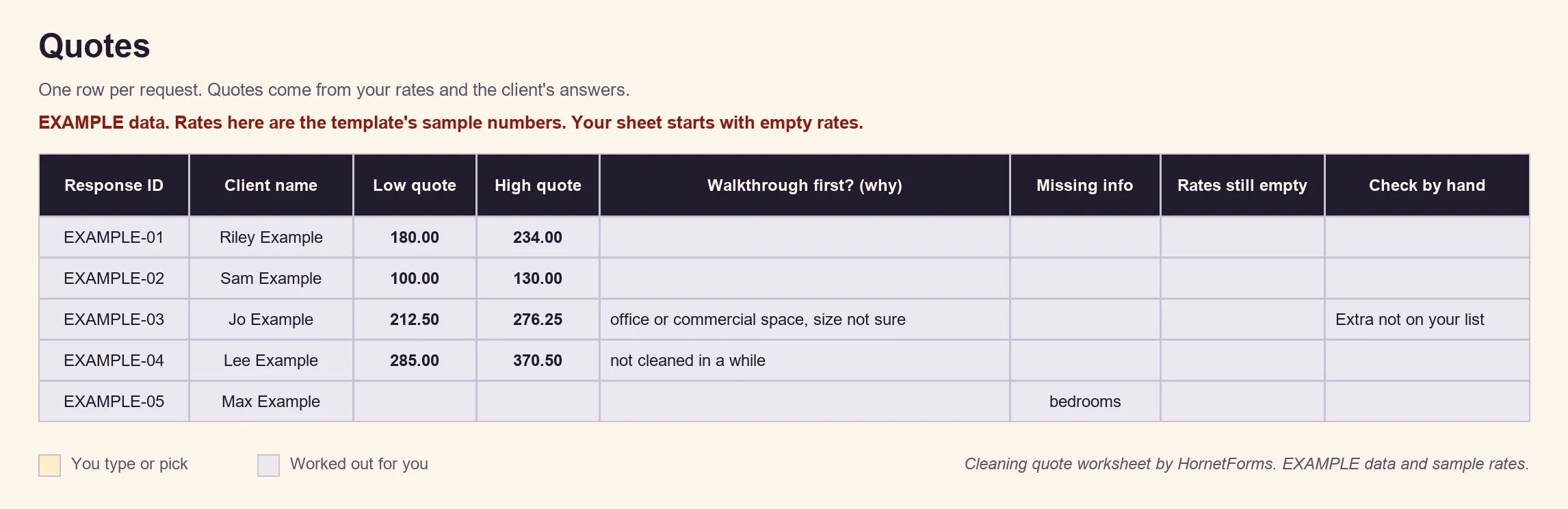
Example data: the rows show made-up requests, and the quotes use the template's sample rates. Your copy starts with empty rates, so swap in your own numbers.
Try it on your next cleaning enquiry#
Now you know how to quote a house cleaning job without a first visit for every lead. Write down your rates, copy the template, and put the link on your website, your Google profile and your next flyer. Sign up for free and publish your first cleaning intake form today.