
On this page
"How much does a website cost?" is the question every agency and freelancer answers ten times a week. The honest answer is "it depends," and that answer sends a lot of visitors away to find someone who will give them a number.
A price calculator for your website fixes that. The visitor picks a package, says how big the job is and ticks a few extras. The page shows an estimate as they answer, and you get their name, email and every answer behind the number. You get a warm lead instead of a bounce.
This guide shows how to plan the pricing rules, build the calculator in a form with no code, show the price live, catch the lead, put it on any site and take a deposit if you want one. At the end there's a free pricing worksheet that mirrors the form's maths, so you can test your numbers before a single visitor sees them.
What a website price calculator does#
A good website price calculator does two jobs at once:
- It answers the price question. The visitor sees a real estimate built from their own answers, not a vague "starting at" line.
- It captures the lead. The estimate sits inside a form, so the visitor leaves their details and you see exactly what they asked for.
The second job is why a form beats a plain calculator script. A script shows a number and forgets it. A form keeps the answers, the estimate and the contact details in one response.
Most calculators run on four kinds of numbers:
| Rule | What it means | Website example |
|---|---|---|
| Base price | What a package costs before anything else | Starter site $1,200 |
| Unit price | A price for each unit of size | $150 per page |
| Add-ons | Fixed amounts for extras the visitor ticks | Copywriting $600, SEO setup $400 |
| Minimum | The smallest job you take | Nothing under $1,500 |
These are example numbers. Your own prices go in the worksheet later.
Build it in HornetForms#
Here's the short version, using a web design studio's calculator. Each step is on the Free plan.
- Ask the pricing questions. "Which package do you need?" (multiple choice), "How many pages?" (a number question) and "Extras" (checkboxes). Give the number question a Min and a Max and switch on "Whole numbers only", so nobody asks for 2.5 pages.
- Add three calculated fields after those questions and name them
price,quoteanddeposit. Visitors never see a calculated field itself. - Add calculate rules. In the logic editor, a calculate rule can add, subtract, multiply or divide a calculated field by a number or by an earlier answer, or set it to one.
- Pipe the result into text. Type
@in a paragraph and pickquote, so the estimate shows while the visitor is still answering. - Ask for contact details, then share or embed the form.
Want a head start? The built-in Quote request template already has pricing questions and an estimate on its second page. It's in the template gallery under Lead generation, or at forms.hornetforms.com/templates/quote-request. The quote request form template guide walks through it.
The rest of this post fills in each step.
Plan your pricing rules first#
Before you build anything, write your prices down. A website price calculator only makes your pricing faster. It can't make your pricing right.
The University of Maine Cooperative Extension puts the first rule plainly: "Prices should be sufficient to cover your total costs and provide a reasonable profit." It also warns: "If you set prices too low, sales volume may be high but does not generate enough gross income to cover all expenses." (University of Maine Cooperative Extension, Bulletin #3000, Basic Pricing Strategies for Small Businesses, read 2 November 2026.)
That's what the minimum price is for. A one-page site at $150 a page plus a $1,200 base comes to $1,350. If your smallest job that makes sense is $1,500, the calculator should say $1,500, not $1,350.
Three questions help you pick the rules:
- What drives your cost? For a website it's usually pages. For a cleaner it's rooms, for a photographer hours, for a landscaper square feet.
- What gets added on? List the extras people ask for most. Keep it to three or four, or the form turns into a menu.
- Where's your floor? Pick the smallest total you'll take, then let the form round anything lower up to it.
Build it with calculated fields#
Calculated fields do the maths. HornetForms works out each one at its place in the form. It starts from its starting value, then runs every matching calculate rule in the order you added them. So the order of your rules matters, the same way it does on a calculator.
Here are the rules for the studio's calculator, in order:
| Field | When | Then |
|---|---|---|
price | How many pages? has an answer | Set to the answer to How many pages? |
price | How many pages? has an answer | Multiply by 150 |
price | The visitor picks Starter | Add 1,200 (one rule per package) |
price | The visitor ticks Copywriting under Extras | Add 600 (one rule per add-on) |
quote | price is greater than 0 | Set to the field price |
quote | price is less than 1,500 | Set to 1,500 |
deposit | quote is greater than 0 | Set to the field quote |
deposit | quote is greater than 0 | Multiply by 0.2 |
Two details keep this working:
- Put the fields after the questions. A rule's condition only sees answers that come before its calculated field. That's also why
quotecan testprice:pricecomes first. - Name fields with letters, numbers,
_and-, starting with a letter.quoteworks. "Final quote!" doesn't.
The minimum is the neat trick. quote copies price, and one more rule raises it to $1,500 when price falls short. Your visitors see one clean number.
HornetForms also works the calculated values out again on its server when the visitor sends the form. Someone who edits the page in their browser can't send you a fake price. For more on rules, piping and endings, read the conditional logic, answer piping and calculations guide.
Show the price as people answer#
An estimate is only useful if the visitor sees it. Add a paragraph after your calculated fields and pipe in the value. Type @ to pick the field, then put a $ sign in front of it:
Your estimate: $@quote. We confirm the final price on a short call.
You can put that line on the same page as the pricing questions, or at the top of the next page. The number updates as the visitor changes an answer, so they can see what dropping the logo or adding five pages does. That's the part that makes a website price calculator feel like a calculator and not a form.
You can pipe the same value into the thank-you screen or a named ending, so the visitor leaves with their number on screen.
Good to know: call it an estimate, and mean it. The FTC's Guides Against Bait Advertising describe bait advertising as "an alluring but insincere offer to sell a product or service which the advertiser in truth does not intend or want to sell," and add: "The primary aim of a bait advertisement is to obtain leads as to persons interested in buying merchandise of the type so advertised." (16 CFR Part 238, eCFR, read 2 November 2026.) This isn't legal advice, but the lesson is simple: only show prices you'd happily honor.
Capture the lead#
In a price calculator for your website, the price is the hook. The contact questions are the catch. Put them after the estimate, when the visitor already knows the number fits:
- Name (short text) and email (an email question checks the format for you)
- Phone, if you'd rather call
- "Anything else we should know?" (long text)
- A deadline or launch date (a date question)
Mark the ones you need as Required. Questions are optional until you switch that on.
Then decide where the lead goes. Owner email notifications are off by default, so turn on an email to yourself for each new response. You can also send each lead to Google Sheets, Slack, Discord or Notion, all built in on every plan. Here's how to send form responses to Google Sheets, Slack or Notion.
The visitor can get their estimate by email too. Pick the email question in the notification settings, write your own subject and body, and insert quote. A respondent email can include number calculations like this one, so they have the figure in writing.
Put it on your site#
A price calculator for your website has to live where people ask the price: your pricing page, a services page or a "Get a quote" button. HornetForms gives you an embed snippet in four styles:
- Inline sits in the page like any other section. The embed script resizes it to fit the form.
- Popup opens on a button click, or on its own after a delay, on scroll or on exit intent.
- Slider slides in from the side of the page.
- Full page takes over the whole screen.
Paste the snippet into any site builder that accepts embed code. On screens narrower than 640 px, popups and sliders open as a full-width sheet from the bottom, so the calculator still works on a phone. The guide to adding a form to a website covers each site builder step by step.
On the Free plan the form shows a small "Made with HornetForms" badge, in embeds too. Pro and Business remove it. The pricing page has the details.
Take a deposit on the spot#
Some visitors are ready to book the moment they see the number. Let them. Add a Payment block at the end of the form and set its price to the deposit calculated field. The visitor pays on Stripe's hosted Checkout page, and the money goes straight to your own Stripe account.
A few things to know:
- It's a one-time payment for the amount the form worked out.
- Payments work on every plan, including Free. Stripe's normal processing fees apply, and HornetForms adds no fee of its own.
- Make it optional if you like. Hide the Payment block with logic for visitors who'd rather talk first, and the form finishes normally without a payment.
- Nothing fires early. Emails and integrations wait until the payment goes through, and unpaid responses wait in an "Awaiting payment" tab.
- It works in embeds. With the embed script, the whole page goes to Stripe for the payment.
For wording that gets the deposit paid without awkwardness, read how to ask a client for a deposit.
Examples for agencies, cleaners, photographers and landscapers#
The same four rules turn almost any service page into a price calculator for website visitors. Only the unit changes:
| Business | Base price | Unit | Add-ons |
|---|---|---|---|
| Web design agency | Package (Starter, Business, Online store) | Pages | Copywriting, SEO setup, logo |
| House cleaner | Type of clean (standard, deep, move-out) | Bedrooms and bathrooms | Inside the oven, inside the fridge, windows |
| Photographer | Session type (portrait, event, product) | Hours | Extra edited photos, second shooter, travel |
| Landscaper | Service (mowing, cleanup, planting) | Area in square feet, or visits | Hedge trimming, haul-away, mulch |
Cleaners can go deeper with how to quote a house cleaning job and the cleaning client intake form page. Photographers can send a photography client questionnaire after the booking. Agencies who sell big custom builds should still send a web design questionnaire before the final quote. The calculator sets the expectation, and the questionnaire firms up the scope.
Still in Google Forms? Our post on whether Google Forms can calculate totals covers that side of the question.
Not sure if "Extras" should be checkboxes or a multi-select? Here's every question type and when to use it.
Download the website pricing worksheet#
Set your numbers in a spreadsheet before you build the form. The website pricing worksheet (Excel) opens in Excel and Google Sheets and has four working tabs:
- Your prices: package names, the unit you count, add-on names, base prices, price per unit, add-on prices, your minimum and a deposit percent. Leave a yellow cell empty and the sheet uses the grey example beside it.
- Test answers: pretend visitors. Pick a package, type the units and tick add-ons, and the sheet works out
price, whether the minimum kicked in,quote,depositand the line the visitor would see. - Form rules: the calculate rules from this post, in order, with your own numbers filled in, ready to copy into the logic editor.
- Start here: five steps and a color key.
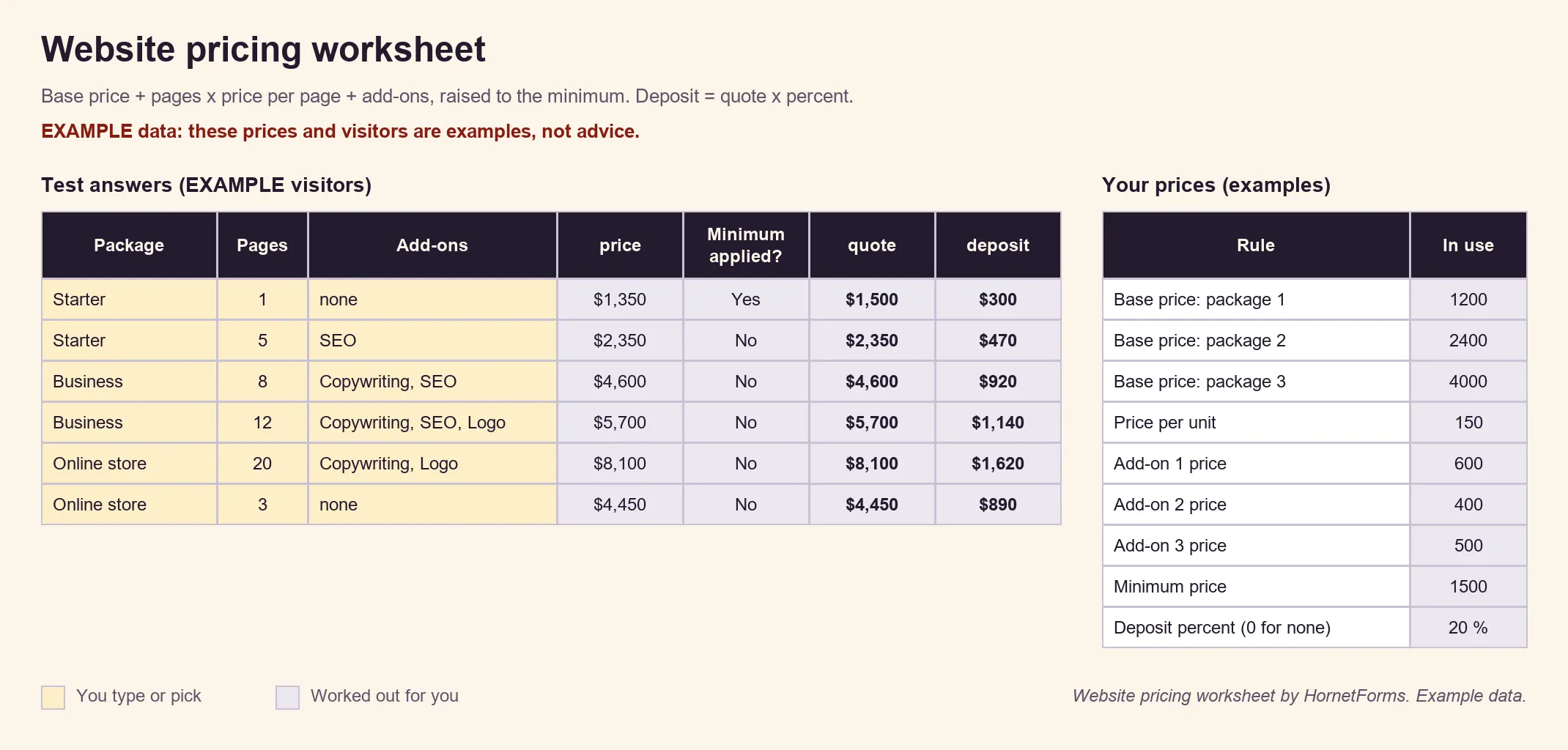
Example data: these prices and visitors are examples. Swap in your own numbers.
The first example shows the minimum at work: a one-page Starter site comes to $1,350, so the quote rises to $1,500. The worksheet as a CSV holds the same six example visitors and their numbers, for any other tool.
Here's the best test: open your form's preview, give it the same answers as a worksheet row, and check the number on screen matches the quote column.
Build your website price calculator free#
Pick your four numbers, test them in the worksheet, and build the form on your pricing page this week. The features page shows everything else forms can do, and the Free plan is free forever, with unlimited responses within fair use and no card needed. Sign up for free and build your website price calculator before the next "how much?" email lands.