
On this page
Your client's "Get a quote" button opens a form with three boxes: name, email and "Tell us about your project." What comes back is a name, an email and "how much?". Then your client spends a day writing back to ask the questions the form should have asked.
A good quote request form template does three jobs before anyone picks up the phone. It shows the visitor a rough price, so the lead knows what they're getting into. It politely turns away jobs your client can't take. And it lets the good fits book the call right there.
This guide walks through the form an agency puts on a client's site: the questions, the estimate, the screen-out rules, the booking step and the embed. At the end there's a free template and a pricing sheet you can copy.
What a quote request form has to do#
Think of the form as a short funnel with two exits. Everyone answers a few questions about the job. The form works out an estimate in the background. Then a fit check runs: is the job in the area, and is the budget above the minimum?
Good fits see their estimate and leave their details, and can book a call on the last page. Bad fits land on a kind ending that explains why, instead of a reply three days later.
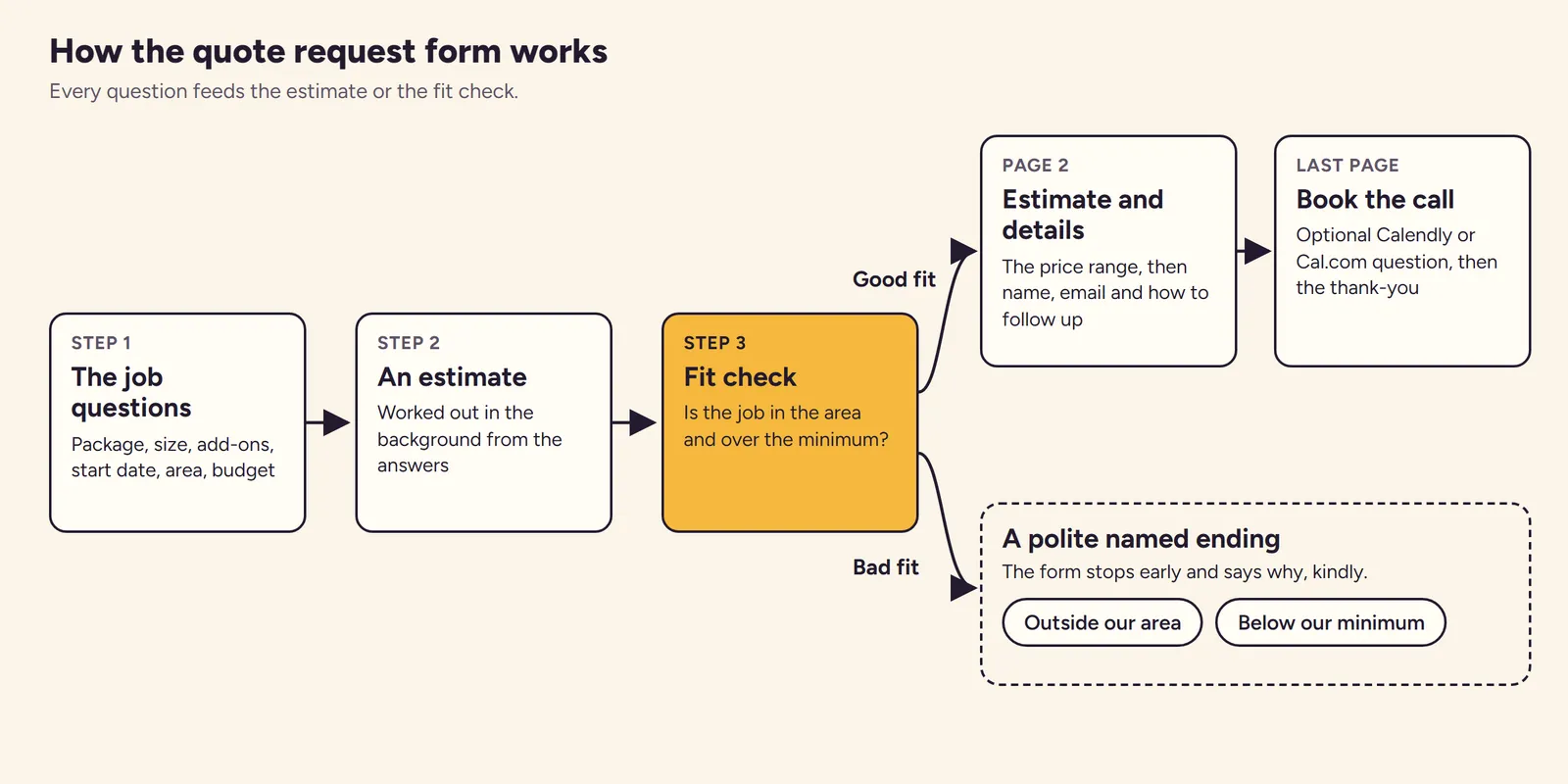
That's the whole design. Every question below earns its place by feeding the estimate or the fit check.
Questions that change the price#
Most quote forms ask too much in the wrong places. They want a company size, an industry and a phone number up front, and they never ask what drives the price. Flip that around.
Ask what moves the number#
Your client already prices jobs in their head. Ask the visitor for the same inputs: which package, how big the job is, which extras, and how soon. Use multiple choice wherever you can. A visitor can't price "a medium kitchen refresh with aftercare" in a text box, but your form can.
Ask what decides fit#
Two questions decide whether the lead is worth a call: where the job is, and what budget they have in mind. Ask them plainly, and offer ranges like "$500 to $1,500". A range is easier to pick than an empty box that asks for a number.
Leave the rest for the call#
Name, email, phone and "Anything else we should know?" come last, after the visitor has seen a price. Ask for photos or a brief as an optional upload. Everything else, like access details or exact dates, belongs on the call. Selling websites? Their scope runs deeper, so send a web design questionnaire before you quote a website.
Here's the set in our quote request form template:
| Question | Type | Why it's there |
|---|---|---|
| Which package do you need? | Multiple choice, required | Sets the base price |
| How big is the job? | Multiple choice, required | Scales the price up or down |
| Add-ons | Checkboxes | Adds a fixed amount per extra |
| When do you want to start? | Multiple choice, required | Rush jobs cost more |
| Where is the job? | Multiple choice, required | Fit check: service area |
| What budget do you have in mind? | Dropdown, required | Fit check: minimum job |
| Photos, plans or a brief | File upload, optional | Saves an email asking for pictures |
| How should we follow up? | Multiple choice, required | A call or an email, their choice |
Not sure whether a dropdown beats multiple choice for a question? Here's a guide to which question type to pick.
Show an estimate, not a promise#
Visitors want a number. Your client wants room to adjust it after the call. A range does both. Show a low and a high end, and call it an estimate, not a quote.
Our quote request form template does this with calculated fields that the visitor never sees. Logic rules fill them in from the answers. The package sets a base price and the size sets a factor. Each add-on adds a fixed amount, and "As soon as possible" adds a rush factor. Two formulas then turn those into a range:
estimate_low  = round((base * size_factor + addons) * timing_factor / 50) * 50
estimate_high = round(estimate_low * 1.3 / 50) * 50
Rounding to the nearest $50 keeps the numbers looking like a human wrote them. The 1.3 puts the top of the range about 30% above the bottom.
With the template's example prices, a Standard package for a Medium job with no add-ons and no rush comes out at $1,800 to $2,350. The visitor sees this on the second page:
Jobs like yours usually land between $1,800 and $2,350. This is an estimate, not a quote. We confirm the price after a short call.
Those are example numbers. Swap in your client's own prices before launch. "Something custom" skips the estimate and shows a short note instead, because custom work has no fair range to show. For a simpler live total on any page, see our guide to a website price calculator.
One detail matters for trust: HornetForms works out every calculated value again on its server when the visitor sends the form. Someone who edits the page can't send you a fake estimate. The logic, piping and calculations guide covers the formula rules in more depth.
Good to know: have the client sign off the price list before the form goes live. The range sets an expectation in the lead's head, so the numbers have to be ones your client is happy to stand behind on the call.
Screen out bad-fit leads politely#
A quote request form template that accepts every lead hands your client a sorting job. Two jump rules do the sorting instead. When a visitor picks an answer that rules them out, the form skips the rest and goes straight to a named ending.
| Ending | When it shows | What it says |
|---|---|---|
| Outside our area | "Where is the job?" is "Outside our service area" | The client only works within about 30 miles of its base, and a local provider will be quicker and cheaper |
| Below our minimum | The budget is "Under $500" | The smallest job starts at $500, and the visitor is welcome to come back if plans change |
| Default thank-you | Everyone else, after sending | "Request received" with their name, and a reply within one business day |
Both endings open with "Thanks for asking." A visitor you turn away still leaves with a clear answer and a good feeling about the business. Change the 30 miles and the $500 to your client's real limits.
Bots are the other kind of bad lead. Every HornetForms plan includes a honeypot field, a time check and rate limits. Pro and Business add email verification with a 6-digit code, for forms where a working email matters. Our guide on how to keep bots out of your forms explains how each one works.
Book the call in the same form#
Every good fit who reaches the end of the form has already passed the fit check. That makes the last page the right place for a calendar.
The quote request form template leaves the booking step out, because it needs your client's own booking link. Adding it takes a minute:
- Add a third page at the end of the form.
- Add a Scheduling question and paste the client's Calendly or Cal.com booking link.
- Optional: add a logic rule that shows the calendar only when "How should we follow up?" is "A quick call".
The visitor picks a time without leaving the form, and the booking widget can fill in the name and email they already gave. Bookings appear in the response, next to the answers and the estimate. Your client's calendar stays the record of truth, and Calendly or Cal.com sends the invite as usual. For what to ask once the call starts, see our discovery call questions.
Put the quote request form on your client's site#
Clients use every site builder under the sun, and a quote request form template shouldn't care which one. Put it wherever the client's old get a quote form lives now. HornetForms gives you an embed snippet for an inline form, a popup, a slider or a full page, and you paste it into any page that accepts embed code.
Make it look like the client's site, not like yours:
- Themes, fonts and colours are on every plan, Free included.
- Logo, cover image and custom CSS come with Pro and Business.
- Pro removes the "Made with HornetForms" badge, and so does Business.
- Custom domains: one on Pro and 10 on Business. HornetForms counts them per account, so plan for how many client domains you run.
For tracking, add hidden fields named utm_source, utm_medium and utm_campaign. When you embed with the HornetForms embed script, it passes the page's utm_* parameters into the form for you. On a direct link, add them yourself, plus source_page to see which page sent the lead:
https://forms.hornetforms.com/f/<your-slug>?utm_source=google&utm_medium=cpc&utm_campaign=spring-quotes&source_page=pricing
If the client runs ads, Pro and Business also support GA4, Google Tag Manager and Meta Pixel. They run on the full-page form only, not in embeds, and Tag Manager needs a verified custom domain. The pricing page lists what each plan includes.
Send every lead where the client will see it#
A quote request that sits in a dashboard nobody opens is a lost job. Point the form at the place your client already checks:
- Email notifications you can turn on, for each new request.
- Google Sheets, Slack, Discord and Notion, built in on every plan.
- Connect with Zapier or use signed webhooks for anything else, like a CRM, also on every plan.
- A response PDF of any request, to attach to the quote.
On Pro and Business you can give each client their own workspace and invite them as a viewer. There's no per-seat pricing, so adding the client costs nothing extra. And every plan has unlimited responses, so a busy month never closes the form. Once the quote goes out, a proposal follow-up email keeps the job from going quiet. For setup steps, see how to send form responses to Google Sheets, Slack or Notion, or browse the integrations page.
A free quote request form template#
We built this quote request form template as a two-page HornetForms form:
- About the job: package, size, add-ons, start date, area and budget, plus the hidden estimate fields and the four tracking fields.
- Your estimate and details: the estimate range (or the custom-work note), then name, email, phone, company, notes, an optional upload of up to three files, and how to follow up.
It also has the two named endings and the thank-you screen from the table above. You'll find it in the template gallery under Lead generation, or on its own page at forms.hornetforms.com/templates/quote-request. Click Use this template, sign up if you're new, and your own copy opens ready to edit.
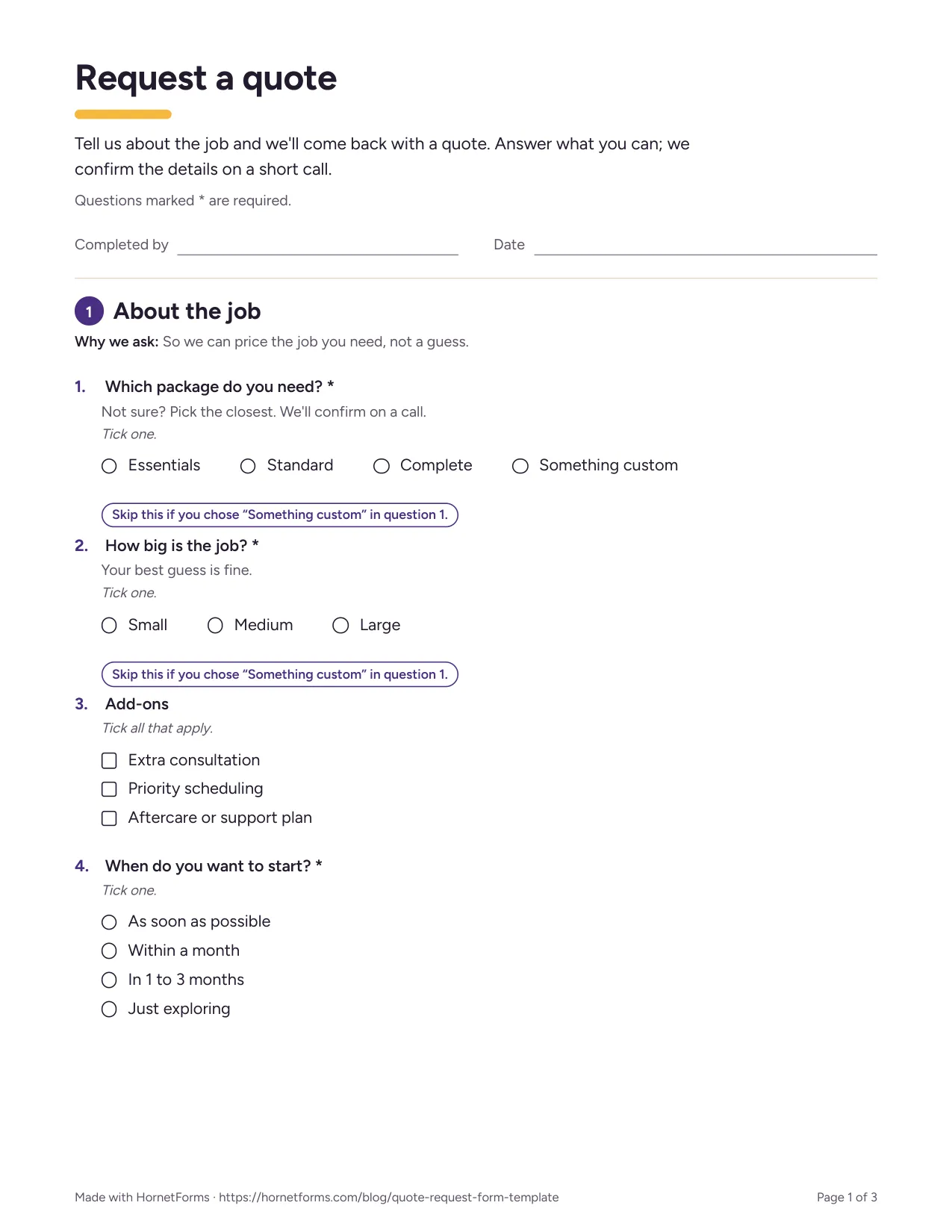
The first page of the printable version, for phone calls and walk-ins.
There are two downloads to go with it:
- A printable quote request form for phone calls or a counter: PDF, US Letter, PDF, A4 or Word (DOCX) to add the client's logo.
- A pricing sheet to set the client's numbers before launch: quote pricing sheet (Excel), which opens in Excel and Google Sheets. Type the client's prices into the yellow cells, then try answers in the Estimate preview tab to see the range a visitor would get. A CSV with the column headers of the form's export is there too.
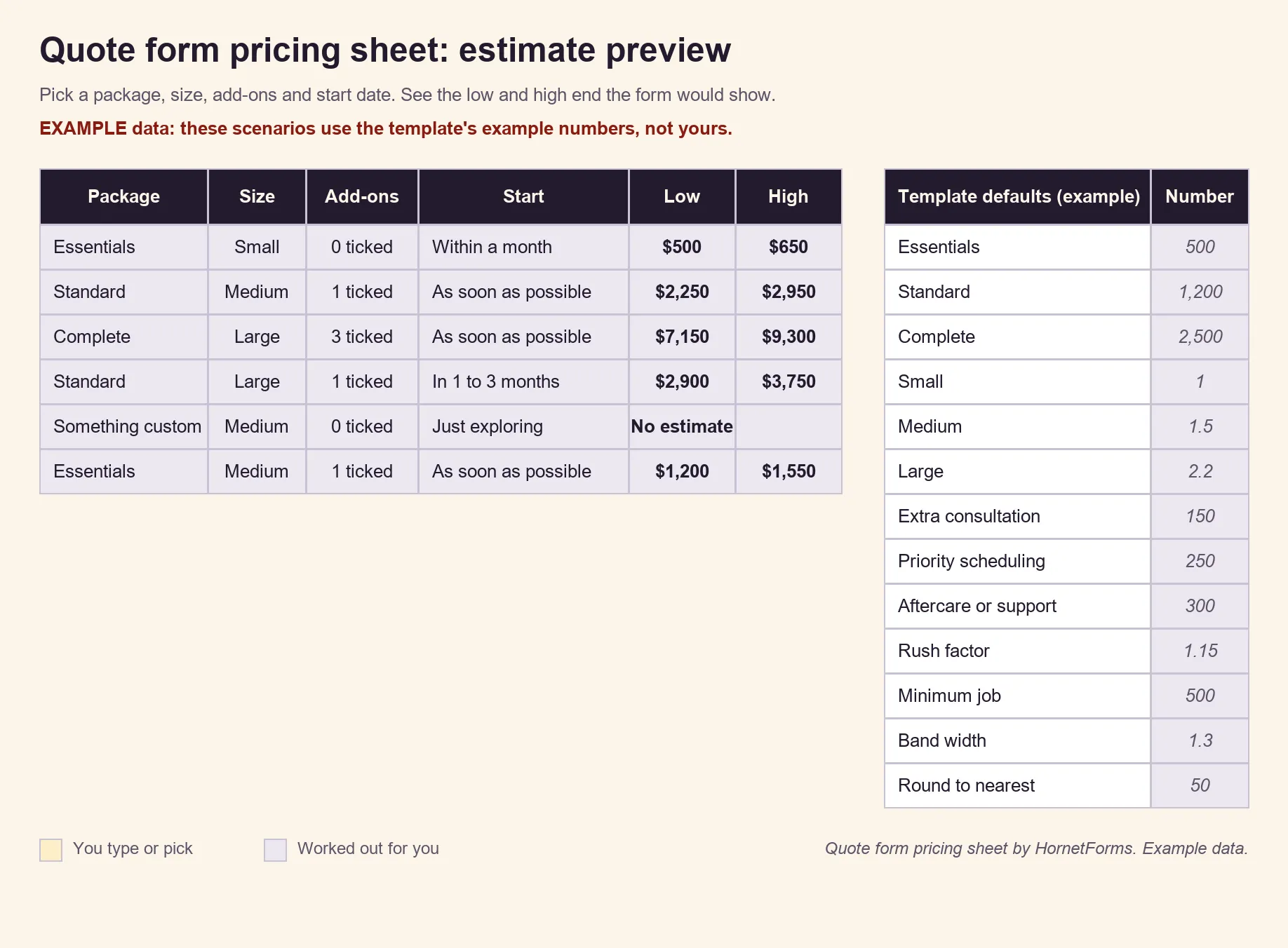
Example data: these scenarios use the template's example prices. Swap in your own numbers.
Try it on your next client site#
Pick one client who gets a lot of "how much?" emails. Set their prices in the sheet, copy the quote request form template, add their booking link and embed it on their quote page. Sign up for free and set up your first client form.