
On this page
You signed the client. The contract is back, the deposit is in, and everyone wants to start. Then a week goes by while you chase a logo, a login and the name of the person who approves the work. A client onboarding questionnaire gives you that week back. You send it once, the client answers in one sitting, and kickoff starts with everything on the table.
This guide groups the questions by the decision each answer unlocks, so you can see why every question earns its place. It also shows how to collect logos, files and account access in the same form, without anyone typing a password. At the end there's a free template you can open in HornetForms or download as a PDF.
What a client onboarding questionnaire is for#
A client onboarding questionnaire is the form a new client fills in after they sign and before your kickoff call. It collects the facts you need to start work: who to talk to, what success looks like, the brand files and the accounts you'll need.
Timing matters. Send it during the sales process and you ask a prospect to do homework before they've agreed to anything. Send it after kickoff and the call turns into a slow, spoken version of the form. Right after signing is the sweet spot. The client is keen, and you get a few days to read the answers before the call. Before the contract, your discovery call questions do the qualifying instead.
One rule keeps it short: if you will not act on an answer, cut the question. "How did you hear about us?" is interesting, but it changes nothing about the first month of work. It belongs in your sales form, not here.
Client onboarding questions, grouped by the decision they unlock#
Most client onboarding questionnaire examples group questions by topic: business, audience, brand, competitors. That's tidy, but it hides the point. Each answer should unlock a decision you have to make before work starts. Group the questions that way and the missing ones show up fast.
| Decision | Questions | What you do with the answer |
|---|---|---|
| Who you talk to | Main contact, who approves the work, where invoices go | Set up your channel, your approval step and billing |
| What you aim at | Services, the 90-day win, the audience, competitors | Write the plan and pick the first deliverable |
| What you design with | Logo, brand guidelines, colours and fonts, things to avoid | Start design work without a second round of requests |
| Which access you request | The accounts they have, website platform, ad budget, past SEO work | Send invite steps for each account on day one |
| How you work together | Contact method, update rhythm, hard dates | Set the meeting rhythm and the timeline |
Who to talk to and who signs off#
Ask for the main contact's name and email, and the company name. Then ask the question most onboarding forms skip: who approves the work? If the answer is "someone else", ask for that person's name and email too. A friendly contact who can't sign off is how a finished design sits in someone's inbox for three weeks. The same person approves extra work later, so name them in your change request process too.
Ask where invoices should go as well. The person who fills in the form is often not the person who pays.
What a win looks like in 90 days#
Ask which services they hired you for, as a checklist: website, paid ads, SEO, social media, branding or other. Then ask what a win would look like 90 days from now. Push for something you can count, like "20 more booked calls a month", rather than "more visibility".
Add who they're trying to reach, and three competitors they admire and why. The "why" tells you more than the names do.
What you need to start designing#
Ask for the logo and the brand guidelines as file uploads, not as "can you email those over?". Ask for color codes and font names if they know them. Then ask for anything to avoid: words, colors, images or topics that are off limits. That last question saves more revision rounds than any other on the list. For the details of one campaign or design job, follow up with a creative brief template.
Which accounts you need on day one#
Here you ask for a list of accounts, never passwords. A checklist works best: Google Analytics, Google Search Console, Google Ads, Meta Business, website host, domain registrar, CMS and other. You get a picture of what exists, and you can send the client the steps to invite you to each one.
Then add questions that depend on the services they picked. For a website project, ask which platform the site runs on. For paid ads, ask about the monthly budget. For SEO, ask what work happened before, who did it and what changed.
How you'll work together#
Ask how they prefer to hear from you (email, Slack, phone or video call) and how often they want an update. Ask about hard dates: launches, events, sales or board meetings. Then close with "Is there anything else we should know?" People use that box for the important thing you forgot to ask.
Extra questions for marketing, SEO and web projects#
A marketing agency client onboarding template often needs a few more questions, depending on the work:
- Paid ads: the ad accounts they use today, past campaigns that worked or flopped, and the monthly budget.
- SEO: past SEO work, any traffic drops they know about, and the pages that matter most to sales.
- Web projects: the platform, who hosts the site, who owns the domain, and anything that must not break, like a booking widget or a shop. Scope and budget belong in the before-quote web design questionnaire.
- Social media: the channels they use and who posts today.
Add only the ones that match the services the client picked. Logic can hide the rest, as the section "Keep it short enough to finish" shows below.
Collect logos, files and access in the same form#
The usual onboarding mess is a form for the questions, an email thread for the files and a spreadsheet of logins. Put all three in one client onboarding questionnaire and the client has a single thing to finish.
In HornetForms, a file upload question takes logos, brand guidelines and slide decks right inside the form. Each file can be up to 10 MB on the Free plan, and Pro and Business have no plan cap on file size. The client doesn't need an account or a sign-in to answer or upload. They open the link and start. If you're unsure whether a question works best as a checklist, a dropdown or a text box, here's a guide to which question type to pick.
Access works differently from files. Ask which accounts exist, then get access through each platform's own user settings.
Good to know: never ask a client to type a password into a form, an email or a spreadsheet. Ask them to invite you as a user from each account's own settings instead. For Google Analytics, Google's help page shows how to add users and choose their role (checked October 2026). Most ad, CMS and hosting platforms have a similar screen for inviting users.
This way the client stays in control, you get your own login, and they can remove your access when the project ends, a step our client offboarding checklist walks through. The template opens its accounts page with one plain line: "Please do not type passwords here. Invite us as a user from each account's own settings."
Keep it short enough to finish#
A long client onboarding questionnaire that nobody finishes helps no one. Three things keep it light.
Split it into pages. A HornetForms form can run over several pages with a progress bar, so the client sees five short steps instead of one long scroll.
Show each client only their questions. Conditional logic hides the website questions from a client who only hired you for ads, and the ad budget question from a website-only client. Our logic, piping and calculations guide shows how to set it up.
Fill in what you already know. URL prefill puts answers into the form from the link itself. Send each client a link with their company name already in place:
https://forms.hornetforms.com/f/onboarding?company=Acme
On Pro and Business you can also turn on partial responses. You see who started but didn't finish, and the client can email themselves a link to finish later. The pricing page lists what each plan includes.
Send the answers where your team works#
A finished client onboarding questionnaire should land where your team already looks, not sit in one more inbox.
- Email notifications tell you the moment a client finishes, on every plan.
- Google Sheets, Slack, Discord and Notion connect natively on every plan, Free included. A Notion database of new clients or a Slack channel for the account team both work well.
- Response PDF: download any response as a PDF for the client folder or the kickoff deck.
- Booking: add a Calendly or Cal.com scheduling question at the end, so the client books the kickoff call in the same form. Bookings appear in the response.
For the setup steps, see how to send form responses to Google Sheets, Slack or Notion, or browse the integrations page.
A free new client questionnaire template#
We built this new client questionnaire template as a HornetForms form with five pages:
- Your contacts: name, email, company, who approves the work (with the approver's name and email if it's someone else) and where invoices go.
- Your goals: services, the 90-day win, who they're trying to reach and three competitors they admire.
- Your brand and files: logo and brand guidelines uploads (up to three files each), colors and fonts, and things to avoid.
- Accounts we may need: the account checklist, plus the website, ad budget and SEO questions that appear only for the matching services.
- Working together: contact preference, update rhythm, hard dates and anything else.
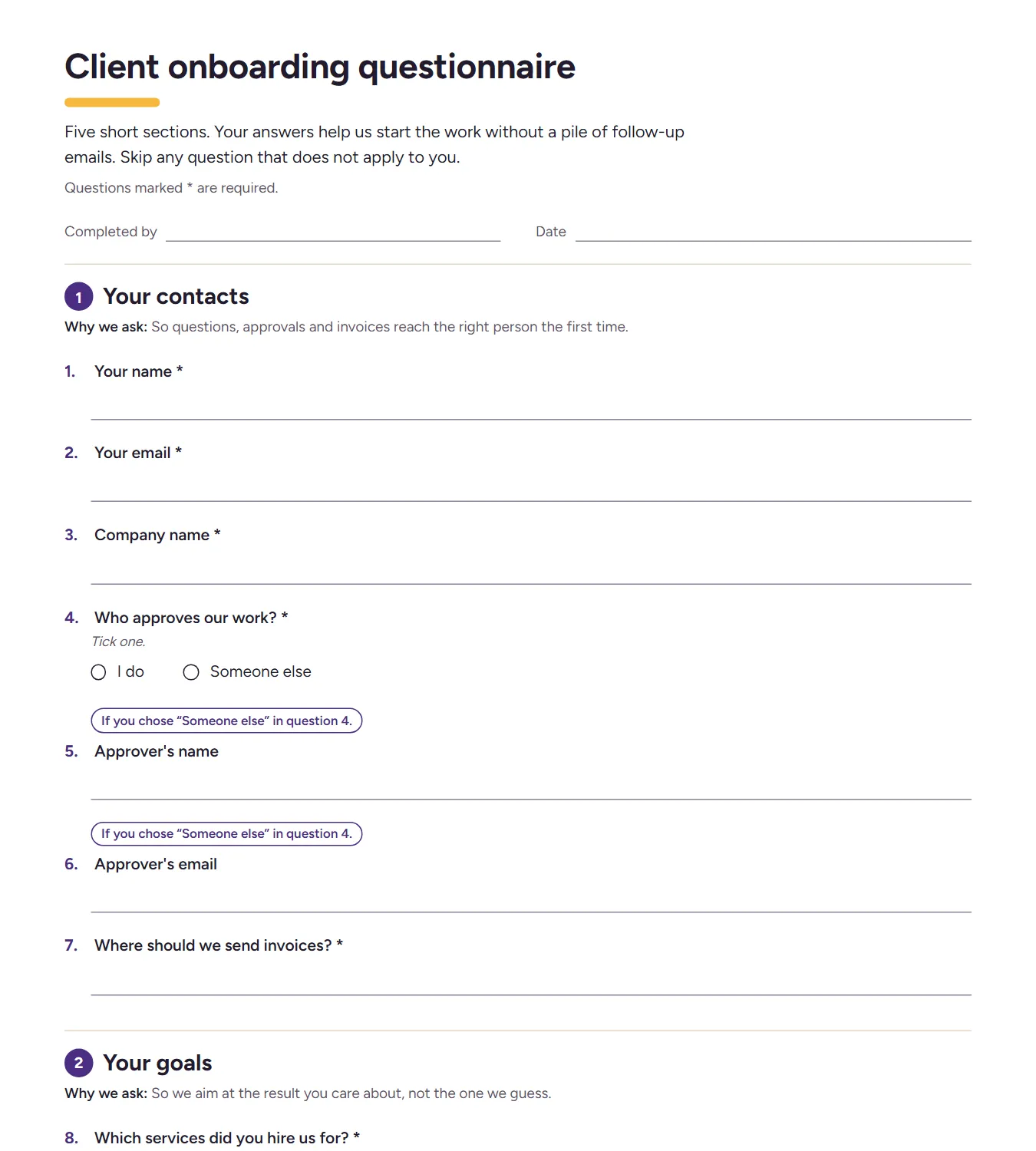
The first page of the printable version.
There are two ways to use it:
- Open it in HornetForms. The template page at
forms.hornetforms.com/templates/client-onboarding-questionnairehas a Use this template button. It takes you through sign-up and opens your own copy, ready to edit. Duplicate the form for each client, or keep one form and send each client a prefilled link. - Download a printable copy for a kickoff call or a client who likes paper: PDF, US Letter, PDF, A4 or Word (DOCX) if you want to add your own logo.
Try it on your next client#
Send the client onboarding questionnaire to your next client on the day the contract comes back. Read the answers before kickoff, and you'll walk into the call with the files, the access list and the name of the person who signs off. The Free plan is free forever, with unlimited forms and responses. Sign up for free, open the template and send your first link.