
On this page
"Can you make it pop?" Every designer has heard it, usually two days before a launch, with no word on who it's for or where it will run. The work comes back, it misses, and everyone loses a week to rounds of changes.
A creative brief template fixes that before it starts. It's a short document that says what you need, why, for whom and by when, so the person making the work can get it right the first time. This guide walks through the 10 parts of a good brief, shows a filled-in example, and covers the extra details video, social and print need. You can download the creative brief template as a Word file or a PDF, plus a filled-in example, further down.
What a creative brief is (and is not)#
A creative brief is the agreement between the person who needs the work and the person who makes it. The New South Wales government's Brand Out Loud guide for businesses calls it "a concise roadmap that guides your campaign from start to finish" (Neon Marketplace, Brand Out Loud topic 2: creative briefs, accessed 28 October 2026).
What a brief is not:
- Not a design. It says what the work must do, not what it must look like. Leave room for the designer to have ideas.
- Not a project plan. It has a few key dates. The task list lives in your own tools. For a brief that covers a whole client job, start from our project brief template.
- Not a novel. One or two pages is plenty. If nobody reads it, it isn't working.
- Not a website scope. Planning a whole site? That needs a longer questionnaire about pages, features and content. A creative brief covers a campaign or a piece of content.
The 10 parts of a good creative brief template#
Every useful creative brief template answers the same 10 questions. Fill them in order: each answer makes the next one easier.
- Project overview. What is this, in two sentences? Name the product, offer or event.
- Background. Why now? What happened, what you tried before and what you already know.
- Goal. One main goal, plus how you'll know it worked. "More awareness" isn't a goal. "40 pre-orders a day by week four" is.
- Audience. Who exactly, what they care about and what stops them today. "Everyone" is not an audience.
- Key message. The one thing people should remember, plus two or three facts that make it believable.
- Tone and style. Three words for how it should feel, and links to work you like (and work you don't).
- Deliverables. Every piece you need, one per line, with its channel, format, size, number of versions and due date.
- Mandatories. What must appear: logo, colours, legal lines, the call to action, links and hashtags.
- Timeline and budget. Dates for first drafts, feedback, final files and launch, plus the budget and what it covers.
- Feedback and sign-off. Who gives feedback, who has the final say, and how many rounds of changes are included.
Parts 3 and 10 do the most work. A clear goal settles most design arguments ("does this help people pre-order?"). A named decision maker stops the work from bouncing between five people with five opinions.
A filled-in creative brief example#
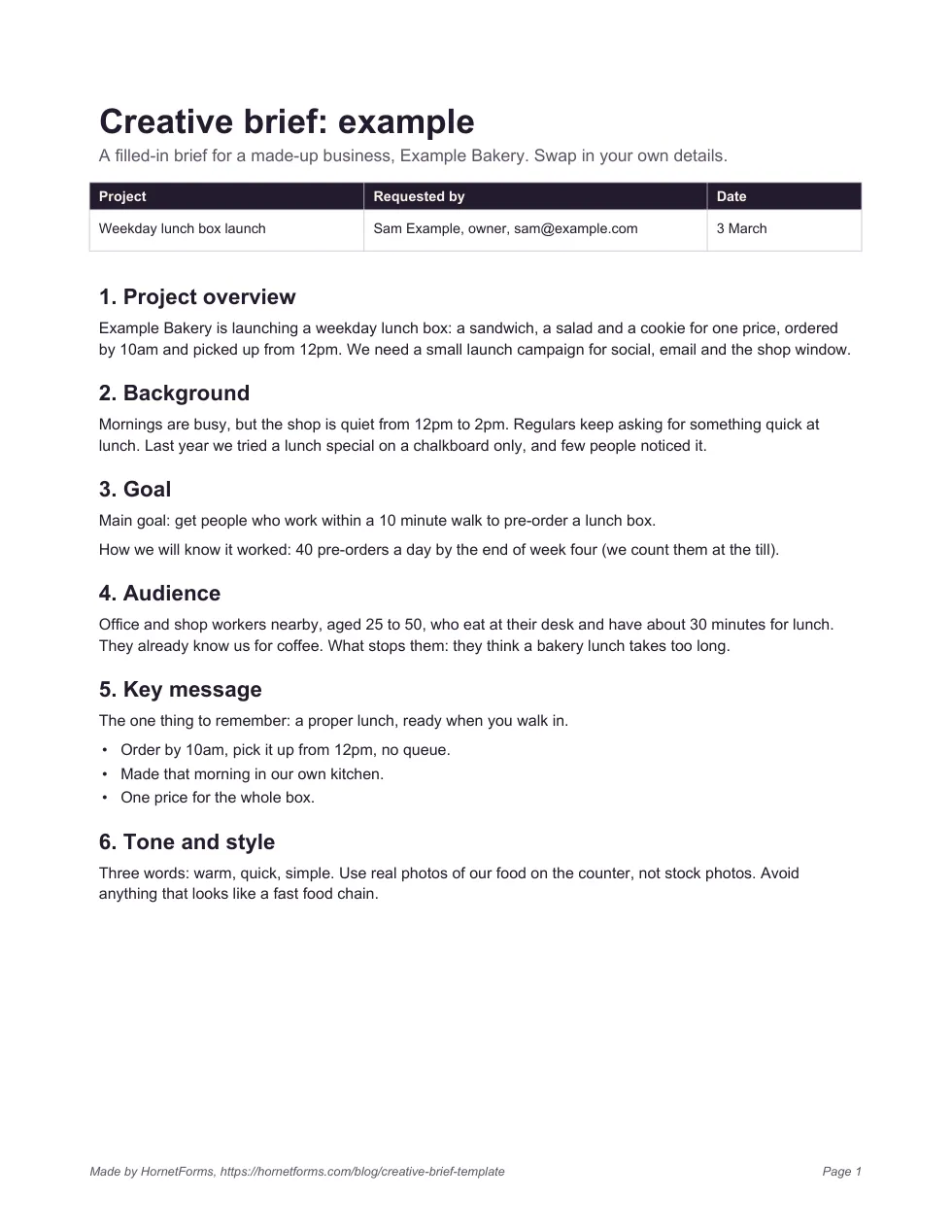
Blank templates are easier to fill when you've seen a finished one. Here's page one of our example brief, for a made-up business, Example Bakery, launching a weekday lunch box.
Example only. Example Bakery and its details are made up.
Notice how specific it gets. The audience isn't "local people". It's office and shop workers within a 10 minute walk who eat at their desk. The goal comes with a number the owner can count at the till. Page two lists five deliverables, each with a format, a size and a date, plus four mandatories, a timeline and one person with the final say.
Download the full example as a PDF, US Letter or a PDF, A4.
How to brief video, social and print#
The 10 parts stay the same for every format. What changes is the detail in part 7, deliverables. The same guide puts it simply: "Be specific about what you need created." Here's what each format needs on top.
| Format | Add to the brief |
|---|---|
| Video | Length, aspect ratio, where it will play, whether it needs captions or a voiceover, and who writes the script |
| Social | Each platform and placement, the image or video size, how many versions, and the caption and hashtags |
| Paper size, how many copies, bleed and file format (ask your printer), and where it will be seen | |
| Header image size, subject line ideas, and who writes the copy |
Platforms change their specs, so check them when you write the brief, not from memory. Two examples, checked on 28 October 2026:
- Instagram Reels. Meta's ads guide lists "Ratio: 9:16" for Reels ads (Meta ads guide, Instagram Reels video).
- YouTube Shorts. YouTube says "You can now create YouTube Shorts up to three minutes in length", and it counts uploads with "a square or vertical aspect ratio" up to that length as Shorts (YouTube Help, understand three-minute YouTube Shorts).
For print, one rule saves the most reprints: name the finished size and ask the printer for their file spec before the designer starts.
Common brief mistakes#
Most bad creative starts with one of these:
- Three goals at once. "Raise awareness, drive sales and grow the email list" gives the designer three jobs and no way to choose. Pick one.
- No real audience. If the brief says "everyone", the work will speak to no one in particular.
- The solution instead of the problem. "Make a video with a dog in it" skips the why. Say what the video must do, and let the creative team suggest how.
- Missing sizes. A beautiful square image is no use if you needed a vertical one. Fill in part 7 completely.
- Feedback by committee. Five reviewers sending separate notes means conflicting changes. Collect feedback in one list, and let one person decide.
- A brief that changes in chat. If the goal or the deadline moves, update the brief first, then tell the team.
Collect briefs with a creative request form#
A creative brief template works well for big projects. But if you run a marketing team, most requests are small: a social post here, an ad there. Asking colleagues to fill in a two-page document for every one of them is how requests end up in hallway chats instead.
A request form is the intake. It asks the questions that matter for every request, in the same order, and the brief document is there for the bigger jobs. Our creative request form template, "Content request", fits on one page and has 12 questions:
- Who and what: requested by, email, the type of content (blog post, landing page, email, social post, case study, video script or ad creative) and a working title.
- Ad details only when needed: pick "Ad creative" and an "Ad platform and sizes" question appears. That's a show rule from conditional logic, on every plan.
- The brief in short: what it should achieve, who it's for and where it will be published.
- Timing: a needed-by date and a priority, from "Nice to have" to "Urgent: a campaign depends on it".
- Files and links: a link to a longer brief or references, and a file upload for brand assets and screenshots. Uploads go up to 10 MB per file on Free, with no plan cap on Pro and Business.
Colleagues answer without an account or a sign-in, on a phone or a laptop. Not sure which question type fits a new field you want to add? Here's every question type and when to use it.
Three ways to use it:
- Open it in HornetForms. The template page at
forms.hornetforms.com/templates/content-requesthas a Use this template button that takes you through sign-up and opens your own copy. Already have an account? It's in the template gallery under Operations, as "Content request". - Print it. Download the PDF, US Letter, the PDF, A4 or the Word (DOCX) version.
- Pair it with the brief. For a big job, ask people to attach the full creative brief template through the link or file question.
Turn a brief into a plan#
A brief is only useful if it reaches the people doing the work. Once requests come in through the form, send each one where your team already looks. HornetForms connects to these on every plan:
- Notion. Each response becomes a page in a Notion database, so your requests board fills itself. Here's how to map form questions to Notion properties.
- Slack. Each new request posts to a channel, so the team sees it without opening another tab.
- Google Sheets. One row per request, ready to sort by needed-by date or priority.
You can also turn on an email to yourself for each new response, and download any response as a PDF to send along with the brief. The rest are in our tour of where your form responses can go.
Then make the plan in your own tools. Read the request, check it against the 10 parts, and fill in what's missing in a short call. Agree on the dates in part 9, and write down who has the final say before anyone starts. The brief stays the single place you check when someone asks "wait, what was this for again?"
Get your free creative brief template#
Download the creative brief template as a Word file (DOCX), a PDF, US Letter or a PDF, A4. Each has the 10 parts with room to write and a short checklist to run before you send it.
Then set up the intake. HornetForms is free forever on the Free plan, with unlimited responses within fair use, and the features page shows what else a form can do. Moving from another tool? Here's how Google Forms compares with HornetForms. Sign up for free and send your first creative request form today.