
On this page
The last invoice is paid and the files are "somewhere in the shared drive". Your designer still has admin access to the client's ad account. The client still sits in your project chat. Three months later they need a small change, can't find the logo files, and quietly hire someone else.
That's what a project looks like without a plan for the ending. A client offboarding checklist fixes it. It lists what to do two weeks before the end date, in the last week, on the day itself and in the weeks after. This guide walks through each stage, gives you an offboarding email to copy, and ends with a free sheet that works out every due date from the project end date.
Why client offboarding matters#
Most agencies put real work into the start of a project. Our guide to the client onboarding questionnaire covers that end: contacts, goals, brand files and account access, collected before kickoff. The ending usually gets one rushed email.
But the ending is what the client remembers. A client offboarding checklist gives the finish the same care as the start, and a tidy finish does three things for you:
- It protects both sides. Access closes on a set day, files land in one place and nobody owes anyone a surprise.
- It turns a good project into proof. The weeks after the end date are when clients are most willing to give feedback, a testimonial and permission to show the work.
- It keeps the door open. A client who leaves happy comes back with the next project, or sends a friend.
A clear client offboarding process also takes the awkward edge off. You are not "breaking up" with the client. You are finishing a job well, on a schedule they can see.
The client offboarding checklist: two weeks out to after the end date#
Plan the client offboarding checklist around one date: the project end date. Every task counts from there. Two weeks is enough runway for most projects. Large retainers with lots of accounts may want four.
| When | What happens | Main tasks |
|---|---|---|
| Two weeks out | Agree what finishing looks like | Confirm the end date in writing, list open deliverables, read the contract, list every account and tool to close, book a wrap-up call |
| Last week | Deliver and hand back | Final work, one shared folder of files, account ownership moved, wrap-up call, final invoice, the offboarding email |
| End date | Close access both ways | Leave the client's accounts, remove them from your tools, change shared passwords, switch off anything still running |
| After the end date | Learn, collect proof, stay in touch | Feedback form, internal review, testimonial, portfolio permission, case study, a 90-day check-in |
Two weeks out#
Start by confirming the end date in writing, with a short line on what "done" means for the last deliverables. Then list every open deliverable and agree which ones ship before the end date. Anything that won't fit becomes a new piece of work, not a free extra. If scope moved during the project, our guide to the change request process shows how to log those changes so the final bill holds no surprises.
Read the contract for what you owe at the end: final files, source files, licences and any notice period. Then make the access list. It has two halves: every client account your team can reach, and every place the client can reach in your tools. Book a 30-minute wrap-up call for the last week while calendars are still open.
The last week#
Deliver the final work and ask the client to confirm they have it. Put the final files, source files, fonts and licences in one shared folder. Move ownership of anything that belongs to the client, such as domains, ad accounts and analytics. Send the final invoice from your billing tool, and check that earlier invoices are paid. Then send the offboarding email (there's one to copy below).
On the end date and after#
Close access on the end date itself, in both directions. After that, the work shifts from wrapping up to learning and collecting proof, which the next sections cover.
Hand back files and revoke access in your own tools#
This is the part of the client offboarding process that causes trouble later, so give it its own block of time. On the client offboarding checklist, it spans the last week, the end date and the archive two weeks later.
Hand back everything in one place. One shared folder beats 14 email attachments. Include the final files, the editable source files, fonts and stock licences, and a short page of plain how-to notes: how things work, what renews when and who to call if something breaks.
Move ownership before you leave. If you set up a domain, an ad account or an analytics property for the client, make sure the client owns it before your access ends. Ask them to log in to each one while you are still around to help.
Revoke access in both directions. Remove your team from the client's accounts, or ask the client to remove you. Then remove the client from your project board, chat channels and shared drives. Change any passwords you shared and delete saved client logins from your password manager. An IT support request form template gives your team one place to ask for these access changes, so each removal has a record. The US Federal Trade Commission gives the same advice for staff who leave a business: "Terminate their passwords, and collect keys and identification cards as part of the check-out routine." (FTC, Protecting Personal Information: A Guide for Business, October 2016, accessed 28 October 2026). A client relationship deserves the same tidy check-out.
Keep only what you need. The same FTC guide says: "Keep sensitive data in your system only as long as you have a business reason to have it." Archive the project files you must keep under your contract, and delete client data you no longer need. If you collected client details through your own forms, auto-delete rules on the Pro and Business plans can delete old responses after the number of days you choose (see the pricing page).
Good to know: your contract and local law decide what you must hand back, keep or delete. This checklist is a planning aid, not legal advice.
Last, switch off anything still running for the project: scheduled posts, automations, and forms that still send answers to the client's channel.
Final feedback and a testimonial#
About three days after the end date, send a short feedback form. Ask how the project went, what worked and what you could do better. Then hold a short internal review with your team: what to repeat and what to change.
If the feedback is good, ask for a testimonial about a week after the end date. The testimonial request template in HornetForms is built for this. It asks for a star rating, what you worked on, what they'd tell someone thinking of hiring you, their name, job title and company, a website or LinkedIn link and an optional photo. If the rating is three stars or lower, logic shows an extra question asking what you could have done better, so a lukewarm client gets a way to say so instead of a request for praise.
The template also asks how the client wants to be quoted: with their name and company, with their first name and company, or without their name. That's a publishing choice you agree to honour, so record it next to the quote. The testimonial request form template page walks through each question, and our guide on how to ask for a testimonial covers timing and wording in depth.
Ask to show the work, then ask for a case study#
A testimonial is words. Your portfolio needs the work itself, and that needs the client's say-so.
Portfolio permission. Around 10 days after the end date, send a portfolio permission form. The portfolio-permission template asks which project it's about, then whether you may feature the work: yes, yes with conditions, ask again later, or no. Logic shows a box for the conditions when they pick "yes, with conditions", and a date question when they pick "ask again later". It also asks where you may show the work (your website, social media, a case study, awards entries or client pitches only), whether you may name the company, whether you may share figures, what you must leave out and who to credit.
You can preview it at forms.hornetforms.com/templates/portfolio-permission. To save the client some typing, give the project question a prefill parameter and send a link that fills it in for them:
https://forms.hornetforms.com/f/your-portfolio-form?project=Spring+site+redesign
When the answers come in, download the response as a PDF (on every plan) and save it in the project folder. Next time someone asks "did they say we could use this?", the answer is one click away.
Case study. Results take time to show, so ask for a case study four to eight weeks after the end date, or whenever the numbers are in. The case-study-request template asks what the client struggled with before, what results they've seen, a quote, whether you may use their company name and logo, and whether they'd be a reference. If they say yes to being a reference, a phone question appears. It also takes up to three logo or photo files.
The client offboarding email template#
The offboarding email is the one message that ties everything together. Send it in the last week, from your own email account, so the client has every link before your access ends. Here's a client offboarding email template to copy:
Subject: Wrapping up [project name]: everything in one place

Hi [first name],

We're at the finish line. [Project name] wraps up on [end date], and it's
been a real pleasure working with you and [company].

Here's everything in one place:

Files: [link to the shared folder]. Final files, source files, fonts and licences.
How-to notes: [link]. How things work, what renews when, who to call.
Accounts: [list]. You now own these. We'll leave your accounts on
[end date], so please check you can log in to each one before then.
Final invoice: [number], sent on [date].
Still open: [anything unfinished, or "Nothing, we're all done."]

In a few days I'll send a two-minute form asking how it went.
Honest answers help us most.

Thanks again for trusting us with this. Reply any time.

[Your name]
Keep it short, and change any line that doesn't sound like you. The free offboarding email pack (Word) has this email plus five follow-ups: the feedback form, the testimonial request, portfolio permission, the case study and a 90-day check-in, each with subject line ideas.
Keep the door open for referrals#
A finished project is a quiet sales channel. Three small habits keep it working:
- Say thank you like you mean it. The offboarding email and the wrap-up call are where clients decide how they'll describe you.
- Check in after about 90 days. Ask how the work is holding up, and whether anyone they know could use a hand with what you do. One friendly question is enough.
- Update your client list. Note the end date, the main contact, and what they agreed to on testimonials and portfolio use, so you never ask twice or publish something they said no to.
When a referral does come in, the cycle starts again with the client onboarding questionnaire, and ends, some months later, with the same client offboarding checklist.
Collect feedback, testimonials and permissions in one place#
You can send all three follow-up forms from HornetForms. Open the testimonial request, portfolio permission and case study request templates, change the wording to match your voice, and share the links in your follow-up emails. Clients don't need an account to answer, and you can turn on an email to yourself for each new response.
Answers can also go where your team already works, on every plan: a Google Sheets row for each response, a Slack message in your team channel, or a page in Notion. The guide to where your form responses can go shows how to set each one up. Every plan has unlimited responses within fair use, so a busy year never hits a response limit. Want different questions? Swap any of them for one of the 20+ question types.
Free client offboarding checklist#
The free client offboarding checklist (Excel) has all 26 tasks from this guide. Each one has a phase, an owner (project lead, account lead, team or finance) and a number of days from the end date. Type the project end date once and the sheet works out every due date, from two weeks before to the 90-day check-in.
Pick Yes in the Done? column as you go. Each task shows Done, Overdue, Due this week or Upcoming. The Summary tab shows progress by phase, open and overdue tasks by owner, and the next task due. There are blank rows for your own tasks.
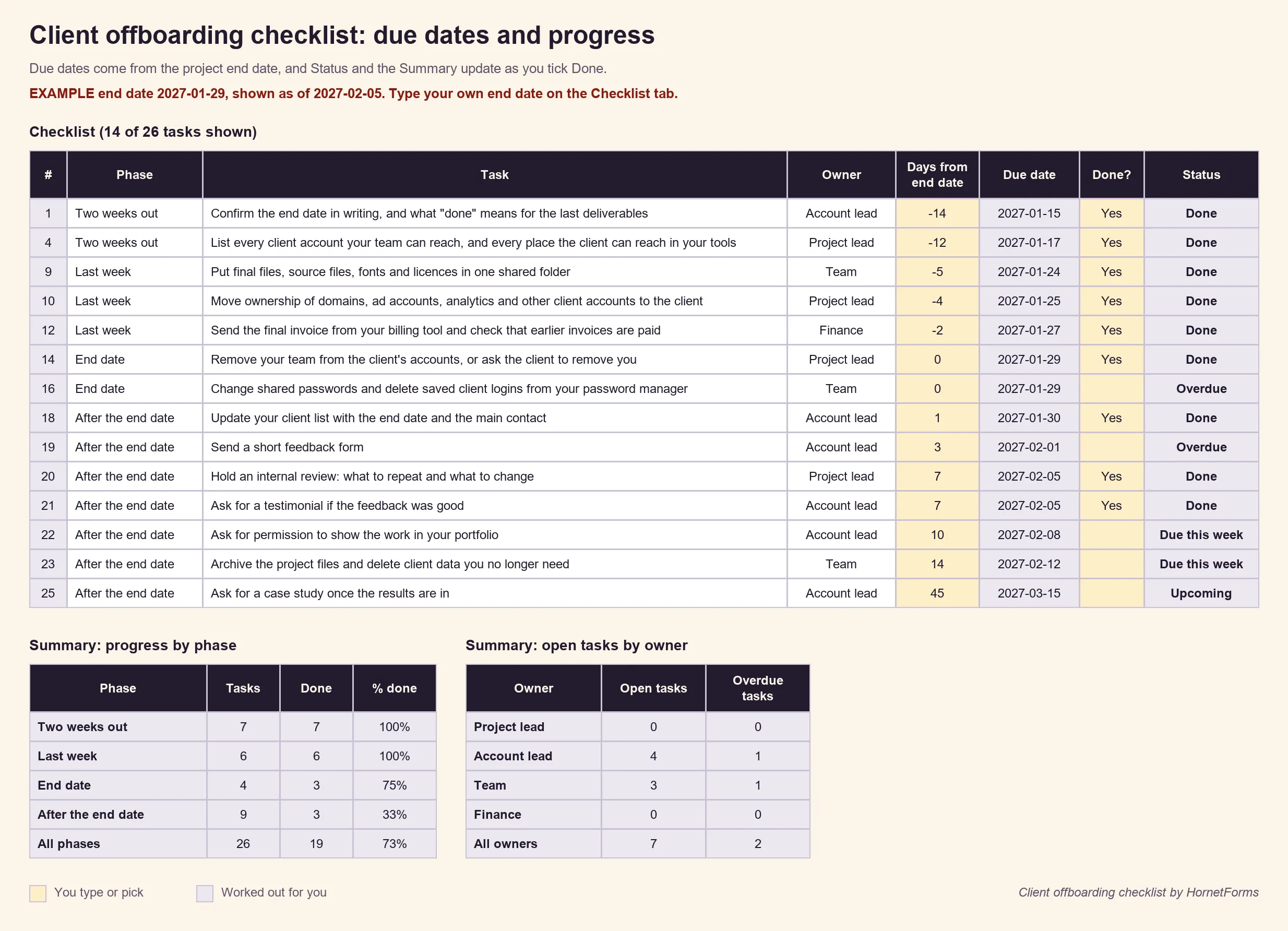
Example data only. Swap in your own end date, tasks and owners.
Prefer another tool? The checklist as a CSV has the same tasks, phases, owners and days from the end date, with empty Done and Notes columns, ready to import. Prefer paper? Print the client offboarding checklist template as a PDF, US Letter or a PDF, A4, or edit the Word (DOCX) version. It has space for the due dates, a Done column and lines for the accounts to close.
End your next project on purpose#
Copy the checklist, put the end date in the sheet and send the offboarding email in the last week. Then let the follow-up forms do the asking. HornetForms is free forever on the Free plan, and the features page has the wider tour. Sign up for free and turn your next finished project into your next referral.