
On this page
A client says "this is amazing, thank you!" on a call. You mean to ask them for a testimonial. Then the week gets busy, the project closes, and three months later you're staring at a website with no client quotes on it.
You don't lack happy clients. You lack a habit and the right words. This guide shows how to ask for a testimonial without feeling pushy: when to ask, five questions that get quotes you can use, six messages to copy and how to handle permission. A free set of request scripts and a tracker sheet wait at the end.
When to ask for a testimonial (and when to wait)#
Ask while the good feeling is fresh. The best moments are:
- Right after a thank-you. If a client praises your work, reply the same day and ask if you can share it.
- At the handover. When you deliver the final files, the keys or the last session.
- After a result. The new website gets its first booking, or the campaign hits its target.
- When they come back. A repeat booking says more than any survey score.
Wait when the project ended badly, an invoice is overdue or a complaint is still open. Fix the problem first, and log it with a customer complaint form so nothing gets lost.
One more rule: ask one person at a time, by name, about one project. "Hi Sam, could you share a few words about the bakery website?" works far better than a blast to your whole client list.
Five testimonial questions for clients#
"Could you write me a testimonial?" sounds easy, but it hands the client a blank page. Most people freeze, then write "Great to work with!" and nothing else. Specific questions get specific answers. These five testimonial questions for clients cover the story a stranger needs:
| Question | What it gets you |
|---|---|
| What was going on before we started working together? | The before: the problem in their words |
| What did we work on? | Context, so a stranger understands the quote |
| What changed afterwards? A number helps, if you have one. | The after: a result people can picture |
| What would you tell someone thinking about working with us? | The quote itself, aimed at your next client |
| What could we have done better? | Feedback for you, not for publishing |
The last question helps in two ways. You learn something, and clients relax when they see you want honest answers, not a scripted rave. Keep its answers out of anything you publish.
How to ask for a testimonial by email, text or LinkedIn#
Here are six messages to copy. Swap the [brackets] for your details, and point [link] at a short form with the questions above. Short on purpose: that's how to ask for a testimonial without making it feel like homework.
1. When a client says something nice#
"Thank you, that made my day! Would you mind if I shared what you just said on my website? Here's a short form where you can tweak the wording and tell me how you'd like me to credit you: [link]"
2. The project wrap-up email#
Subject: A quick favour, [first name]?
"Hi [first name], thanks again for trusting me with [project]. Seeing [result] go live was a highlight of my month. Would you share a few words about working together? It's five short questions: [link]
You choose how I credit you, from your full name and company to no name at all. I'll send you a link once it's up. No pressure if this is a busy week."
3. The short email for a regular client#
Subject: Five quick questions?
"Hi [first name], we've done [number] projects together now, and I'd love to put your words on my website. Five quick questions here: [link]. Thank you!"
4. The text message#
"Hi [first name], it's [your name]. So glad [project] went well! Could you answer five quick questions for a testimonial? It takes a few minutes: [link]"
Only text clients who already text with you. A message from an unknown number asking for a favour reads like spam.
5. The LinkedIn message#
"Hi [first name], thanks again for [project]. I'm collecting a few client stories for my website. Would you answer five short questions? [link] If you'd rather write a LinkedIn recommendation, that would be lovely too."
6. The one follow-up#
"Hi [first name], just floating this back up in case it got buried. If you have a few minutes this week, here's the link: [link]. If now's not a good time, no worries at all."
That's the whole answer to how to ask for a testimonial via email: name the project, say why it matters to you, give them a link and make saying no easy.
Ask for permission and how to credit them#
A great quote is no use if you can't publish it. So part of how to ask for a testimonial is asking, in writing, how the client wants you to credit them. A simple last question does it: "How may we publish this?", with three choices.
- With my name and company. The strongest version: full name, job title and company under the quote.
- First name and company only. For people who want a little distance.
- No name. Some clients are happy to help but don't want their name online. Publish the quote with a role instead, like "Owner of a bakery in Leeds".
Respect the choice exactly. And if you later want to use a quote somewhere new, like an ad or a printed brochure, ask again. It takes one message and keeps the trust you just earned.
Follow up once, kindly#
People forget, not refuse. Knowing how to ask for a testimonial includes knowing how to nudge, and when to stop. A single reminder about a week after your first ask is enough for most clients. Send it in the same thread so they see the context.
If there's still no reply after the follow-up, let it go. Chasing a busy client three times for a favour costs more goodwill than the quote is worth.
Turn answers into quotes you can publish#
Long answers need trimming, and the best line is often buried in the middle. Edit with care:
- Trim, don't rewrite. Cut words for length, but keep the meaning and the client's voice.
- Send it back. Show the client the edited quote and ask for a thumbs up before it goes live.
- Keep the record. Save their answers, including how they said you may publish them.
- Say if you gave them something. A discount, a freebie or another perk is worth a short note next to the quote.
In the US, the Federal Trade Commission's Endorsement Guides set the ground rules. They say endorsements "must reflect the honest opinions, findings, beliefs, or experience of the endorser". They also say an endorsement may not be "presented out of context or reworded so as to distort in any way the endorser's opinion" (16 CFR 255.1, eCFR, up to date as of 26 October 2026). The same guides count "free or discounted products" given to an endorser as a possible material connection to disclose (16 CFR 255.5).
If you also ask clients for reviews on a review site or platform, a separate FTC rule covers those. It bars rewards "conditioned expressly or by implication on" a review with a particular sentiment (16 CFR 465.4). So a thank-you gift for everyone who answers is one thing. A gift only for five-star answers is another.
Good to know: this is general information, not legal advice. Rules on testimonials and reviews differ by country and state, so check your local rules or ask a qualified adviser.
Collect every testimonial in one place#
A form puts every answer in the same shape and in one place. Once you have one, how to ask for a testimonial from a client stops being a puzzle: you send the same link every time. Our testimonial request form template is built for this. It's one page with nine questions:
- A 1 to 5 rating for how working together went.
- What you worked on, and what they'd tell someone considering working with you.
- What you could have done better. It only appears when the rating is 3 or less, so happy clients get a shorter form. That's a show rule from conditional logic.
- Name, job title and company, and a website or LinkedIn link.
- A photo upload for a headshot or logo, up to 10 MB per file on Free and with no plan cap on Pro and Business.
- How may we publish this? with the three naming choices above.
Clients answer on any phone or laptop without an account or a sign-in. A few touches make it smoother:
- Fill in the project for them. Give the "What did we work on?" question a prefill parameter in the editor (here it's called
project), then send each client a link with it already filled in:
https://forms.hornetforms.com/f/testimonials?project=Bakery%20website
- Know when one arrives. Turn on an email to yourself for each new response, or send each one to Slack or Notion. Both are free on every plan (see integrations).
- Say thanks automatically. The template has no email question, so add one first. Then pick it in the notification settings and write your own subject and message for the confirmation email.
- Keep a copy. Download any response as a PDF, on every plan, as your record of what the client agreed to.
The photo question is one of HornetForms' 20+ question types, and our Google Forms comparison shows how uploads and logic differ.
Free request scripts and testimonial tracker#
The testimonial request scripts (PDF, US Letter) hold all six messages, the five questions, the permission line and a short publishing checklist. They also come as an A4 PDF and a Word file you can edit.
The testimonial tracker (Excel) keeps the whole process in one sheet. Log each client you ask, and it works out when to follow up and when to let it go. Paste in your form responses, and it marks who replied and writes a credit line for each quote from the client's naming choice. A CSV with just the column headers shows the export layout.
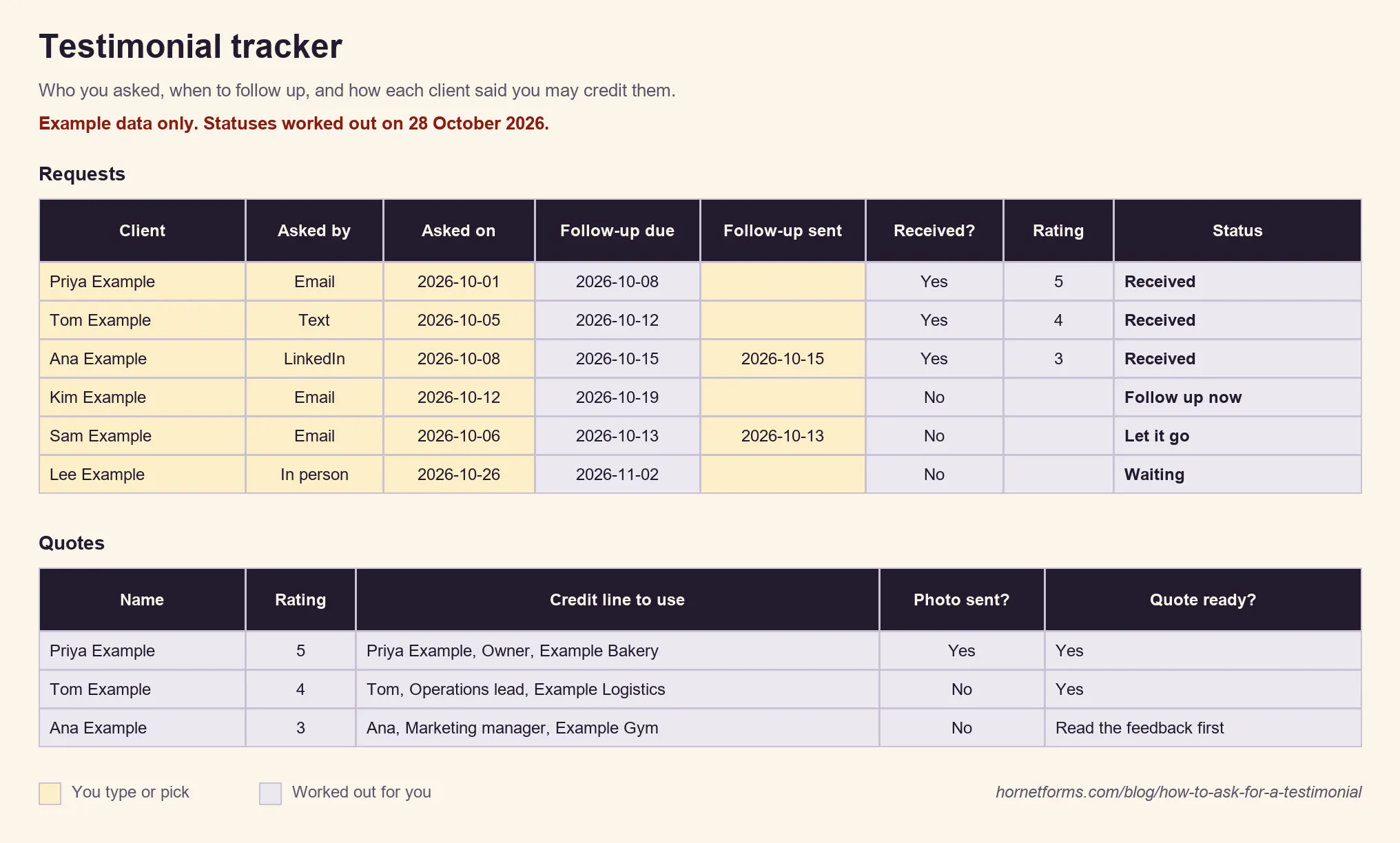
Example data only. Swap in your own clients.
Prefer paper? The form itself comes as a PDF for US Letter, an A4 PDF or a Word file, handy at the end of an in-person job.
Ask for your next testimonial this week#
Pick one happy client from the last month. Send them message 2, with a link to a short form, and log it in the tracker. That's how to ask for a testimonial without the awkward part, and it gets easier with every one. Need more ideas for your client process? Read how to ask a client for a deposit or how to run a client onboarding questionnaire. HornetForms is free forever on the Free plan, with unlimited forms and responses. Sign up for free and send your first testimonial request today.