
On this page
You held a Saturday for a client and turned down two other jobs for it. Then on Friday night a message lands: "So sorry, something came up." No money changed hands, and the day is gone.
A deposit fixes most of that, but asking for one feels awkward, especially early on. This guide shows how to ask a client for a deposit so it sounds like a normal booking step, not a favour. It covers when to ask, how to set the amount and wording you can copy for each moment. It also shows how to take the deposit in the same form as the booking. A free policy and wording kit and a booking form template wait at the end.
Why service businesses ask for a deposit#
A deposit does two jobs. It pays you for time you hold back from other clients. And it covers costs you pay before the work starts, like materials, special orders or travel. It also shows the client is serious, because paying something is a bigger step than replying "sounds good". Bake to order? Our custom cake order form shows how to take a deposit with each order.
Clients expect it more than you might think. One cabinetmaker said it plainly in a 2008 forum thread about deposits on cabinet jobs. "I haven't met a client yet that thought they were going to have something built without a deposit." (WoodWeb Business and Management Forum, 7 December 2008, accessed 27 October 2026). That's a different trade and an old thread, but the point travels.
Small studios work the same way. One photography studio's published policy asks for a flat deposit to book a session. It allows one free reschedule with 72 hours' notice, and it keeps the deposit when someone doesn't show. It's short, clear and the same for everyone. That's the shape to aim for.
How to ask a client for a deposit before they say yes#
The hardest moment to ask is after the client has agreed to everything else. Then the deposit feels like a new condition. The easy way to ask a client for a deposit is to mention it everywhere your price appears, so by the time they book, it's old news.
| Moment | What to tell the client |
|---|---|
| Your website or price list | You take a deposit to book, and it comes off the final price |
| Your quote | The deposit amount, when it's due and that it holds the date |
| Your booking form | The full policy, a tick box to agree, then the deposit itself |
| Your confirmation email | The deposit arrived, the date you're holding and how to move it |
Say it the same way each time, with the same amount and the same notice period. When the words match in all four places, the deposit reads as policy, not as a mood. That's most of how to ask a client for a deposit without the awkward pause.
How much to ask for, and the rules that can cap it#
The amount is the one part of how to ask a client for a deposit that only you can answer. There's no single right number, so this guide won't give you one. Instead, tie the deposit to what you lose if the client cancels:
- Time you can't resell. A Saturday wedding or a full-day job is hard to fill at short notice. A short weekday slot is easier.
- Money you spend first. Materials, special orders, travel or extra help for the day.
- The size of the job. A flat amount suits short appointments. A share of the price suits big jobs with big costs.
Then check the rules where you work. Some places limit how much you can take before the work starts, or what you can keep when a client cancels.
Good to know: here's one example. In California, the Contractors State License Board writes: "The down payment cannot be more than $1,000 or 10 percent of the contract price, whichever is less, for a home improvement job or swimming pool, excluding finance charges." (CSLB, Learn About Home Improvement Contracts, accessed 27 October 2026). That rule covers one kind of work in one state. Rules differ by trade, state and country, so check your local rules. This is not legal advice.
Deposit wording you can copy#
Most of the awkwardness comes from making it up on the spot. The simplest answer to how to ask a client for a deposit is to have the words ready. If you've wondered how to politely ask clients for an upfront deposit, the answer is mostly repetition: write the lines once, then reuse them. Swap the parts in square brackets for your own details. Every line below is also in the free kit at the end.
On your website or price list#
- "To book, we ask for a deposit of [amount]. It holds your date and comes off your final price."
- "The deposit is due [when you book]. We hold your date once you pay it."
In your quote#
- "Your quote is [price]. To book your date, we ask for a deposit of [amount]. It comes off the final price."
- "This quote is good until [date]. Once you pay the deposit, the date is yours."
On your booking form#
Put the policy right above a required tick box that says "I've read and agree to the deposit and cancellation policy." Then take the deposit on the next step, so agreeing and paying happen together.
In your confirmation email#
- "Your deposit is in, and we're holding [date and time] for you. The deposit comes off your final price. To move your booking, tell us at least [notice period] before."
When a client pushes back#
Stay calm and keep it short. Say what the deposit does, then say what your policy says. No apology needed. A calm, short reply is how to ask a client for a deposit a second time without sounding defensive.
| A client says | You can say |
|---|---|
| Why do I need a deposit? | "The deposit holds your date. I turn other clients away for that time, so it keeps the date fair for both of us. It comes off your final price." |
| Can I pay at the end instead? | "I take the deposit up front for every booking, so the policy is the same for everyone. Once you pay it, the date is yours." |
| Can I pay a smaller deposit? | "The deposit for this service is [amount]. If that is a problem, tell me what is going on and we can talk about it." |
The kit has two more replies, for clients who ask about getting the deposit back and for clients who cancel after paying.
Write a deposit and cancellation policy clients read#
Wording handles the asking. The policy handles the "what if". Part of how to ask a client for a deposit well is answering the questions before the client has to raise them. Keep the policy to one short paragraph that covers five things:
- How much the deposit is, and that it comes off the final price
- When it's due
- How a client can move a booking, how often and with how much notice
- What happens if the client cancels late or doesn't turn up
- What happens if you cancel
Here's the sample paragraph in our booking template, ready for your own details:
"Our deposit policy: a deposit holds your booking and comes off your final price. You can move your booking once with at least 72 hours' notice. Late cancellations and missed appointments keep the deposit."
Put it in the form, right above the required tick box. Every response then shows that the client ticked it before paying.
Good to know: "non-refundable" can mean different things in different places, and some rules limit what you can keep. Before you call a deposit non-refundable, ask a local lawyer to check your wording.
Take the deposit in the same form as the booking#
This is where knowing how to ask a client for a deposit meets actually getting paid. In HornetForms, the Payment block takes a one-time payment on Stripe's hosted Checkout page, right after the client answers your questions. It works on every plan, including Free.
Connect your own Stripe account#
A workspace admin connects your Stripe account once. The money goes straight to your Stripe account, and you are the merchant of record. HornetForms never sees or stores card data, because clients pay on Stripe's own page. HornetForms adds no fee of its own, and Stripe's normal processing fees apply.
Set the deposit by service#
Our booking template already works out the amount. A calculated field called deposit sits on page two, where clients never see it, and three logic rules set it from the service picked:
Which service would you like? is "Standard appointment"   → deposit = 25
Which service would you like? is "Extended appointment"   → deposit = 50
Which service would you like? is "Consultation"           → deposit = 15
These are sample amounts, not advice. Swap in your own numbers before you publish, and rename the services to match yours. Our logic, piping and calculations guide shows how rules like these work.
The last step is yours: add the Payment block, so the deposit lands in your own Stripe account. The same block handles other one-time fees too, like a joining fee on a membership application form template or payment up front on a pre-order form.
- Open your copy of the template and add a Payment block at the end of page two.
- Set its price to come from the calculated field
deposit, instead of a fixed amount. - Pick your currency.
Offer free consultations? Set that rule to 0. When the price comes out at 0, the form completes normally, with no payment step. You can also hide the Payment block with logic for any answer that needs no deposit.
What happens after the client pays#
After the last question, the client goes to Stripe's Checkout page. Until they finish paying, the response waits in an Awaiting payment tab, apart from your paid bookings. Emails, webhooks and integrations fire only after the payment goes through. So your "new booking" email and the client's confirmation go out only for bookings with a deposit behind them.
That's also why the template asks for a preferred date and a back-up date, not a fixed slot. You confirm one of them once the paid response arrives, so you never promise a date to someone who hasn't paid. The thank-you screen says so: "Thanks, you're nearly booked. We'll email you to confirm your date and time."
A few more settings help:
- Your own email. Turn on the respondent email and write your own subject and text, like the confirmation line above.
- Your own page. Set the form's redirect URL, and Stripe sends clients back through HornetForms to your page after they pay.
- Returning a deposit. Handle refunds in your own Stripe Dashboard. HornetForms shows the refund status on the response.
- Your website. The form works embedded too. With the HornetForms embed script, the whole page goes to Stripe for the payment step.
- Your records. CSV exports include payment columns, such as status, amount and paid at, on every plan. Excel export is Pro and Business.
- Your other tools. On every plan, HornetForms can send each booking to Google Sheets, Slack, Discord or Notion once the deposit is in. Here's where your form responses can go.
When your diary fills up, set the form's close date, and visitors see your own closed message, like "We're fully booked this month. Check back on the 1st." HornetForms has unlimited responses on every plan, so a busy month never runs into a plan's response cap.
A free deposit booking template and wording kit#
Two downloads go with this guide on how to ask a client for a deposit.
The "Book your appointment" template has two short pages:
- The booking: name, email, phone, the service, a preferred date and time, a back-up date and anything you should know before the appointment.
- The policy: your deposit and cancellation paragraph, the required tick box, and the hidden
depositfield.
It has its own page at forms.hornetforms.com/templates/deposit-booking-request. Click Use this template, sign up if you're new, and your own copy opens ready to edit. Then add the Payment block as described above. Want to change a question? Here's which question type to pick.
The deposit policy and wording kit starts with a fill-in policy in seven parts. They cover how much, when it's due, what it covers, if plans change, if you cancel, how to pay and how you return a deposit. Then come the copy lines for your website, quote, booking form and confirmation email, and five replies for pushback. Get the PDF, US Letter, the PDF, A4 or the Word (DOCX) version if you want to add your logo.
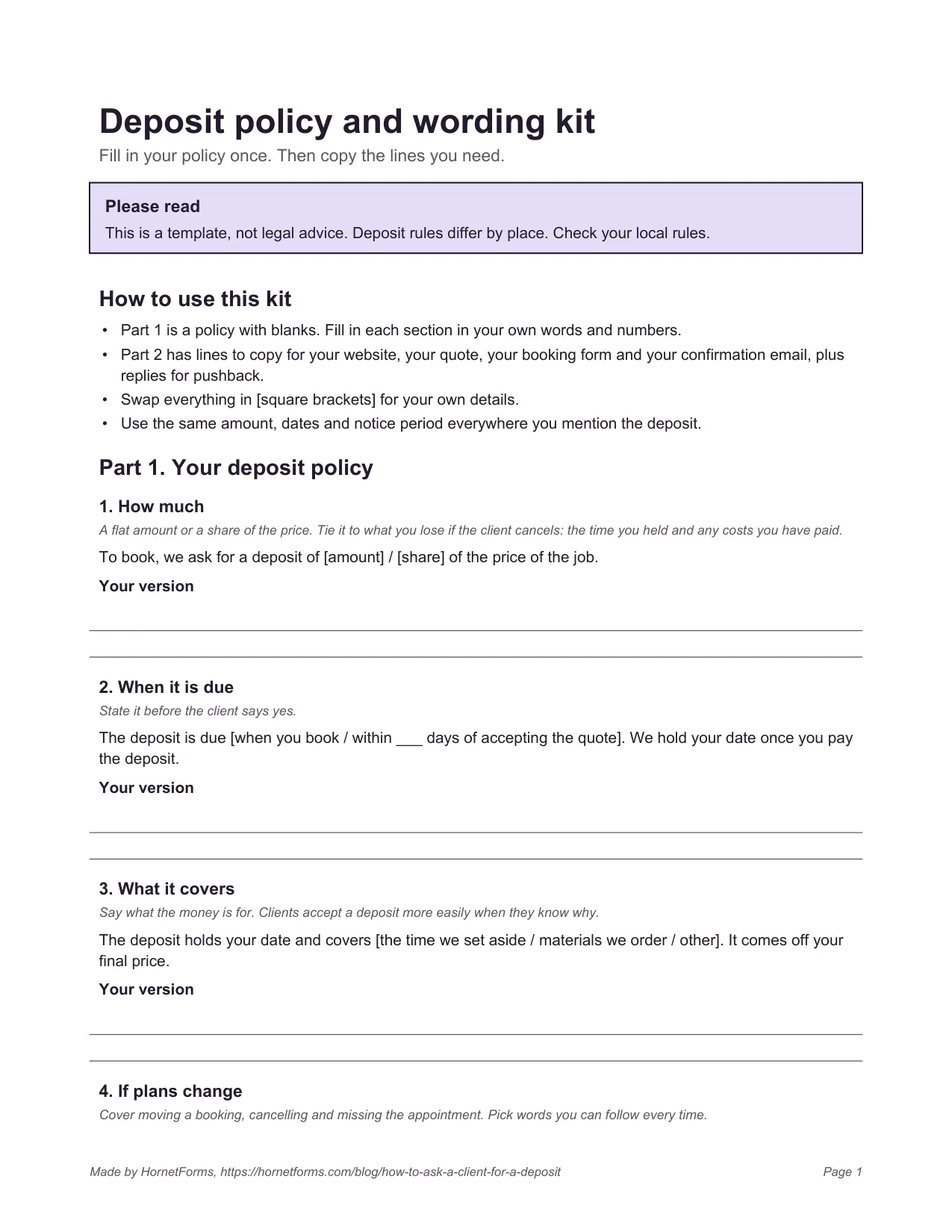
A template to fill in: page one of the deposit policy and wording kit. Replace everything in square brackets with your own details.
On the Free plan, your form shows a small "Made with HornetForms" badge. Pro and Business remove it and let you add your logo. The pricing page lists what each plan includes, and the features page covers the rest.
Try it on your next booking#
Now you know how to ask a client for a deposit without the awkward pause. Say it early, say it the same way everywhere and take it in the booking form. Fill in the kit, copy the template, set your own amounts and add the Payment block. Sign up for free and add a deposit to your booking form today.