
On this page
Most custom cakes start in a message thread. Someone asks "do you do unicorn cakes?", sends three photos, forgets to say the date, and asks about the price twice. A week later you are scrolling back through 40 messages to find out whether it was chocolate or vanilla, and whether they ever paid the deposit.
A cake order form fixes that. Every order arrives in the same shape, with the date, size, flavor, design notes and a photo, before you say yes. This guide covers what to ask, lead times, a price that adds up as people choose, and a deposit with the order. At the end you'll find a free printable cake order form in Word and PDF, plus an order and prep tracker.
It works for home bakers, cottage food sellers, cake studios and small bakeries that take custom orders. If you sell one batch for one pickup day, such as holiday pies, a pre-order form with a cap fits better; we cover that in our guide to pre-order forms.
What to ask on a cake order form#
Every question should help you bake the right cake for the right day, or decide whether you can take the order at all. Here's the core set:
| Question | Type | Why it's there |
|---|---|---|
| Name, phone and email | Short text, phone and email | So you can confirm the order and send the confirmation email |
| What the cake is for | Multiple choice | Birthday, wedding, baby shower, office party or other |
| Pickup or delivery | Multiple choice | Show the address question only when someone picks delivery |
| Pickup or delivery date and time | Date, plus a time question | The one answer you check before anything else |
| Size | Dropdown or picture choice | Each size sets a price, and the servings guide helps people pick |
| Flavor, filling and frosting | Multiple choice | Keep the list to what you actually make |
| Writing on the cake | Short text | Ask people to spell names exactly |
| Design notes | Long text | Theme, colors, toppers, anything they have in mind |
| Inspiration photos | File upload | One photo saves ten messages |
| Food allergies | Long text | Ask plainly, and read the answer before you bake |
Not sure which question type fits a row? Here's every question type and when to use it.
A few details make a big difference:
- Show sizes as pictures. Picture choice puts an image on each option, so "two-tier" stops being a guess. Add your own servings guide to each label, such as "8-inch round (serves about 12 to 16)", using the numbers you actually cut to.
- Ask about allergies as a plain question. "Does anyone eating this cake have a food allergy? Tell us what it is." Then tell people what your kitchen uses. Never promise a cake free of an allergen unless you can keep that promise.
- One cake per form. A cake plus two dozen cupcakes is two orders, each with its own row, price and pickup date.
Build your cake order form in HornetForms#
Every step works on the Free plan.
- Start from a template or a blank form. The order request template (
forms.hornetforms.com/templates/order-request) already asks for the product, quantity, pickup or delivery and a reference photo, and shows a rough estimate on the thank-you screen. It collects no payment, so you add that in step 5. The order form template page walks through it. - Add the questions from the table. A file upload question takes up to 10 files, and you can limit it to image types. Free allows files up to 10 MB each, and Pro and Business have no plan cap. Customers never need an account to order or upload.
- Add a calculated price. Add a calculated field named
cake_priceafter the size and flavor questions, then add logic rules that set and add to it (the next section shows the rules). - Show the price while they choose. Pipe
cake_priceinto a text line on the last page. The number updates as people change their answers. - Add a Payment block for the deposit. Connect your own Stripe account, and set the block's price to a calculated
depositfield. People pay once, on Stripe's hosted Checkout page, before the order counts as finished. - Set your limits. A close date and time stops orders before a holiday rush, and a response limit caps how many cakes you take.
- Send each order somewhere you'll see it. Notifications are off by default, so turn on an email to yourself for each new response. You can also send every order to Google Sheets.
Price your cakes with a calculated total#
Showing the price saves you the "how much?" message. You can add, subtract, multiply or divide answers in a calculated field, so the price follows the size and extras someone picks. Here's a sample price list (use your own numbers):
| If someone picks | Rule on cake_price | Sample result |
|---|---|---|
| 6-inch round | Set to 40 | 40 |
| 8-inch round | Set to 60 | 60 |
| Two-tier | Set to 140 | 140 |
| A premium filling | Add 10 | 70 for an 8-inch round |
| Cupcakes, with "How many dozen?" answered 3 | Set to 30, then multiply by the "How many dozen?" answer | 90 |
Three things to get right:
- Rule order matters. A calculated field starts from its starting value, then every matching rule runs in the order you added the rules. Add the "set" rules before the "add" and "multiply" rules.
- Put the calculated field after the questions it uses. Its rules only see answers that come before it.
- Use a number question for counts. For "How many dozen?", set Min to 1, a Max you can bake, and turn on "Whole numbers only".
For the deposit, add a second calculated field named deposit after cake_price. Set it to the cake_price field, then divide it by 2. Field names use letters, numbers, _ and -, and start with a letter.
Then add a line on the last page. Type @ to pipe in each field, then put a $ sign in front of it:
Your cake comes to $@cake_price. Pay your $@deposit deposit now to hold your date.
HornetForms works the calculated values out again on the server when the order comes in, so the stored total matches the answers. The guide to conditional logic, answer piping and calculations covers the logic editor in more depth. Coming from Google Forms? Our guide to whether Google Forms can calculate totals covers that side.
Take a deposit with the order#
A deposit in the form takes the awkward message out of asking for money: the customer sees the price and the deposit, and pays before the order lands with you. For how much to ask and how to word it, read how to ask a client for a deposit.
How the Payment block works:
- One-time payment on Stripe's Checkout page. HornetForms never sees or stores card data.
- Your own Stripe account. The money goes straight to it, and you are the merchant of record.
- Fixed or calculated price. Charge a fixed deposit, or the value of the
depositfield. To take the full price instead, point the block atcake_price. - On every plan, Free included. Stripe's normal processing fees apply, and HornetForms adds no fee of its own.
- Nothing fires before payment. Emails, integrations and webhooks wait until the payment goes through. Unpaid orders wait in an "Awaiting payment" tab, so you can follow up yourself.
- Refunds happen in Stripe. Refund a deposit in your own Stripe Dashboard, and HornetForms shows the refund status on the response.
Good to know: a pending payment holds a place under the form's response limit. Cap your holiday week at 20 cakes, and someone paying on the Checkout page uses one of those places. More in what happens when a form hits a response limit.
Lead times and holiday order cut-offs#
Every baker has a notice period, and every customer forgets it. Put yours in the question label itself: "Pickup date (we need at least 7 days' notice, 14 for tiered cakes)." Then check each date against your calendar before you confirm.
For busy weeks, use the form's own settings:
- Close date and time. Close the form at, say, 6 pm on December 15 for Christmas orders, set in your own time zone.
- Response limit. Cap the number of orders you can bake. Every finished order uses a place, plus any payment still pending.
- Your own closed message. Write what late visitors see, up to 500 characters of plain text: "Holiday orders are full. Orders for January open on December 27."
Confirm the order and track it#
The customer should know their order went through. In the notification settings, pick the email question that holds their address and write your own confirmation email. Unless people verify their email with a code (Pro and Business), it can include only the form title, the Submission ID and number calculations, so cake_price and deposit fit in: "Thanks! Your order total is $90 and we've received your deposit. We'll message you within a day to confirm the design."
Then decide where orders land for you:
- An email to yourself for each new response.
- A Google Sheets row per order, with a Response ID, a Submitted at time, one column per question and a link to the full response.
- Slack, Discord or Notion, if that's where you plan your week.
All of them are built in on every plan. Here's more on where your form responses can go. The Payment block never becomes a Google Sheets column: the payment shows on the response, and the CSV export adds payment columns (status, amount, currency, refunded amount, paid at and the Stripe payment ID).
Plan your baking week in the tracker#
Planning the bake happens in our free order and prep tracker. Copy each order in from your Google Sheets row or a CSV export: one row per cake, with the order date, customer, pickup date, size, flavor, order total, deposit paid and status.
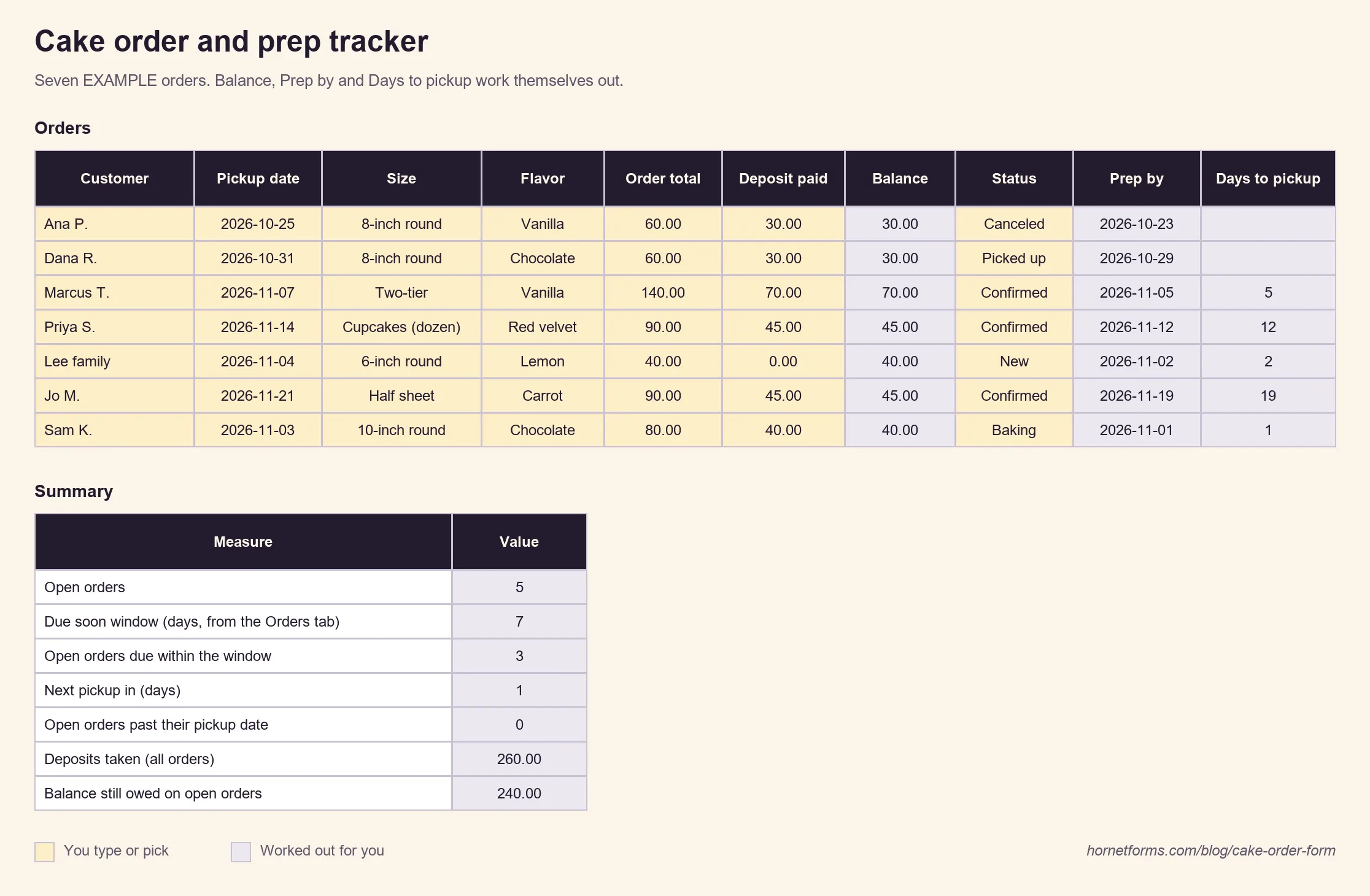
- Balance is the order total minus the deposit paid, so you know what to collect at pickup.
- Prep by is the pickup date minus your prep days (2 to start, in cell C4).
- Days to pickup counts down from today for every open order and turns red once you're inside your prep days.
- The Summary tab counts orders by status, open orders by size (your shopping list starts here), orders due soon, the next pickup, deposits taken and the balance still owed.
Cottage food rules: check your state#
If you bake at home, your state's rules decide what you can sell, where, and how you label it. The National Agricultural Law Center's state-by-state compilation says "Nearly every state in the United States has enacted laws that allow entrepreneurs to produce certain food products in the home or 'cottage' with little or no regulatory oversight." It also notes that "there is much variation in the approaches taken by the states." (National Agricultural Law Center, "Cottage Food" Laws, compilation updated April 2025, read 2 November 2026.)
Take one state as an example. Illinois Extension's cottage food site lists "pastries with potentially hazardous fillings or toppings" among prohibited foods, while dairy is allowed "as an ingredient in a baked good frosting, such as buttercream." On labels, it notes that "Some products may be difficult to properly label or package, such as a wedding cake," and tells operators to contact the local health department for permission in that case. (University of Illinois Extension, Prohibited Foods and Food Labeling and Placards, read 2 November 2026.)
So list only the fillings and frostings you're allowed to sell, keep the allergy question plain, and give ingredient lists when your state asks for them. Rules differ, and some counties add their own, so check your state and city first. This is not legal advice.
Take orders on paper and online#
Some customers will always order at the counter or by phone. Offer both:
- Online: put the form link in your bio, on your website and in your auto-reply, and print a QR code for the counter or your market table. Here's how to make a QR code for a form.
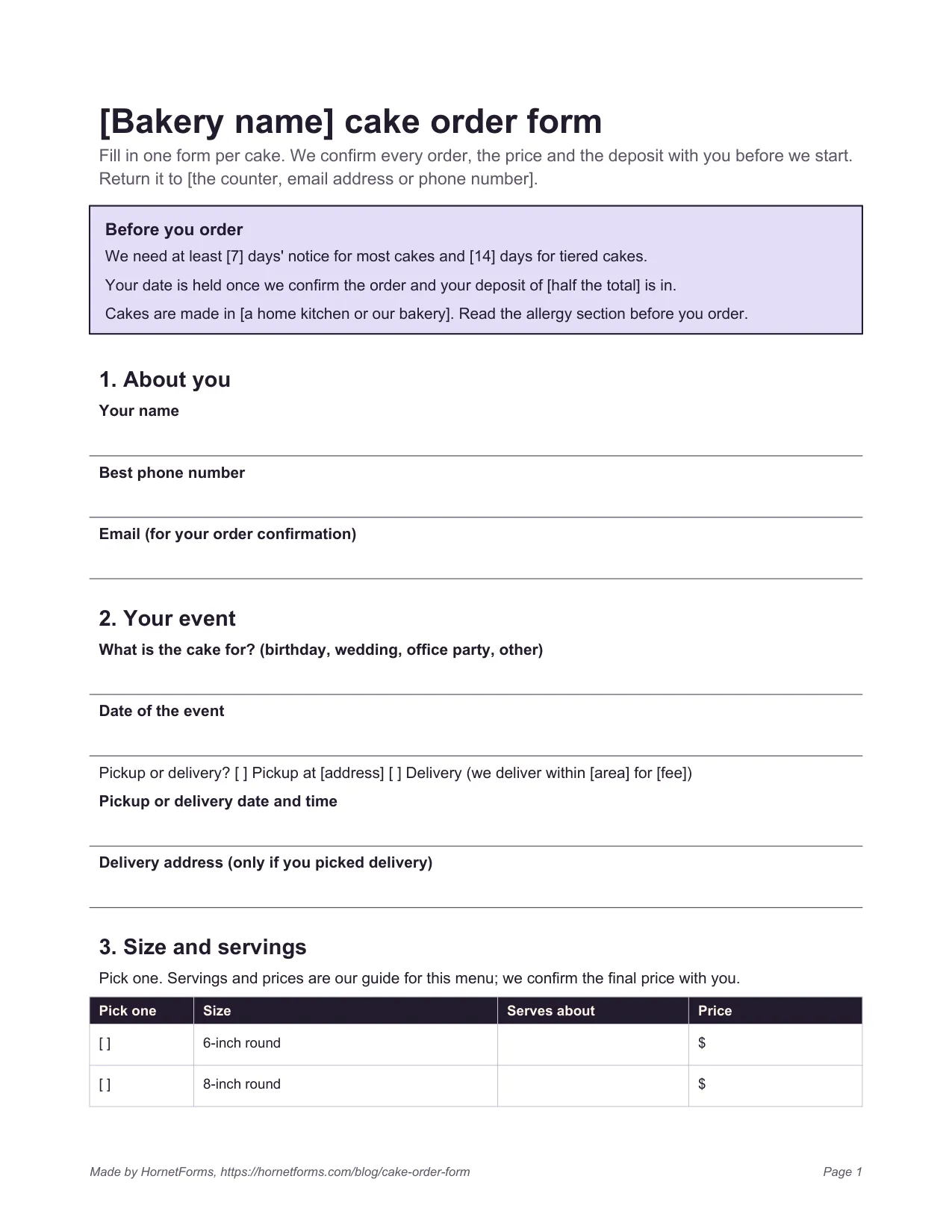
- On paper: print the free cake order form below, fill it in during phone calls, and log each paper order in the tracker the same day.
Download the cake order form and tracker#
The cake order form. Edit it in Word (DOCX), or print a PDF, US Letter or a PDF, A4. It has a "Before you order" box for your notice period and deposit, seven short sections (you, the event, size and servings, flavor and design, allergies, price and deposit, signature), a bakery-use box and a last page of notes for the baker. Fill in every [square bracket] before you print it.
The order and prep tracker. The tracker spreadsheet opens in Excel and Google Sheets. It has seven EXAMPLE orders to delete, dropdowns for size, flavor and status, the Balance, Prep by and Days to pickup formulas, and a Summary tab. The tracker as a CSV holds the same columns and example rows for any other tool.
Build your cake order form free#
Start from the order request template or a blank form, add your sizes, the calculated price and a Payment block for the deposit. Then turn on the email to yourself and place one test order from your phone. The Free plan is free forever, with unlimited responses within fair use, and the pricing page shows what each plan includes.
Sign up for free and build your cake order form before the next "do you do unicorn cakes?" message lands.