
On this page
Registration night at the rec center. One table, three clipboards, a cash box and a line out the door. A dad asks which age group his daughter plays in. Nobody's sure, because the cutoff date is in an email from last spring. Two families forgot the birth certificate, and someone wrote "medium?" for the uniform size.
A good youth sports registration form moves all of that online, before anyone queues. This guide covers what to ask, how to handle tryouts, how to take the fee in the same form, and how to collect birth certificates and physical forms as uploads. You'll also get a printable form for families who want paper and a team roster for Excel or Google Sheets that works out age groups from your own cutoff date.
What to ask on a youth sports registration form#
Keep it to what the coach and the league actually use. Here's the set this guide uses, over four short pages:
| Question | Type | Why it's there |
|---|---|---|
| Player first name, last name | Short text, required | Who's playing |
| Player birth date | Date, required | Sets the age group |
| Season registration or tryouts? | Multiple choice, required | Shows the tryout questions when needed |
| Uniform size, and does your player need a new uniform? | Dropdown, multiple choice | Your uniform order, and part of the fee |
| Parent or guardian name, email, phone | Short text, email, phone (required) | Who to reach about practices and games |
| Second parent or guardian name and phone | Short text, phone (optional) | A backup contact |
| Emergency contact name and phone | Short text, phone, required | Someone to call if you can't reach a parent |
| Allergies, medical conditions or medicines the coach should know about | Long text, optional | Plain notes for the coach |
| Birth certificate or proof of age; sports physical form | File upload | Only if your league asks for them |
| Photo permission | Multiple choice (Yes, No) | Team updates and your website |
| Concussion information | Checkboxes, one option | "I have read the concussion information sheet with my player" |
| Parent or guardian signature | Signature | The parent signs on screen with a finger or a mouse |
Check what your league accepts as a parent's signature before the season. Some leagues may still want ink on paper for certain forms, and the printable version below covers that.
There's also a calculated field called registration_fee that never shows on the form. Need a question type that isn't here? See which question type to pick for each job.
Why a birth date beats an age#
Ask for the birth date, not the age. Ages change halfway through a season, and leagues place players by their age on a set date. With a birth date, the roster can work out the age group for you (more on that below).
What to leave off#
Skip the school name, a full medical history and anything else you won't use this season. If a coach needs more for travel games, send a short second form to that team only.
Tryouts vs registration: let logic sort them#
Some players sign up for the season. Others want a tryout for a travel or select team first. One youth sports registration form can handle both.
The second question asks "Season registration or tryouts?". A show rule then reveals three tryout questions only when someone picks Tryouts:
- Tryout session, such as "Saturday 9:00 am" or "Sunday 1:00 pm"
- Positions played, as checkboxes
- Last team played for
Families signing up for the season never see them. The logic, piping and calculations guide shows how show rules work, step by step.
Tryouts first, team fee later#
If you pick teams after tryouts, you might take a small tryout fee now and the team fee later. For that, build a second, shorter form for the players who make the team. Give its questions a "Prefill parameter" in their settings, and send each family a link with the player's details already filled in:
https://forms.hornetforms.com/f/u12-team-fee?first=Eli&last=Novak&size=Youth%20L
Choice questions match the option label, so "Youth L" lands on the right uniform size.
Take the registration fee in the same form#
HornetForms has a Payment block that takes a one-time payment on Stripe's hosted Checkout page, on every plan, Free included:
- Your own Stripe account. A workspace admin connects it once. The money goes straight to your account, and your league is the merchant of record.
- A fixed or calculated price. One price for everyone, or a price worked out from the answers.
- No HornetForms fee. Stripe's normal processing fees apply, and HornetForms adds nothing on top.
- No card data in HornetForms. HornetForms never sees or stores card data. Families pay on Stripe's own page.
For a calculated price, three logic rules fill in registration_fee:
Season registration or tryouts? is "Season registration"   → Set registration_fee to 150
Season registration or tryouts? is "Tryouts"               → Set registration_fee to 25
Does your player need a new uniform? is "Yes"               → Add 35 to registration_fee
Place registration_fee after the uniform questions, and add the uniform rule last, so it adds 35 to the price the first two rules set. The prices are made up, so swap in your own. A season player who needs a new uniform pays 185. Point the Payment block's price at registration_fee and you're done. If your fees are simpler, a separate youth sports registration form for each fee works too, with one fixed price each.
Until a family finishes paying, their response waits in an Awaiting payment tab. Emails, webhooks and integrations fire only after the payment goes through. If a family drops out, refund them in your own Stripe Dashboard, and HornetForms shows the refund on the response. For a deeper walk-through of the Payment block set-up, see the event registration form with payment guide.
Registering brothers and sisters#
Ask families to fill in one form per child. Every player then gets their own response, their own fee and their own row in the roster, so age groups and team picks stay simple. If you'd rather keep a family on one form, add a fixed "Second player" page with the same player questions, plus a show rule so it appears only when someone answers Yes to "Are you registering another player?". The second player's answers land in their own columns of the same response, so you'll split them into two roster rows yourself. You'll also need rules that add the second player's fee to registration_fee.
Collect birth certificates and physical forms#
Your league may ask for proof of age and a sports physical before the first game. Add a file upload question for each one. In HornetForms, a file upload question takes up to 10 files, and you can limit the file types it accepts. For these two, allow PDF files and images, and keep each one to a file or two.
Families never need an account or a sign-in to fill in the form or upload a file. On the Free plan, each file can be up to 10 MB. Pro and Business have no plan cap on file size.
Good to know: put a line of help text under each upload, such as "a clear photo of the birth certificate is fine". Then tell families what to do if they'd rather show the original at the first practice. The roster has a "Papers handed in" column for exactly that.
If your league only needs a physical for tryouts, use a show rule so the upload appears only for players who pick Tryouts.
Close date, team sizes and who sees the answers#
Two settings on every plan keep your youth sports registration form in check:
- Close date. Set the date and time registration closes. After that, families see your own closed message (plain text, up to 500 characters), such as "Spring registration is closed. Email the league to join the waitlist."
- Response limit. Set the most registrations you can take, and the form closes when it's full. With a Payment block, a pending payment holds a place under your response limit while the family pays.
The response limit counts the whole form. So if each age group or team has its own cap, make one form per age group, each with its own limit. Here's more on what happens when a form hits its response limit. You get unlimited responses within fair use on every plan, so any cap is one you set.
A few more settings help:
- Emails. You can turn on an email to yourself for each new response. You can also send each family a confirmation with the season dates, once you pick the email question it goes to. With a Payment block, it goes out after the payment goes through.
- QR codes. Every form gets one (PNG or SVG) for the flyer at school pickup.
On Pro and Business you can invite coaches and volunteers to your workspace. Everyone you add can see every response in that workspace, health notes included. So ask only for the health notes coaches need to keep players safe.
Concussion information for parents#
If your league hands out concussion information at registration, the form can carry it too. The CDC runs HEADS UP, a program with handouts for parents, athletes and coaches. Its home page puts it plainly: "A concussion is a type of traumatic brain injury." (CDC HEADS UP, accessed 28 October 2026).
The CDC's Concussion Information Sheet for parents (revised January 2019) ends with a tear-off section. It says: "Discuss the risks of concussion and other serious brain injuries with your child or teen, and have each person sign below." It also lists what a parent should do first if they think their child may have a concussion: "Remove your child or teen from play." and "Keep your child or teen out of play the day of the injury." (CDC, Concussion Information Sheet, PDF, accessed 28 October 2026).
That's why the youth sports registration form in this guide names the sheet, with its web address, in the help text of its "Concussion information" question. Your state or league may have its own sheet and its own rules, so check with them before the season and use their wording. This guide isn't medical or legal advice.
Volunteer coaches and team parents#
Every team needs adults: a head coach, an assistant, a team parent, someone with the first aid kit. Recruit them on a separate form, so player registrations stay clean. The volunteer sign-up form template asks for names, contact details, availability and the roles people want. Add your own options, such as "Assistant coach", "Team parent" or "Snacks on game days".
Build your team roster in a sheet#
Every youth sports registration form ends in a list of players you sort into teams. The free youth sports team roster opens in Excel and Google Sheets:
- Set your cutoff date and age groups. On the Settings tab, type your league's age cutoff date and your age groups, youngest first (for example U8 for ages 6 to 7). Leagues and sports set these differently, so the file never assumes one rule.
- Export your registrations. Open the form's Responses page and download the CSV. It includes the payment columns.
- Paste them in at cell A1 of the Registrations tab, headers included. The sheet finds columns by their names, so the order doesn't matter.
- Pick teams. Type your teams on the Teams tab, then pick a team for each player.
For each player, the roster shows the age on your cutoff date, the age group, the team, the uniform size, a paid status from your export and the documents still missing. Type Y under "Paid another way" for a check or cash. The Teams tab counts players, payments and uniform sizes per team, and flags a player whose age group doesn't match the team's. Summary counts each age group, who still owes, and new uniforms to order by size.
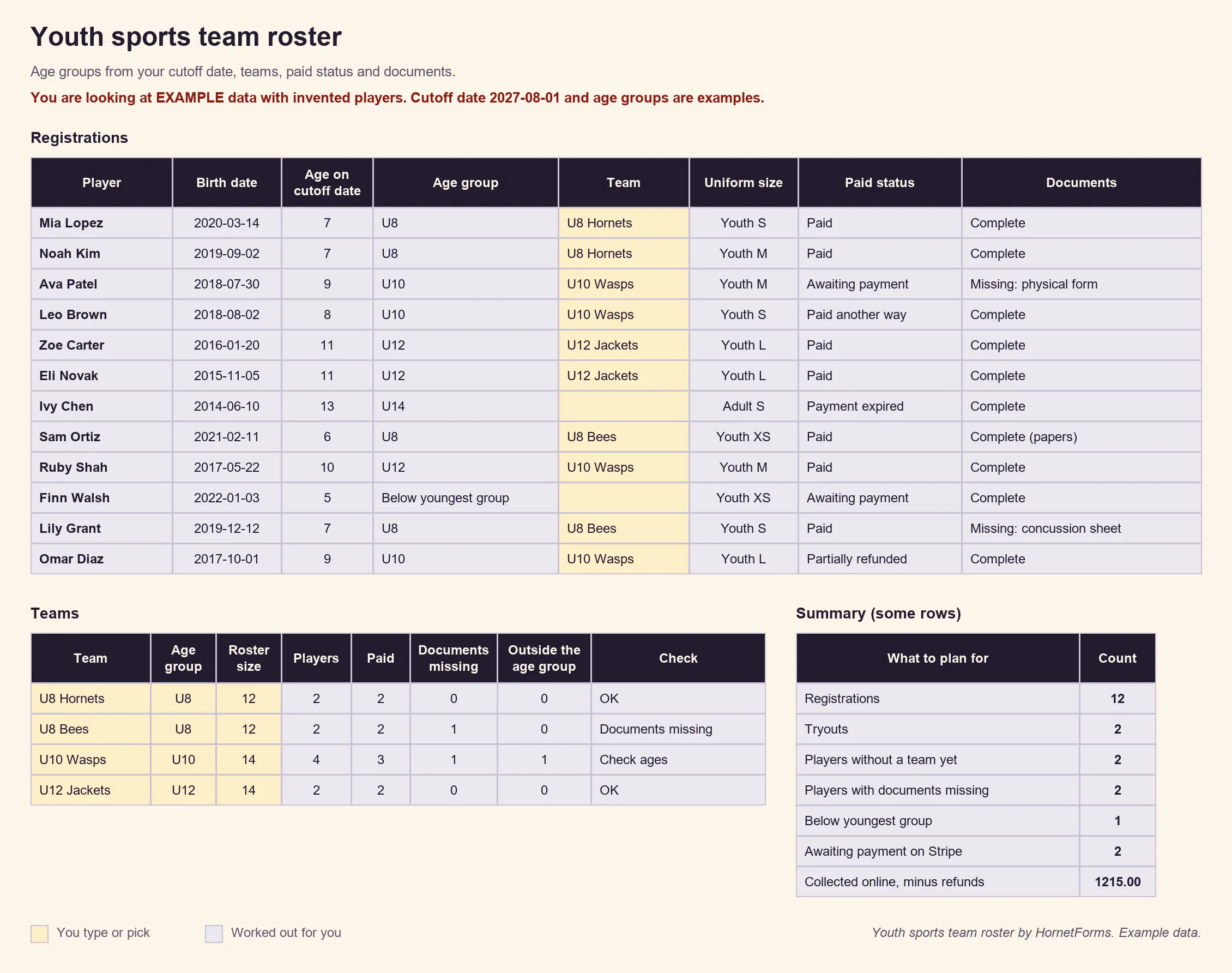
EXAMPLE data only: the players, dates, cutoff date and age groups are made up. Clear the example rows and set your own before you paste.
Prefer rows that arrive on their own? Connect Google Sheets on any plan, and each registration lands as a new row with a "Response ID" and "Submitted at" column. For paid status, use the CSV export, which includes the payment columns. Here's how to send form responses to Google Sheets, Slack or Notion. There's also a CSV with just the roster's column headers if you'd rather build your own.
Printable youth sports registration form#
Some families will still turn up at the rec center with a pen. The printable youth sports registration form asks the same questions in the same order, so paper and online sign-ups fit the same roster:
- PDF, US Letter
- PDF, A4
- Word (DOCX), to add your league's name, dates and fees
It ends with a signature line and a "For the league" box: date received, fee paid and how, age group, team, documents seen and the uniform size ordered.
Open registration for your next season#
Build this one from a blank form, with the table above as your list:
- Add the questions over four pages: Player, Uniform, Parents and emergency contact (with the health notes), and Documents and permissions.
- Add the show rule for the tryout questions and the calculated field
registration_feewith its three rules. - Add the Payment block, a close date and, if you need one, a response limit.
- Share the link or the QR code, then paste the export into the roster when sign-ups come in.
Running a summer program too? The summer camp registration form guide covers sessions, pickup names and camp fees. Teaching a first aid class for your coaches? The CPR class registration form has a ready template. On the Free plan, your form shows a small "Made with HornetForms" badge, and Pro and Business remove it. The pricing page lists what each plan includes, and the features page has the wider tour.
A youth sports registration form that works asks for the birth date, the fee and the papers in one go, and leaves the team picks to you. Sign up for free and open registration this week.