
On this page
You teach a class with 12 mats. Sign-ups arrive in a group chat, the money lands in a payment app, and the list lives on a scrap of paper by the door. Then a 13th person turns up, sure they booked. A yoga class registration form puts the sign-up, the fee and the head count in one place, so the list at the door matches the money in your account.
This guide covers what to ask and how to stop at the number of mats you have. It also shows how to take the fee in the same step. And when a class fills up, it shows how to send everyone else to a waitlist you can actually work from. At the end you'll find two free templates, a printable copy, a roster and waitlist sheet, and a sign-in sheet for the door.
The questions on a yoga class registration form#
Keep it short. Most people sign up on a phone, often on the way to something else. Our class sign-up template asks nine questions across three short pages:
| Question | Type | Why it's there |
|---|---|---|
| Your name | Short text, required | For the roster and the door list |
| Email, required | Where the class details go | |
| Phone | Phone, optional | Only for last-minute changes |
| What are you signing up for? | Multiple choice, required | "One class" or "The whole series", which sets the price |
| Is this your first class with us? | Multiple choice, required | Flags new faces; a "No" hides the "How did you hear" question |
| How much yoga have you done? | Multiple choice, required | None yet, A few classes, I practise regularly, I teach or train |
| How did you hear about the class? | Dropdown, shown to first-timers | Tells you whether posters, friends or social media bring people in |
| Anything you'd like your teacher to know? | Long text, optional | A plain note, with "No need to share medical details here." under it |
| Class policy | Checkbox, required | One tick: "I've read the class policy" |
The template also carries two fields people never see: a hidden class field and a calculated price. Both come up below.
Who's coming#
Page one of the yoga class registration form asks for a name, an email and a phone number. The phone question says "Only for last-minute changes", so people know why you want it. Above the questions sits a short paragraph you fill in for each class: "Class: [day, date and time]. Where: [studio, park or video link]. Bring: [a mat, water, layers]. Places are limited."
Which class and how much yoga they've done#
Page two, "About your practice", tells you who's in the room before you unroll your own mat. The experience question lets you plan options for a mixed group. The first-class question turns this into a new yoga student registration form too: you can spot first-timers and greet them by name at the door.
Your class policy#
Page three holds your house rules. The sample asks people to arrive five minutes early and says doors close when class starts. It also asks them to tell you by a set time if they can't come, so someone on the waitlist can take the place. Edit it to match your own policy. One required tick box, "I've read the class policy", closes the page. Want to add your own questions? Here's which question type to pick.
Good to know: this is a sign-up form, not a health form. The note question already says "No need to share medical details here." Keep that line, and keep the form to who's coming and how the class works.
One form per class, each with its own response limit#
A yoga class registration form works best as one form per class. Build the first one, then duplicate it for each class on your timetable, on every plan. Each copy gets its own settings, so each class stops at its own number.
For each form, set:
- A response limit equal to the number of mats. The form closes when it reaches that number.
- A scheduled opening date if sign-ups should open at a set time. Visitors see a notice until then.
- A close date for the last moment you take sign-ups, say an hour before class.
Then give each form a short custom slug and add the class code to its link:
https://forms.hornetforms.com/f/tue-6pm-yoga?class=tue-6pm
https://forms.hornetforms.com/f/sat-9am-yoga?class=sat-9am
The ?class= part fills the hidden class field, so every response and every export row says which class it belongs to. People never see it, and they never need an account or a sign-in to sign up.
Take payment when they sign up#
Chasing fees after class is awkward for everyone. A Payment block lets your yoga class registration form take a one-time payment right after the last question, on every plan, Free included.
Connect your own Stripe account#
A workspace admin connects a Stripe account once, under Settings, then Payments. The money goes straight to your Stripe account, and you are the merchant of record. Students pay on Stripe's hosted Checkout page, so HornetForms never sees or stores card data. HornetForms adds no fee of its own, and Stripe's normal processing fees apply.
Set the price from the answers#
The template already works out the price. Two logic rules fill in the calculated price field from "What are you signing up for?":
What are you signing up for? is "One class"         → price = 15
What are you signing up for? is "The whole series"  → price = 60
These are sample prices, so swap in your own numbers before you publish. Someone who picks the whole series pays once, up front, for the run of classes. Our logic, piping and calculations guide walks through rules like these.
The template comes without a Payment block, because the Stripe account has to be yours. Adding one takes about a minute:
- Open your copy of the template and add a Payment block at the end of page three.
- Set the price to come from the calculated field
price. - Pick your currency.
Running a free community class? Set both prices to 0. When the price comes out at 0, or logic hides the Payment block, the form completes normally.
What happens while they pay#
Until someone finishes on Stripe's page, their sign-up waits in an Awaiting payment tab. Emails, webhooks and integrations fire only after the payment goes through, so your "new sign-up" email always means a paid place.
A pending payment also holds a place under the form's response limit. So two people paying for the last mat at the same moment can't oversell the class. If someone needs a refund, handle it in your own Stripe Dashboard. HornetForms shows the refund status on the response.
When the class is full, send people to a waitlist#
A full class shouldn't be a dead end. Your yoga class registration form can point people somewhere useful the moment it closes.
Write a closed message that points to the waitlist#
When a form closes or fills up, visitors see your own closed message, up to 500 characters, on every plan. It's plain text, so give the waitlist a short custom slug that people can copy or type:
This class is full. Join the waitlist at
forms.hornetforms.com/f/yoga-waitlist?class=tue-6pm
and we'll email you if a place opens.
Use the class waitlist template#
The class waitlist template is one short page. Its heading reads "This class is full", and it asks for:
- Your name and Email (both required)
- Phone, with the note "A place can open at short notice."
- Which classes would work for you? with "This class only", "Any class this week" and "Future classes too"
It has the same hidden class field, so the link in your closed message records which class each person is waiting for. One waitlist form can serve every class on your timetable. The thank-you screen says "You're on the waitlist".
When someone drops out#
The waitlist template tells people "We offer places in the order people join." Keeping that promise is your job, and the roster sheet below does the sorting:
- Refund the person who dropped out in your Stripe Dashboard, if your policy says so.
- In the roster sheet, type Y in their Cancelled cell. The class tab's "Spot opened" box then shows who to offer the place to.
- Raise that class form's response limit by one, then email the next person the sign-up link. The place goes to whoever signs up first, so send the email straight away.
- Note the date in Offered on, and pick Signed up, Said no or No reply when you hear back.
Online classes and joining details#
Teaching on video? Put the joining details in the confirmation email your yoga class registration form sends. Turn on the respondent email, on every plan, and write your own subject and body: the video link, what to bring, when to log on. On a form with payment, it goes out only after the payment goes through.
To spread the word, embed your yoga class registration form on your own site as inline, popup, slider or full page, on every plan. With the HornetForms embed script, the whole page goes to Stripe for the payment step. Each form also gets a QR code (PNG or SVG) for a flyer on the studio door or the café noticeboard. A public link attracts bots too, and our guide on how to keep bots out of your forms covers the protection every plan includes.
Can you do this in Google Forms?#
For a free class, Google Forms makes a fine yoga class registration form. As of October 2026, it can close itself at a date and time or after a set number of responses. That works on every account type, personal accounts included (Google Workspace Updates, 12 January 2026, accessed 27 October 2026).
Payment is where it gets fiddly. Google's list of question types includes no payment question (Google Docs Editors Help, question types, accessed 27 October 2026). So the fee needs a separate payment link, and you match payers to sign-ups by hand. Our Google Forms comparison goes into the rest.
Free templates, printables and a roster sheet#
Here's everything that comes with this guide, so your yoga class registration form is ready before your next class.
The two templates#
- Class sign-up. The template page at
forms.hornetforms.com/templates/class-signuphas a Use this template button. It takes you through sign-up and opens your own copy. Then fill in the class paragraph, set your prices and add the Payment block. - Class waitlist. The template page is at
forms.hornetforms.com/templates/class-waitlist. Its thank-you screen reads "We'll email you if a place opens."
A printable class sign-up form#
For walk-ins and people who'd rather use paper, download the class sign-up form as a PDF, US Letter, a PDF, A4 or a Word (DOCX) file if you want to add your logo. It has the same nine questions, with "Tick one" hints and a short "why we ask" line for each section. Type the paper answers into your form later, so everyone ends up on one list.
The class roster and waitlist sheet#
The free class roster and waitlist sheet opens in Excel and Google Sheets. It's built for this exact setup: one yoga class registration form per class and one waitlist.
- Paste your exports. Download the CSV from your sign-up form and from your waitlist form. Clear the example rows, then paste each file at A1 on the Sign-ups and Waitlist tabs.
- Set up a class tab. On Class 1 to Class 4, type the class code (the value after
?class=), a name and the places you can take. Each tab shows who's in, places left and the waitlist in the order people joined. - See every class at once. The All classes tab puts every class on one screen.
- Count only paid places. With a Payment block, the CSV export carries payment columns, like Payment status. On the Lists tab, you choose which statuses hold a place. With no Payment block, every sign-up holds a place.
There are also header-only CSVs for the sign-up form and the waitlist form if you'd rather build your own sheet.
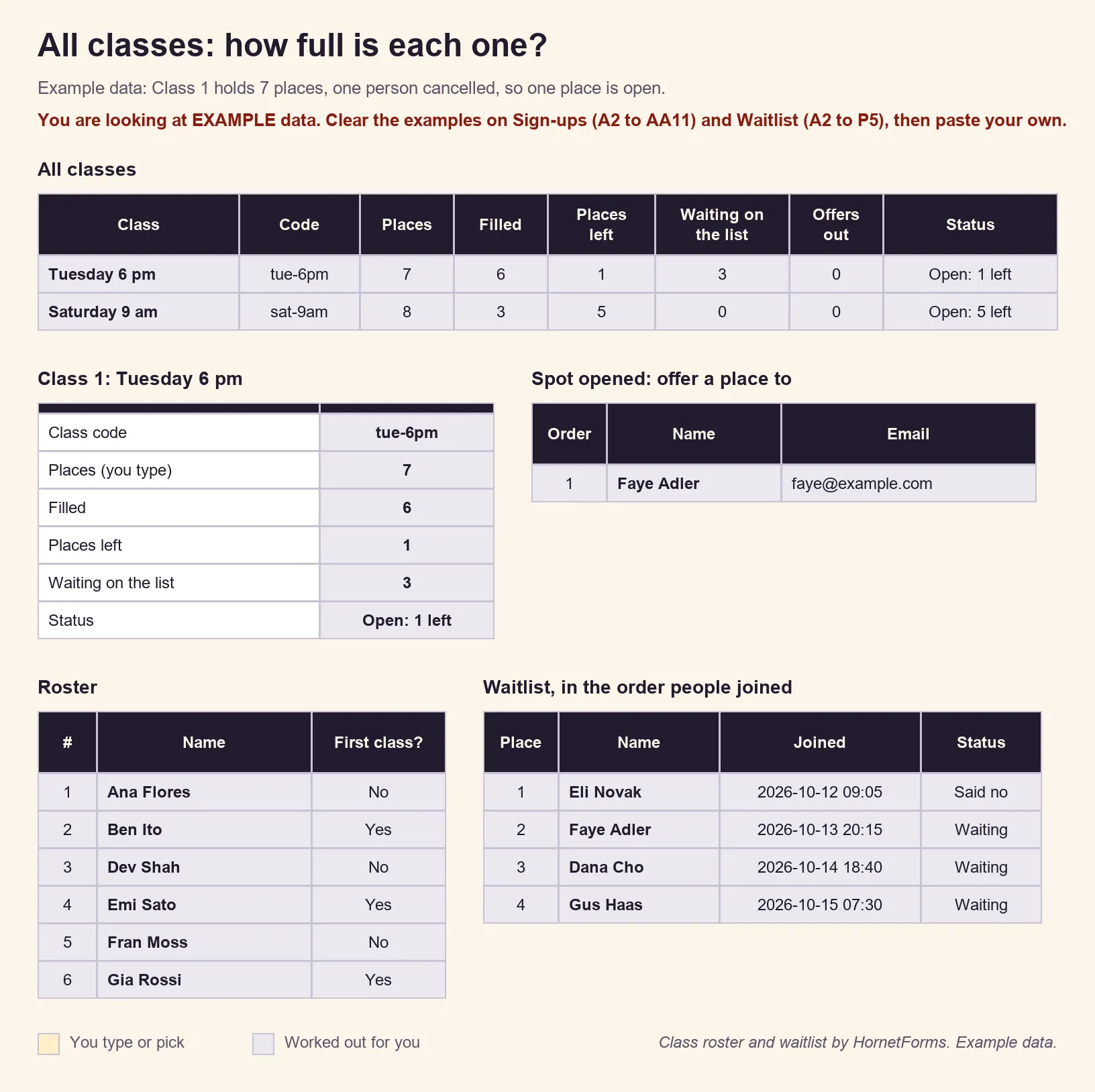
EXAMPLE data only. The names, class codes and places are made up, so clear the example rows before you paste your own export.
A sign-in sheet for the door#
Prefer a paper door list on the day? Print the class sign-in sheet as a PDF, US Letter, a PDF, A4 or a Word (DOCX) file. It has spaces for the class, date and teacher, then 22 numbered rows for each person's name, the time they arrived and their initials. For visitors, meetings and open days, we have more sign-in sheet templates.
Want sign-ups to land in a spreadsheet as they arrive instead? HornetForms can add a row to Google Sheets for every response, and our guide to sending form responses to Google Sheets, Slack or Notion shows the setup. HornetForms has unlimited responses on every plan, so a busy January never runs into a response cap. The only limit is the one you set for each class.
Open sign-ups for your next class#
A good yoga class registration form asks who's coming, how much yoga they've done and whether they've read your policy. Then it takes the fee and stops at the number of mats you have. Duplicate it for each class, point the closed message at your waitlist, and keep the roster sheet open as places fill. The features page has the wider tour. Sign up for free and open sign-ups for your next class.