
On this page
Permission slips go home in backpacks on Monday. By Friday most come back, two sit crumpled at the bottom of a bag, and one has a signature that looks a lot like the child's. Then the chase starts, because schools set firm deadlines. MLK Elementary in Oklahoma City wants slips "returned to school no later than one week prior to the trip" (MLK Elementary, Oklahoma City Public Schools, accessed 27 October 2026).
This guide covers what a field trip permission slip template should include and how to send it as a link parents sign on their phone. It also covers an optional trip fee and how to see whose slip is still missing. At the end you'll find a free template, printable copies and a trip tracker sheet.
What to include in a field trip permission slip template#
A good field trip permission slip template answers every question a parent has about the trip, and every question the adults on the trip have about the child:
| Item | Why it matters |
|---|---|
| Trip details: place, date, times, transport, cost and what to bring | Parents say yes to one specific trip, and they know what to pack |
| The child's full name and class | Each slip matches a name on your class list |
| A clear yes or no | A "no" is an answer too, and it saves you a chase |
| An emergency contact for the day | The person to call if a parent can't pick up |
| Allergies, medical needs and medicines | The adults on the trip need this with them, not in the office |
| The parent or guardian's name, signature and date | Shows which adult gave permission, and when |
| An offer to help as a chaperone | You find helpers without sending a second note home |
The child is the reason for the slip, but a parent or guardian fills it in. So write every question to the adult: "Can your child go on this trip?", not "Can you go?"
The health questions matter more than they look. At MLK Elementary the emergency health card is part of the permission slip, and teachers take it on the trip. The same page says parents may join a trip only after a district background check. If your district has a rule like that, say so under the chaperone question, so nobody offers to help and then hears no on the day.
Paper or digital permission slips?#
Paper still has a place, but a digital permission slip fixes the parts that cost you the most time.
| Compare | Paper slip | Digital permission slip |
|---|---|---|
| Who it suits | Families without a phone or email, and anyone who signs at the front desk | Most families, who read school messages on their phone |
| What goes missing | The slip itself, at the bottom of a bag | Nothing to lose: the link stays in the message |
| Counting who signed | Sorting a pile by hand | A list of responses you can search, filter and export |
| Taking the trip fee | Cash or a check in an envelope | An optional payment in the same form |
Our advice: send the slip online first, and keep printed copies for families who prefer paper. Nobody misses out.
Good to know: check what your school or district accepts as a parent's signature before the first trip. Policies differ, and some activities may need ink on paper.
How to make a digital permission slip#
You can build a slip from scratch, but it's quicker to start from a field trip permission slip template that already asks the right questions in the right order.
Start from the template#
Our template has five short pages: Trip details, Permission, Health and emergency contact, Helping on the day, and Sign the slip. Each page opens with a short "Why we ask" line, so parents see why you need each answer.
Put the trip details at the top#
The first page holds the trip details in square brackets. Fill in the place, the date, the times, the transport, the cost and what to bring, then the due date in the line below. Parents read this before they answer anything.
Ask for a signature#
The last page asks for the parent or guardian's full name, an email, a signature and the date. It's a signature question: a parent signs on screen with a finger or a mouse.
A parent who answers "No, my child will not go" doesn't need to fill in health notes or offer to help. A jump rule sends them straight to the signing page, so a "no" stays quick. If a parent says their child has allergies or medical needs, a follow-up box appears and asks what they are and what to do. Not sure which question type fits a field you want to add? Here's which question type to pick.
Close it on the due date#
Set a close date on the form to match the due date on the slip. Write your own closed-form message of up to 500 characters, such as "Slips for the zoo trip closed on Friday. Please call the school office." A scheduled opening date works the other way round: the form opens on the morning the note goes home.
One link per class#
The template has a hidden field called class. Add a class code to the link, and every slip records its class, even when a parent types the class wrong:
https://forms.hornetforms.com/f/<your-slug>?class=4b
https://forms.hornetforms.com/f/<your-slug>?class=4c
Parents never see the hidden field, but it shows up in your responses and your export. Every plan includes QR codes, so you can print one on the note that goes home. The logic, piping and calculations guide covers hidden fields and show and hide rules in more depth.
Collect the trip fee in the same form#
A trip that costs money usually means a second chase, for envelopes of cash. A field trip permission slip template with a Payment block takes the fee in the same form, on every HornetForms plan, Free included:
- Add a Payment block to the Sign the slip page. Parents pay once, on Stripe's hosted Checkout page.
- Connect your own Stripe account. The money goes straight to it, and you're the merchant of record.
- Charge a fixed price, or one calculated from the answers. For example, a calculated field can add a packed lunch to the trip price for families who ask for one.
- HornetForms adds no fee of its own. Stripe's normal processing fees apply.
- HornetForms never sees or stores card data. Parents pay on Stripe's own page.
Emails and integrations fire only after the payment goes through. Until then, the slip waits in an "Awaiting payment" tab, so check that tab before you chase a family. If you cancel a trip, refund parents in your own Stripe Dashboard, and each response shows the refund status.
Make the fee optional#
Not every family can or wants to pay online. MLK Elementary's page puts it well: "Student cost for field trips should be reasonable so as not to exclude students based on financial capabilities."
So give families a choice. Add a "How will you pay?" question above the Payment block, with three options:
- Online now
- Cash or check at school
- I'd like to talk to someone about the cost
Then add a logic rule that hides the Payment block for the last two answers. Add a second rule that hides it when the answer to "Can your child go on this trip?" is "No, my child will not go". A hidden block means the slip goes through without a payment. You can also set the price to 0 for a free trip, and the form completes normally.
Good to know: if you work for a public school, check with your school office or district before you take card payments online. Your district may have rules for trip money. MLK Elementary, for example, asks teachers to "keep a detailed log of all funds received with student name and amount paid."
On a form with a Payment block, the CSV export adds payment columns: status, amount, currency, refunded amount, paid at and the Stripe payment ID. That gives you the start of a funds log with no extra typing.
Can you do this in Google Forms?#
For a simple yes or no that every family can open, yes. Google Forms is free, and plenty of teachers already use it. Three things get in the way of a full field trip permission slip template, though.
First, access. Google's help page says: "Unless the creator changes the settings, forms created through work or school accounts are only accessible to people within the organization" (Google Docs Editors Help, accessed 27 October 2026). Parents on a personal Gmail account see a "You need access" page until you change that setting.
Second, uploads. About the file upload question, Google says: "To answer this question, responders need to sign in to a Google Account" (Google Docs Editors Help, accessed 27 October 2026).
Third, the question types. The same help page lists 12 question types, from short answer to time. None of them is a signature or a payment, so the slip and the trip money end up in two places.
On HornetForms, parents never need an account or a sign-in to answer a form or upload a file. For the wider picture, read a fair comparison with Google Forms or see our side-by-side Google Forms comparison page.
See who has signed and who hasn't#
Once your field trip permission slip template goes out, the real job is spotting the missing slips fast. Here's what you get on every plan:
- A responses table with search and filters, plus the
classcolumn from the link. - An email for every new slip, sent to you as it arrives.
- A PDF of any slip to download for the trip folder.
- A CSV export of every slip, with the payment columns on forms that take a fee.
- A Google Sheets row for each slip, built in. Here's how to send form responses to Google Sheets, Slack or Notion.
Your class list knows who should send a slip, and your responses know who did. The free trip tracker sheet puts the two side by side. Paste your class list into the Class list tab and your CSV export into the Responses tab. The sheet finds columns by name, so their order doesn't matter.
The Tracker tab shows one row per child: whether the slip is back, the parent's answer, whether it's signed and whether there's an emergency phone number. If the trip costs money, type Y or N in the Paid column of the class list and the tracker counts it. Any child with something missing shows Yes under "Follow-up needed", with the reason beside it. A Chaperones tab lists parents who offered to help. It opens in Excel and Google Sheets, and there's a CSV with the column headers too.
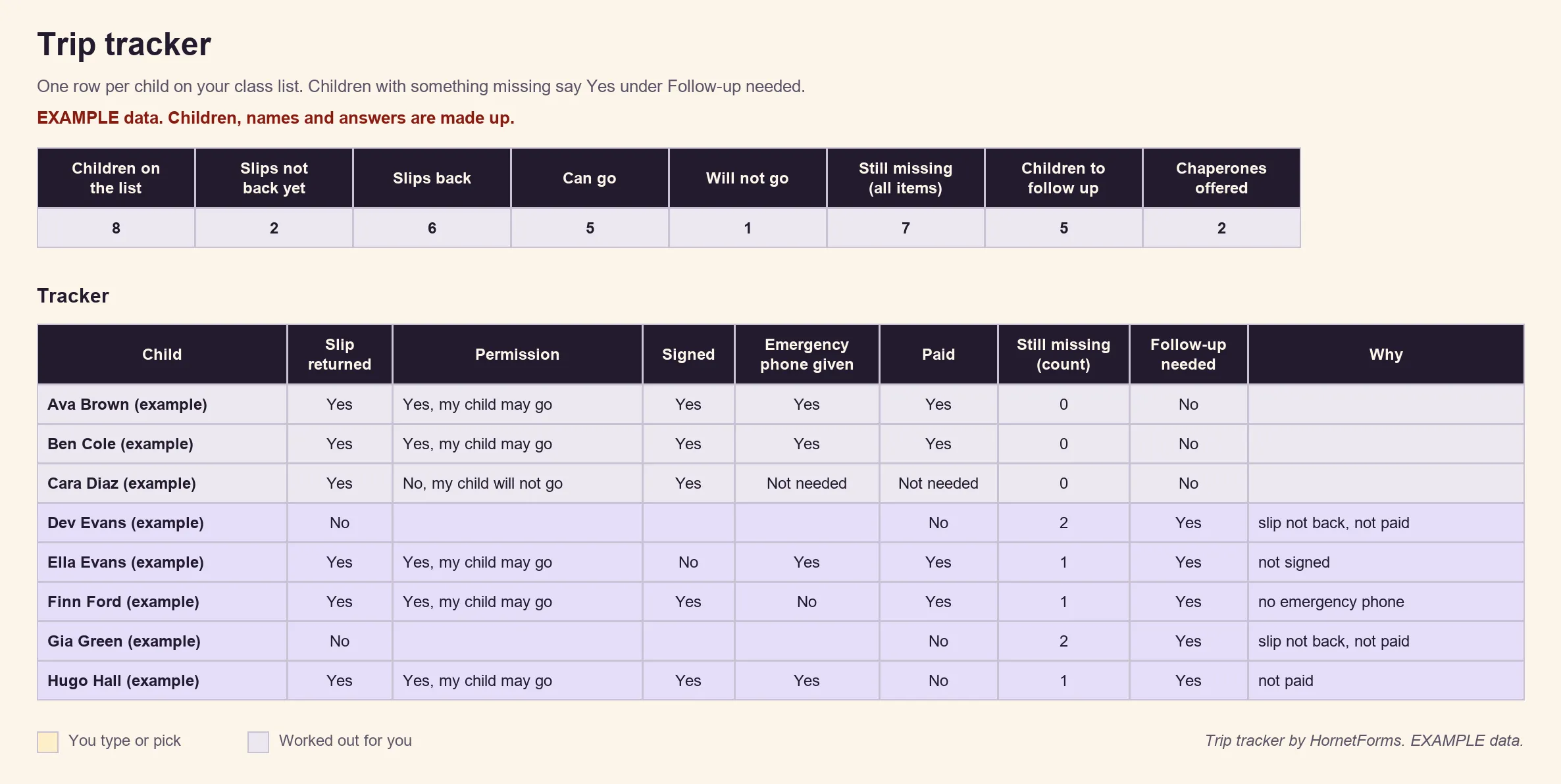
Example data: we made up the children, names and answers. Delete the example rows and add your own class.
The tracker matches slips to children by name, so ask families for the child's full name. Health notes are personal, too. Everyone with access to your HornetForms workspace can read the responses, so share the workspace only with staff who need them. Keep the tracker file where only those adults can open it, and follow your school's rules on medical details.
A free field trip permission slip template#
Our free field trip permission slip template has the five pages, the three logic rules and the hidden class field described above. You add the Payment block and the "How will you pay?" question yourself, because templates don't include a Payment block.
Three ways to use it:
- Open it in HornetForms. The template page at
forms.hornetforms.com/templates/field-trip-permission-sliphas a Use this template button that takes you through sign-up and opens your own copy. Already have an account? It's in the template gallery under Education, as "Field trip permission slip". Fill in the square brackets before you share it. - Print it for families who want paper. Download the field trip permission slip template as a PDF, US Letter, a PDF, A4 or a Word (DOCX) file to add your school's name and trip details.
- Track it. Use the trip tracker sheet from the section above.
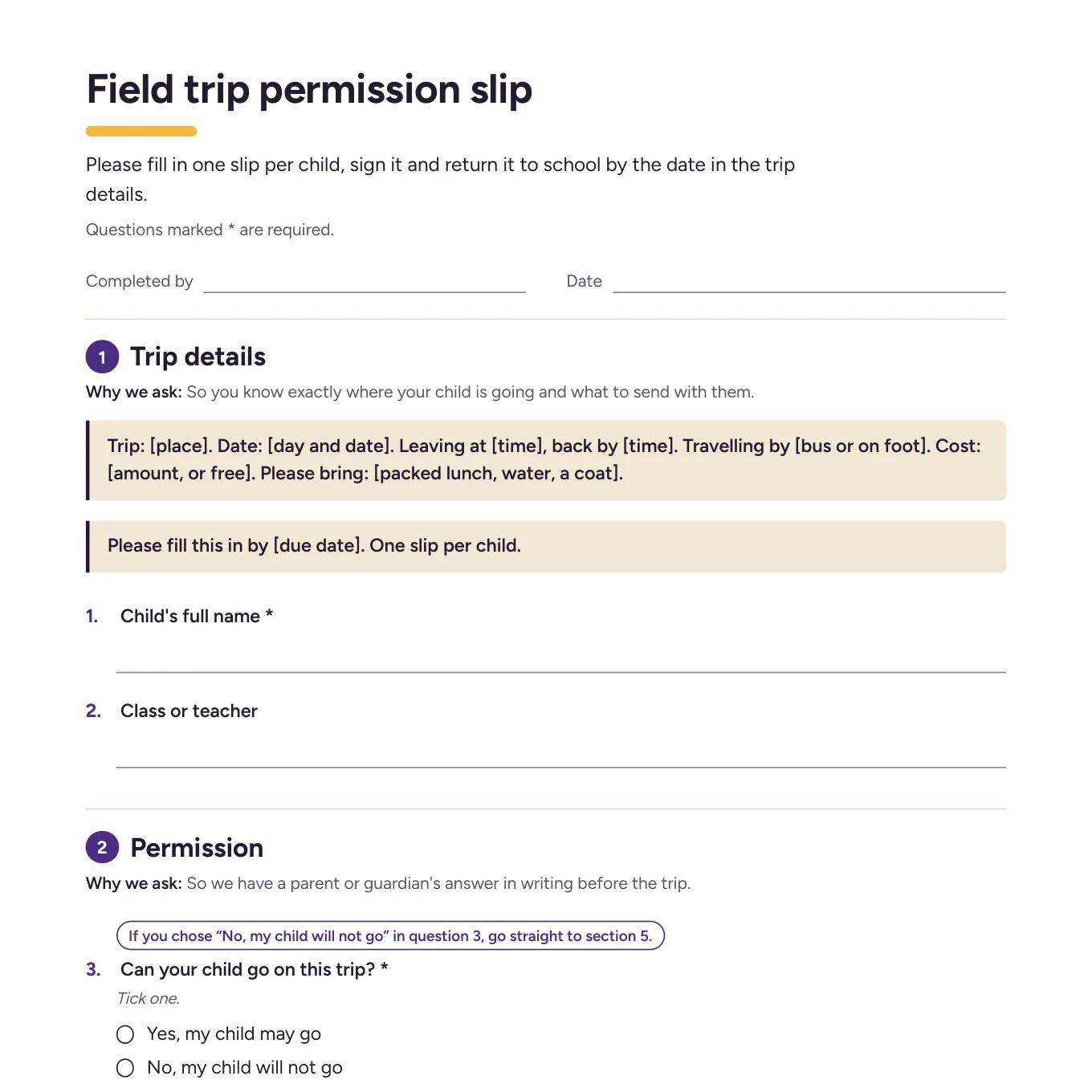
The first page of the printable version, for families who prefer paper.
Send your next slip online#
Copy the field trip permission slip template, fill in the trip details, set the close date and add a fee if the trip costs money. Then print a QR code on the note that goes home. After the trip, a few parent survey questions tell you what families thought. The pricing page shows what each plan includes, and the Free plan is free forever with unlimited forms and responses. Sign up for free and send your next permission slip as a link.