
On this page
The client has booked and the date is in your calendar. Now you need the rest: where to be, who's in the photos, which relatives shouldn't share a frame, and what "natural" means to this person. A photography client questionnaire collects all of that before the day, so you're not piecing it together from six emails and a voice note.
Most photographers keep one questionnaire per session type: a wedding PDF, a family PDF, a headshot PDF. This guide takes a different route. It groups the questions by what they change on the day: the timeline, the people, the places and the style. Then it puts every session type in one form that shows each client only their own page. At the end you'll find a free template, printable copies and a wedding day timeline and shot list.
Inquiry form or client questionnaire: which one you need#
People search for both, but they do different jobs. An inquiry form comes first, from a stranger who wants to know if you're free. A photography client questionnaire comes after the booking, from a client who has already said yes.
| At a glance | Inquiry form | Client questionnaire |
|---|---|---|
| When you send it | Before booking, from your website or profile | After you confirm the booking |
| What it asks | Date, session type, rough location, how they found you | Timeline, people, places, style, the contact on the day |
| How long it takes | A minute or two | About ten minutes, with room to write |
| What it decides | Whether you take the job | How the day runs |
Keep the inquiry short. This guide is about the second form: the questions you ask once a client has booked.
Questions every photo session needs#
Whatever the session, a few answers shape the whole plan. Every client answers these, so keep the list to what you need every time. Our template asks them on the first page:
- What kind of session is this? Wedding or elopement, family, newborn or maternity, portrait or headshot, or other. This one answer decides which page comes next.
- Your name and email, so you can reply.
- Phone number on the day. Not their usual number. The one that will be in their pocket when you can't find the side entrance.
- Session date and start time.
- Location or address. A full address beats "the park near my mum's place".
That's the core of any photography client questionnaire. The rest depends on the session type.
Wedding photography questions to ask clients#
Weddings need the longest photography client questionnaire, because the day has the most moving parts. Group the questions by what they help you plan.
Timeline and locations#
Ask where each partner is getting ready, when the ceremony starts, and where the ceremony and reception take place. Then ask for a rough timeline of the day. A placeholder shows people the shape you need. Ours reads "First look 2pm, ceremony 3pm, speeches 6pm, first dance 7pm".
Couples don't always know the timeline when they fill this in. Ask anyway. A half-finished timeline still shows you where the gaps are, and you can fill them in together on a planning call.
The family and group photo list#
Group photos are where wedding days tend to run late. Ask for one group per line, with names and how each person fits into the family. "Bride with parents: Jane, Ann and Tom Doe" tells you who to call out of the crowd. "Family photos" doesn't.
Then ask one gentle question: "Anything we should know about family dynamics?" Our help text gives an example: "parents who would rather be photographed separately." Divorced parents, a recent loss, a relative who hates cameras: you want to know before you line people up, not during.
The day-of contact and other vendors#
Ask who your contact on the day is, and for their phone number. Suggest someone who isn't getting married: a friend or relative who knows the family and can round up the cousins. Then ask which other vendors you'll work with, like the planner, florist, DJ and venue coordinator. The venue coordinator can tell you the venue's own rules about where you can stand and shoot.
Family, newborn and portrait session questions#
Shorter sessions need a shorter photography client questionnaire. The right questions still make the difference between stiff photos and relaxed ones.
Family and newborn sessions#
Ask who will be in the photos, with names and ages, pets included. Then ask what each person is like in front of a camera. An answer like "our six-year-old hides when she sees a lens" might be the most useful line you read all week. It tells you to bring bubbles and skip "say cheese".
Also ask where they'd like the session (at home, outdoors, in the studio or no preference) and for any must-have shots, like the grandparents holding the baby. In our template, newborn and maternity clients see the same page as families.
Headshots and brand portraits#
For portraits, start with where the photos will go: a website, LinkedIn or social media, press or speaking, or print. That answer decides the crop, the orientation and the background. Then ask how many outfits they're bringing, so you can plan the time. Finish with what the photos should say about them. "Approachable but expert" and "bold and creative" lead to very different shoots.
One questionnaire with logic instead of five forms#
Five separate PDFs mean five files to update every time you change how you work. One photography client questionnaire with conditional logic is easier to keep current. In our template, the first question asks for the session type, and three logic rules do the rest:
What kind of session is this? is "Wedding or elopement"         → show the wedding page
What kind of session is this? is "Family" or "Newborn or maternity" → show the family page
What kind of session is this? is "Portrait or headshot"         → show the portrait page
The three session pages start hidden. So a family client goes from the first page to the family page and then to the style page, and never sees a wedding question. A client who picks "Other" skips straight to the style page.
Two more touches make the form feel written for each client:
- Answer piping. Put the client's name into a later question or the thank-you screen, so it reads "Thanks, Maria" instead of a generic line.
- URL prefill. If you already know the session type, give the first question a prefill parameter called
sessionin its settings. Then send a link that fills in the answer:
https://forms.hornetforms.com/f/plan-your-session?session=wedding%20or%20elopement
Choices match their option labels, and %20 stands for a space. Our logic, piping and calculations guide walks through rules like these, step by step.
Collect inspiration photos in the same form#
"Bright and airy" means one thing to you and another to a client who just saved a moody film photo. Two questions at the end of your photography client questionnaire close that gap.
First, the style question. The template asks "Which style feels most like you?" with five options: bright and airy, warm and natural, moody and dramatic, classic black and white, and not sure yet. Better still, switch it to picture choice and add one of your own photos to each option. A photo of each style shows what you mean better than any adjective.
Then the upload. "Inspiration photos (optional)" takes up to three files. Clients never need an account or a sign-in to answer a form or upload a file. Files can be up to 10 MB each on the Free plan, with no plan cap on Pro and Business (see the pricing page).
The template closes with two open questions: anything to avoid, and anything else you should know. The first one catches what nobody thinks to mention, like a side they'd rather keep out of frame. Not sure which question type suits a question you want to add? Here's which question type to pick.
Send it at the right time#
Send the photography client questionnaire once you confirm the booking, not with your first reply to an inquiry. A client who has booked has a reason to spend ten minutes on it. For weddings, send it early and ask for a final check closer to the day, once the timeline is firm.
A few habits help:
- Book the planning call in the same form. Add a Calendly or Cal.com question at the end, so the client picks a time to go through the answers with you. Bookings appear in the response, next to the answers.
- Get the answers where you work. You can turn on an email to yourself for each new response, and send a confirmation to the client. Responses can also go to Google Sheets, Slack, Discord or Notion, on every plan. Here's how to send form responses to Google Sheets, Slack or Notion, and the integrations page lists every option.
- Keep a PDF in the shoot folder. Download any response as a PDF and save it with the job, or print it for the day.
- Don't worry about busy season. HornetForms has unlimited responses on every plan, so a full wedding season never runs into a plan's response cap.
Taking a deposit at booking is a separate form with its own job. There, the Payment block takes a one-time payment on Stripe's hosted Checkout page, on every plan including Free. Stripe's processing fees apply.
A free photography client questionnaire template#
We built the questions above into a five-page HornetForms template, "Plan your photo session":
- Let's plan your session (everyone): session type, name, email, phone number on the day, session date, start time and location.
- Your wedding day (weddings and elopements): partner's name, getting ready, ceremony start time, venues, the timeline, group photos, family dynamics, the contact on the day and other vendors.
- Your family session (family, newborn and maternity): who's in the photos, what each person is like on camera, where, and must-have shots.
- Your portraits (portraits and headshots): where the photos will go, how many outfits and what the photos should say.
- Your style (everyone): style, up to three inspiration photos, anything to avoid and anything else.
Each page has a short "why we ask" line, and the thank-you screen says "Thanks, that's everything". The template is in the gallery under Operations, or on its own page at forms.hornetforms.com/templates/photography-client-questionnaire. Click Use this template, sign up if you're new, and your own copy opens ready to edit. Then switch the style question to picture choice and add the Calendly or Cal.com question by hand. The features page shows what else you can add.
Three downloads go with it:
- A printable questionnaire for clients who'd rather write: PDF, US Letter, PDF, A4 or Word (DOCX) to add your logo. Each session page says who should answer it, such as "If you chose 'Wedding or elopement' in question 1."
- The wedding day timeline and shot list for couples to fill in: PDF, US Letter, PDF, A4 or Word (DOCX). It has three tables: the timeline, the family and group photos (marked must have or nice to have, with a done column), and key people and vendors.
- The same plan as a workbook for you (Excel, opens in Excel and Google Sheets). Copy the client's "Timeline of the day" and "Family and group photos" answers across. Type a start time and your own estimate of the minutes for each moment, and the Timeline tab works out when each one ends and flags overlaps. The Shot list tab counts must-haves, groups done and minutes still to shoot. The minutes start empty, so the plan holds only numbers you chose. There's also a CSV with the column headers of the questionnaire's export, if you'd rather build your own sheet.
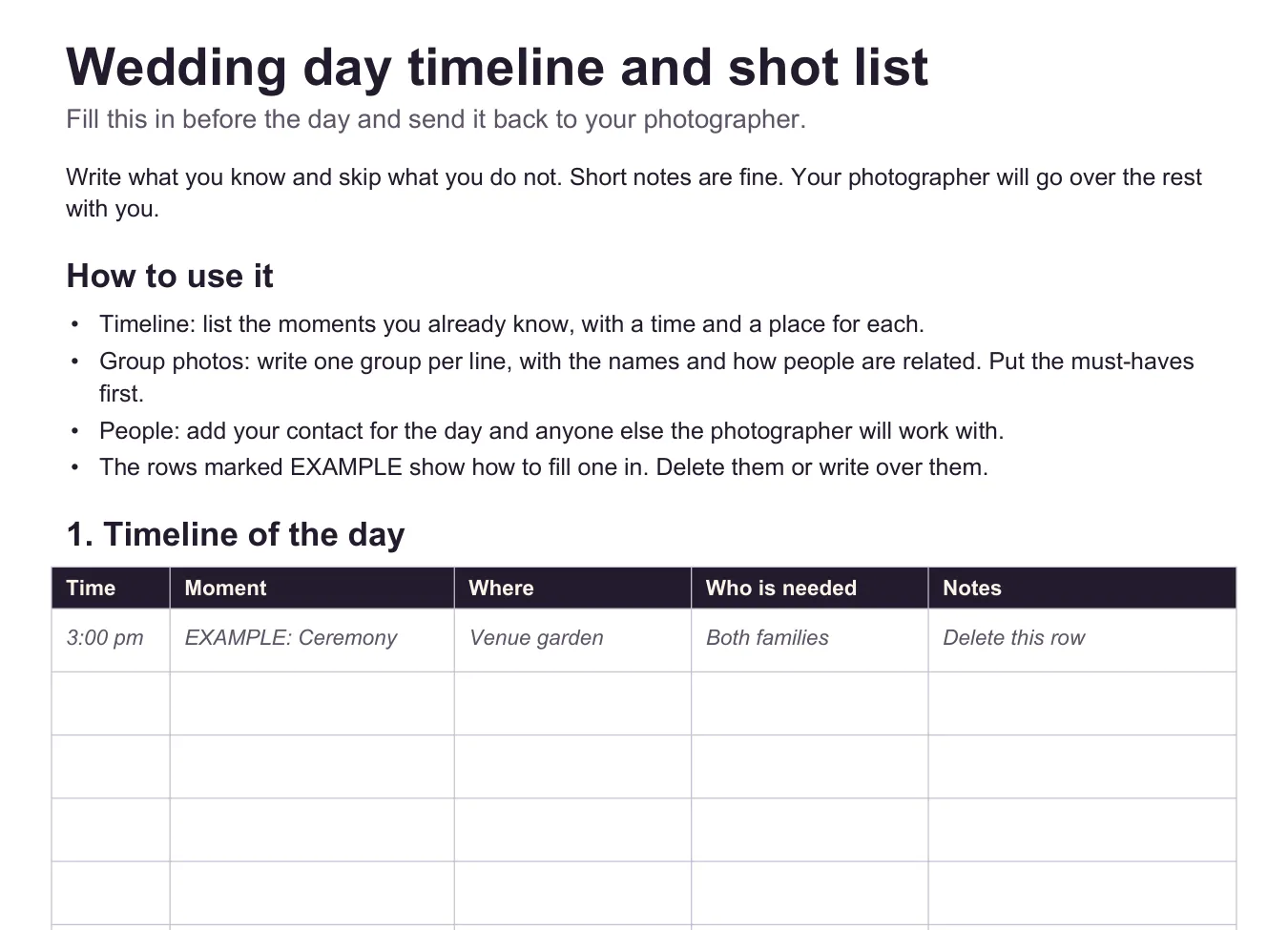
EXAMPLE row only. Couples delete it or write over it, and every other row starts empty.
Try it before your next session#
Copy the template, add your own style photos, and send the link as soon as you confirm the next booking. You'll walk in knowing the timeline, the people and the shots that matter, without chasing a single email. Sign up for free and send your first photography client questionnaire this week.