
On this page
Most client sites launch with one form: a contact form in the footer that emails someone who left the company last spring. Then the client wonders why the new site "doesn't bring in leads."
The fix isn't more forms everywhere. It's the right form on the right page, with answers that land where someone will read them. Below are six website form examples that nearly every client site needs, what each one should ask, and where its answers should go. At the end there's a free forms planner to map them for each client and a launch checklist to test them before the site goes live. Building in Google Forms instead? See our Google Forms examples.
What good website form examples have in common#
Every good web form has four things in common, whatever its job:
- One job per form. A contact form that also signs people up for a newsletter and asks for a quote does all three badly.
- Only the fields you'll use. Every extra required field costs you some people. If nobody will read the "Company size" answer, cut it.
- A thank-you message that says what happens next. "Thanks, we'll reply within one business day" beats "Submitted."
- A named person on the other end. Answers need an owner who replies, not a shared inbox nobody checks.
Keep those four in mind as you read the website form examples below. They matter more than the design. When you do get to layout, labels and error messages, our form design best practices cover them.
Contact form#
The one every site has. Its job is simple: let a person reach a human.
Ask for: name, email, a topic, the message. Add an optional phone number only if the business really calls people back.
Where answers go: turn on an email to yourself for each new response, plus a channel such as Slack or Discord if a team shares the inbox.
A topic dropdown is the quiet hero here. The topic arrives with each message, so whoever reads it knows who should reply, and the form can show an order number box only when someone picks Support. Our contact form template is built that way, with a call back option for people who'd rather talk. If the client wants hand-coded markup instead, start from a basic HTML form you can copy.
Quote or project request#
For service businesses, this is the form that pays the bills. A contact form asks "what do you want?" A quote form asks the questions that change the price.
Ask for: the service or package, the size of the job, timing, location if it matters, a budget range, and contact details last.
Where answers go: the owner's email and a spreadsheet, so leads don't vanish into a thread.
Calculated fields can show a rough estimate on the thank-you screen, which sets expectations before the first call. We built a whole guide around this: the quote request form template prices the job, screens out bad-fit leads and books the call. Selling made-to-order things rather than services? Our order form template takes the product, quantity and date, so you can confirm availability and price by email. Running a bakery? Our cake order form guide covers sizes, pricing and deposits.
Newsletter and lead magnet sign-up#
Two close cousins. A newsletter sign-up lives in the footer or on the blog. A lead magnet form trades something useful, like a checklist or a price guide, for an email address.
Ask for: an email address. Maybe a first name. That's it. Every extra field on a sign-up form needs a strong reason.
Where answers go: your email marketing tool through Zapier or a webhook, or a Notion database, plus a hidden field that records which page or download the person came from.
Hidden fields work well here. Put source=pricing-guide in the link and every sign-up says which offer it came from, without asking the visitor anything. Running ads to the page? Our post on how to capture UTM parameters in a form shows how to keep campaign data on each response.
Support request#
A support form beats "email us" because it collects the details you'd otherwise ask for in the second email.
Ask for: name, email, what they need help with (a dropdown), an order or account number, a description, and an optional screenshot.
Where answers go: a shared team channel or a tracker, so two people don't answer the same request.
A file upload question lets people attach a screenshot, which saves a lot of back and forth. Respondents never need an account to answer or upload. For software teams, the bug report form template adds steps to reproduce, the browser and how bad the problem is.
Website feedback#
The form most sites skip, and the one that tells you what to fix after launch.
Ask for: why they came, whether they found it, and what got in the way. Keep it short and optional.
Where answers go: a spreadsheet or a CSV export the client reviews regularly.
Put a small "Feedback" link in the footer, or show it on the pages you just changed. Add page_url= to each feedback link and a hidden field records the page, so "the menu is confusing" comes with the page it's about. Our website feedback survey has a ready-made version with a rating grid for menus, search, speed and phone use.
| Form | Usual home on the site | Where answers go first |
|---|---|---|
| Contact | Contact page, footer | Owner email (turn it on) |
| Quote or project request | Services or pricing page | Owner email plus a spreadsheet |
| Newsletter sign-up | Footer, blog sidebar | Email marketing tool (Zapier or webhook) |
| Lead magnet download | Blog post, landing page | Email marketing tool, with a source hidden field |
| Support request | Help or account page | Team channel or tracker |
| Website feedback | Footer link, changed pages | A spreadsheet or CSV export, reviewed regularly |
Embed them: inline, popup, slider or full page#
Where a form sits on the page changes how many people finish it. Our guide on how to add a form to a website walks through the setup. HornetForms has four embed modes, on every plan:
- Inline sits in the page like any other section. Best for contact and quote forms, where the form is the point of the page.
- Popup opens over the page when someone clicks a button. Good for "Get the price guide" buttons in a blog post.
- Slider slides in from the side. Handy for a feedback link that shouldn't take over the page.
- Full page gives the form its own page. Good for long forms, like a project questionnaire.
Use the embed script rather than a bare iframe where you can. The script passes the page's utm_ parameters into the form, so campaign data survives the embed. For a form that should look like part of the client's brand, Pro adds a custom domain (one on Pro, 10 on Business) and removes the "Made with HornetForms" badge.
Keep spam out without annoying people#
Spam is the fastest way to make a client hate their contact form. The good news: most of the protection should be invisible to real people.
Behind every HornetForms form sit three quiet checks: a honeypot field (a hidden box only bots fill in), a time check that catches forms completed faster than a person could type, and rate limits on repeat responses. Bots caught by the honeypot or the time check are shown a pretend thank-you, which teaches them nothing. Our post on spam protection that doesn't annoy humans goes deeper.
Good to know: test every form after launch with a real test response. Notification settings are the thing most often left off, and you only find out when a lead goes unanswered.
Plan the website form examples for each client site#
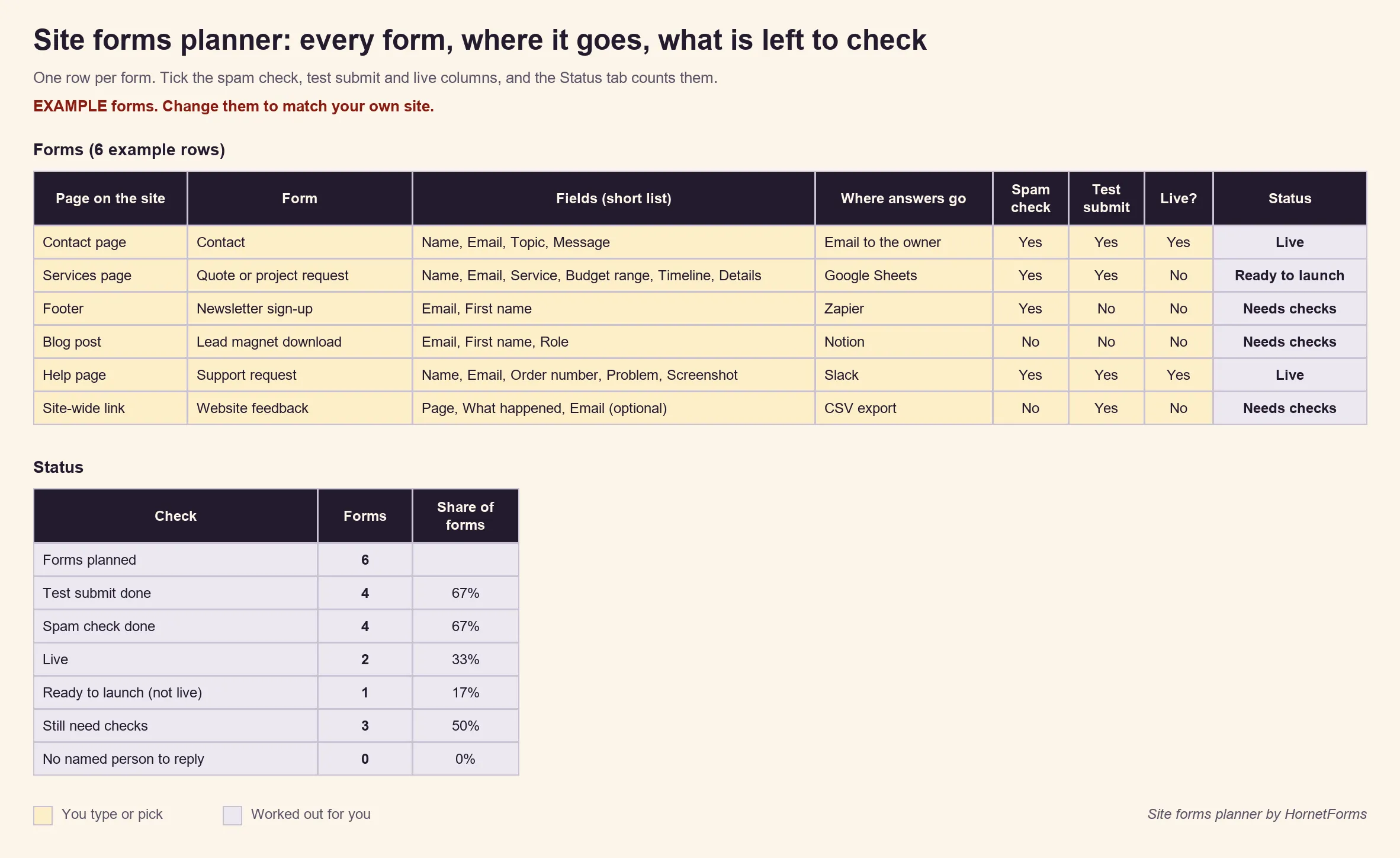
The free client-site forms planner (Excel) lists each form by page, with its fields, where the answers go, who replies and how fast. Status columns track whether each one has been spam-checked, test-submitted and switched on, and a Status tab counts what's left. It starts with the six examples above, so you can delete what a client doesn't need. There's a CSV version too.
Before launch, run through the website forms launch checklist (PDF, US Letter), also in A4. It covers test responses, notifications, spam checks and a phone check for every form.
Every form on HornetForms has unlimited responses on every plan, Free included, within fair use, so a busy month doesn't hit a response cap. Our story about what happens when a form hits a response limit explains why we built it that way. Want answers in Google Sheets, Slack, Discord or Notion? Those connect on every plan too; the integrations page lists them.
Build the first one today#
Pick one client site and list its forms in the planner. Start with the contact form, then add the quote form. New to building forms? Follow our guide on how to create an online form. Sign up for free and embed your first form this afternoon.