
On this page
You spent two evenings on the proposal. You sent it on Tuesday. It's now Friday of the next week, and your inbox is quiet. Did they read it? Did it land in spam? Are they waiting for a board meeting, or did they hire someone else?
A good proposal follow-up email answers those questions without sounding needy. This guide gives you six emails to copy, a table that says when to send each one, subject lines that get opened, and a two-minute form that lets a busy client tell you where things stand. At the end there's a free email pack and a pipeline tracker that works out your follow-up dates for you.
When to follow up on a proposal#
Don't chase the same day. Give the client a few business days to read the proposal before the first nudge. We suggest about four.
After that first check-in, nobody has a magic number. Here's the rhythm we suggest for each proposal follow-up email. It's our own plain suggestion, not a study, so change it to fit how your clients buy.
| When to send it | What happens next | |
|---|---|---|
| 1. When you send the proposal | Day 0 | Wait for a reply |
| 2. The first check-in | About four business days later | No reply? Send email 3 |
| 3. Add something useful | About a week after email 2 | No reply? Send email 5 later |
| 4. Their decision date has passed | One or two business days after the date they gave you | Use the new date they give you |
| 5. The last follow-up | About three weeks after you sent the proposal | No reply? Stop and mark it parked |
| 6. After a no | The same day they say no | Log the reason and check in later |
If the client never replies, you send emails 2, 3 and 5. That's three follow-ups. Email 4 swaps in for email 3 when the client told you when they'd decide. Email 6 is for the day you hear no.
Six proposal follow-up emails to copy#
Each proposal follow-up email template below has a subject line and a short body. They work as a business proposal follow-up email for a client project and as a sales proposal follow-up email for a bigger deal. Swap everything in square brackets for your own details. Send each one as a reply in the same email thread, so the client sees the proposal and your note together. [form link] is optional: it points to the short form described further down.
Email 1: when you send the proposal#
Subject: Your proposal for [project]
Hi [name],
Here's the proposal for [project], as we discussed on [day]. The short version: [one line on the work], ready by [date], for [price].
Two quick questions so I can plan: when do you expect to decide, and is anyone else reading it with you?
If something is unclear, reply here. Or tell me where things stand in this two-minute form: [form link]
Thanks, [your name]
The two questions do the heavy lifting. A decision date tells you when email 4 is due. Knowing who else reads it tells you who might stall it.
Email 2: the first check-in#
This is the first real proposal follow-up email. Keep it light.
Subject: Any questions on the [project] proposal?
Hi [name],
I wanted to check the proposal reached you and that it made sense.
If it's easier than email, I'm happy to walk you through it on a 15-minute call. Here are two times that work for me: [time 1] or [time 2].
Or, if you'd rather not write an email, this short form takes two minutes: [form link]
Thanks, [your name]
Email 3: add something useful#
Subject: One idea for [project]
Hi [name],
While you look over the proposal, I thought this might help: [one useful thing: a short example from a similar project, an answer to a question they raised on the call, or a smaller first phase].
Would it help if I changed anything in the proposal, like the scope, the timeline or the payment schedule?
Thanks, [your name]
This is the email that turns "just checking in" into a reason to reply. Bring something new, or don't send it.
Email 4: their decision date has passed#
Subject: Updated timing for [project]?
Hi [name],
You mentioned you hoped to decide on [project] by [date]. No pressure from my side. Could you share an updated idea of timing, so I can plan my schedule?
If something has changed, like the budget or the people involved, tell me and I can adjust the proposal.
Thanks, [your name]
Email 5: the last follow-up#
Subject: Should I close the file on [project]?
Hi [name],
I haven't heard back, so I'll guess the timing isn't right and stop following up on [project].
If things change, reply to this email and I'll pick it up from there. A one-line answer in this form also helps me plan: [form link]
All the best with [their goal], [your name]
A clear last email gives the client an easy way out. Saying "not now" to a polite goodbye takes ten seconds, and you get an answer instead of a guess.
Email 6: after a no#
Subject: Thanks for letting me know
Hi [name],
Thanks for telling me, and for considering us. I know saying no is never fun to write.
If you have two minutes, I'd love to know what tipped the decision. It helps me quote better next time: [form link]
If it's alright, I'll check in around [month] in case anything changes. Good luck with [project].
Thanks, [your name]
Subject lines that get opened#
A proposal follow-up email subject line has one job: tell the client what this email is about before they open it. Name the project, keep it short and make it sound like a person wrote it.
- Name the project: "Next steps for [project]" or "Your questions on the [project] proposal, answered"
- Ask one easy question: "Is [project] still a priority this quarter?" or "Quick question about [project]"
- Offer a smaller yes: "A smaller first phase for [project]?"
- Check the date: "[Project] timeline: does [start date] still work?"
Skip "Just following up", "Checking in again" and anything in capital letters. They say nothing about why the client should open it, and they read like the 40th email of the day. Because they probably are.
Ask where things stand with a two-minute form#
Most clients don't ignore you on purpose. Writing a careful reply to a supplier sits on their to-do list behind everything else. A short form lowers the bar: their name, a couple of clicks, and they've told you where things stand.
HornetForms has a built-in Proposal follow-up template that does exactly this. It's one page, titled "How does the proposal look?", with eight questions:
- Their name, email and which proposal it's about
- Where are things at? Ready to go ahead, still reviewing internally, I have questions, or not moving forward
- What questions can we answer? This box only appears if they're still reviewing or have questions
- What tipped the decision? This box only appears if they're not moving forward
- Anything you'd like changed? Scope, price, timeline, payment terms, or nothing
- Ideal start date
The boxes that appear and disappear use conditional logic, which works on every plan. The client never needs an account to answer.
You can fill in the proposal name for them, too. Give the "Which proposal is this about?" question a prefill parameter in the editor (say, proposal), then put the name in the link you paste into your email:
https://forms.hornetforms.com/f/<your-slug>?proposal=Acme%20website%20redesign
One thing to be clear on: HornetForms doesn't send your follow-up emails. You send them from your own inbox, and the form collects the answer. To hear about each answer as it arrives, turn on an email to yourself for each new response in the form's notification settings. Or send answers to a Slack channel or a Google Sheet, both on the Free plan. The integrations page lists the rest.
To use it, open the template page at forms.hornetforms.com/templates/proposal-follow-up. Click Use this template, sign up if you're new, and your own copy opens ready to edit. Already have an account? It's in the template gallery under Lead generation.
What to do when they say no#
A no is still an answer, and it beats silence. Reply the same day with email 6. Keep it short and gracious, then do three things:
- Ask what tipped it. Price, timing, scope or a competitor? One honest answer can change how you write your next proposal. The "What tipped the decision?" question in the form asks this for you.
- Log the reason. Over a few months, the reasons show a pattern. If "price" keeps coming up, try a smaller first phase. If "timing" does, ask about decision dates earlier.
- Set a date to check in. We suggest about four months out. Budgets reset and plans change.
If the no came because the scope grew past what you quoted, our guide to the project change request process helps with that conversation next time.
When to stop following up#
Stop after about three follow-ups. Past that, each new email does more to annoy a busy client than to win the work.
That's why the six emails above include only three proposal follow-up emails for a client who stays silent, ending at email 5. After that, mark the proposal as parked and put a reconnect date in your calendar. Don't delete it. A parked proposal is a warm lead for later, and a polite exit makes it easy for the client to come back.
Good to know: these timings are a starting point, not a rule. A client who said "we decide at our March board meeting" doesn't need three emails in January. Follow the date they gave you.
Track every proposal in one sheet#
Three proposals out and you can keep them in your head. Ten out, and someone slips. The free proposal pipeline tracker keeps one row per proposal:
- You type the client, the proposal, the date you sent it, its value and the decision date if they gave one.
- It works out the date of each follow-up from the sent date, skipping weekends, and the date to reconnect if you park it.
- A Next action column tells you which email to send and when, and flags anything overdue or due today.
- Copy the client's answer from the form, and the next action changes to match.
- A Summary tab adds up open, won, lost and parked values, with your win rate.
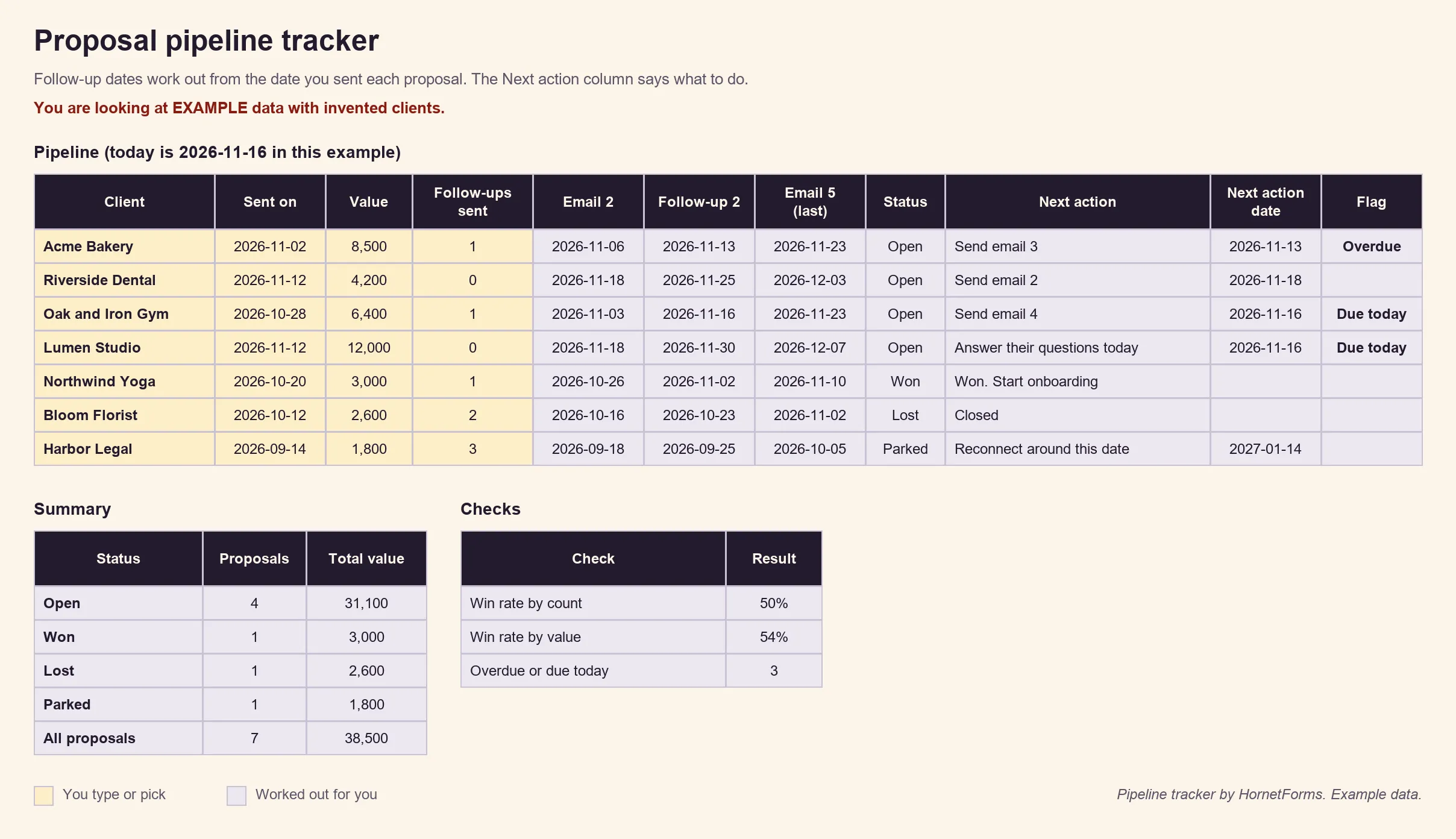
Example data only. Swap in your own clients.
The follow-up gaps live on a Settings tab, so you can change them to your own. Download the files:
- Proposal pipeline tracker (Excel), or the same columns as a CSV with the example rows
- The six proposal follow-up email templates (PDF, US Letter), the A4 PDF or the Word (DOCX) version, with every subject line and the timing table
Send your next proposal with a plan#
Write your follow-up dates down on the day you hit send. Then each proposal follow-up email has a reason and a date, and you never have to wonder whether it's too soon. Want better proposals from the start? Our quote request form template collects the details before you write one. HornetForms is free forever on the Free plan, with unlimited forms and responses within fair use, and every question type is in it. Sign up for free and add the proposal follow-up form to your next proposal email.